-
Search Results
-
Topic: Some slight nags in theme.
I’m just about to relaunch my site using enfold and there’s some things that may be quite small, but still big enough to nag me :)
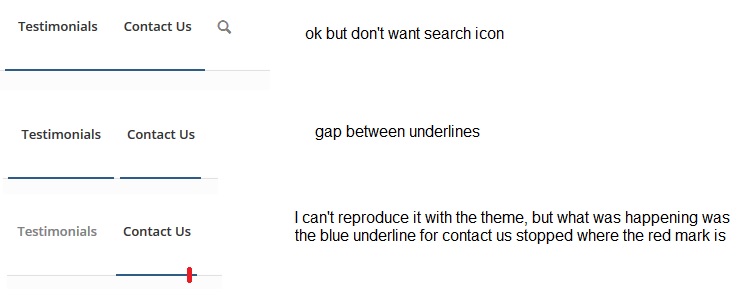
1) If the search tab from the main menu is removed, it seems the menu tab underline doesn’t extend properly beyond the last menu item. I just tried to reproduce it and I couldn’t, but now instead I get a gap between testimonials and contact us. I noticed this before but my developer fixed it, but then the “line not being extended” problem was there, and adding the search icon fixed this. I’d prefer not to have the search button in the main menu. I’m not sure if it’s because of some customisations in the child theme that the menu is reacting this way, but he said there’s no actual customisation to the menu.
Please see screenshot here: http://omg.wthax.org/6QGJ7t.jpg
2) I’m displaying rotating testimonials on my homepage and I want these above the contact form. At the start if you would be filling out the contact form, every time the testimonial rotated to a short to long text testimonial, the contact form would move position on the page to accommodate the longer/shorter testimonial. My developer did some customisation to fix this, but it’s still an issue on mobile and there’s still some movement within the assigned section for the testimonials, I’d prefer if the left/right scroll arrows didn’t move at all, or the “what our clients say” heading didn’t move either and it was just the actual text of the testimonial that extended or shrunk within the assigned section.
Customisations were also required in the following areas:
o – /homepage and /services – to reduce gap between service icons and service title (the large default gap meant the rendering on mobile made it difficult to see which service title was with which icon)
o – several customisations required on testimonials on homepage and /testimonials
o – I embedded a new map using the following: https://developers.google.com/maps/documentation/embed/ This provides full business information, link to reviews and shows rating etc. I also found some code to add to the Quick CSS from another website that allows the map to be responsive. The enfold editor map element doesn’t show business informatin/review count etc so wanted something that showed these.I think there must have been a few more customisations to achieve the requests I was making with certain changes but I’m not sure.
Any feedback would be greatly appreciated :)
I am new to Enfold and I am just getting going testing layouts and such. at the the moment the show stopper for me is the Scroll to Top button (shows on the right of this forum as well). Is there any way to turn that off? I really hate those buttons. Other than that I think I am falling in love with the theme!
The Plus 1 is this: is it possible on setting up the Photography Portfolio with a horizontal header? Is there any documentation on these layouts? The default and the Photographers Portfolio layouts.
Hi. We’re using the Enfold theme.
I have taken over development of the site.
On our contact page, we have the following code in our Avia Layout Builder:
[av_contact email=' (Email address hidden if logged out) ' title='Send us mail' button='Submit' on_send='text' sent='Your message has been sent!' link='' subject='' autorespond='' captcha='']
[av_contact_field label='Name' type='text' check='is_empty']
[av_contact_field label='E-Mail' type='text' check='is_email']
[av_contact_field label='Subject' type='text' check='is_empty']
[av_contact_field label='Message' type='textarea' check='is_empty']
[/av_contact]
However, this only produces a Submit button, with no form fields.
How can we fix this?
Thanks.
Topic: Promo boxes
Hello awesome people at Enfold!
I’m hoping you might have some advice for me. I need to build a promo box area similar to the following image

I see that you cannot upload images into the available promo boxes on Enfold, nor can you change the set dimensions. Would you have any other possible solution to achieve what I’m aiming for? I’ve used a gallery image with text above and a button below but it looks rather messy and the spacing between each element is too far apart. I’ll pop my url in the PM below or here is a screen shot http://imgur.com/W6ajVKo
Thanks again I love working with this theme, it’s easy-ish for a beginner like me :)
Hi guys,
I love the social sharing buttons from enfold that can be integrated into blogposts via the enfold menu.
Can I also use them elsewhere as shortcode or widget? that would be so great! :)Thanks a lot for your help!
Hi, everybody!
I want to put a logout button or link in the top menu.
I’ve searched the wordpress.org site but I didn’t see clearly the way to do it.
When I tried to get a logout & redirect to homepage link putting
<a href="<?php echo wp_logout_url( home_url() ); ?>" title="Logout">Logout</a>in the WP menu url field, and click Save Menu, the Menu rewrite ahref and become useless.Then, I found this as example and I think that I have to put it in enfold-child theme functions
add_filter('allowed_redirect_hosts','allow_ms_parent_redirect');
function allow_ms_parent_redirect($allowed)
{
    $allowed[] = 'multisiteparent.com';
    return $allowed;
}

<a href="<?php echo wp_logout_url( 'http://multisiteparent.com' ); ?>" title="Logout">Logout</a>
How can I get it?
Thanks!
Best regards!
Hi,
I recently purchased enfold theme and it had been working fine till two days ago. All the content from the bottom half of my theme had gone missing once I added something new to the page along with all newly added things that had also disappeared. I’m using enfold child theme and all was going well till two days ago. What ever you see on the site was added around a week earlier. Some of the older things went missing too once the theme was updated with new content specially everything above the footer all the way to mid section of the theme.
This is what I’ve tried so far:
1- restored the theme from a fresh copy
2- disabled plugins and re-tested it, issue was not resolved
3- ran anti-virus from the cpanelTheme is running on WP4.1 and I’m using the latest version of the theme.
Your prompt assistance will be appreciated
Regards!
Atif S.Hi, i have some questions regarding the Contact Form Element of Enfold.
Question 1. When clicking on the fields of the Contact Form, there is a shadow around the fields, is it possible to remove it ?
Question 2. When clicking on the Submit button of the Contact form, the text changes and there is an animation (effect), i would like to remove it too. (no effect).
Question 3. Also, when clicking on this Submit button, all the fields (just around the fields) change of color to be green, i don’t want them to change of color. Can you please give me the exact code to answer to my questions ? Also, can i add this code to quick CSS or in the editor ?
Thank you very much for your response.Topic: HELP – Contact Form
Hello,
I am very new to this theme and building websites through wordpress. I have inherited a website that currently has just a landing page. On that page there is a place to enter a name and an email address for people that are interested in when our site launches. I have tested the form from outside of wordpress and it gives me a “thank you” after I hit the submit button, but when I look for the email in my inbox, it never comes. I really need help because I need this up an running ASAP. I have looked at other threads and saw that people were downloading the plugins “Contact Form 7” and “Easy WP STMP.” I can’t figure out how to use them and to make sure they are formatted in the same way as the default form for the enfold theme.
Is there anyone out there that can help me please?!
Have been trying to add a button next to the phone number in the top bar for awhile but it doesn’t the phone field in the Theme Options > Header area doesn’t seem to be taking the short code.
I have been using this in the phone field:
(651) 328-6830 [button link=”http://02e.404.myftpupload.com/contact-2” color=”#52A6D0″ border=”#222222″ text=”light” window=”yes”]Get A Quote[/button]Site is http://02e.404.myftpupload.com, trying to make it look like this Enfold theme http://www.konkapot.com
Thanks
JonI recently upgraded WordPress to 4.0 and cannot access add media button and other features. So I purchased the latest version of Enfold (3.0) and installed the new theme. Well it broke the site. How do you update the parent theme when using a child theme?
Topic: Galerie
Hi, ich habe zwei Enfold Lizenzen und hätte zur zweiten Seite eine Frage.
Ich will hier eine Galerie aufbauen. Über den Erweitereten Editor habe ich eine Galerie mit einer Spalte angelegt. Ich will die Fotos untereinander darstellen ohne Mouse Over (Bilder werden erst dann richtig angezeit) Effekt. Außerdem will ich den Rahmen um die Fotos deaktivieren (bei mir wird eine 1px graue Linie angezeigt).
Aussedem wüsste ich gerne welches die ideale Größe für den JPG Upload ist wenn ich die Fotos so anzeige, damit sie nicht mehr skaliert werden müssen?
Gibt es dir Möglichkeit einen Mouse Over Effekt in die Galerie und nur dort einzubinden der beim “darüberfahren mit dem curser” einen Teilen Button für Pininterest und Facebook anzeigt. Bzw. kann ich diese Teilen funktion auch am Ender der Seite für den ganzen Portfolio oder Blogeintrag anzeigen lassen?
Danke, Alexander
Howdy folks,
So for some reason unknown to me, the contact forms on my Enfold site are working for me in Firefox, but not in Chrome or Internet Explorer. In Firefox, the contact forms display and works correctly. In IE and Chrome, the contact form only shows up as a button without any of the fields showing.
I’ve created dozens of landing pages with contact forms, and my company needs these working so we can ensure lead conversion. Any ideas? I’m using the latest WordPress version with the latest Enfold version.
Another question I had was in terms of styling the contact form in a way that makes it look like the contact form is in a colored box. I’d like to draw users eyes to the contact form by giving it a colored background and making it pop out from the white behind it.


 </b></font></button>