Viewing 30 results - 4,681 through 4,710 (of 11,211 total)
  • Author
    Search Results
  • @Guenni007: Are you sure about it? So how I would use Google maps GPDR-ready in Enfold or with Enfold theme?
    Adding some lines e.g. into function file?! How ever – thank you to point it out, Guenni007!
    And those shortcode [av_privacy_google_maps] is not making the job properly.
    Waiting for response of development team member too.

    Please, if it is as Guenni007 wrote, make changes, that api is only loading, if user clicked the accept button in the blog-entry we use the Google Maps element!!!

    Best regards,
    John

    Hello,
    thank you for your update 4.4 and that GDPR stuff, that you included!
    Great job!
    I have two issues for you.
    1.)
    I want to be able to be asure, that on using shortcode [av_privacy_google_maps] Google Maps is
    on standard loading deactivated! Because it makes no sense load the site and send sensitve Data
    along Google and have it afterwards deactivated.
    2.)
    Your tutorial: https://kriesi.at/archives/enfold-4-4-and-the-gdpr-general-data-protection-regulation is confusing, because of those lines: If you do not like the default text or language these shortcodes generate you can use your own text like this: [shortcode]YOUR OWN TEXT[/shortcode]

    I figured out this is the right use of shortcode on these: [av_privacy_google_maps]BLABLA[/av_privacy_google_maps]

    Just before that I tried: [av_privacy_google_maps][shortcode]BLABLA[/shortcode][/av_privacy_google_maps]

    Best regards,
    John

    #963412

    I pressed the ‘Reset all options’ button at the bottom of the Styling Extra window, thinking it would only reset the options in the Styling Extra window, but it reset everything of the Enfold settings!

    Please tell me that there’s a file that I can put back from my backup in order to restore this, including my Quick CSS!

    Thanks!

    Mark

    #963398

    In reply to: child theme problems

    Hi,

    If the style.css file looks good and you don’t see the changes, it’s mostly the cached files are still loading in your browser.

    Please perform the below steps to clear the browser cache:

    1. Disable “merging and compression” for CSS and JS files from Enfold > Performance.
    2. If a caching plugin is installed check the plugin settings and clear the cache and deactivate the plugins for testing purpose.
    3. Hard refresh by pressing Ctrl + Shift + F5 on your browser or press the F12 key to open chrome dev tools and right click on the refresh button and select “Empty Cache and Hard Reload”.

    This should ensure new CSS will be loaded in the browser.
    If you still have an issue please let us know what are you trying to change using the CSS? also, please post the admin login details in private content area so we can check the backend settings for you.

    Best regards,
    Vinay

    #963159

    In reply to: Enfold Form Tracking

    Hey lindenhof,

    Thank you for using Enfold.

    There’s a minor syntax error. Please replace the code with this one.

    add_filter('avf_contact_form_submit_button_attr','avia_add_submit_attributes_to_cf', 10, 3);
    function avia_add_submit_attributes_to_cf($att, $formID, $form_params){
    	$gaq = "_gaq.push(['_trackPageview', '/VP/XXX/XXX']);";
      	$att = "onclick='{$gaq}'";
      	return $att;
    } 

    Replace the tracking ID.

    Best regards,
    Ismael

    #963108
    zarlekin
    Participant

    Hello kriesi team, first of all I want to thank you for this excellent theme and your top-notch support. I am using Enfold for years now and love it :-)

    I recently updated a website from a very old Enfold version (I think 3.5.3) to the newest version and encountered two problems with the burger menu /mobile menu.

    First problem: Close button doesn’t show up because of problems with avia.js in the child-theme

    In the old version I had made changes to functions.php and avia.js in the child theme to move the featured Image below post title, date, etc.
    The changes I made:

    child-theme/function.php:

    // Replace avia.js
    function change_aviajs() {
     wp_dequeue_script( 'avia-default' );
     wp_enqueue_script( 'avia-default-child', get_stylesheet_directory_uri().'/js/avia.js', array('jquery'), 2, true );
    }
    add_action( 'wp_enqueue_scripts', 'change_aviajs', 100 );

    As shown in: https://kriesi.at/support/topic/modifying-jsavia-js-for-a-child-theme/

    child-theme/js/avia.js:

    jQuery('article.post').each(function(){
    
    jQuery(this).find('.entry-content-header').after(jQuery(this).find('.big-preview').detach());
    
    })

    As shown in: https://kriesi.at/support/topic/move-featured-image-below-post-title-date-etc/

    In order to update the website, I now copied the new avia.js from the new Enfold version into the child-theme. After that I added again the code snippet at the end oft the document as I did in the old version. However doing this now leads to problems with the burger menu. If I click on the menu, the icon won’t get replaced with a close button. Also the secondary menu is displayed on top of the mobile menu.

    Only if I delete my avia.js file from the child theme, the burger menu works fine again.
    So I guess the code snippet has to be updated, too. But I am not a developer :( Could you please help me with that?

    Second problem: Search and close icons are displayed on top ob menu links

    If I click on a menu item with a lot of subitems naturally I have to scroll the menu. But when I scroll, only the menu items scroll. The search icon and the close icon remain where they are and overlap with the menu items. How can I fix this?

    #963087
    norasp
    Participant

    Hello there!

    Thank you for your theme, it’s awesome. However, I’ve been perusing through several topics opened to find the answer and I’ve almost found the solution to my issue. I’m trying to include the Telegram icon on the social header. I’m using a child theme and have added this code to the function.php file as stated in this tutorial :

    // Register new icon as a theme icon
    function avia_add_custom_icon($icons) {
        $icons['paper-plane']	 = array( 'font' =>'fontello', 'icon' => 'ue800');
        return $icons;
    }
    add_filter('avf_default_icons','avia_add_custom_icon', 10, 1);
    
    // Add new icon as an option for social icons
    function avia_add_custom_social_icon($icons) {
        $icons['Telegram'] = 'paper-plane';
        return $icons;
    }
    add_filter('avf_social_icons_options','avia_add_custom_social_icon', 10, 1);

    The icon i’m looking for already exist on entypo-fontello, it’s simply a paper plane, I’m trying to add the correct code since currently the icon is displaying a pencil instead of the paper plane I’m looking for. And I’m also playing with this code:

    .av-social-link-telegram a:before {
        content: '\ue8b7';
        font-family: 'entypo-fontello';
    }

    Changing the content part of the code trying to match the symbol I’m looking for but nothing is quite right.

    Please, could you help?

    I cannot currently add a link to my website since it’s in preproduction and not yet uploaded to the final server.

    #962933

    Hi,

    Here’s a complete guide to updating the theme via FTP or via theme options.

    // https://kriesi.at/documentation/enfold/how-to-install-enfold-theme/#update-via-dashboard
    // https://kriesi.at/archives/the-complete-guide-to-updating-enfold

    Use this css code for the scroll to top button.

    #scroll-top-link {
        color: #e8e8e8;
        border: 1px solid #282b2e;
        background-color: #282b2e;
    }

    Best regards,
    Ismael

    #962913

    Hi Mike,

    I have another cookie law plugin, but I deleted it think it was the culprit. However, if you look at another ticket https://kriesi.at/support/topic/help-login-register-form-and-new-privacy-settings-preventing-user-access/#post-962479 the buttons don’t show for two of my other websites. So I suspect the new version of Enfold where we can append a privacy policy message to login/registration or comment pages does not work. This may be the case for this website as well..

    Thanks
    Lyse

    #962876

    Hey Mike
    Thanks yes I could add in that gallery image. But I am in Avia layout builder and in products and inside there are Layout element and there I put Image and under that gallery.

    I made new products Test page to saw you. It look like the button to insert image are frosen. Also is product Salatrettir – Saelkerasafn Voku.
    I update first woocommers and then Enfold
    Best regards,
    Omar SG

    #962788

    Hi,

    @tremblayly
    sorry for the late reply,
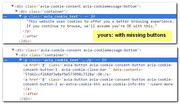
    I looked at your staging site and I see you are missing the buttons in the code. Here is a comparison:
    2018-05-27_094950
    I’m thinking there is a conflict somewhere, did you try disabling your plugins?
    We will need to be able to login to investigate.


    @corefocusgroup
    please read this post

    Best regards,
    Mike

    #962622

    Hey agrebstein,
    Please check if Enfold Theme Options > Performance > JS & CSS file merging and compression is activate. While developing please disable because the stylesheets are combined and merged, but the merged files are only rebuilt when the theme settings are saved.
    For most users this occurs when css is added to Enfold Theme Options > General Styling > Quick CSS field and the “Save all changes” button is clicked. Entering a blank space in the Quick CSS field will also make the button clickable.
    I hope this addresses and explains your issue.

    Best regards,
    Mike

    lsk7209
    Participant

    I am using a child theme.

    (Enfold) Version Number is 4.4

    The checkout page is out of order.

    How can I solve this?

    1. http://emaillab.kr/product/무료소책자카페소책자_1년-30억-매출올린-카페-고수와/

    2. 바로구매 button click

    View post on imgur.com

    #962509
    Travis
    Guest

    Yes, that is exactly what I said in my explanation. . .

    “so that when visitors click on them they like/follow the page”

    “for instance a button that has a Facebook Icon and says “like” and when they click it they have “liked” my facebook page so they will see my updates in their Facebook feed)”

    Is there an option for this in Enfold theme?

    DigitalMcMahan
    Participant

    I found the thread from July 31, 2017 about adding custom IDs by simply clicking a button in the Layout Builder options. Has this been removed? Is there now a better way to add custom IDs to ALB elements? Thanks.

    #962338

    Hi Ismael,

    yes, the button is now implemented. Thank you for checking.
    Another problem seems to be more persistent: the styling for the cookie consent bar I set in the special element styling does not work on several of my Enfold projects. Although I set i.e. a background color, it stays dark greay 10%transparent. Is this a known issue? Are any workarounds for this already known?
    Thanks and keep it up!

    • This reply was modified 7 years, 10 months ago by eee_lala.
    #962290

    Topic: Enfold Form Tracking

    in forum Enfold
    lindenhof
    Participant

    Hello,

    I’d like to track when users use contact forms (that’s a conversion in its own right) – tried following the instructions on https://kriesi.at/documentation/enfold/contact-form/#add-on-click-event-to-the-contact-form-submit-button-
    , and added the code to my functions.php, but it gave me a 505 error when I tried to open the website.

    Here’s the code I added to my child theme’s functions.php:

    add_filter(‘avf_contact_form_submit_button_attr’,’avia_add_submit_attributes_to_cf’, 10, 3);
    function avia_add_submit_attributes_to_cf($att, $formID, $form_params){
    $att = “onclick=”_gaq.push([‘_trackPageview’, ‘UA-1111111-1’]);””;
    return $att;
    }

    (UA-1111111-1 being my tracking ID.)

    • This topic was modified 7 years, 10 months ago by lindenhof.
    #962175
    Travis
    Guest

    Hello,

    I was wondering if there were social media like buttons in the content builder option of Enfold theme. I know that there are social media icons which allow you to share the page/post and/or email the link but what I am specifically looking for are icons for each of the main social media platforms so that when visitors click on them they like/follow the page (for instance a button that has a Facebook Icon and says “like” and when they click it they have not “liked” my facebook page so they will see my updates in their Facebook feed).

    Thank you!

    #962137
    gianmarizzi
    Participant

    Hi,
    on website https://www.hecoclima.com the cookies dismiss button (“OK”) doesn’t work and can’t dismiss the notification.
    Got WP 4.9.6
    Enfold 4.4

    Thanks.

    #961996

    Same here: no button section in Cookie-Consent-Theme-settings – on multiple Enfold installs…

    #961967

    Hi,

    Please try adding this code to the Quick CSS section under Enfold > General Styling or to your child theme’s style.css file:

    CSS Snippet:

    
    /* CSS - Caption above title */
    
    
    #top .avia-fullwidth-slider .slideshow_align_caption {
        display: flex!important;
        flex-direction: column;
        justify-content: space-between;
        flex-wrap:wrap;
    }
    #top .avia-fullwidth-slider h2.avia-caption-title,
    #top .avia-fullwidth-slider .avia-caption-content {
       position: relative;
    }
    
    #top.avia-fullwidth-slider h2.avia-caption-title {    
        order:2;
    }
    #top .avia-fullwidth-slider .avia-caption-content {    
        padding: 0;
        order:1;
    }
    
    #top .avia-fullwidth-slider .avia-slideshow-button {
        order:3;
    }
    
    /* End CSS */


    Best regards,
    Vinay

    #961921

    Hey DROR,

    Please try adding this code to the Quick CSS section under Enfold > General Styling or to your child theme’s style.css file:

    CSS Snippet:

    
    /* CSS - Full width checkout button */
    
    #top .woocommerce-checkout-payment .button {
        display:block;
        width:100%;
        text-align:right;
    }
    
    /* End CSS */


    Result:

    Best regards,
    Vinay

    #961896

    Hi,

    The heading text from h1 to h6 are already lighter.

    You may not see the changes until the cached files are cleared in your browser.

    Please perform the below steps to clear the browser cache:

    1. Disable “merging and compression” for CSS and JS files from Enfold > Performance.
    2. If a caching plugin is installed check the plugin settings and clear the cache and deactivate the plugins for testing purpose.
    3. Hard refresh by pressing Ctrl + Shift + F5 on your browser or press the F12 key to open chrome dev tools and right click on the refresh button and select “Empty Cache and Hard Reload”.

    Best regards,
    Vinay

    Eleina_Shinn
    Participant

    Just wanted you to know that I’ve changed both in the newest release of Enfold, Theme Options. I can see that you can change button background, text color, etc. in Advanced Styling. However, it does not take effect, buttons remain the same and the default is for them both to be white – looks like one button instead of two. just wanted you to know. Let me know if you come with a fixe for this. Otherwise, I will use CSS.

    Here’s my site:

    #961821
    yan_nik
    Participant

    Hi there,

    with the new Enfold update some easy built-in functions like enabling/disabling google tracking etc. via toggle buttons were added.
    I was able to change the overall design of the toggle button, but I couldn’t find the code/classes to target the specific toggle state colors with.
    Right now the color of the toggle button is blueish, when active and white, when inactive. How can I change both the color of the background and the toggle buttons in each state to match the rest of my website’s design?

    Thanks and best regards,
    Yannik

    #961816

    Does the Enfold version disable/enable the actual cookies? It doesn’t appear to do anything when the buttons are switched.

    This is the same for a lot of the other GDPR plugins. A lot of them have all the options but YOU have to program them to disable the cookies. The Enfold solution seems to be the same.

    Also, for the cookies to be disabled/enabled after the the user selects what they want, wouldn’t the page have to reload to active/deactivate the cookies? Enfold does nothing when the dialog box is closed.

    Hi Rikard,

    Just to let you know I updated my Enfold theme to V4.4 today. Also running WordPress latest V 4.9.6.

    The audio players inside the icon boxes are now displaying perfectly as in the screenshot below :)
    Looks good on chrome and safari – much cleaner / nicer styling too with sharper corners and bigger play button.

    https://screencast.com/t/Jo8UcypFozv

    As you say the headline rotator problem is still there on safari – I take your point that it is out of your hands.

    thanks for your help.

    Pete

    #961723

    Hi,

    The slider has a limit of 2 buttons only. However, do not worry we are happy to help you with this modification.

    To add multiple buttons to the slider we can use button shortcodes.

    1. Enable debug mode.
    2. Create a new page and add the “Button Row” element.
    3. Set the button styles and links and copy the shortcode.
    4. Paste the same in caption area of the slider.

    If you need any help please feel free to get in touch with us.

    Best regards,
    Vinay

    #961692
    alex8524
    Participant

    I tried to update to Enfold 4.4 using the update button in the Enfold section. Since that I am not able to access my WordPress anymore. After logging in the following error is shown:
    “Parse error: syntax error, unexpected T_FUNCTION, expecting ‘)’ in …/wp-content/themes/enfold/framework/php/font-management/class-avia-font-management-base.php on line 429”

    A manual reinstallation of the theme using ftp unfortunately didn’t solve the problem either.

    Any ideas would be appreciated.

    #961347

    Hi,

    I checked your site and the blog images appear to be of the same size. You may not see the changes until the cached files are cleared in your browser.

    Please perform the below steps to clear the browser cache:

    1. Disable “merging and compression” for CSS and JS files from Enfold > Performance.
    2. If a caching plugin is installed check the plugin settings and clear the cache and deactivate the plugins for testing purpose.
    3. Hard refresh by pressing Ctrl + Shift + F5 on your browser or press the F12 key to open chrome dev tools and right click on the refresh button and select “Empty Cache and Hard Reload”.

    Best regards,
    Vinay

Viewing 30 results - 4,681 through 4,710 (of 11,211 total)