Hi B,
Can you try adding this css code in Quick CSS (located in Enfold > General Styling):
#top #wrap_all .avia-button .avia_iconbox_title {
    position: relative;
    top: 3px;
}

#top #wrap_all .avia-button.avia-color-dark .avia_iconbox_title {
    top: 0;
}
Hope it helps.
Best regards,
Nikko
Hey eskitaco,
I was able to login and address your issue, I added the following css to your Enfold Theme Options > General Styling > Quick CSS field
which adjusts the form to stacked and centered for mobile & tablets, and then into one row for laptops and smaller desktop screens up to 1440px, at this size the form didn’t fit right so it moved the button to a second line. At full desktop it was fine so I didn’t change anything.
@media only screen and (max-width: 1023px) {
.avia-builder-el-63 .avia_ajax_form .first_form,.avia-builder-el-63 .avia_ajax_form .first_form.av-last-visible-form-element {
    width: 100% !important;
    margin-left: 0px !important;
}
}
@media only screen and (min-width: 1024px) and (max-width: 1440px) {
.avia-builder-el-63 .avia_ajax_form .first_form {
    width: 33% !important;
    margin-left: 5px !important;
}
.avia-builder-el-63 .avia_ajax_form .first_form.av-last-visible-form-element {
    width: 31% !important;
}
}
Please clear your browser cache and check.
Best regards,
Mike
Hey kpcradix!
Use this code to change the back to shop cart url:
/**
 * Changes the redirect URL for the Return To Shop button in the cart.
 *
 * @return string
 */
function wc_empty_cart_redirect_url() {
	return 'http://mywebsite.com/sample-page/';
}
add_filter( 'woocommerce_return_to_shop_redirect', 'wc_empty_cart_redirect_url' );
and replace http://mywebsite.com/sample-page/ with the url of the page you want to redirect to.
You can insert it into the functions.php of your child theme. If you don’t use a child theme I’d recommend to create a small plugin, otherwise the code will be removed on every theme update.
You can use this code for the plugin:
<?php
/*
Plugin Name: Enfold Custom Code
Description: Enfold Custom Code
Version:     1.0
Author:      InoPlugs
Plugin URI:  https://inoplugs.com
Author URI:  https://inoplugs.com
*/

/**
 * Changes the redirect URL for the Return To Shop button in the cart.
 *
 * @return string
 */
function wc_empty_cart_redirect_url() {
	return 'http://mywebsite.com/sample-page/';
}
add_filter( 'woocommerce_return_to_shop_redirect', 'wc_empty_cart_redirect_url' );
– replace http://mywebsite.com/sample-page/, then save it to a text file with the extension .php (i.e. enfold_custom_code.php).
Then upload this text fiele to wp-content/plugins/. Afterwards go to the wordpress admin panel > Plugins and activate the new plugin.
Best regards,
Peter
I am using a different page for my shop and want to change the href for the “return to shop” button that comes with woocommerce. Is this something I can do within the enfold theme?
Thanks!
Hey sumio17,
To create a button in the top bar, also called the Header Phone Number/Extra Info bar, first ensure that it is enabled by going to Enfold Theme Options > Header > Extra Elements > Phone Number or small info text, and choose “Display in top bar at the right” or left option.
Then open a new post, you don’t need to fill in the title because you are not going to save it, you only want to use the default editor. Choose the wand tool and find the option for buttons.
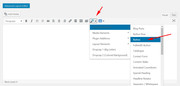
Then fill in your options, such as the size, color, url, etc.
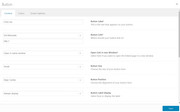
Then I recommend copying the shortcode from the “text” tab so none of the quotes turn into curly quotes.
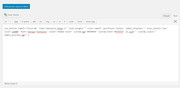
Now you can paste the code in the Enfold Theme Options > Header > Extra Elements > Phone Number or small info text field and save.

Enjoy.

Best regards,
Mike
Hi,
I checked the footer and the site looks good on my end. And from the screenshot, you posted there are no errors in your CSS.
It is mostly a caching issue in your browser. Please perform the below steps to clear the browser cache:
1. Disable “merging and compression” for CSS and JS files from Enfold > Performance.
2. If a caching plugin is installed check the plugin settings and clear the cache and deactivate the plugins for testing purpose.
3. Hard refresh by pressing Ctrl + Shift + F5 on your browser or press the F12 key to open chrome dev tools and right click on the refresh button and select “Empty Cache and Hard Reload”.

Best regards,
Vinay
here with enfold and only css – if this is it – tell me:
hover the about me column: https://webers-testseite.de/buttonlink/
it is all in the code of you link you gave to us ;)
In the meantime I have bought more than 30 enfold themes and I am still very satisfied with them! But this thing with the Reader View on iPhones still annoys me. Customers also repeatedly ask me why in the view often nothing or only the first headline appears. Current example:
http://wp.knoebel24.de/heizungsbau/heizsysteme/
Is there no way to do that correctly or simply prevent the Reader View Button?
I would not be happy about your help!
Kind Regards
Stephan
Hey Folks,
I have a problem with my Styling. How can I change the hover Color on my Shop page? at the bottom of every product you can click on a hover button. I’d like to change the color. When I change it in Enfold Theme options in alternate Content, other Boxes are changed as well, that’s not, what I want. I only want to have that small bar in a light green.
How Can i Change the colour of my price? I have some price offers and I want to change it in size and colour, so that the new price is red and a little bit larger.
Thanks for your help!
Kind regards,
Christian
Hi,
As far as I can tell, there is no way to have it apply to that specific popup. But…odds are you aren’t going to have more than one on a page at a time.
Did you try to use the custom css class setting ( https://kriesi.at/documentation/enfold/intro-to-advanced-layout-builder/#turn-on-custom-css-class-field-for-all-alb-elements ) to apply specific css code to th modal popup. I.e. you could apply the css class of the button to the modal popup div, etc.
Best regards,
Dude
Hello,
I am trying to add an item to the cart using an enfold button click. Is this possible? I’ve never used woocommerce before so it all kind of seems like magic how it works. Is there a shortcode I need? Please let me know.
Thanks!
Chris
Hello! I love your theme and use it on our PTA site. I have updated the Enfold theme to the latest version and increased the WP Memory limit in the wp config file. However, I am still not able to update Menus in the backend of the site. I get the following message:
This page isn’t working. www…didn’t send any data. ERR EMPTY RESPONSE.
Can you please help? Thanks!
Hi,
Thank you for using Enfold.
I don’t think this is a good idea because the page will refresh or load an AJAX request each time the product quantity is changed. Users will have to wait for the ajax request to finish before they can increase the quantity again. If you really want to implement it, replace the script with this one.
/**
 * @snippet       Automatically Update Cart on Quantity Change - WooCommerce
 * @how-to        Watch tutorial @ https://businessbloomer.com/?p=19055
 * @sourcecode    https://businessbloomer.com/?p=73470
 * @author        Rodolfo Melogli
 * @compatible    Woo 3.4
 */

add_action( 'wp_footer', 'ava_cart_refresh_update_qty', 9999 );
function ava_cart_refresh_update_qty() {
    if (is_cart()) {
        ?>
        <script type="text/javascript">
        (function($) {
            var triggerUpdate = function() {
                $('.woocommerce-cart-form .quantity').on('click', '.qty, .plus, .minus', function(){
                    console.log('test');
                    $("button[name='update_cart']").trigger("click");
                 });
            }

            triggerUpdate();

            $(document).ajaxComplete(function() {
                triggerUpdate();
            });
        })(jQuery);
        </script>
        <?php
    }
}
And then use this css code to hide the update button.
button[name='update_cart'] {
  display: none !important;
}
Best regards,
Ismael
Hi,
Essentially can you use the Enfold theme on a multisite website. For example would I have to create a child theme for each sub-directory (including the main directory to) and what is the easiest way as there are many sub-directories ie would I use the export and import function?
Each sub-directory is a blog and you should be able to activate a (different) theme for each blog. You could i.e. use the same child theme or even create a different child theme for each blog. If you want to use the same child theme with the same settings for all blogs I’d recommend to set up one blog (activate the child theme, configure it and save the options) and then use the Export/Import features (Enfold > Theme Options > Export/Import) to export/import the settings on other multisite blogs. To export the settings use the “Export Theme Settings File” button and save the configuration file, to import the settings click on the “Import Theme Settings File” button and select the configuration file.
Best regards,
Dude
Hello,
thank you for you answer.
I have defined the page as a blog in Enfold – like your way. But that does not change my problem ….
If I additionally set the read setting in WordPress, he will not find any entries: “Nothing Found – Sorry, no posts matched your criteria” – so I only do it in Enfold.
Please look under the first adress I mentioned above under “Blog-Test”.
My problem are the translations: on the German side is still “Read more” and not “Weiterlesen” as in the .po files is deposited.
Similarly, the share button in the single Blog-Entrie is on the German side “Share!” and not “teilen” (also in the .po file deposited).
Do you have an idea why this may be? At the settings its not the problem, I think….
Thank you!
Daniela
Hi,
The images are loading from our demo site:
http://test.kriesi.at/enfold-2017/wp-content/uploads/sites/24/2017/02/banner-cc-845x684.jpg
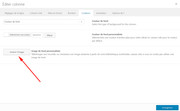
to change the images go to the element and click the button to add a image, adding your image will replace the demo image.
Best regards,
Mike
Hi Enfold team,
In one of the sections of our webpage I have used CF7 and am trying to style it to be like the contact form (img 1) attached in terms of the look. The email and submit boxes need to be on a transparent background with a white border. The submit button needs to have a hover effect when the mouse hovers on the submit button.
I have used the following code:
#top.page-id-3261 #cf7-contact-form #wpcf7-f3290-p3261-o2 input[type=”submit”].wpcf7-form-control.wpcf7-submit {
width: 30% !important;
padding: 9px 2px!important;
font-size: 13px !important;
color: #ffffff !important;
border: 3px solid #ffffff !important
background: rgba(0,0,0,0.1) !important
}
#top.page-id-3261 #cf7-contact-form #wpcf7-f3290-p3261-o2 input[type=”email”].wpcf7-form-control.wpcf7-text.wpcf7-email.wpcf7-validates-as-required.wpcf7-validates-as-email {
display: inline-block !important;
width: 67% !important;
padding: 9px 2px!important;
border: 4px solid #ffffff !important
font-size: 13px !important;
background: rgba(0,0,0,0.1) !important
}
#top.page-id-3261 #cf7-contact-form #wpcf7-f3290-p3261-o2 input[type=”submit”].wpcf7-form-control.wpcf7-submit hover {
color: #fa812f !important;
border-color: #ffffff! important
}
However, I am unable to get the transparent background for both the buttons as well as the similar size as in the image attached.
Appreciate your help.
Thanks
Garima
Hi there,
the responsive version shows Enfold logo , search button and menue, although it should be hidden.
I am using this to hide it in the “normal” view:
#menu-item-search {
display: none;
}
.logo { display: none; !important;
}
Also i am missing the text that should be underneath the top-photo in the responsive version
Thanks for your help
Michael F Kraus
Hey Ivana,
Thank you for using Enfold.
The button color doesn’t change when I tried it. Can you please provide a screenshot of the issue? The color scheme looks a little dark.
Screenshot: https://imgur.com/a/yNUWYhy
Best regards,
Ismael
Hi, I’m using OptinMonster in my website and I can’t find the reason why the “Popup” type of optin doesn’t work.
The close button and the submit button don’t do anything while the Enfold theme is active.
The other types of optins work.
Could you please help me check? :)
 Peter Weger
Guest
Hi,
I have a new client which needs a website. Check the design here: https://drive.google.com/file/d/1GHSR_-0zREbUn0U3TMpGDtj10lo2fU4E/view?usp=sharing
My question is. Do you think that this design is basically creatable 1 to 1 with Enfold without too much customization?
I am wondering for example the sqaure images (which will be usded as buttons) with only a little bid of margin in between. Is this possible with enfolds page builder?
Looking forward to your reply and recommondations.
Best regards,
Peter
Hi there!
I am Using the enfold theme with the Startup Business Demo.
There is an Option in the Header to start a video in a top-frame and when the video is finished you press the x-button and the topframe is gone. perfect. But this only works with vimeo not with youtube.
Or am i doing something wrong?
Thanks for your assistance!
Michael F. Kraus
Hi CodeSamurai,
Thank you :)
Here is the code you can put in Enfold > General Styling > Quick Css, if it does not work, put into themes/enfold/css/custom.css
#top .avia-layerslider .ls-bottom-slidebuttons a {
  border: 2px solid #666 !important;
}
If you need further assistance please let us know.
Best regards,
Victoria
Hello I use the new Privacy and Cookies in Enfold.
I have a button with a link to my contact page (you can see attached), but now we can not see down this message the footer with all the links we have there.
Please Help
Hello,
in your demo page you have no border around area where are Add to car button or variables. See picture. How can I hide it? I am using Enfold with Brown color scheme. Thanks.
Hi Andy,
Yes your question is very clean indeed, though we need to see the element in question on your site in order to give you accurate CSS. Also, please start new threads instead of using other customers threads in the future. You can start a new thread in the Enfold sub forum, there is a big blue button on the top of the page where you can start a new one.
I’ll close this thread for now since the original poster has had his problems solved already.
Best regards,
Rikard
Hey CodeSamurai,
Please try the following in Quick CSS under Enfold->General Styling:
.ls-bottom-slidebuttons a {
  margin-right:5px;
  border:none !important;
}
Best regards,
Rikard
Hi,
The problem seems to have been solved.
Solution
I went to WPML -> Settings -> Post Types Translation -> Media (attachment) and put the radio button to “Translatable – only show translated items” .
My previous selection had been: “Translatable – use translation if available or fallback to default language”
I feel like I already tried to change the Post Types Translation settings once before but I can’t remember anymore. Anyhow, I’m glad media translation is working again on my site.
I did try to manually update the translated pages and re-upload the images which didn’t work and the “Translatable – use translation if available or fallback to default language” option doesn’t seem to be working with Enfold.
So something with the WPML media translation still need bug fixing.
But that is up to the WPML plugin team.
-
This reply was modified 7 years, 7 months ago by
 olppa.
Hi, so there is no way to get a load more type button with enfold?
thanks
Hi,
Please excuse the late reply – we overlooked it.
1) You can use following css code to change the color of the green box. Just insert it into the quick css field or child theme style.css:
#top #wrap_all div.woocommerce-message {
    border-color: #8BAF5B;
    background-color: #E0F1B5;
    color: #4F5F39;
}
and change the color values.
2) Use this code to change the back to shop cart url:
/**
 * Changes the redirect URL for the Return To Shop button in the cart.
 *
 * @return string
 */
function wc_empty_cart_redirect_url() {
	return 'http://virtualbewerbung.de/?page_id=1176';
}
add_filter( 'woocommerce_return_to_shop_redirect', 'wc_empty_cart_redirect_url' );
and replace 1176 with the ID of the page you want to redirect to.
You can insert it into the functions.php file of your child theme. If you don’t use a child theme I’d recommend to create a small plugin, otherwise the code will be removed on every theme update.
You can use this code for the plugin:
<?php
/*
Plugin Name: Enfold Anpassungen
Description: Anpassungen des Enfold Codes
Version:     1.0
Author:      InoPlugs
Plugin URI:  https://inoplugs.com
Author URI:  https://inoplugs.com
*/

/**
 * Changes the redirect URL for the Return To Shop button in the cart.
 *
 * @return string
 */
function wc_empty_cart_redirect_url() {
	return 'http://virtualbewerbung.de/?page_id=1176';
}
add_filter( 'woocommerce_return_to_shop_redirect', 'wc_empty_cart_redirect_url' );
– replace the ID 1176, then save it to a text file with the extension .php (i.e. enfold_anpassungen.php).
Then upload this text fiele to wp-content/plugins/. Afterwards go to the wordpress admin panel > Plugins and activate the new plugin.
Best regards,
Dude



