Viewing 30 results - 3,961 through 3,990 (of 11,211 total)
  • Author
    Search Results
  • #1047083
    Cliffy
    Participant

    @Ismael

    Thanks for closing topic: https://kriesi.at/support/topic/enfold-contact-form-and-spam/page/2/#post-1047072

    As requested, here is your new topic post.
    My question was HOW, not where. I already saw that you could get the ‘plugin’ from Github, but how.
    When you look at the link that was provided, there is just a list of files.
    Where is the button that says “Download Plugin” – that’s the info I need.
    It is not clear what to do.

    Many thanks,

    #1046742

    Hi,

    @big-webdesign
    I first enabled all builder elements to be loaded at: Enfold Theme Options > Performance > Disable Template Builder Elements > Always load all elements Then your page gave the error: jQuery is not defined with this clue I noticed that your jQuery options are not showing in the theme options:
    2018-12-17-235248
    so I believe your webhost has added the function to load your jQuery after the footer in your wp-config.php file, some Managed WordPress Hosts do this to speed up the site.
    Please ask your webhost to help you remove the code so your jQuery loads in the header.
    I also recommend updating your Enfold to version 4.5.1 so you can switch to the advanced layout builder on the pages, you should have a button like this at the top of your pages:
    2018-12-18-001226

    Best regards,
    Mike

    #1046672

    Hi Epic,

    Try adding this css code in QUick CSS (Located in Enfold > General Styling):

    #top #avia-menu .av-menu-button > a .avia-menu-text {
        border-radius: 100px;
    }

    Best regards,
    Nikko

    #1046153

    Hi,

    You can click the huge blue button at the top of each sub-forum reading Can’t find a solution to your problem? Open a new thread, or follow this link.

    Best regards,
    Rikard

    #1045690

    Hi,
    I stand corrected, Ismael has created a plugin from his original code, no other plugins are needed for it to work.
    2018-12-15-114829
    Please download from here:
    https://www.dropbox.com/s/741o1cuvcojrk8h/enfold-recaptcha.zip?dl=0
    and install as a plugin.
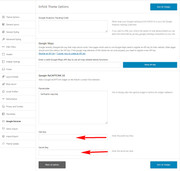
    Then go to the Enfold > Google Services panel and put your public and site key in the respective fields, and save.
    2018-12-15-114212
    It will automatic show on your contact form, the submit button will be hidden until the Google Captcha is checked.

    Best regards,
    Mike

    #1045611
    NevNic
    Participant

    Please see:

    https://goodshepherdbangkok.com/ which is built via the Enfold theme.

    The Learn More and Get Involved buttons on the Home page have broken links.

    But I cannot see where to go to edit those button links.

    Also, I want to add more similar buttons.

    #1044975

    According to their page, they handle security updates differently. I had selected the “defer updates” button when WP 5 came out and we saw the issues.

    “SECURITY/MAINTENANCE UPDATES
    This type of update contains security or minor fixes that are pushed out to repair a vulnerability or bug in the WordPress core. We immediately investigate that the change doesn’t adversely affect our platform then push it out to our customer’s installs. We have found that the vast majority of installs that are adversely affected by security updates are ones that are using the vulnerability that is being closed. Because of this, we cannot defer security updates as this would keep your site and our platform vulnerable. Given the timeframe, site administrators will only be emailed on the same day as the upgrade occurs.”

    Full page here:

    Having said this, the classic editor plugin seems to solve the issues I was having on ALB pages not loading, but the fact that there is an incompatibility makes me concerned to update to 5.0.1 until Enfold weighs in. I don’t think I will have a choice much longer according to WP Engine’s process.

    #1044495
    Chris
    Participant

    Dear support team,
    I want to use ezplayer (video player) with Enfold theme. Everything works fine so far BUT the link of the Magic Button doesn’t work. Means that the magic button shows up properly after 3 seconds under the video but the link doesn’t work. Has anyone of you heard oft that problem or any idea why Enfold theme disables the link function?
    Your help would be highly appreciated. Thanks in advance.

    Best regards,
    Chris

    kesdeg
    Participant

    Hi Support Team,

    I’ve update the latest Enfold theme no problem and updated to WordPress 5.0.

    I’m just getting the following warning on my site and I can’t seem to figure out a solution.

    “Warning: file_get_contents(/home/whizzki2/public_html/http://assets.pinterest.com/js/pinit.js): failed to open stream: No such file or directory in /home/whizzki2/public_html/wp-content/themes/enfold/config-templatebuilder/avia-template-builder/php/asset-manager.class.php on line 326”

    I had some support from you on a previous thread about adding a Pinit Button to some of my blog posts but can’t seem to unpack this problem.

    Very much appreciate your help urgently,

    Thanks,

    kesdeg

    #1044038
    KennethPlay
    Participant

    Hi all,

    I’m trying to add in some Java Script to create a lightbox popup of an order form from Ontraport. Sadly, whenever I try to place this code on an Enfold Button, the button’s code seems to cancel out the Java Script. I’ve been using the Code Block element to place in the JS, and then tried adding in the button through my custom button code, your button shortcode (from the documentation), and just putting in “[av_button]” where the JS trigger text should be; none of these worked.

    This is the code for the JS from Ontraport:
    <a style=' font-size: 1.5em;text-transform: uppercase;text-decoration: none;font-family: Arial, Helvetica, sans-serif;padding: .3em .6em;letter-spacing: .05em;color: #333;' href='javascript://' data-opf-trigger='p2c184280f16'>Register Now!</a><script type='text/javascript' async='true' src='https://app.ontraport.com/js/ontraport/opt_assets/drivers/opf.js' data-opf-uid='p2c184280f16' data-opf-params='borderColor=#fff&borderSize=5px&formHeight=1620&formWidth=60%&popPosition=mc&instance=599315932'></script>

    Where it says “Register Now!” I would like to put the Enfold Button.

    Any help would be appreciated!

    Quinn

    #1044009

    Hey charmb123,

    Add the buttons as widget. More info here. http://kriesi.at/documentation/enfold/adding-a-widget-area-to-the-header/

    Best regards,
    Jordan Shannon

    #1043969

    Hey Iain,

    Often if someone adds css into their child theme style.css via WordPress > Appearance > Editor > Child Theme > Stylesheet and then checks their site it seems that the css is not working, this is because adding the css this way doesn’t rebuild the merged files to add the new css.
    One way to resolve this is to disable the Performance > JS & CSS file merging and compression option until they are done developing the site, in the same way that it is not recommend in using a caching plugin until they are done developing the site, clearing cached css can be a pain sometimes.
    Another option is to rebuild the merged files after adding css to the child theme styles file, this is done by clicking the blue “save all changes” button in the theme options, if this button is not clickable, then go the Enfold Theme Options > General Styling > Quick CSS field and add a blank space, this will activate the button so you can click it.
    Then please clear your browser cache for the changes to take effect.

    Best regards,
    Victoria

    #1043925
    Iptor
    Participant

    Hello!

    I noticed on the page that gets created automatically to display events via The Events Calendar plugin, the div housing the “tribe-events-bar” is rendering wonky on my site here: https://iptor.com/events/
    (compared to an enfold demo site here –>https://kriesi.at/themes/enfold-church/events/)

    Also, none of the fields/buttons/drop downs seem to work when clicked.

    I’m at a bit of a loss on how that happened, it used to work fine before. Any suggestions on how to fix?

    The site is running WordPress 4.9.8 and Enfold 4.5, but I’ve tested WP 5.0 on our dev site with the same Enfold theme version and it’s the same problem on both.

    Thank you in advance!

    Mike

    #1043603

    In reply to: Paypal button

    Hi,

    Please try this instead:

    .woo_pp_ec_button_product .paypal-button {
      display:none !important;
    }

    Also please make sure to clear the old CSS and JS files under Enfold->Performance before checking the results.

    Best regards,
    Rikard

    between2brackets
    Participant

    I was made away by clients that within the Avia Layout Builder the “Insert Image” button of the Image object and the “Add/Edit Gallery” button of the Gallery object are unresponsive within Internet Explorer. I confirmed with the Internet Explorer version below – the button’s do not open the intended window. Other browsers do not seem to be affected.

    Enfold Version: 4.4.1
    Version: Internet Explorer 11.407.17134.0
    Update Versions: 11.0.95 (KB4466536)

    Cheers

    #1043542
    abyjrc2016
    Participant

    Im having a bunch of errors when trying to upgrade enfold theme to v4.5.1

    I’m using the update button from enfold theme options, theme update…

    These are the errors shown:
    Inside WordPress admin
    Warning: preg_match() expects parameter 2 to be string, array given in /home/bascguat/public_html/wp-content/plugins/the-events-calendar/common/src/Tribe/PUE/Package_Handler.php on line 75

    Warning: preg_match() expects parameter 2 to be string, array given in /home/bascguat/public_html/wp-admin/includes/class-wp-upgrader.php on line 258

    Warning: file_exists() expects parameter 1 to be a valid path, array given in /home/bascguat/public_html/wp-admin/includes/class-wp-upgrader.php on line 258

    Warning: strip_tags() expects parameter 1 to be string, array given in /home/bascguat/public_html/wp-admin/includes/class-bulk-upgrader-skin.php on line 61
    Descargando la actualización desde …

    Warning: parse_url() expects parameter 1 to be string, array given in /home/bascguat/public_html/wp-admin/includes/file.php on line 970

    Warning: preg_split() expects parameter 2 to be string, array given in /home/bascguat/public_html/wp-includes/kses.php on line 1348

    Warning: strtolower() expects parameter 1 to be string, array given in /home/bascguat/public_html/wp-includes/http.php on line 517

    Warning: strtolower() expects parameter 1 to be string, array given in /home/bascguat/public_html/wp-includes/http.php on line 517

    I’m sending admin login on private area

    Thanks for the help!

    #1043539

    Thanks Mike
    I’m using the update button from enfold theme options, theme update…
    Inside WordPress admin

    #1043310

    In reply to: Paypal button

    Hi

    I adding this code to the Quick CSS section under Enfold > General Styling / Quick CSS

    #zoid-paypal-button-91236fbf3b.paypal-button-size-responsive {
    display: none;
    }

    The yellow button PayPal is not delete

    Best regards

    #1043273

    In reply to: Paypal button

    Hi,

    Please try adding this code to the Quick CSS section under Enfold > General Styling or to your child theme’s style.css file:

    CSS Snippet:

    
    #zoid-paypal-button-91236fbf3b.paypal-button-size-responsive {
        display: none;
    }


    Best regards,
    Yigit

    asolleux
    Participant

    Hello,

    I am having trouble building my website (ENFOLD theme),
    Whenever I modify some of my content on my home page (for example a text block), I hit the update button on the top right corner to update the modification on my website. When the update load is done, most of the sections on my home page disapear. Which forces me to come back to a previous revisions.

    Any hint on how I could keep working and not deleting all my sections by updating revisions ?

    Best,
    Augustin

    #1043012
    Monique
    Participant

    Hi there,

    The site https://vick.nl/ uses Enfolds MailChimp sign up forms. Because of the GDPR we checked the “Append a privacy policy message to mailchimp contactforms” at Privacy and Cookies in the theme options. On the site the checkbox is placed in between the fields, before the submit button, which results in an ugly style.

    I assume visitors need to accept the privacy policy before they click the submit button.

    Can you help me to place the privacy checkbox before/above the input fields, so at the beginning of the form? So that at the same time the three fields get inline again. At least for the larger screens.

    Thanks for your help.

    Best regards,
    Monique

    #1042707

    In reply to: Transparent Background

    you can check what I want here:

    http://ferdyenanna.nl/

    it’s made with

    if you inspect the element from the bootom seems like seems like he has this code :

    <div class=”flex_column av_one_full flex_column_div first avia-builder-el-13 avia-builder-el-no-sibling ” style=”padding:20px; background-color:rgba(216,159,132,0.81); border-radius:0px; “><section class=”av_textblock_section ” itemscope=”itemscope” itemtype=”https://schema.org/CreativeWork”><div class=”avia_textblock av_inherit_color ” style=”color:#FFFFFF; ” itemprop=”text”><p style=”text-align: center;”>Hoi, wat leuk dat je een kijkje neemt op deze website! Mijn naam is Anna Korpershoek. Samen met mijn man Ferdy ben ik een aantal jaar geleden mijn droom officieel achter na gegaan door samen een fotografie bedrijf te starten. In dit bedrijf kon ik mijn passie voor fotografie, werken met mensen en het vereeuwigen van mooie momenten helemaal kwijt én het was super om samen met Ferdy te kunnen werken. Inmiddels heeft Ferdy ervoor gekozen zich volledig te richten op het geven van onderwijs en staat hij dus zelf niet meer achter (maar nu vóór de camera). Ikzelf wilde niet stoppen met dit mooie werk, dus vandaar dat ik in 2019 gewoon door zal gaan met fotograferen! Wil je meer over mij weten? Klik dan op de button hieronder!</p>
    </div></section>
    <div class=”avia-button-wrap avia-button-center avia-builder-el-15 el_after_av_textblock avia-builder-el-last “><span class=”avia_iconbox_title”>Meer Over Anna</span></div></div>

    and yes he’s using enfold theme.

    thank you

    Thanks Mike. The solution from 007 is not working for me on pages that I had already opened to test… perhaps it only works the first time a page is opened? In any event I will wait for 4.5.2 before installing WP 5.0 on my production site. :)

    “Edit: if you first – when you open an existing Enfold ALB Page goto “Save” : “Update” Button on the right top side – then the page will be as it should be – and the image of text-block element would not be this way above:”

    #1042473

    Topic: ENFOLD BLOG PROBLEMS

    in forum Enfold
    Isotopper
    Participant

    Hi team,
    I’ve installed your theme few days ago and updated last time today. I’m encountering lots issues in the way blog posts are shown as listed:
    – If I add a video in a post, in the main blog page this post is shown without any part of text but just the “read more” button after featured image. At the same time if I click the post the title is gone.
    – Many posts featured images disapperar when listed in any category page.
    – In category pages posts are listed with their entire text, that’s annoying because some of them are quite long. Is there a way to cut them after a while and add the “read more” button to point to the post itself?
    – In WP dashboard it indicate as I have 1 plugin to update, but there isn’t. Same even if I deactivate all plugins.
    Website url is http://www.lucaveronesi.it

    Help please…
    Best regards,
    Luca

    #1042428
    osukaru
    Participant

    hello
    i try to set enfold full-width button tabs and images on it.
    now it looks:


    http://s6.ifotos.pl/img/Screen-Sh_qwxrxsn.png

    I would :

    http://s5.ifotos.pl/img/Screen-Sh_qwxrxse.png

    thx for help

    • This topic was modified 7 years, 3 months ago by osukaru.
    #1042357

    Hey hbourdillon,

    Please try the following in Quick CSS under Enfold->General Styling:

    .avia_ajax_form .button {
        min-width: 100%;
    }

    Best regards,
    Rikard

    #1042298

    In reply to: Adding Padding to logo

    Hi,
    The /wp-content/uploads/dynamic_avia/avia-merged-styles[..].css is used if you are using the option at Enfold Theme Options > Performance > JS & CSS file merging and compression
    Often if someone adds css into their child theme style.css via WordPress > Appearance > Editor > Child Theme > Stylesheet and then checks their site it seems that the css is not working, this is because adding the css this way doesn’t rebuild the merged files to add the new css.
    One way to resolve this is to disable the Performance > JS & CSS file merging and compression option until they are done developing the site, in the same way that it is not recommend in using a caching plugin until they are done developing the site, clearing cached css can be a pain sometimes.
    Another option is to rebuild the merged files after adding css to the child theme styles file, this is done by clicking the blue “save all changes” button in the theme options, if this button is not clickable, then go the Enfold Theme Options > General Styling > Quick CSS field and add a blank space, this will activate the button so you can click it.
    Then please clear your browser cache for the changes to take effect.

    Best regards,
    Mike

    #1042271
    fcbcurethemes
    Participant

    I’d set up a basic wordpress install with enfold, imported the “gym” demo, and made sure “minify and concatenate” css and js were both enabled, however, I’m not seeing any minification or concatenation of any theme files and there’s quite a significant number of them:

    base.css,
    layout.css,
    buttons_fullwidth.css?ver=4.9.8
    gallery.css?ver=4.9.8
    google_maps.css?ver=4.9.8
    grid_row.css?ver=4.9.8
    heading.css?ver=4.9.8
    hr.css?ver=4.9.8
    icon.css?ver=4.9.8
    iconlist.css?ver=4.9.8
    image.css?ver=4.9.8
    numbers.css?ver=4.9.8
    slideshow.css?ver=4.9.8 slideshow_fullsize.css?ver=4.9.8

    and the list goes on and on…which is good in the sense that it’s modular…but I need a working solution for minifying and concatenating these files — and also ideally only serving up the files that are used on the page instead of everything;

    “Load only used elements” also isn’t working.

    Any ideas?

    Thank you

    • This topic was modified 7 years, 3 months ago by fcbcurethemes.
    #1042270
    Vasilis
    Participant

    Hi everyone,
    I am using Enfold’s share buttons and have following problem:
    When I am using the facebook share button it shows me the facebook title and the word “WordPress” next to it.
    I am sure there will be plugins to avoid this but I would prefer to avoid any plugin. As I have it still under construction I will post a temporary login in the private area.

    Thank you,
    Vasilis

    #1042111
Viewing 30 results - 3,961 through 3,990 (of 11,211 total)