Viewing 30 results - 1 through 30 (of 103 total)
  • Author
    Search Results
  • #1489434

    Hey BlewWeb,
    You could download the icon here and upload it to your Enfold Theme Options ▸ Import/Export ▸ SVG Iconset and Iconfont Manager
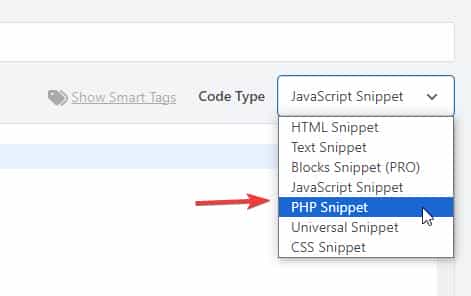
    Then add this snippet to your child theme function.php file or if you are not using a child theme you could use the WP Code plugin then add a new snippet, in the top right corner use the PHP snippet as the code type:
    Enfold_Support_2680
    then add this code and save.

    function avia_add_custom_icon($icons) {
    $icons['bluesky'] = array( 'font' =>'fontello', 'icon' => 'ue800');
    return $icons;
    }
    add_filter('avf_default_icons','avia_add_custom_icon', 10, 1);
    
    function avia_add_custom_social_icon($icons) {
    $icons['BlueSky'] = 'bluesky';
    return $icons;
    }
    add_filter('avf_social_icons_options','avia_add_custom_social_icon', 10, 1);
    add_filter('avia_social_share_link_arguments', 'avia_add_social_share_link_arguments', 10, 1);
    function avia_add_social_share_link_arguments($args){
        $bluesky = array('bluesky' => array("encode"=>true, "encode_urls"=>false, "pattern" => "https://bluesky.com/", 'label' => __("Share on BlueSky",'avia_framework')));
        $args = array_merge($bluesky, $args);
        return $args;
    }

    Then add this css to your Enfold Theme Options ▸ Quick CSS

    #top #wrap_all .av-social-link-bluesky:hover a {
    	  color: #fff;
        background-color: #1185FE;
    }

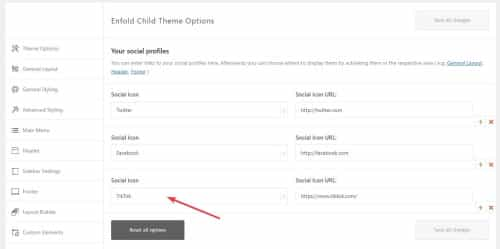
    Then choose the icon in your Enfold Theme Options ▸ Your Social Profiles
    You can also vote for this feature here.

    Best regards,
    Mike

    #1489115

    if you like to have that on Enfold – Blog Layout – to choose the icons for “share on …”

    function avia_add_social_share_link_arguments($args){
        $tripadvisor = array('tripadvisor' => array("encode" => true, "encode_urls" => false, "pattern" => "https://www.tripadvisor.com/", 'label' => __("Share on Trip Advisor", 'avia_framework')));
        $args = array_merge($tripadvisor, $args);  
        return $args;
    }
    add_filter('avia_social_share_link_arguments', 'avia_add_social_share_link_arguments', 10, 1);
    #1488888

    allthough i set the right font and ID it does not show the right name and does not show the social icon

    So how to have new social icons via media library?

    function avia_add_custom_icons($icons){
      $icons['bluesky'] =  array( 'font' =>'svg_wp-media-library', 'icon' => '1787', 'display_name' => 'Bluesky SVG');
        return $icons;
      }
    add_filter('avf_default_icons','avia_add_custom_icons', 10, 1);

    Edit: now i see your comment with the name that $icons[‘bluesky’] inside the bracket has to be the file name of the icon!
    And: and my mistaken – the display_name is only for the hover style – and not for that drop-down list in Soziales Symbol list.

    ________

    Next: On the ALB Element Share Buttons – if we do not want the standard ( set on Options: Blog Layout ) but to set it manually in the ALB (Use a custom set). The new icon is not in there.

    function avia_add_social_share_link_arguments($args){
        $bluesky = array('bluesky' => array("encode" => true, "encode_urls" => false, "pattern" => "https://www.bluesky.com/", 'label' => __("Share on bluesky", 'avia_framework')));
        $args = array_merge($bluesky, $args);  
        return $args;
    }
    add_filter('avia_social_share_link_arguments', 'avia_add_social_share_link_arguments', 10, 1);

    so maybe a similar (or the same ) filter inside social_share.php would be nice to have. And inserting the above will do the job twice

    • This reply was modified 4 months, 1 week ago by Guenni007.

    Hey dogsbody,

    Thank you for the inquiry.

    The process should be the same for SVG icons. Create a folder called “svg”, place the “bluesky.svg” and “mastodon.svg” file inside, compress or archive the folder to a zip file and name it “social”, then upload it to the SVG Iconset and Iconfont Manager. You may need to delete the previous icons to avoid conflict.

    https://kriesi.at/documentation/enfold/svg-icon-sets/#use-svg-icon-files-to-create-svg-icon-set-quick-setup

    Add this in the functions.php file to register the social icons:

    function avia_add_custom_icon($icons)
    {
        $icons['mastodon'] = array('font' => 'svg_social', 'icon' => 'mastodon');
        $icons['bluesky'] = array('font' => 'svg_social', 'icon' => 'bluesky');
        return $icons;
    }
    add_filter('avf_default_icons', 'avia_add_custom_icon', 10, 1);
    
    function avia_add_custom_social_icon($icons)
    {
        $icons['mastodon'] = 'mastodon';
        $icons['bluesky'] = 'bluesky';
        return $icons;
    }
    add_filter('avf_social_icons_options', 'avia_add_custom_social_icon', 10, 1);
    add_filter('avia_social_share_link_arguments', 'avia_add_social_share_link_arguments', 10, 1);
    function avia_add_social_share_link_arguments($args)
    {
        $mastodon = array('mastodon' => array("encode" => true, "encode_urls" => false, "pattern" => "https://www.mastodon.com/", 'label' => __("Share on mastodon", 'avia_framework')));
        $bluesky = array('bluesky' => array("encode" => true, "encode_urls" => false, "pattern" => "https://www.bluesky.com/", 'label' => __("Share on bluesky", 'avia_framework')));
        $args = array_merge($mastodon, $bluesky, $args);
        return $args;
    }
    

    View post on imgur.com

    Best regards,
    Ismael

    #1479658

    Hi,
    I tested your fontello-d73127ed.zip and added this php code to my functions.php

    function avia_add_custom_icon($icons) {
    $icons['mastodon'] = array( 'font' =>'mastodon-bluesky', 'icon' => 'ue800');
    $icons['bluesky'] = array( 'font' =>'mastodon-bluesky', 'icon' => 'ue801');	
    return $icons;
    }
    add_filter('avf_default_icons','avia_add_custom_icon', 10, 1);
    
    function avia_add_custom_social_icon($icons) {
    $icons['mastodon'] = 'mastodon';
    $icons['bluesky'] = 'bluesky';
    return $icons;
    }
    add_filter('avf_social_icons_options','avia_add_custom_social_icon', 10, 1);
    add_filter('avia_social_share_link_arguments', 'avia_add_social_share_link_arguments', 10, 1);
    function avia_add_social_share_link_arguments($args){
        $mastodon = array('mastodon' => array("encode"=>true, "encode_urls"=>false, "pattern" => "https://www.mastodon.com/", 'label' => __("Share on mastodon",'avia_framework')));
    	$bluesky = array('bluesky' => array("encode"=>true, "encode_urls"=>false, "pattern" => "https://www.bluesky.com/", 'label' => __("Share on bluesky",'avia_framework')));
        $args = array_merge($mastodon,$bluesky, $args);
        return $args;
    }

    and this css to my quick css:

    #top #wrap_all .av-social-link-mastodon:hover a{
        color:#fff; 
        background-color:blue; 
    }
    #top #wrap_all .av-social-link-bluesky:hover a{
        color:#fff; 
        background-color:blue; 
    }

    and they both show in my social profiles:
    Screen Shot 2025 03 18 at 4.09.25 PM
    and in my “Profile Links At The Bottom Of Your Blog Post”
    Screen Shot 2025 03 18 at 4.11.09 PM
    and in the header:
    Screen Shot 2025 03 18 at 4.15.24 PM
    and in the “Share this entry” on blog posts:
    Screen Shot 2025 03 18 at 4.16.42 PM
    please give this a try.

    Best regards,
    Mike

    theVR
    Participant

    Looking to add a TikTok icon button using the “Social Buttons” module but it is not allowing us to add this.

    Below is the code we are trying:

    // Register new icon as a theme icon
    function avia_add_custom_icon($icons) {
    $icons[‘tiktok’] = array( ‘font’ =>’fontello’, ‘icon’ => ‘e800’);
    return $icons;
    }
    add_filter(‘avf_default_icons’,’avia_add_custom_icon’, 10, 1);

    // Add new icon as an option for social icons
    function avia_add_custom_social_icon($icons) {
    $icons[‘TikTok’] = ‘tik-tok’;
    return $icons;
    }
    add_filter(‘avf_social_icons_options’,’avia_add_custom_social_icon’, 10, 1);

    add_filter(‘avia_social_share_link_arguments’, ‘avia_add_social_share_link_arguments’, 10, 1);
    function avia_add_social_share_link_arguments($args){
    $tiktok = array(‘tiktok’ => array(“encode”=>true, “encode_urls”=>false, “pattern” => https://www.tiktok.com/, ‘label’ => __(“Share on TikTok”,’avia_framework’)));
    $args = array_merge($tiktok, $args);
    return $args;
    }

    #1439041

    In reply to: Chinese share link

    Hey Yaphoon,

    Thank you for the inquiry.

    You can use the avia_social_share_link_arguments filter in the functions.php file to add more icons to icons to social share box. Please check the link below for more info:

    // https://kriesi.at/documentation/enfold/social-share-buttons/#display-custom-social-icons-in-social-share-box

    Best regards,
    Ismael

    #1438304

    In reply to: Author

    Hi,
    1: try changing the date format at WordPress ▸ Settings ▸ General ▸ Date Format
    2: Try adding this code to the end of your child theme functions.php file in Appearance ▸ Editor:

    add_filter('avia_social_share_link_arguments', 'avia_add_social_share_link_arguments', 10, 1);
    function avia_add_social_share_link_arguments($args) {
        if (isset($args['square-x-twitter'])) {
            $args['square-x-twitter']['label'] = __("Share on X", 'avia_framework');
        }
    	if (isset($args['twitter'])) {
            $args['twitter']['label'] = __("Share on X", 'avia_framework');
        }
        return $args;
    }

    This will probably not show in German, feel free to adjust “Share on X” in the code above to German
    3: try this css:

    #top #socket .social_bookmarks .social_bookmarks_mail {
    	display: none;
    }

    4: try this css:

    #top .avia-post-nav {
    	display: none;
    }

    Please note that we kindly ask that each thread is for a single topic, it is hard to manage threads with many questions, typically it causes confusion when other Mods try to help or when clients answer but are not so clear, Thank you for your patience and understanding and for using Enfold.

    Best regards,
    Mike

    #1428589

    Hi,
    Typically when you add a new social profile following the documentation this is the correct code snippet that you should add to your child theme functions.php:

    
    // Register new icon as a theme icon
    function avia_add_custom_icon($icons) {
    $icons['line'] = array( 'font' =>'icomoon', 'icon' => 'ue900');
    return $icons;
    }
    add_filter('avf_default_icons','avia_add_custom_icon', 10, 1);
    
    // Add new icon as an option for social icons
    function avia_add_custom_social_icon($icons) {
    $icons['Line'] = 'line';
    return $icons;
    }
    add_filter('avf_social_icons_options','avia_add_custom_social_icon', 10, 1);
    // Add new icon to sharebox
    add_filter('avia_social_share_link_arguments', 'avia_add_social_share_link_arguments', 10, 1);
    function avia_add_social_share_link_arguments($args){
        $tiktok = array('line' => array("encode"=>true, "encode_urls"=>false, "pattern" => "https://line.me/", 'label' => __("Share on Line",'avia_framework')));
        $args = array_merge($line, $args);
        return $args;
    }

    and then you would choose the new social profile from the options”
    Enfold_Support_4185.jpeg
    and then it will show on the front end:
    Enfold_Support_4187.jpeg
    I have done this for you.

    Best regards,
    Mike

    #1420929
    This reply has been marked as private.
    #1420859

    Hi,

    Thank you for the update.

    First, you have to add this code in the functions.php file to register the Tripadvisor icon.

    // Register tripadvisor icon as a theme icon
    function avia_add_custom_icon($icons) {
    $icons['Tripadvisor'] = array( 'font' =>'tripadvisor', 'icon' => 'uf262');
    return $icons;
    }
    add_filter('avf_default_icons','avia_add_custom_icon', 10, 1);
    
    // Add new icon as an option for social icons
    function avia_add_custom_social_icon($icons) {
    $icons['Tripadvisor'] = 'Tripadvisor';
    return $icons;
    }
    add_filter('avf_social_icons_options','avia_add_custom_social_icon', 10, 1);
    
    //Add items on the social share section
    add_filter('avia_social_share_link_arguments', 'avia_add_social_share_link_arguments', 10, 1);
    function avia_add_social_share_link_arguments($args) {
    	$new_array = array(
    		'Tripadvisor' => array(
    			"encode"=>true, "encode_urls"=>false, "pattern" => "https://www.tripadvisor.com://send?text=[title]-[permalink]"
    		)
    	);
    
    	return array_merge($new_array, $args);
    }

    After that, go to the Enfold > Social Profiles, click the plus (+) symbol below the Facebook entry, select Tripadvisor from the dropdown, then add your Tripadvior account URL in the Social Icon URL field. Let us know if you need further assistance.

    Best regards,
    Ismael

    #1414198

    Hi Mike,

    Thanks for this.

    My coding knowledge is limited and I do not run a child theme.

    If I am adding the Teams logo, is the CSS below correct?
    Then I add the Teams logo in > Enfold > Social Profiles

    Please advise.

    Thanks

    ********

    function avia_add_custom_icon($icons) {
    $icons[‘teams’] = array( ‘font’ =>’fontello’, ‘icon’ => ‘ue800’);
    return $icons;
    }
    add_filter(‘avf_default_icons’,’avia_add_custom_icon’, 10, 1);

    function avia_add_custom_social_icon($icons) {
    $icons[‘Teams’] = ‘teams’;
    return $icons;
    }
    add_filter(‘avf_social_icons_options’,’avia_add_custom_social_icon’, 10, 1);
    add_filter(‘avia_social_share_link_arguments’, ‘avia_add_social_share_link_arguments’, 10, 1);
    function avia_add_social_share_link_arguments($args){
    $teams = array(‘teams’ => array(“encode”=>true, “encode_urls”=>false, “pattern” => “https://www.microsoft.com/en-gb/microsoft-teams/group-chat-software/”, ‘label’ => __(“Share on Teams”,’avia_framework’)));
    $args = array_merge($teams, $args);
    return $args;
    }

    #1397384

    Hey Jorge,

    Thank you for the inquiry.

    Are you referring to the URL in the twitter social icon? You can try this filter in the functions.php file to adjust the URL pattern.

    add_filter('avia_social_share_link_arguments', 'avia_add_social_share_link_arguments', 10, 1);
                function avia_add_social_share_link_arguments($args)
                {
                    global $post;
                    $permalink = get_the_permalink($post->ID);
                    $title = get_the_title($post->ID);
                    $args['twitter']["pattern"] = 'https://twitter.com/share?text=' . $title  . '&url=' . $permalink;
                    return $args;
                }


    Best regards,
    Ismael

    #1394706

    Hey lauragrashoff,
    The TikTok icon is not available on Fontello.com so you need to create it by finding an SVG and converting it on Fontello to create the icon font
    converting_SVG_on_Fontello_to_create_a_icon-font.png
    The icon font will be black and white a colored SVG won’t work. But if you find a png with a transparent background then you can convert it here. For example I found a TikTok icon here and downloaded it as a SVG and then uploaded it to Fontello which converted it for me. This is the fontello-tiktok.zip file I’m using in this example.
    Then to create the TikTok social profile follow the steps outlined here in our documentation.
    For example, I added this code to the end of my child theme functions.php file in Appearance ▸ Editor, If you are not using a child theme I recommend the WPcode plugin this plugin supports PHP code snippets, JavaScript code snippets, & CSS code snippets and allows you to export and import your custom code snippets to other sites that you may have or as a backup.

    function avia_add_custom_icon($icons) {
    $icons['tiktok'] = array( 'font' =>'fontello', 'icon' => 'ue800');
    return $icons;
    }
    add_filter('avf_default_icons','avia_add_custom_icon', 10, 1);
    
    function avia_add_custom_social_icon($icons) {
    $icons['TikTok'] = 'tiktok';
    return $icons;
    }
    add_filter('avf_social_icons_options','avia_add_custom_social_icon', 10, 1);
    add_filter('avia_social_share_link_arguments', 'avia_add_social_share_link_arguments', 10, 1);
    function avia_add_social_share_link_arguments($args){
        $tiktok = array('tiktok' => array("encode"=>true, "encode_urls"=>false, "pattern" => "https://www.tiktok.com/", 'label' => __("Share on TikTok",'avia_framework')));
        $args = array_merge($tiktok, $args);
        return $args;
    }

    Then I enabled it at Enfold Theme Options ▸ Social Profiles ▸ Your social profiles
    Enfold_Support_158.jpeg
    Now it shows on the frontend:
    Enfold_Support_160.jpeg
    Now to add the on mouse-over color add this css to your Enfold Theme Options ▸ General Styling ▸ Quick CSS field:

    #top #wrap_all .av-social-link-tiktok:hover a{
        color:#fff; 
        background-color:#00f2ea; 
    }
    

    Now go to the theme options Enfold Theme Options ▸ Blog Layout ▸ Profile Links At The Bottom Of Your Blog Post and enable the TikTok item:
    Enfold_Support_162.jpeg
    and now on blog posts when the share box shows TikTok will be included:
    Enfold_Support_164.jpeg

    Best regards,
    Mike

    Hey Chris_85,

    Thank you for the inquiry.

    To add a new entry in the Social Button element, you have to use the avia_social_share_link_arguments filter. Please check the examples in the following threads.

    // https://kriesi.at/support/topic/telegram-in-social-share-button/#post-1358871
    // https://kriesi.at/support/topic/changement-couleur-et-police-ne-fonctionne-pas/#post-1344998
    // https://kriesi.at/support/topic/tripadvisor-as-social-share-icon/#post-1286736

    Best regards,
    Ismael

    #1358877

    Hi Nico,

    perfect, just needed to replace $medal with $telegram – does now exactly what I was looking for.

    Thanks for the fast and helpful support as usual.

    And for reference the complete functions.php from my child theme that allows telegram to be used to share pages, posts etc via the social share button (after the fontello telgram icon has been imported):

    <?php
    // Register Telegram icon as a theme icon
    function avia_add_custom_icon($icons) {
    $icons[‘telegram’] = array( ‘font’ =>’entypo-fontello’, ‘icon’ => ‘ue8b7’);
    return $icons;
    }
    add_filter(‘avf_default_icons’,’avia_add_custom_icon’, 10, 1);

    // Add new icon as an option for social icons
    function avia_add_custom_social_icon($icons) {
    $icons[‘Telegram’] = ‘telegram’;
    return $icons;
    }
    add_filter(‘avf_social_icons_options’,’avia_add_custom_social_icon’, 10, 1);

    // Add the URL to the telegram URL in the share section
    function avia_add_custom_social_share_link_arguments($args) {
    $telegram = array(‘telegram’ => array(
    ‘encode’ => true,
    ‘encode_urls’ => true,
    ‘pattern’ => ‘https://t.me/share/url?url=[permalink]&text=[title]&#8217;
    ));
    $args = array_merge($args, $telegram);
    return $args;
    }
    add_filter(‘avia_social_share_link_arguments’, ‘avia_add_custom_social_share_link_arguments’, 10, 1);

    #1358871

    Hi aboderc,

    Please try to replace this code:

    function avia_add_custom_social_share_link_arguments($args) {
    	$telegram = array('telegram'	=> array(
    								'encode'		=> false,
    								'encode_urls'	=> false,
    								'profile_only'	=> true
    							));
    	$args = array_merge($args, $telegram);
    	return $args;
    }
    
    add_filter('avia_social_share_link_arguments', 'avia_add_custom_social_share_link_arguments', 10, 1);

    with:

    function avia_add_custom_social_share_link_arguments($args) {
    	$medal = array('medal'	=> array(
    								'encode'		=> true,
    								'encode_urls'	=> true,
    								'pattern'		=> 'https://t.me/share/url?url=[permalink]&text=[title]'
    							));
    	$args = array_merge($args, $medal);
    	return $args;
    }
    
    add_filter('avia_social_share_link_arguments', 'avia_add_custom_social_share_link_arguments', 10, 1);

    Let us know if it helps.

    Best regards,
    Nikko

    #1358737

    Hi aboderc,

    Thanks for posting the code that you used.
    The code will only show up in Social Profiles where you have the option to add it on the header or footer, on the social links however you may need to do these extra steps:
    1. Override Social Share
    – Do the things posted on this section: https://kriesi.at/documentation/enfold/intro-to-layout-builder/#add-elements-to-alb
    – Copy social_share folder located in the parent theme wp-content/enfold/config-templatebuilder/avia-shortcodes and paste it to the shortcodes folder in the child theme
    – Edit social_share.php in the child theme and find this code (line 453-462):

    array(
        'name'		=> __( 'YouTube Link', 'avia_framework' ),
        'desc'		=> $check_profile,
        'id'		=> 'share_youtube',
        'type'		=> 'checkbox',
        'std'		=> '',
        'container_class' => 'av_third ',
        'lockable'	=> true,
        'required'	=> array( 'buttons', 'equals', 'custom' )
    ),

    and below it add this code:

    array(
        'name'		=> __( 'Telegram Link', 'avia_framework' ),
        'desc'		=> $check_profile,
        'id'		=> 'share_telegram',
        'type'		=> 'checkbox',
        'std'		=> '',
        'container_class' => 'av_third ',
        'lockable'	=> true,
        'required'	=> array( 'buttons', 'equals', 'custom' )
    ),

    2. Add this code in functions.php:

    function avia_add_custom_social_share_link_arguments($args) {
    	$telegram = array('telegram'	=> array(
    								'encode'		=> false,
    								'encode_urls'	=> false,
    								'profile_only'	=> true
    							));
    	$args = array_merge($args, $telegram);
    	return $args;
    }
    
    add_filter('avia_social_share_link_arguments', 'avia_add_custom_social_share_link_arguments', 10, 1);

    Hope this helps.

    Best regards,
    Nikko

    #1344998

    Hi,

    You can use the “avia_social_share_link_arguments” filter to adjust the label of the social sharing items. Please check the following examples in the link below.

    // https://kriesi.at/support/search/avia_social_share_link_arguments/?avia_filter_search=yes&avia_search_forums=66&avia_search_dates=all&avia_search_include=no

    To change the label of the Pinterest icon for example, you can use this filter in the functions.php file.

    add_filter('avia_social_share_link_arguments', 'avia_add_social_share_link_arguments', 10, 1);
    function avia_add_social_share_link_arguments($args)
    {
    	$args['pinterest']["label"] = __("Share on Pinterest",'avia_framework');
    	return $args;
    }
    

    Best regards,
    Ismael

    #1333118
    Grobi
    Participant

    Hi there,
    I want to change the links on the social media share icons.
    For example the link to Facebook – after clicking the Facebook icon, I want to open a popup and let people know that they are leaving my page.

    Ygit made a suggestion in answer #783467 that doesn’t work on my website.
    I put this code on the functions.php:

    add_filter(‘avia_social_share_link_arguments’, ‘avia_add_social_share_link_arguments’, 10, 1);
    function avia_add_social_share_link_arguments($args)
    {
    $args[‘facebook’][‘pattern’] = “http://kriesi.at&#8221;;
    $args[‘twitter’][‘pattern’] = “http://kriesi.at&#8221;;
    $args[‘gplus’][‘pattern’] = “http://kriesi.at&#8221;;
    $args[‘pinterest’][‘pattern’] = “http://kriesi.at&#8221;;
    return $args;
    }

    Do I have to pay attention to anything else?
    Do you can help me?

    Best regards
    Grobi

    aixhibitag
    Participant

    Hi;

    the newly in 4.8.3 introduced feature “ALB Social Share Buttons extended” seems to break custom changes via the avia_social_share_link_arguments filter.

    Before the update, this code would add a xing share button to blog pages:

    function avia_add_social_share_link_arguments($args)
    {
        $args['xing'] = array("encode"=>true, "encode_urls"=>false, "pattern" => "https://www.xing.com/social_plugins/share/new?h=1&url=[permalink]&t=[title]");
        return $args;
    }

    I´ve already tried another approach, but it isn´t working either:

    add_filter('avia_social_share_link_arguments', 'avia_add_social_share_link_arguments', 10, 1);
    function avia_add_social_share_link_arguments($args)
    {
        $xing = array('xing' => array("encode"=>true, "encode_urls"=>false, "pattern" => "https://www.xing-share.com/app/user?op=share;sc_p=xing-share;url=[title]&url=[permalink]", 'label' => __("Teile auf Xing",'avia_framework')));
        $args = array_merge($xing, $args);
        return $args;
    }

    Additinally my code, which added the social share links to every single page, does no longer work:

    add_filter('avf_template_builder_content', 'avia_add_social_toolbar_template_builder', 10, 1);
    function avia_add_social_toolbar_template_builder($content = "")
    {
        if (is_single()) {
            $content .= avia_social_share_links(array(), false, '', false);
            $content .= '';
        }
        return $content;
    }

    Is there a fix or workaround for this?

    Regards
    Ansgar

    marcobe
    Participant

    i put this code in function.php but it doesn’t work.
    it does not show the possibility of inserting telegram in the admin – enfold section

    other solutions to insert the social telegram icon?

    // Register new icon as a theme icon
    function avia_add_custom_icon($icons) {
    $icons[‘telegram’] = array( ‘font’ =>’entypo-fontello’, ‘icon’ => ‘ue8b7’);
    return $icons;
    }
    add_filter(‘avf_default_icons’,’avia_add_custom_icon’, 10, 1);
    //Add items on the social share section
    add_filter(‘avia_social_share_link_arguments’, ‘avia_add_social_share_link_arguments’, 10, 1);
    function avia_add_social_share_link_arguments($args) {
    $new_array = array(
    ‘telegram’ => array(
    “encode”=>true, “encode_urls”=>false, “pattern” => “https://t.me://send?text=[title]-[permalink]&#8221;
    )
    );

    return array_merge($new_array, $args);
    }

    #1286736

    Hi Verena,

    Your code in functions.php file should be looking as following at the moment

    // Register tripadvisor icon as a theme icon
    function avia_add_custom_icon($icons) {
    $icons['tripadvisor_icon'] = array( 'font' =>'tripadvisor', 'icon' => 'uf262');
    return $icons;
    }
    add_filter('avf_default_icons','avia_add_custom_icon', 10, 1);
    
    // Add new icon as an option for social icons
    function avia_add_custom_social_icon($icons) {
    $icons['Tripadvisor'] = 'tripadvisor_icon';
    return $icons;
    }
    add_filter('avf_social_icons_options','avia_add_custom_social_icon', 10, 1);
    
    //Add items on the social share section
    add_filter('avia_social_share_link_arguments', 'avia_add_social_share_link_arguments', 10, 1);
    function avia_add_social_share_link_arguments($args) {
    	$new_array = array(
    		'tripadvisor_icon' => array(
    			"encode"=>true, "encode_urls"=>false, "pattern" => "https://www.tripadvisor.com://send?text=[title]-[permalink]"
    		)
    	);
    
    	return array_merge($new_array, $args);
    }

    Please change it to following one

    // Register tripadvisor icon as a theme icon
    function avia_add_custom_icon($icons) {
    $icons['Tripadvisor'] = array( 'font' =>'tripadvisor', 'icon' => 'uf262');
    return $icons;
    }
    add_filter('avf_default_icons','avia_add_custom_icon', 10, 1);
    
    // Add new icon as an option for social icons
    function avia_add_custom_social_icon($icons) {
    $icons['Tripadvisor'] = 'Tripadvisor';
    return $icons;
    }
    add_filter('avf_social_icons_options','avia_add_custom_social_icon', 10, 1);
    
    
    //Add items on the social share section
    add_filter('avia_social_share_link_arguments', 'avia_add_social_share_link_arguments', 10, 1);
    function avia_add_social_share_link_arguments($args) {
    	$new_array = array(
    		'Tripadvisor' => array(
    			"encode"=>true, "encode_urls"=>false, "pattern" => "https://www.tripadvisor.com://send?text=[title]-[permalink]"
    		)
    	);
    
    	return array_merge($new_array, $args);
    }

    After that you may need to reset Tripadvisor icon in Enfold theme options > Social Profile.

    If you only need to add Tripadvisor icon to social share and not social profiles, you can use the code as following

    // Register tripadvisor icon as a theme icon
    function avia_add_custom_icon($icons) {
    $icons['Tripadvisor'] = array( 'font' =>'tripadvisor', 'icon' => 'uf262');
    return $icons;
    }
    add_filter('avf_default_icons','avia_add_custom_icon', 10, 1);
    
    //Add items on the social share section
    add_filter('avia_social_share_link_arguments', 'avia_add_social_share_link_arguments', 10, 1);
    function avia_add_social_share_link_arguments($args) {
    	$new_array = array(
    		'Tripadvisor' => array(
    			"encode"=>true, "encode_urls"=>false, "pattern" => "https://www.tripadvisor.com://send?text=[title]-[permalink]"
    		)
    	);
    
    	return array_merge($new_array, $args);
    }

    Best regards,
    Yigit

    #1286690

    Hi Verena,

    Could you please try adding following code to Functions.php file as well

    //Add items on the social share section
    add_filter('avia_social_share_link_arguments', 'avia_add_social_share_link_arguments', 10, 1);
    function avia_add_social_share_link_arguments($args) {
    	$new_array = array(
    		'tripadvisor_icon' => array(
    			"encode"=>true, "encode_urls"=>false, "pattern" => "https://www.tripadvisor.com://send?text=[title]-[permalink]"
    		)
    	);
    
    	return array_merge($new_array, $args);
    }

    Best regards,
    Yigit

    #1204018

    Hey ehquionest,

    Thank you for the inquiry.

    You can use this snippet to add a new item in the social share section.

    // Register new icon as a theme icon
    function avia_add_custom_icon($icons) {
    	$icons['instagram']	 = array( 'font' =>'entypo-fontello', 'icon' => 'ue909');
    	return $icons;
    }
    add_filter('avf_default_icons','avia_add_custom_icon', 10, 1);
    
    //Add items on the social share section
    add_filter('avia_social_share_link_arguments', 'avia_add_social_share_link_arguments', 10, 1);
    function avia_add_social_share_link_arguments($args) {
    	$new_array = array(
    		'instagram' => array(
    			"encode"=>true, "encode_urls"=>false, "pattern" => "https://www.instagram.com://send?text=[title]-[permalink]"
    		)
    	);
    
    	return array_merge($new_array, $args);
    }

    This one adds an instagram icon, but you replace the value in the array with your own.

    Best regards,
    Ismael

    #1203270

    Hello,

    I know this is an old thread but it showed up on Google when I searched for the same possibility.
    I figured to make it work : display a 2:3 ratio image to Pinterest share pins.

    First, you need to create a custom size with 2:3 ratio, here I took 600×900 :

    add_image_size( 'pinterest-size', 600, 900, true );
    add_filter( 'image_size_names_choose', 'custom_pinterest_size' );
    function custom_pinterest_size( $sizes ) {
        return array_merge( $sizes, array(
            'pinterest-size' => __( 'Ratio 2:3' ),
        ) );
    }

    Then, you can edit the pinterest URL pattern with avia_add_social_share_link_arguments :

    add_filter('avia_social_share_link_arguments', 'avia_add_social_share_link_arguments', 10, 1);
    function avia_add_social_share_link_arguments($args)
    {
    	if(is_single() && get_the_ID()){
    		$args['pinterest'] = array("encode"=>true, "encode_urls"=>true, "pattern" => "https://pinterest.com/pin/create/button/?url=[permalink]&description=[title]&media=".get_the_post_thumbnail_url(get_the_ID(), 'pinterest-size'), 'label' => __("Share on Pinterest",'avia_framework'));
    	}
    	return $args;
    }

    And that’s it !
    Hope it will help some other who get to this thread from Google with the same issue.

    #1198809

    Hi Victoria, finally i have create a correct code to share un whatsapp.
    This is the code

    // Register new icon as a theme icon
    add_filter('avf_default_icons','avia_add_custom_icon', 10, 1);
    function avia_add_custom_icon($icons) {
    	$icons['whatsapp']	 = array( 'font' =>'whatsapp-font-icon', 'icon' => 'ue800');
    	return $icons;
    }
    
    //Add items on the social share section
    add_filter('avia_social_share_link_arguments', 'avia_add_social_share_link_arguments', 10, 1);
    function avia_add_social_share_link_arguments($args)
    {
    	$args['whatsapp'] = array("encode"=>true, "encode_urls"=>false, "pattern" => "https://web.whatsapp.com/send?text=[permalink]", 'label' => __("Condividi su Whatsapp",'avia_framework'));
    	return $args;
    }

    thanks

    #1197695

    Hey Andrea,

    The code is missing braces after the function name and where did you even get the code?

    
    add_filter('avia_social_share_link_arguments', 'avia_add_social_share_link_arguments', 10, 1);
    function avia_add_social_share_link_arguments() {
    	$new_array = (
    		'whatsapp' => array(
    			echo do_shortcode('[ht-ctc-share]')
    		)
    	);
    
    	return array_merge($new_array);
    }
    

    Please have a look here:

    Best regards,
    Victoria

    #1195279
    foscolino
    Participant

    Hello, I want to use this shortcode [ht-ctc-share] when i click to whatsapp image on function “share this article”, but buttom not work :-(

    This is my code:

    add_filter('avia_social_share_link_arguments', 'avia_add_social_share_link_arguments', 10, 1);
    function avia_add_social_share_link_arguments {
    	$new_array = (
    		'whatsapp' => array(
    			echo do_shortcode('[ht-ctc-share]')
    		)
    	);
    
    	return array_merge($new_array);
    }
    • This topic was modified 5 years, 9 months ago by foscolino.
    #1193225

    Hi, i have created a function to embed instagram buttom, this is the code:

    // Register new icon as a theme icon
    function avia_add_custom_icon($icons) {
    	$icons['instagram']	 = array( 'font' =>'entypo-fontello', 'icon' => 'ue909');
    	return $icons;
    }
    add_filter('avf_default_icons','avia_add_custom_icon', 10, 1);
    
    //Add items on the social share section
    add_filter('avia_social_share_link_arguments', 'avia_add_social_share_link_arguments', 10, 1);
    function avia_add_social_share_link_arguments($args) {
    	$new_array = array(
    		'instagram' => array(
    			"encode"=>true, "encode_urls"=>false, "pattern" => "https://www.instagram.com://send?text=[title]-[permalink]"
    		)
    	);
    
    	return array_merge($new_array, $args);
    }

    BUT my problem is pattern not work: “https://www.instagram.com://send?text=[title]-[permalink]&#8221; :-)
    What should I write to post my article to instagram?
    thanks

    • This reply was modified 5 years, 10 months ago by foscolino.
Viewing 30 results - 1 through 30 (of 103 total)