I want this image to be 3:2 proportion, but css coding doesn’t help. Howto?

Hi,
1.) Please read the comments after each thumbnail registration in the functions.php file.
featuredmages -> for fullsize pages and fullsize slider
featured_large -> images for fullsize pages and fullsize slider
extra_largewidth -> images for fullscrren slider
portfolio -> images for portfolio entries
entry_with_sidebar -> big images for blog and page entries
2.) The theme will use the original version of the image if the certain thumbnail used for an element, template or content is not available.
We can’t really know which thumbnail are being used or not within the site without inspecting it. Unfortunately, this will require significant amount of time and is beyond the scope of support.
Best regards,
Ismael
Hey Bert,
Thank you for the inquiry.
1.) It depends on the content or template used within the site, or the elements that you added in the advance layout builder. To get an idea on how or where each thumbnail is used, check the comments in this block of code from the functions.php file.
$avia_config['imgSize']['widget'] 			 	= array('width'=>36,  'height'=>36);						// small preview pics eg sidebar news
$avia_config['imgSize']['square'] 		 	    = array('width'=>180, 'height'=>180);		                 // small image for blogs
$avia_config['imgSize']['featured'] 		 	= array('width'=>1500, 'height'=>430 );						// images for fullsize pages and fullsize slider
$avia_config['imgSize']['featured_large'] 		= array('width'=>1500, 'height'=>630 );						// images for fullsize pages and fullsize slider
$avia_config['imgSize']['extra_large'] 		 	= array('width'=>1500, 'height'=>1500 , 'crop' => false);	// images for fullscrren slider
$avia_config['imgSize']['portfolio'] 		 	= array('width'=>495, 'height'=>400 );						// images for portfolio entries (2,3 column)
$avia_config['imgSize']['portfolio_small'] 		= array('width'=>260, 'height'=>185 );						// images for portfolio 4 columns
$avia_config['imgSize']['gallery'] 		 		= array('width'=>845, 'height'=>684 );						// images for portfolio entries (2,3 column)
$avia_config['imgSize']['magazine'] 		 	= array('width'=>710, 'height'=>375 );						// images for magazines
$avia_config['imgSize']['masonry'] 		 		= array('width'=>705, 'height'=>705 , 'crop' => false);		// images for fullscreen masonry
$avia_config['imgSize']['entry_with_sidebar'] 	= array('width'=>845, 'height'=>321);		            	// big images for blog and page entries
$avia_config['imgSize']['entry_without_sidebar']= array('width'=>1210, 'height'=>423 );						// images for fullsize pages and fullsize slider
$avia_config['imgSize'] = apply_filters('avf_modify_thumb_size', $avia_config['imgSize']);
2.) The images are not going to be enlarged if they are smaller than the specified thumbnails. Only smaller thumbnails or versions will be generated.
3.) If you delete a specific thumbnail, WordPress will no longer generate this thumbnail when you upload an image or regenerate the whole media library.
4.) If a thumbnail is not available, the theme will use the original version of the image.
Best regards,
Ismael
Hi
(I’ve already been researching this topic, but couldn’t find a suggestion to work for my specific issue)
I’m using Shortpixel (lossy) to optimize my images. Those images are looking pretty good.
I’m also using the ‘Simple Image Sizes’ (which is recommended here often) to get certain image sizes, which wordpress doesn’t offer out of the box.
Right now I have an issue, that pictures in the masonry gallery are looking pretty good, when looking at the thumbnails.
But when clicking on them to see them ‘full size’ (Lightbox) the image quality is pretty bad (very visible color grading, aliasing, etc.)
This only happens in the masonry gallery and I have the feeling that my small thumbnails are getting blown up to the ‘Large size’ (1030 pixel width max.).
I’ve already tried to regenerate thumbnails and re-optimize in Shortpixel, but the only effect I got was blowing up the image size (30kb to 350kb+)
You can see an quality example here (example of a full screen masonry link): https://www.parkour-austria.at/wp-content/uploads/2017/05/performance_masonry7-1030×687.jpg
What’s the correct process to get good image quality AND a small file size, for masonry pictures in the lightbox (full screen) view?
Normal pictures/thumbnails etc. are all optimized and are looking good, only masonry pictures are affected.
(I think this should be possible without fiddling within the php code)
thanks in advance!
TOM
-
This topic was modified 6 years, 2 months ago by
 TOM.
TOM.
Dear Mike,
thank you for the suggestion.
I tried it out, but it makes a sudden enlargement of the thumbnails, it is not really a zoom effect. The image itself should remain the same size. Also the change is sudden (not really smooth) and reverts to the original size after a few secs. It should stay until the mouse is over the element.
By the way I see that if I add something to the quick css it will be generally applied. Is it possible to customize a certain gallery independently from the others?
BR
András
All comes to child-theme functions.php
just for WordPress Things
// Remove unneeded WP image sizes
add_filter( 'intermediate_image_sizes_advanced', 'prefix_remove_default_images' );
// Remove default image sizes here.
function prefix_remove_default_images( $sizes ) {
// do NOT remove small and medium sizes, they are used in backend Media Library!
// unset( $sizes['small']); // 150px
// unset( $sizes['medium']); // 300px
 unset( $sizes['large']); // 1024px
 unset( $sizes['medium_large']); // 768px
 return $sizes;
}
here for Enfold Sizes:
// Disable loads of Enfold & WP image sizes upon upload
// do image sizes manually, double-size with high compression for retina screens
// use Photoshop to set exact double size and quality between Q30 and Q40
add_action('init', 'remove_enfold_image_sizes');
function remove_enfold_image_sizes() {
// do NOT remove widget size, is used in backend portfolio items!
// remove_image_size('widget');
  remove_image_size('square');
  remove_image_size('featured');
  remove_image_size('featured_large');
  remove_image_size('portfolio');
  remove_image_size('portfolio_small');
  remove_image_size('gallery');
  remove_image_size('magazine');
  remove_image_size('masonry');
  remove_image_size('entry_without_sidebar');
  remove_image_size('entry_with_sidebar');
  remove_image_size('shop_thumbnail');
  remove_image_size('shop_catalog');
  remove_image_size('shop_single');
  remove_image_size('shop_gallery_thumbnail');
}
This is better to be done before making Content.
If you will make it later – you had to use some plugins like force regenerate thumbnails
PS : comment out the image sizes you like to hold on your installation
Hi guys, I have changed the size of little previews for the plugin Recent posts thumbnail.
I see they are blurring. If I change manually the size from inspect element from 40 to 80 px they look good, but once I have set the size on the quick CSS the thumbnail are totally blurred.
Page https://www.ninserviziogratuito.co.uk/contratto-casa-regno-unito
Example of images blurring https://www.screencast.com/t/VTApgHMgn
The following is the code I used and I also hidden it now.
/* Change size thumbnail recent posts NO AS IT IS MAKING THE PIC BLURRED
#rpwwt-recent-posts-widget-with-thumbnails-2 img {
width: 80px !important;
height: 80px !important;
}
*/
Any way i can fix the blurring?
thanks,
Marco
Hi Kriesi Team,
i know, there are some other threads with nearly the same problem, but i cant find for me a good solution.
So if upload a picture, the following type of images where generated:
WP
Vorschaubilder Thumbnail 80×80
Mittelgroß medium large 300×300
Groß big 1030×1030
Enfold
Bildgröße „medium_large“ 768×0
Bildgröße „1536×1536“ 1536×1536
Bildgröße „2048×2048“ 2048×2048
Bildgröße „widget“ 36×36
Bildgröße „square“ 180×180
Bildgröße „featured“ 1500×430
Bildgröße „featured_large“ 1500×630
Bildgröße „extra_large“ 1500×1500
Bildgröße „portfolio“ 495×400
Bildgröße „portfolio_small“ 265×185
Bildgröße „gallery“ 845×684
Bildgröße „magazine“ 710×375
Bildgröße „masonry“ 705×705
Bildgröße „entry_with_sidebar“ 845×321
Bildgröße „entry_without_sidebar“1210×423
Bildgröße „ab-block-post-grid-landscape“600×400
Bildgröße „ab-block-post-grid-square“ 600×600
Ok, thats a lot of images and so a lot of storage space too. For me, a little too much. So therefore some questions:
1. It is unlikely, that i use all this sizes. How can i find out, which one i use?
2. I upload pictures that i have “optimized” so good as i can, size around 1040x76x or 76x x 1040, size 100-200kbite.Do i need then the sizes with 1500 ? Stretch Enfold my pictures of that size or stay they max at the uploaded size and these 1500 size options are useless for me?
3.Plugin Simple Image Size – after all sizes there are the possibility to push a delete button. What will this button do? Delete the enfold option to create the specific size ? Delete the images of this size?
4.If Enfold will show a picture in a size, that is not before createt, say like 100×100. What will happen? Use a smaller created and stretch or will it be created if needed?
It would help me a lot, that i can delete some big sizes that i dont need, because they have the most storage size. It would be very nice, if anyone can help or have some tips for me. Thanks in advance
Bert
-
This topic was modified 6 years, 2 months ago by
 Bert.
Bert.
Dear Enfold Support,
on this site I try to achieve a change: http://www.chironkft.net/konyhastudioknak/
With the standard gallery element I can set the thumbnail size – that’s good.
With the masonry gallery I can’t set this.
However I don’t like the fade in fade out effect of the gallery thumbnails, but I like the zoom in zoom out effect of the masonry thumbnails.
What I’d like to have is either a masonry gallery for which I can set the thumbnail size or to be able to change the hover effect of the standard image gallery from fade in-out to zoom in-out.
Thanks!
Hey tekniskakari,
Thank you for the inquiry.
Did you adjust the size of the entry_without_sidebar thumbnail after installing the Simple Image Sizes plugin? You should also regenerate the thumbnails or upload the image again after the adjustment. Let us know if that helps.
Best regards,
Ismael
Hello
I feel like we have tried everything. My coworker tried first and then handed me the task.
I have done these changes before by looking at your forum but this one just won’t change.
It’s a post with a header image that won’t change the height size.
I have:
Changed size in the PHP file
Used Simple Image Sizes
Used Regenerate Thumbnails
Tried CSS on the image, the parent and the container
(margin, height, max-height, min-height, in px and %)
It’s saved as draft, can I send some of you the login so you can take a quick look?
Would be appreciated and an answer will definitely saved for later!
Regards Akari.
-
This topic was modified 6 years, 2 months ago by
 tekniskakari.
Hey Ismael,
I uploaded the logo in the dimensions you suggested and things look the same. How do you make sure the logo is selected instead of the thumbnail view in the Enfold options?
Hi,
Please try adding this code to the Quick CSS section under Enfold > General Styling or to your child theme’s style.css file:
CSS Snippet:
.fake-thumbnail a.slide-image {
    display: none;
}
Best regards,
Yigit
Hey beachcitiescryo,
Thank you for the inquiry.
The size of the logo used in the site is 300x87px. Please try to resize the original image to 600x172px, upload it again, then make sure that the original size of the logo is selected instead of the thumbnail versions.
Best regards,
Ismael
Omg – this so weird ..
In Chrome:
“No cookies from this domain”
In Firefox:
PHPSESSID ( 82a66b5dff86f78334d87a8ca712dc65 ) – Trackt deinen Seitenbesuch
aviaPrivacyEssentialCookiesEnabled ( true ) – Erlaube das Speichern von notwendigen Cookies, anderen Cookies und die Verwendung von Erweiterungen, wenn diese nicht abgelehnt wurden (Opt-Out)aviaPrivacyGoogleMapsDisabled ( true ) – Google Maps nicht zulassenaviaPrivacyGoogleReCaptchaDisabled ( true ) – Google reCaptcha nicht zulassenaviaPrivacyGoogleWebfontsDisabled ( true ) – Google Webfonts nicht zulassenaviaPrivacyMustOptInSetting ( true ) – Einstellungen sind für Nutzer, die Cookies und Erweiterungen zustimmen müssen (Opt-In)aviaPrivacyRefuseCookiesHideBar ( true ) – Bei weiteren Seitenaufrufen die Cookie-Bar ausblenden und Cookies verweigern, die nicht erlaubt wurden – aviaPrivacyEssentialCookiesEnabled muss gesetzt seinaviaPrivacyVideoEmbedsDisabled ( true ) – Video-Einbettungen nicht zulassenwordpress_test_cookie ( WP+Cookie+check ) – Unbekannte Verwendungwp-settings-11 ( editor%3Dhtml%26m10%3Do%26m7%3Do%26ngg_show_update_notice196%3D1%26hidetb%3D1%26ed_size%3D543%26wplink%3D1%26posts_list_mode%3Dlist%26libraryContent%3Dbrowse%26align%3Dleft%26imgsize%3Dthumbnail ) – Unbekannte Verwendungwp-settings-time-11 ( 1578159579 ) – Unbekannte VerwendungaviaCookieConsent ( 7ff4260bf2a119ba1df3579f1c898b80||v1.0 ) – Die Benutzung und Speicherung von Cookies wurde akzeptiert. Bei anderen Cookies wurden Einschränkungen festgelegt
This is so weird because of many things:
1: “Unbekannte Verwendung” is not allowed. Website owners are obliged to give a clear information what the cookie does
2: The translation is totaly absurd. This for example suggests that there is an option to disable/enable – but it does not: Google Maps nicht zulassen
So the shortcode does NOT ALL ALL what it is supposed to.
Its supposed to just show a list with information and not to confuse or mislead a user
Meanwhile i removed the shortcode because leaving it there – messy like it is – brings me in severe danger to catch a lawsuit
Danny
Hey rolf2,
Sorry for the late reply, and thanks for the login, I checked your homepage color section and found that no background image has been picked, please add one:

I also see that your media library is not showing the image thumbnails, please try disabling your plugins and clearing your browser and site cache to see if that restores.
Best regards,
Mike
Hi,
Sorry for the late reply, I see that your logo is an 80×80 thumbnail, “w-new-logo-small-80×80.png”
please try using the full size logo “w-new-logo-small.png”
So to correct this try going to Enfold Theme Options > Logo, and paste the url in the Private Content area below and then click the “save all changes” button in the top right corner, not the “upload” button to the right of the “logo” box:
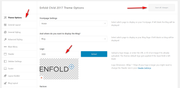
This is because the logo is already uploaded to your site.
Best regards,
Mike
Hi pikachul,
Please have a look at the solution posted here:
If you need further assistance please let us know.
Best regards,
Victoria
Hi team!
I suspect this happened after the latest WordPress update, but I’m not 100%. We use the Portfolio function on a page (link in private content) and recently I noticed the portfolio is not loading correctly – at all.
On the page showing portfolio thumbnails, you only see empty boxes around each portfolio item. It is linkable but even though I have it setup to display an AJAX portfolio, it opens the portfolio item in a new page, which of course defeats the purpose of the function.
I’m not sure what other updates have been made other than the WordPress core files, so I updated the Enfold theme files and it did not fix the problem.
Login credentials are also provided in the private content.
Thanks in advance!
Hello everybody,
we have the problem that the link (see screenshot) is active even though we have chosen the setting “Change Product Image” in the backend of the products (Iconic WooCommerce Attribute Swatches). if you click on the swatches, this link opens on the same page and you see a picture where you can not interact.
If I manually delete the link in the inspector, “Change Product Image” will work as normal as we need it.
My question: how can I remove the link function automatically everywhere? or is there another trick to hide it or make it inactive again
My goal: the customer should have the opportunity to change the product image directly in the catalog (See Video from Iconic down this mail).
Iconic on the topic (Jhimross Olinares, (Email address hidden if logged out) ):
“Upon further investigation, the issue was caused by your theme. The reason is that the thumbnails when clicked when your theme is active will open in a lightbox.
If you will try to switch the theme to WooCommerce default theme. The change of image in the catalog will work as expected. See this video
Since we have isolated the issue, the next course of action would be contacting Enfold developer so they can have a look with the issue as well.
If they need anything from our end, let us know as we are eager to help you with this issue.”
Many thanks for the help,
Johannes
Hi there,
I found an old thread with some JS modifications to randomize testimonials upon page load, but it doesn’t seem to be working. The testimonials continue to display in the same order that they were loaded.
Can you see if this code is still valid and diagnose what I may be doing wrong, please?
This is my JS code, which I modified enfold/config-templatebuilder/avia-shortcodes/testimonials/testimonials.js:
(function($)
{
	"use strict";

	// -------------------------------------------------------------------------------------------
	// testimonial shortcode javascript
	// -------------------------------------------------------------------------------------------
	$.fn.shuffle = function() {

	var allElems = this.get(),
		getRandom = function(max) {
			return Math.floor(Math.random() * max);
		},
		shuffled = $.map(allElems, function(){
			var random = getRandom(allElems.length),
				randEl = $(allElems[random]).clone(true)[0];
			allElems.splice(random, 1);
			return randEl;
	   });

	this.each(function(i){
		$(this).replaceWith($(shuffled[i]));
	});

	return $(shuffled);

};

	$.fn.avia_sc_testimonial = function(options)
	{
		return this.each(function()
		{
			var container = $(this), elements = container.find('.avia-testimonial');
			$('.avia-testimonial').shuffle();


			//trigger displaying of thumbnails
			container.on('avia_start_animation', function()
			{
				elements.each(function(i)
				{
					var element = $(this);
					setTimeout(function(){ element.addClass('avia_start_animation') }, (i * 150));
				});
			});
		});
	}

}(jQuery));
Hi
I’m developing a website on the following link and on the home page I use buttons within a grid row:
https://tremblayly.wpengine.com/?preview_id=206&preview_nonce=838ee9a14f&_thumbnail_id=-1&preview=true
The buttons don’t get centered correctly and are off the right margin on mobile devices (ipad portrait, iphone both directions).
I was expecting these to be responsive to screen sizes, so I’m not sure how to fix this issue.
Any help would be appreciated,
Lyse
Hi!
Thank you for the update.
Is there an easy way to turn this image location into a slide show?
This is possible, but it will require a lot of modifications. Unfortunately, we won’t be able to help you with it because it’s outside the scope of support. If you want to try it, first you have to convert the Shop Banner Image thumbnail uploader to a gallery media uploader so that you can insert multiple images to the slideshow, then modify the avia_woocommerce_parallax_banner function in the config-woocommerce > config.php file to render a slideshow instead of the default parallax banner. You can probably use the theme’s slideshow shortcode as a replacement, but then again this will require a handful of modifications.
Cheers!
Ismael
Hi,
Did you upload a new image or did you choose one that was already uploaded before?
I tested by replacing your featured image with a new image and it is not cropped, please check.
As I had tried to regenerate your thumbnails before, but the process seemed to lock up without any errors, probably a plugin conflict, but the settings seem to be in effect for new uploads going forward.
Best regards,
Mike
Hi,
Thank you for the update.
Enfold theme prevents YouTube static images from being displayed?
It actually prevents the whole iframe or youtube video from loading, not just the thumbnail. This is to comply with the privacy rules or regulations and to protect users from cookies or services that they didn’t explicitly consent to, so in light of that, the theme’s cookie part is actually doing its job as expected.
Best regards,
Ismael
How can I fix this?
Warning: Missing argument 3 for avia_woocommerce_gallery_thumbnail_description(), called in /www/htdocs/w00d6ce9/xxx.com/wp-includes/class-wp-hook.php on line 288 and defined in /www/htdocs/w00d6ce9/xxx.com/wp-content/themes/enfold-child/functions.php on line 46
Warning: Missing argument 4 for avia_woocommerce_gallery_thumbnail_description(), called in /www/htdocs/w00d6ce9/xxx.com/wp-includes/class-wp-hook.php on line 288 and defined in /www/htdocs/w00d6ce9/xxx.com/wp-content/themes/enfold-child/functions.php on line 46
I have already disabled all plugins, I added this code at the buttom of the functions.php
global $woocommerce;
if( version_compare( $woocommerce->version, ‘3.0.0’, “>=” ) ) {
function avia_woocommerce_gallery_thumbnail_description($img, $attachment_id, $post_id, $image_class ) {
return $img;
}
function avia_woocommerce_post_thumbnail_description($img, $post_id){
return $img;
}
}
and I have no Updates available. You are running the latest version! (4.5.2)
Any Ideas?
Hi,
I would like to have a bigger space on both the left and right sides.
Now I use GridRow 1/2 1/2 and active Sidebar on this page and change the sidebar ratio larger, but it seems now work.
Is there any way to fix this?
–
I find the clour section works for the spacing, but it has another problem is the image and text won’t be horizontal-aligned.
It would be great to have your help! Thank you in advance!
https://drive.google.com/drive/folders/1lHHhU0cnDbJNLPZLSQPBFIVeIc7e4ol4?usp=sharing” alt=”Spacing”
https://coolbitx.com/thestory/?preview_id=727&preview_nonce=6c538f09a0&_thumbnail_id=-1&preview=true
-
This topic was modified 6 years, 3 months ago by
 yidansat.
Sorry. I was not clear. I want to turn off all the animation on the avia-gallery aswelll.. including the thumbnails.
Hi,
Thank you for the update.
You have to use a youtube URL in a different format. We edited the first video in the post as an example. And please note that the video thumbnail will only display once the cookies are accepted unless a fallback image is set manually.
Best regards,
Ismael



