
-
AuthorSearch Results
-
January 17, 2021 at 7:56 pm #1273154
In reply to: Static related post.
Hi Ismael
In the end I have succeeded, I added a new image size, regenerated the thumbnails, and I put this css:
#top .av-related-style-full .related_image_wrap, #top .av-related-style-full .related_image_wrap img {
    width: 115px !important;
    height: 60px !important;
}
it worked but I would like to deactivate the plugin. Is it correct to put it in functions.php child the following code and then desactivate the plugin?
/* add  related post new size*/
function ava_image_sizes() {
add_image_size('related_post_mini', 115, 60, array('center', 'center'));
}
is it correct? oO
thanks!!!-
This reply was modified 5 years, 3 months ago by
Astrobiologic.
January 16, 2021 at 10:50 pm #1272971Hi,
Sorry for the very late reply and thanks for the links, video, and login.
I was able to copy the test page shortcode to my localhost and I found that your shortcode is missing the image attachment ID:

This information is required, it looks like your WP All Import is missing it somehow. In my tests I found that the color section retained the URL to the image in the shortcode, but there is no attachment ID for the image, and this is what WordPress is looking for. Yet because this image doesn’t exist on my server, there is no correct attachment ID to use, thus the image won’t show.
If I then open the color section and click on the image thumbnail and upload that image to my localhost the shortcode is updated with the correct attachment ID and the image shows.So I don’t know if your WP All Import is missing the attachment ID, or if during the import the actual attachment ID for the newly imported image is different and the error results in the ID being removed, or if your not importing the images and are relying on the URL to include the image, which would not work because you will also need the correct attachment ID.
Best regards,
MikeJanuary 16, 2021 at 9:27 am #1272899In reply to: Gallery layout not working after theme update
Hi Rikard, thanks for your help. I’ve installed the plugin and set the jQuery version to 1.12.4-wp but it hasn’t had any noticeable effect. The galleries still aren’t creating thumbnails properly. The same errors are still in the console.
Cheers,
Chris MacLeayJanuary 15, 2021 at 7:15 pm #1272808In reply to: Static related post.
Hey,
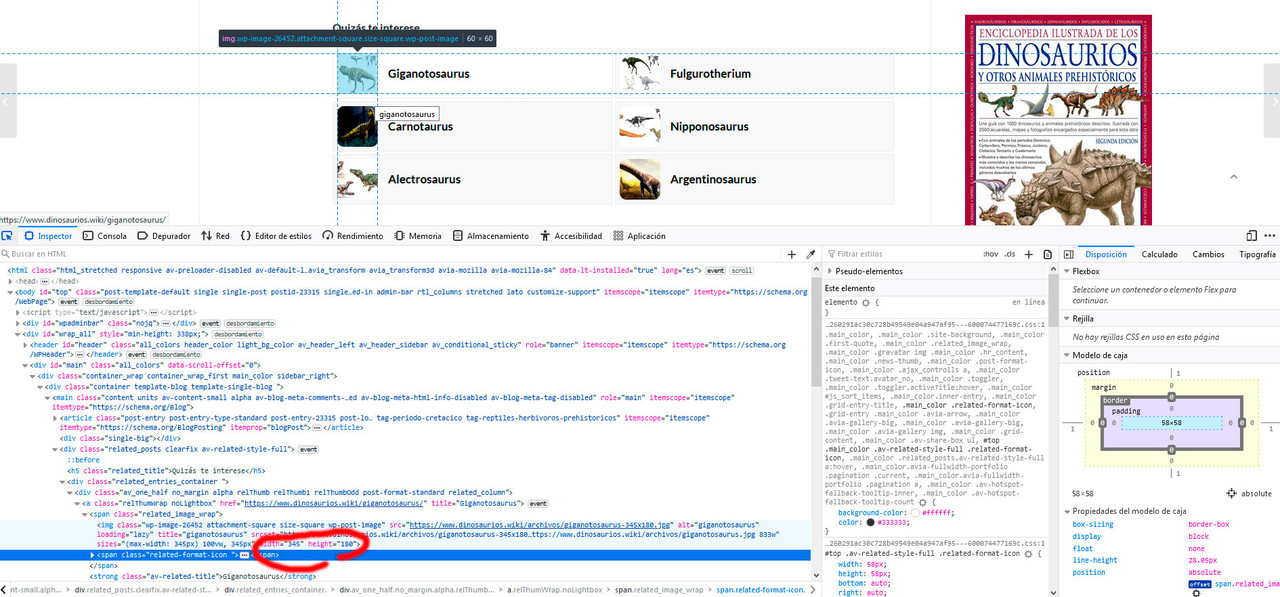
Yes, the thumbnails are already regenerated at 345×180, and I’ve also seen them on the FTP.
But I don’t know why they keep showing square.
Now the code does call the 345×180 images correctly. But it shows them square and squashed.:
Best regards and thanks!!!
January 15, 2021 at 11:55 am #1272678Topic: t arredo problem after theme upgrade
in forum EnfoldManuel Curatolo
ParticipantGood morning,
Help!! I’m a bit panicked.
I made the update of the Theme and the site started to work badly or in an anomalous way in the home in the frontend some images have disappeared, in the other pages the thumbnails of the photos are very transparent, in the backend a block of code appeared before of the standard composer.
I don’t know what to do.Give me a hand
-
This topic was modified 5 years, 3 months ago by
Manuel Curatolo.
January 15, 2021 at 8:44 am #1272615In reply to: How do I delete unused image thumbnails?
Hi,
Glad to know that the solution that we provided above works.
To delete unused images, you could either do it manually by deleting the image from the Media > Library panel — this will also delete the thumbnails for that particular image — or use the following plugin.
// https://wordpress.org/plugins/media-cleaner/
Again it is very IMPORTANT that you have a site backup or a restore point before using the plugin.
Best regards,
IsmaelJanuary 15, 2021 at 8:00 am #1272604In reply to: Static related post.
Hi,
Thank you for following up.
Did you regenerate the images after adjusting the thumbnail size? You could also upload the images again manually, but regenerating the images is probably much faster and easier. The thumbnail regeneration option is in the same panel as the thumbnail adjustment options. But if you cannot find it in the same panel, try to install this plugin instead.
// https://wordpress.org/plugins/regenerate-thumbnails/
Best regards,
IsmaelJanuary 15, 2021 at 5:46 am #1272576Topic: Gallery layout not working after theme update
in forum Enfoldcmacleay
ParticipantI recently started managing a site that had been created with your theme. It hadn’t been updated in quite a while so I purchased a new license for the theme and then cloned the site to a development server to apply the update in a test environment to make sure it would work. Mostly looks great but the image gallery layout doesn’t seem to be working at all and doesn’t seem to be responding when I try to change it to the Big image with smaller thumbnails underneath option.
The production site is running Enfold 4.3.1
This page is a good example of how the galleries should look.
The upgraded development site in now running Enfold 4.7.6.4
This page is a good example of how the galleries are broken.
Thanks for your help.
January 14, 2021 at 6:50 pm #1272513In reply to: Again Issues with Gallery
Yes, now the lightbox shows the images in the original Dmensions, but now i CANT upload pictures.
YES, i checked several times, sometimes it works, sometimes not.
But when i remove your code uploads work always`function avia_change_masonry_thumbnail_link($size) {
return “full”;}
add_filter(‘avf_avia_builder_masonry_lightbox_img_size’, ‘avia_change_masonry_thumbnail_link’, 10, 1);Die Verarbeitung des Bildes ist fehlgeschlagen. Der Server ist möglicherweise ausgelastet oder hat nicht genügend Ressourcen zur Verfügung. Eventuell hilft es, wenn Sie ein kleineres Bild hochladen. Die vorgeschlagene Maximalgröße ist 2500 Pixel.
.January 14, 2021 at 6:40 pm #1272507In reply to: Blog post image sizes suddenly all different sizes?
Hi,
We just realized that most of the thumbnails generated by the theme are scaled instead of cropped, so the size of those thumbnails might differ depending on the size of the original images. Fortunately, there is a thumbnail called “Shop Catalog” with the crop parameter enabled, so we selected that thumbnail from the Styling > Appearance > Preview Image Size settings to keep the height of the images the same.
FYI, the login info above is incorrect.
Best regards,
IsmaelJanuary 14, 2021 at 6:39 pm #1272506In reply to: Error message
This reply has been marked as private.January 13, 2021 at 7:52 pm #1272253In reply to: Enfold Theme broken
This reply has been marked as private.January 13, 2021 at 2:24 pm #1272168In reply to: Again Issues with Gallery
Hey!
Alright. The large thumbnail is set as the default size for the lightbox script, and currently the width is set to 1030px. You have to adjust the width and height of the large thumbnail in the Settings > Media panel, and as suggested above, you have to regenerate the thumbnails or upload the images again afterwards.
Now if you want to decrease the file size of the generated thumbnails or images, please refer to our suggestions above. Just use the filter in the functions.php file, refresh the page and once again, regenerate the thumbnails or upload them again.
However, if you want to use a different thumbnail size other than the default large thumbnail, try to use the provided filter in the previous thread.
// https://kriesi.at/support/topic/thumbnail-size-in-galleries-2/#post-1142492
This should set the lightbox thumbnail size to full instead of large.
Best regards,
IsmaelJanuary 13, 2021 at 2:05 pm #1272161In reply to: What image sizes are essential?
Hi XV,
These image sizes are the ones used by shop_thumbnail, shop_catalog, shop_single, shop_gallery_thumbnail however since you mentioned that removing woocommerce_thumbnail, woocommerce_single, woocommerce_gallery_thumbnail results to shop displaying no images. I would suggest using this plugin: https://wordpress.org/plugins/media-cleaner/ which is recommended to removed unused images.
The plugin also states to have a backup first before using it and also you can check their tutorial: https://meowapps.com/media-cleaner-tutorial/
And the reason for many image sizes is page speed/performance however the downside of this is eats a lot of storage space.Best regards,
NikkoJanuary 13, 2021 at 11:06 am #1272110In reply to: What image sizes are essential?
Hi Nikko,
Thanks again for the reply!
After removing those image sizes all the shop images have disappeared!
I’m very confused now.
If i remove these:
shop_thumbnail
shop_catalog
shop_single
shop_gallery_thumbnailThe shop pages show the original images (large resolution)
If i remove these:
woocommerce_thumbnail
woocommerce_single
woocommerce_gallery_thumbnailThen the shop displays NO images at all and i only see a default image.
Can you help me out with this. I want to get rid of tons of unnecessary images because the site had almost 50GB of images.
I don’t understand why the shop needs so many images or why enfold even needs so many images. I think the developers should look into this!
Thanks in advance!
January 13, 2021 at 10:54 am #1272101In reply to: Enfold Theme broken
Hi,
I actually edited each element on your page and copied image link from thumbnails, deleted -80×80 part to get fullsized image instead of thumbnails, downloaded them on my computer and re-uploaded them in element :)
Best regards,
YigitJanuary 12, 2021 at 8:06 pm #1271977In reply to: Media Upload and Enfold's Thumbnail Sizes
Link: https://wordpress.org/plugins/regenerate-thumbnails-advanced/
My lesson learned from all this: If you really know something about image optimization, it is sometimes better to embed the original image. Even if performance tools like Gtmetrix complain about browser scaling. The real benefit of those recalculated and cropped files is – that the aspect ratio fits better to f.e. a slider on top – and so you will have more control over the presented image section
-
This reply was modified 5 years, 3 months ago by
Guenni007.
January 12, 2021 at 4:24 pm #1271938In reply to: Media Upload and Enfold's Thumbnail Sizes
Thanks for your support!
So the 2 new snippets already work in the Child Theme?
And your mentioned plugins are these? @Guenni007: What do you mean with “plugin from shortpixel”?And if we already upload optimized images for e.g. sliders and want to disable unneeded thumbnails, what exactly can I disable without issues in the Layout Builder?
Best regards
January 12, 2021 at 12:02 pm #1271847In reply to: How do I delete unused image thumbnails?
Hi,
sorry for that.. I try it and it really works! Thank You very much.Please, can You advise me a plugin for deleting unused images? (For example photos of old=out of shop products.)
And if I delete image from multimedia library, will be automatically deleted his thumbnails?Thanks!
January 12, 2021 at 11:13 am #1271820In reply to: What image sizes are essential?
Hi Nikko,
Thanks for your reply.
I have seen that post and I already tried to remove these:
shop_thumbnail
shop_catalog
shop_single
shop_gallery_thumbnailAnd thats when the webshop stopped functioning correctly. It suddenly displays all the original images instead of the resized ones. Which makes the webshop load time very long!
I had to restore these image sizes and regenerate 6000 images! which takes forever too haha
So my question is:
Can delete the following image sizes?
woocommerce_thumbnail
woocommerce_single
woocommerce_gallery_thumbnailAnd can you confirm these are not being used by Enfold to display the shop images correctly?
January 12, 2021 at 11:07 am #1271815In reply to: What image sizes are essential?
Hi Rhodo,
Rhodo, please try the solution posted by Guenni007 in this thread: https://kriesi.at/support/topic/media-upload-and-enfolds-thumbnail-sizes/#post-1270140
Hope it helps.Best regards,
NikkoJanuary 12, 2021 at 10:51 am #1271808In reply to: Media Upload and Enfold's Thumbnail Sizes
Summary
// new snippet to set the compression level of calculted images
add_filter("avf_jpeg_quality", "avf_set_quality_mod", 9999, 1);
add_filter("avf_wp_editor_set_quality", "avf_set_quality_mod", 9999, 1);
function avf_set_quality_mod($quality) {
	$quality = 65;   // compression level what you like in percent
	return $quality;
}
// Snippet to exclude Enfold Image Thumbnail-Formats from generation add_action('init', 'remove_enfold_image_sizes'); function remove_enfold_image_sizes() { // do NOT remove widget size, is used in backend portfolio items! // comment out what you do not like to preserve as available thumbnail size // remove_image_size('widget'); remove_image_size('square'); remove_image_size('featured'); remove_image_size('featured_large'); remove_image_size('portfolio'); remove_image_size('portfolio_small'); remove_image_size('gallery'); remove_image_size('magazine'); remove_image_size('masonry'); remove_image_size('entry_without_sidebar'); remove_image_size('entry_with_sidebar'); remove_image_size('shop_thumbnail'); remove_image_size('shop_catalog'); remove_image_size('shop_single'); remove_image_size('shop_gallery_thumbnail'); }after that you can use that plugin from shortpixel to recalculate all Images
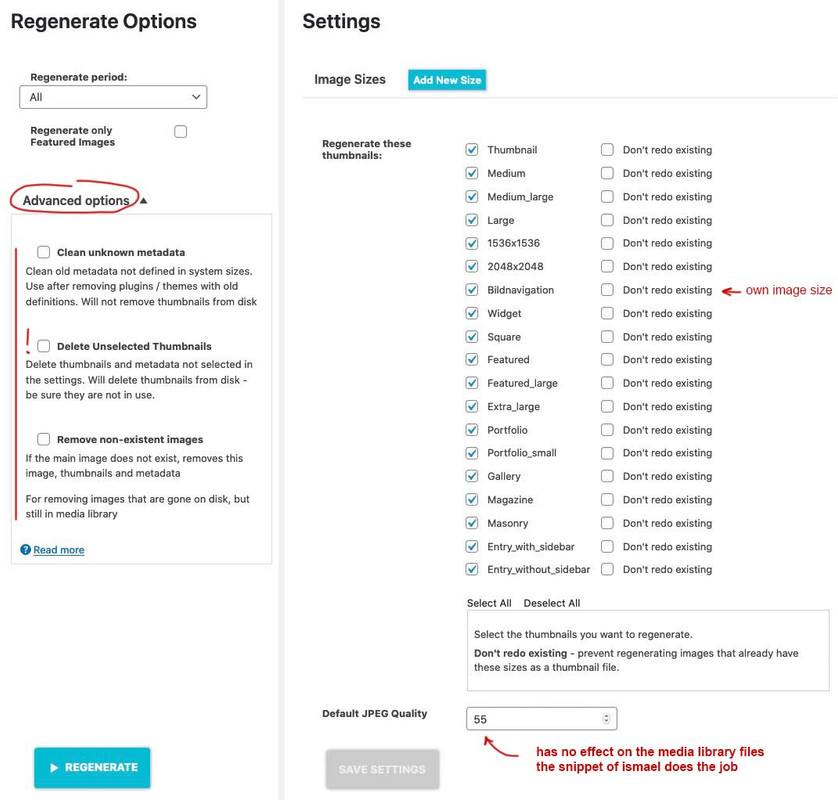
nice tool: because if you got a very big uploads folder with a lot of jpgs – you can use the advanced option by “deselect all” and “delete unselected Thumbnails” – then only the original images stay in uploads folder – save it for backup and then recalculate them to have what you like to preserve
January 12, 2021 at 9:55 am #1271791In reply to: Media Upload and Enfold's Thumbnail Sizes
Hey!
These file-size is best for the file – but we recognize that a lot of the calculated are much bigger than the original file.
Since the previous filters are not working in the child theme, it is possible that the quality is still set to 100, or that the compression level was not decreased during the time the images are uploaded, and thus the size of the generated thumbnails are bigger compare to the original image. If am not mistaken, you are already aware of this.
Cheers!
IsmaelJanuary 12, 2021 at 9:45 am #1271789In reply to: Resized images much bigger than original ones
Hi Daniele,
Can you try the snippet by Ismael or Guenni007 in https://kriesi.at/support/topic/media-upload-and-enfolds-thumbnail-sizes/#post-1271480 ?
Just change the $quality value.
@Guenni007 thanks, I have tested the snippet and it worked pretty well on my end.Best regards,
NikkoJanuary 12, 2021 at 9:44 am #1271788In reply to: Again Issues with Gallery
Hi,
The image used in the lightbox container is actually a thumbnail. Please try to add this snippet in the functions.php file to adjust the compression quality of the uploaded images including the thumbnail used in the lightbox container. And after adding the code, refresh the page, then upload the images again or regenerate the thumbnails.
 add_filter("avf_jpeg_quality", "avf_set_quality_mod", 9999, 1);
 add_filter("avf_wp_editor_set_quality", "avf_set_quality_mod", 9999, 1);

 function avf_set_quality_mod($quality) {
	$quality = 80;
	return $quality;
 }
The theme sets the default quality to 100.
Best regards,
IsmaelJanuary 12, 2021 at 1:17 am #1271716In reply to: Media Upload and Enfold's Thumbnail Sizes
left is original / right is compressed image with 55% compression level
only a little color difference is there – guess my uploaded original has implemented the rgb color profile. i do not know if recalculated Images do have implemented Profiles too.
to get rid of calculated images the snippet in https://kriesi.at/support/topic/media-upload-and-enfolds-thumbnail-sizes/#post-1270140 “// Disable loads of Enfold & WP image sizes upon upload …”
will do a good job without a plugin.January 12, 2021 at 1:12 am #1271714In reply to: Media Upload and Enfold's Thumbnail Sizes
I had this issue but if you install this plugin Stop Generating Unnecessary Thumbnails (Formerly Stop Generating Image Sizes)
You can then disable a ton of sizes, then regenerate thumbnails using another plugin and it will delete all the unrequired ones.I cant believe there were 21 in total additional versions of an image. I understand why various sizes are good but 21 seems way to many, surely 3 or 4 is ok? or should be an option to enable or disable in options.
January 11, 2021 at 3:40 pm #1271603Topic: What image sizes are essential?
in forum EnfoldRJ
ParticipantHi,
I would like to know which image sizes are necessary for Enfold + Woocommerce to work correctly.
The webshop of a client of mine has over 6000 images which resulted in nearly 50GB of images!
So to reduce the file size I tried to disable these image sizes:
shop_thumbnail
shop_catalog
shop_single
shop_gallery_thumbnailSince Woocommerce already uses these:
woocommerce_thumbnail
woocommerce_single
woocommerce_gallery_thumbnailBut then the shop pages of my site didn’t display the right image sizes anymore so i had to restore these.
So is it right to assume i can delete this image sizes?
woocommerce_thumbnail
woocommerce_single
woocommerce_gallery_thumbnailHope somebody can shine some light on this!
Thanks in advance!
Rhodo
January 11, 2021 at 1:18 pm #1271581In reply to: Blog post image sizes suddenly all different sizes?
Hi,
Could you also provide the FTP details? We would like to check if the thumbnails actually exists in the uploads folder. Right now, the grid or the Blog Posts element falls back to the original image instead of displaying the selected thumbnail.
We actually deactivated the Smush plugin. Did you configure it before?
Best regards,
IsmaelJanuary 11, 2021 at 7:22 am #1271503In reply to: How do I delete unused image thumbnails?
Hi,
Thank you for the update.
I try to manually remove them using the following your snippet in the functions.php
Adding the snippet in the functions.php file will only deregister the thumbnail sizes but it will not remove those that are already generated. To remove the existing thumbnails, you have to regenerate the images using the plugin (Regenerate Thumbnails) that we suggested above. This process might take a while depending on the number of images uploaded in the site, and since the site contains many, expect it to take some time.
IMPORTANT: Please do not forget to create a backup or a restore point before proceeding with the thumbnail regeneration.
Best regards,
Ismael -
This reply was modified 5 years, 3 months ago by
-
AuthorSearch Results
-
Search Results
-
Good morning,
Help!! I’m a bit panicked.
I made the update of the Theme and the site started to work badly or in an anomalous way in the home in the frontend some images have disappeared, in the other pages the thumbnails of the photos are very transparent, in the backend a block of code appeared before of the standard composer.
I don’t know what to do.Give me a hand
I recently started managing a site that had been created with your theme. It hadn’t been updated in quite a while so I purchased a new license for the theme and then cloned the site to a development server to apply the update in a test environment to make sure it would work. Mostly looks great but the image gallery layout doesn’t seem to be working at all and doesn’t seem to be responding when I try to change it to the Big image with smaller thumbnails underneath option.
The production site is running Enfold 4.3.1
This page is a good example of how the galleries should look.
The upgraded development site in now running Enfold 4.7.6.4
This page is a good example of how the galleries are broken.
Thanks for your help.
Hi,
I would like to know which image sizes are necessary for Enfold + Woocommerce to work correctly.
The webshop of a client of mine has over 6000 images which resulted in nearly 50GB of images!
So to reduce the file size I tried to disable these image sizes:
shop_thumbnail
shop_catalog
shop_single
shop_gallery_thumbnailSince Woocommerce already uses these:
woocommerce_thumbnail
woocommerce_single
woocommerce_gallery_thumbnailBut then the shop pages of my site didn’t display the right image sizes anymore so i had to restore these.
So is it right to assume i can delete this image sizes?
woocommerce_thumbnail
woocommerce_single
woocommerce_gallery_thumbnailHope somebody can shine some light on this!
Thanks in advance!
Rhodo


