Viewing 30 results - 1,051 through 1,080 (of 10,095 total)
  • Author
    Search Results
  • karmenka
    Participant

    Hi,
    I am using Single Post with small review pic on my site.
    I am trying to implement Easy digital downloads for subscription of reports etc.
    I would like to change the thumbnail size from square to an A4 rectangular size 300px wide x 424px tall on the single post (download) pages.
    I’ve had a look at a lot of forum posts which suggest using simple image sizes for this. But I don’t want to effect all “square” images on my site, just the single post entry ones PLUS that plugin has not been updated for two years.
    If possible I’d like to do this in my child theme, so I don’t have to re-do every time theres an update.
    Unfortunately that part of the site isn’t live, I’ve included login details in private content.

    Any help much appreciated.

    Thanks Karmen

    • This topic was modified 4 years, 7 months ago by karmenka.
    #1316980

    Additional Note – the issue is that the feature image on the portfolio page + the thumbnails within the portfolio item are not loading.

    #1316831

    Hey profumopuntoit,
    Thank you for your patience and for the link to your page, for tablet to have your footer two columns two rows please try this css:

    @media only screen and (min-width: 767px) and (max-width: 1024px) { 
    	#footer .flex_column.av_one_fourth {
    		  width: 44%;
    	}
    }

    Please see the screenshot in the Private Content area for the expected results.
    In this screenshot you will note that the first column with the news thumbnails has a 70px by 70px image but the frame around it is 143px by 72px this is due to your custom css:

    @media only screen and (min-width: 767px) and (max-width: 989px) {
    span.news-thumb {
        width: 46% !important;
        height: 46% !important;
    }
    }

    please remove or adjust this css to correct.

    Best regards,
    Mike

    Hey profumopuntoit,
    Thank you for your patience, I see that your page is a woocommerce archive page, so you would go to that category and upload a thumbnail and choose Display product image and description as fullwidth page banner
    2021-08-14_005.jpg
    then you will have a full width banner on the frontend for the category
    2021-08-14_006.jpg
    Please note that Tags don’t have this option, but the shop page does in the theme options, you can also set one banner for all category pages.
    2021-08-14_007.jpg

    Best regards,
    Mike

    #1316407

    Thanks Ismael, the article works for me. Now the thumbnail is the right one.

    #1316395

    Google Chrome is the browser I use but this bug has been cross-tested across different browsers and devices.
    I have created screenshots of this issue (see private content).
    Screenshot 1 and 2 show the erroneous sorting function while screenshot 3 represents the thumbnails flying around when clicking on a different category.
    The issue with the wild thumbnails can be reproduced when clicking different categories after one another, on some it happens, on others not.

    #1316369

    Hi,

    We are not really sure if it is possible to set thumbnails for Vimeo videos and show it before the player starts, but we have found the following articles, which might help.

    // https://vimeo.com/blog/post/video-thumbnail-ultimate-guide/
    // https://vimeo.com/blog/post/turn-any-video-frame-into-a-thumbnail/

    Best regards,
    Ismael

    #1316241
    Marc
    Participant

    Hello together,

    I am using the masonry content element to display our blogposts.
    Unfortunately, clicking on any of the above displayed categories to filter the blogposts doesn’t work at all.
    Random blogposts are being displayed while in the back different blogpost thumbnails are flying through the screen.
    I’ve updated to the latest Enfold version and also tried deactivating any interfering plugins (e.g. caching) without any promising result.
    How can this be fixed?

    Best regards,
    Marc

    #1316208

    Hi,

    Thank you for the clarification.

    You can use the following filter to change the default size of the lightbox thumbnail in the slider.

    add_filter("avf_alb_lightbox_image_size", function($size, $context) {
        if($context = "avia_slideshow") {
            $size = "full";
        }
        return $size;
    }, 10, 2);
    

    The filter is declared in the enfold/config-templatebuilder/avia-shortcodes/av-helper-slideshow.php file.

    Best regards,
    Ismael

    #1315817

    Hi,

    I still need help – we want the lightbox images to have fullsize once clicked on the preview.
    I’ve searched for that and found some snippets to add to the functions.php, but that doesnt work:

    add_filter( 'avf_avia_builder_masonry_lightbox_img_size', 'enfold_customization_change_popup_size' );
    function enfold_customization_change_popup_size( $size ) {
      return 'full';
    }

    as well as

    function change_lightbox_size() {
        return "full";
    }
    add_filter('avf_avia_builder_helper_lightbox_size','change_lightbox_size', 10);

    and

    function avia_change_gallery_thumbnail_link($link, $attachment, $atts, $meta){
        $link = wp_get_attachment_image_src($attachment->ID, "full");
        return $link;
    }
    add_filter('avf_avia_builder_gallery_image_link', 'avia_change_gallery_thumbnail_link', 10, 4);

    Are these deprecated or why aren’t they working?
    Regards

    • This reply was modified 4 years, 7 months ago by emilconsor. Reason: Specification
    #1315125
    cosmstudio
    Participant

    On top of the web site there’s an error message:

    Notice: is_feed was called incorrectly. Conditional query tags do not work before the query is run. Before then, they always return false. Please see Debugging in WordPress for more information. (This message was added in version 3.1.0.) in /var/www/wp-includes/functions.php on line 5535

    Please let me know how I can solve this problem, thanks!

    Enfold Version: 4.7.6.3
    PHP Version 7.3.12
    Plugins: Jetpack, Ninja Forms, Polylang, Regenerate Thumbnails, SRS Simple Hits Counter & Yoast Duplicate Post

    • This topic was modified 4 years, 7 months ago by cosmstudio.
    #1314883

    In reply to: Logo SrcSet?

    Thanks Gunter,
    I wouldnt rush to do it. The current implimentation is solid.

    It was more an observation.
    The way it works now – If I upload a massive logo. As long as there is a 360 wide thumbnail generated that should be the smallest image it displays?
    This is more than good enough for the average Enfold user. It is also the default way WordPress handles things.

    I was just trying to force it to serve the smallest image possible but this will depend on the uploaded size of the original image. So really difficult for you to code filters that the average user can work with.

    I’d be happy to try a filter and see if it does serve a smaller image. But if not its not broken so dont fix it ;)

    #1314656

    Hey Sebastian,

    Thank you for the inquiry.

    1.) You can choose the thumbnail size in the Styling > Grid Settings > Portfolio Grid Image Size settings, but you cannot select multiple kinds of thumbnails or image sizes.

    2.) This is possible but you may need to modify the /config-templatebuilder/avia-shortcodes/portfolio/portfolio.js file around line 79.

    imgParent.css({height:'auto'}).each(function(i)
    					{
    						var currentLink = $(this);
    
    						setTimeout(function()
    						{
    							currentLink.animate({opacity:1},1500);
    						}, (100 * i));
    					});
    

    If you have any additional questions at this time we kindly ask that you open them up in a separate thread. The longer threads get in the forum, they become more difficult to support as they tend to drift off topic and they also make it troublesome for users trying to search for solutions. Keeping threads relevant to their original inquiry ensures that we can keep better track of what has been resolved and that users can more effectively find answers to similar issues they might be experiencing.

    Thanks!

    Best regards,
    Ismael

    #1314613

    Hi,

    Thank you for following up.

    Are you referring to the slider images in the portfolio preview? We should be able to use the “avf_ajax_preview_image_size” filter to adjust the default thumbnail in the slider.

    add_filter("avf_ajax_preview_image_size", function($size) {
       $size = "full";
       return $size;
    }, 10, 1);
    

    Best regards,
    Ismael

    Hi Ismael,

    Is this still valid for 2021 version of Enfolds 4.8.6

    I have implemented the code in the Child theme functions.php file
    Added custom field “product_video” to the product
    Pasted in Youtube Watch url
    Updated product
    Enfold Child > Theme Options > Shop Options > Product Gallery = Default enfold product gallery (and not the WooCommerce 3.0 product Gallery)

    A quick multi-file test search of enfolds theme does not reveal the use of the function woocommerce_single_product_image_html

    The Enfolds Gallery uses these two functions

    avia_woocommerce_thumbnail OR avia_woocommerce_gallery_first_thumbnail

    Hoping you can help update this code so that the filter works with Default enfold product gallery

    I’d also like the Video as the fist item in the product gallery.

    Yes I can achieve this using WooCommerce 3.0 product Gallery and a plugin – YITH WooCommerce Featured Audio and Video Content Premium

    However, I would really like to work out a solution using “Default enfold product gallery”

    Are their any specific hooks or filters to achieve this?

    missouriartscouncil
    Participant

    I want to be able to collect Vimeo’s analytics for a Vimeo video I am inserting onto a page. How should I therefore create the layout in Enfold?

    BACKGROUND
    Based on my experience with Enfold and also this thread last updated in March 2020, https://kriesi.at/support/topic/enfold-video-lightbox/page/2/
    I believe there are two ways of setting a Vimeo video into a layout:
    1) Use the Video element; insert the video’s Vimeo URL
    2) Use an image of my choice; insert it into the Image element; place the Vimeo URL on the image
    Image > Advanced > Image Link Settings > Set manually (insert URL) and Open in New Window

    Here is what happens:
    1) Video element
    The image that shows up is the thumbnail, plus the viewing controls, that I chose in Vimeo for the video.
    – On that image, in the lower right corner it says “Vimeo.” Clicking on that takes me to Vimeo’s homepage, vimeo.com.
    – In the lower left corner is the “play” arrow symbol. Clicking on that starts the video playing within that image-box on the page. I can make it go full screen by hitting the full-screen command in the lower right corner.

    2) Image element
    The video automatically opens in a lightbox. The lightbox shows the same thumbnail plus the same viewing controls that show up in #1. I can then start it playing by hitting the “play” arrow symbol etc. The only difference is that it opens in a lightbox.

    QUESTIONS
    On either or both of these layout options, is the video actually playing via Vimeo’s website?
    If so, will the viewing session get added to Vimeo’s analytics?
    Example: Before I click “play” on the video in either the Video element or the Image element, its Vimeo analytics show 9 views. After I click “play,” in the Vimeo analytics will I see 10 views?

    My ultimate goal is to create the layout so that any views of the video that take place via our website show up in the video’s Vimeo analytics.

    #1314017
    jaimemerz
    Participant

    Hi there,
    We’re having some trouble with images appearing blurry in masonry galleries on our site, both as thumbnails and in the lightbox. Can you please let me know what the best solution to resolve this is? Thanks!

    • This topic was modified 4 years, 7 months ago by jaimemerz.
    #1313416
    jerome
    Participant

    Hi

    since the last version 4.8.5, when i create a article, i have not a thumbnail “Featured Image”
    if I edit an old article and change the image “Featured Image” the problem is the same, I also lose the thumbnail
    it was working perfectly a few days ago before the update

    could you see the problem ? thanks

    • This topic was modified 4 years, 7 months ago by jerome.
    #1313335

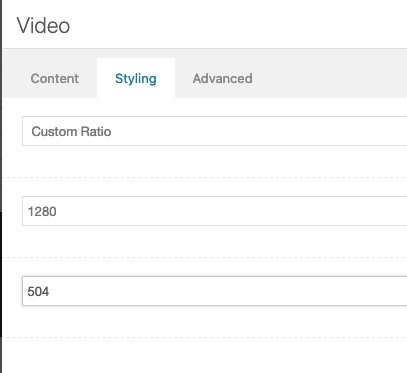
    you do not need to enter small natural integers there.
    The closer you get to the aspect ratio, the better the black bars will be.

    see here: https://consulting.webers-testseite.de/externe-videos/#hitrev

    just put in the exact ratio

    PS: When you first open the page my cookie blocker is still active, and shows a local preview image ( based on the youtube thumbnails – that are most in 16:9 format ) if you don’t agree to the cookie policy. so there the black bar is still shown.
    Accept the Cookies and see your video

    #1313088
    julhobart
    Participant

    Hi! I would like to format the tabs so the active tab has a thick blue line underneath it and the non active tabs do not have a line underneath. Can you help me with the code for this?

    Also, I have removed the border from the titles and the content but would like a border across the top and bottom of the content but not the sides. Please help.

    Finally, I have a gallery where I’d like to remove the thin border around all the images. I was able to remove it from the thumbnails but not the main image.

    Thanks!

    #1312406

    Hi,
    Thanks for the feedback, I looked into this further and I didn’t find this specifically mentioned in WP Post Formats but I did find this article describing the first video being used as the featured image. But when I test on a new install with the default theme Twenty Twenty-One it doesn’t work, yet with Twenty Nineteen it does work. So it’s not clear if this is a default feature, but my research finds this is not a feature in the Enfold elements, so I will submit this to the dev team for review as a feature request and recommend for now that you add your featured image to your posts and use the Layout ▸ Featured Image option on the post to disable the image from showing along with your video.
    2021-07-26_001.jpg

    Best regards,
    Mike

    #1312398

    Hey emilconsor,

    Thank you for the inquiry.

    By default, the lightbox is set to use the large thumbnail, which has a maximum width of 1024px. You can adjust its size in the Settings > Media panel.

    Best regards,
    Ismael

    #1312313

    Hi Mike,

    thanks for your reply.

    I kinda remeber that it should work like this. The first embedded Video in the post is used as thumbnail and featured image. Am I wrong? I thought it’s a standard wordpress feature.

    The problem is, if we’re using the normal thumbnail image upload, the image gets also displayed within the post as featured image, and we don’t want this to happen, because the video within the post has the same thumbnail. So it would be shown twice and we don’t want that.

    Is there a way to get this to work like I described above?

    Thanks so far,
    Sebastian

    #1312295

    In reply to: Photo gallery

    Hey MidasPL,

    Thank you for the inquiry.

    We cannot find the “1 panorama : 2 Square : 1 panorama” gallery in the site. Would you mind providing a screenshot of the section? Have you tried using the column elements to separate the images?

    Try to make it with Masonry gallery but no good efect. When it is panoaram a picture loose quality

    Did you select a thumbnail in the Styling > Masonry Settings > Image Size settings? You should be able to select larger images with better quality.

    Best regards,
    Ismael

    #1312220

    Hey emilconsor,
    Thank you for your patience the thumbnails are the featured images and videos can’t be uploaded as featured images so please include your video thumbnails as your featured images in your blog posts then they will show in the blog element.

    Best regards,
    Mike

    Note: The missing thumbnail seems to work out of no where. Will test more.

    Edit: Fail, today they are broken again

    • This reply was modified 4 years, 7 months ago by Dommel.
    Dommel
    Participant

    Hi,

    After updating to the latest Enfold version a couple of days ago. Strange things seem to happen. I tried doing some debugging like disabling plugins (we don’t use many), or re-creating elements and objects to see if that fixes, but sadly no success. Here is a list we are running into:

    1) New uploaded images that we want to use as thumbnails, using ‘feature image’ option in (portfolio) posts. Don’t show up in gallery elements. The post and the space for the thumbnail is here. But the image itself is not showing. I did some testing, any new images we upload to the website, don’t work. Any old images we already had from the past, still work.
    2) Animated Numbers (the element). The description text below the number, now always shows “Add your own text” no matter what text you give it. The number itself is still working. This is on both already placed “animated numbers” elements we created in the past. And newly created “animated numbers” elements.
    3) There seems to be a strange flickering artifact going on over the entire website when you roll over multiple (gallery) buttons. It’s as if the image of the button (or item) is, for a split second, full screen. Then every thing goes back to normal. We never had this before. It could of course also be a browser thing. It’s hard to say.

    Here is our website:
    http://www.highpriority.com

    If you go here: https://highpriority.com/portfolio/
    You will notice that one of the thumbnails is missing. I will see if I can add more.

    If you go here: https://highpriority.com/portfolio-item/media-monks-lego-nexo-knights/
    You will see the animated numbers and their issue. This is website wide. (except on the Smurfs project page where we used a static solution. We are going to apply this static solution everywhere).

    I’m seeking help, where to look, any tips of what it could be. I’m not a coder, but also not a complete layman.
    Perhaps this is all related to the latest update of Enfold or WordPress? Perhaps I did something wrong and files are broken or corrupt.
    Also note that I have a large-ish quick CSS file. So far it is all tested and keeping it clear where possible, but with limited understanding of code/css.

    Thanks for taking the time. You guys an gals make great themes!

    Robert Berrier

    #1312106

    Hi,
    Thank you for your patience, for your first issue your content slider creates a new “wrap” after every three items, probably based on the setting to only show three in each row, this adds a bottom margin to the last item on mobile, to remove please try this code in the General Styling > Quick CSS field or in the WordPress > Customize > Additional CSS field:

    @media only screen and (max-width: 767px) { 
    .avia-content-slider .slide-entry-wrap {
        margin-bottom: 0 !important;
    }
    }

    After applying the css, please clear your browser cache and check.

    To change the space between columns try this css:

    @media only screen and (min-width: 1024px) { 
    .slide-entry-wrap > .slide-entry.av_one_third {
        margin-left: 2%;
        width: 31.333333333333332%;
    }
    }

    the default is:

        margin-left: 6%;
        width: 29.333333333333332%;

    try adjusting to suit.
    To change the size of your images try the Simple Image Sizes plugin, it is the easiest method. Once to set a new size for the “magazine” images you will need to “regeneration the thumbnails” for them to take effect.

    Best regards,
    Mike

    #1312053

    PROOF:
    maskenzauber.com/temp/enfold-483.mp4 (works)
    maskenzauber.com/temp/enfold-484.mp4 (messed)

    Code:

    [av_heading heading='Überschrift' tag='h2' style='' subheading_active='' show_icon='' icon='ue800' font='' size='24' av-medium-font-size-title='' av-small-font-size-title='' av-mini-font-size-title='' subheading_size='15' av-medium-font-size='' av-small-font-size='' av-mini-font-size='' icon_size='' av-medium-font-size-1='' av-small-font-size-1='' av-mini-font-size-1='' color='' custom_font='' subheading_color='' seperator_color='' icon_color='' margin='' margin_sync='true' padding='10' icon_padding='10' link='' link_target='' id='' custom_class='h2leistung' template_class='' av_uid='av-wi1cvv' sc_version='1.0' admin_preview_bg=''][/av_heading]
    
    [av_three_fourth first av_uid='av-sexbw57']
    [av_textblock size='' av-medium-font-size='' av-small-font-size='' av-mini-font-size='' font_color='' color='' id='' custom_class='' template_class='' av_uid='av-ruxp997' sc_version='1.0' admin_preview_bg='']
    Lorem ipsum dolor sit amet, consetetur sadipscing elitr, sed diam nonumy eirmod tempor invidunt ut labore et dolore magna aliquyam erat, sed diam voluptua. At vero eos et accusam et justo duo dolores et ea rebum. Stet clita kasd gubergren, no sea takimata sanctus est Lorem ipsum dolor sit amet. Lorem ipsum dolor sit amet, consetetur sadipscing elitr, sed diam nonumy eirmod tempor invidunt ut labore et dolore magna aliquyam erat, sed diam voluptua. At vero eos et accusam et justo duo dolores et ea rebum. Stet clita kasd gubergren, no sea takimata sanctus est Lorem ipsum dolor sit amet.
    
    Lorem ipsum dolor sit amet, consetetur sadipscing elitr, sed diam nonumy eirmod tempor invidunt ut labore et dolore magna aliquyam erat, sed diam voluptua. At vero eos et accusam et justo duo dolores et ea rebum. Stet clita kasd gubergren, no sea takimata sanctus est Lorem ipsum dolor sit amet. Lorem ipsum dolor sit amet, consetetur sadipscing elitr, sed diam nonumy eirmod tempor invidunt ut labore et dolore magna aliquyam erat, sed diam voluptua. At vero eos et accusam et justo duo dolores et ea rebum. Stet clita kasd gubergren, no sea takimata sanctus est Lorem ipsum dolor sit amet.
    [/av_textblock]
    [/av_three_fourth]
    
    [av_one_fourth min_height='' vertical_alignment='' space='' custom_margin='' margin='0px' row_boxshadow='' row_boxshadow_color='' row_boxshadow_width='10' link='' linktarget='' link_hover='' padding='0px' highlight='' highlight_size='' border='' border_color='' radius='0px' column_boxshadow='' column_boxshadow_color='' column_boxshadow_width='10' background='bg_color' background_color='' background_gradient_color1='' background_gradient_color2='' background_gradient_direction='vertical' src='' background_position='top left' background_repeat='no-repeat' animation='' mobile_breaking='' mobile_display='' av_uid='av-rineby3']
    [av_hr class='custom' height='-500' shadow='no-shadow' position='center' custom_border='av-border-none' custom_width='50px' custom_border_color='' custom_margin_top='0px' custom_margin_bottom='0px' icon_select='no' custom_icon_color='' icon='ue808' font='entypo-fontello' av_uid='av-r2l8ae3']
    
    [av_icon_box icon='ue81f' font='entypo-fontello' title='Preise' position='top' icon_style='' boxed='' font_color='' custom_title='#b02b2c' custom_content='' color='custom' custom_bg='' custom_font='' custom_border='' custom_title_size='' av-medium-font-size-title='' av-small-font-size-title='' av-mini-font-size-title='' custom_content_size='' av-medium-font-size='' av-small-font-size='' av-mini-font-size='' heading_tag='' heading_class='' link='' linktarget='' linkelement='' id='' custom_class='' av_uid='av-qbofqu3' admin_preview_bg='']
    Preise & FAQ[av_button label='FAQ' link='manually,#tab-id-2' link_target='' size='x-large' position='left' icon_select='no' icon='ue800' font='entypo-fontello' color='theme-color' custom_bg='#444444' custom_font='#ffffff' av_uid='av-py4gvff'][av_button label='Preise' link='manually,#tab-id-1' link_target='' size='x-large' position='right' icon_select='no' icon='ue800' font='entypo-fontello' color='theme-color' custom_bg='#444444' custom_font='#ffffff' av_uid='av-pbgzg57']
    [/av_icon_box]
    [/av_one_fourth]
    
    [av_textblock size='' av-medium-font-size='' av-small-font-size='' av-mini-font-size='' font_color='' color='' id='' custom_class='' template_class='' av_uid='av-ovwwzdn' sc_version='1.0' admin_preview_bg='']
    <strong>Lorem Ipsum</strong>
    Lorem ipsum dolor sit amet, consetetur sadipscing elitr, sed diam nonumy eirmod tempor invidunt ut labore et dolore magna aliquyam erat, sed diam voluptua. At vero eos et accusam et justo duo dolores et ea rebum. Stet clita kasd gubergren, no sea takimata sanctus est Lorem ipsum dolor sit amet. Lorem ipsum dolor sit amet, consetetur sadipscing elitr, sed diam nonumy eirmod tempor invidunt ut labore et dolore magna aliquyam erat, sed diam voluptua. At vero eos et accusam et justo duo dolores et ea rebum. Stet clita kasd gubergren, no sea takimata sanctus est Lorem ipsum dolor sit amet.
    [/av_textblock]
    
    [av_section min_height='' min_height_px='500px' padding='default' shadow='shadow' bottom_border='border-extra-arrow-down' id='' color='alternate_color' custom_bg='' src='' attachment='' attachment_size='' attach='scroll' position='top left' repeat='no-repeat' video='' video_ratio='16:9' overlay_opacity='0.1' overlay_color='#28343c' overlay_pattern='' overlay_custom_pattern='' av_uid='av-8vd7qz']
    
    [av_one_full first av_uid='av-o3spxtn']
    
    [av_gallery ids='30327,30326,30325,30324,30323,30322,30321,30320,30319,30318,30317,30316,30315,30314,30313,30312,30311,30310' style='thumbnails' preview_size='no scaling' crop_big_preview_thumbnail='avia-gallery-big-no-crop-thumb' thumb_size='portfolio_small' columns='6' imagelink='lightbox' link_dest='' lightbox_text='caption' lazyload='deactivate_avia_lazyload' html_lazy_loading='disabled' alb_description='' id='' custom_class='' template_class='' av_uid='av-jrmjqais' sc_version='1.0' admin_preview_bg='']
    
    [av_hr class='invisible' height='40' shadow='no-shadow' position='center' custom_border='av-border-thin' custom_width='50px' custom_border_color='' custom_margin_top='30px' custom_margin_bottom='30px' icon_select='yes' custom_icon_color='' icon='ue808' font='entypo-fontello' av_uid='av-2cyzbvf']
    
    [av_button label='Weiter' icon_select='no' icon='ue800' font='entypo-fontello' link='page,14091' link_target='' size='small' position='center' label_display='' title_attr='' color_options='' color='theme-color' custom_bg='#444444' custom_font='#ffffff' btn_color_bg='theme-color' btn_custom_grad_direction='vertical' btn_custom_grad_1='#000000' btn_custom_grad_2='#ffffff' btn_custom_grad_3='' btn_custom_grad_opacity='0.7' btn_custom_bg='#444444' btn_color_bg_hover='theme-color-highlight' btn_custom_bg_hover='#444444' btn_color_font='theme-color' btn_custom_font='#ffffff' btn_color_font_hover='white' btn_custom_font_hover='#ffffff' border='none' border_width='' border_width_sync='true' border_color='' border_radius='' border_radius_sync='true' box_shadow='' box_shadow_style='0px,0px,0px,0px' box_shadow_color='' hover_opacity='' sonar_effect_effect='' sonar_effect_color='' sonar_effect_duration='1' sonar_effect_scale='' sonar_effect_opac='0.5' id='' custom_class='' template_class='' av_uid='av-nc04ukb' sc_version='1.0' admin_preview_bg='']
    
    [/av_one_full][/av_section][av_two_third first min_height='' vertical_alignment='av-align-top' space='' margin='0px' margin_sync='true' row_boxshadow_color='' row_boxshadow_width='10' link='' linktarget='' link_hover='' padding='0px' padding_sync='true' highlight_size='1.1' border='' border_color='' radius='0px' radius_sync='true' column_boxshadow_color='' column_boxshadow_width='10' background='bg_color' background_color='' background_gradient_color1='' background_gradient_color2='' background_gradient_direction='vertical' src='' attachment='' attachment_size='' background_position='top left' background_repeat='no-repeat' animation='' mobile_breaking='av-break-at-tablet' mobile_display='' av_uid='av-mqk8crf' custom_class='']
    [av_tab_container position='top_tab' boxed='border_tabs' initial='1' av_uid='av-8103wb']
    [av_tab title='Preise' icon_select='yes' icon='ue8e3' font='entypo-fontello' av_uid='av-2751vyz']
    [av_table purpose='pricing' pricing_table_design='avia_pricing_default' pricing_hidden_cells='avia_show_empty_cells' caption='' responsive_styling='avia_responsive_table' av_uid='av-l9f8gxn']
    [av_row row_style='avia-heading-row' av_uid='av-ksm9x5n'][av_cell col_style='avia-desc-col' av_uid='av-kccltdn']Art[/av_cell][av_cell col_style='avia-highlight-col' av_uid='av-k2hiw6z']Trallala[/av_cell][/av_row]
    [av_row row_style='' av_uid='av-jp9n4d7'][av_cell col_style='avia-desc-col' av_uid='av-j3k5jq3']Typ[/av_cell][av_cell col_style='avia-highlight-col' av_uid='av-in3xoaj']nach Bedarf[/av_cell][/av_row]
    [av_row row_style='' av_uid='av-i60bgsb'][av_cell col_style='avia-desc-col' av_uid='av-hsmd2l7']Was[/av_cell][av_cell col_style='avia-highlight-col' av_uid='av-h5g8s2j']Alle[/av_cell][/av_row]
    [av_row row_style='' av_uid='av-gp8yepn'][av_cell col_style='avia-desc-col' av_uid='av-g92z6vv']Lorem Ipsum[/av_cell][av_cell col_style='avia-highlight-col' av_uid='av-fx39s57']Irgendwas[/av_cell][/av_row]
    [av_row row_style='' av_uid='av-5ls3rv'][av_cell col_style='avia-desc-col' av_uid='av-ew86kqj']Lorem Ipsum[/av_cell][av_cell col_style='avia-highlight-col' av_uid='av-eble6ez']Ja[/av_cell][/av_row]
    [av_row row_style='' av_uid='av-1eylebf'][av_cell col_style='avia-desc-col' av_uid='av-1cz9o1n']Lorem Ipsum[/av_cell][av_cell col_style='avia-highlight-col' av_uid='av-db7xeij']Ja[/av_cell][/av_row]
    [av_row row_style='' av_uid='av-clbe5p7'][av_cell col_style='avia-desc-col' av_uid='av-c0uk3ff']Lorem Ipsum[/av_cell][av_cell col_style='avia-highlight-col' av_uid='av-bqx9vaz']Ja[/av_cell][/av_row]
    [av_row row_style='' av_uid='av-bdbr9q3'][av_cell col_style='avia-desc-col' av_uid='av-aq5r9iz']Lorem Ipsum[/av_cell][av_cell col_style='avia-highlight-col' av_uid='av-ageudkr']Nein[/av_cell][/av_row]
    [av_row row_style='' av_uid='av-9shikpn'][av_cell col_style='avia-desc-col' av_uid='av-9dgdozf']Lorem Ipsum[/av_cell][av_cell col_style='avia-highlight-col' av_uid='av-927xxqz']Ja[/av_cell][/av_row]
    [av_row row_style='avia-pricing-row' av_uid='av-8n0hv0b'][av_cell col_style='avia-desc-col' av_uid='av-85wa7wb'][/av_cell][av_cell col_style='avia-highlight-col' av_uid='av-7iw249n']Mal sehen.[/av_cell][/av_row]
    [/av_table]
    [/av_tab]
    [av_tab title='oft gestellte Fragen' icon_select='yes' icon='ue81c' font='entypo-fontello' av_uid='av-6xqzpob']
    [av_toggle_container initial='0' mode='accordion' sort='' av_uid='av-6tyh0nv'][av_toggle title='lorem Ipsum dolor?' tags='' av_uid='av-62utznf']
    Answer
    [/av_toggle] [av_toggle title='lorem Ipsum dolor' tags='' av_uid='av-5tbygd7']Answer
    [/av_toggle][av_toggle title='lorem Ipsum dolor?' tags='' av_uid='av-5a2iw3f']
    Answer[/av_toggle]
    [av_toggle title='lorem Ipsum dolor?' tags='' av_uid='av-4p7kusb'] Answer[/av_toggle]
    [av_toggle title='lorem Ipsum dolor' tags='' av_uid='av-4k11qyj'] Answer[/av_toggle]
    [av_toggle title='lorem Ipsum dolor?' tags='' av_uid='av-3yr5qd7']Answer[/av_toggle]
    [av_toggle title='lorem Ipsum dolor?' tags='' av_uid='av-30aviyj'] Answer[/av_toggle][/av_toggle_container]
    [/av_tab]
    [/av_tab_container]
    [/av_two_third]
    
    [av_one_third min_height='' vertical_alignment='' space='' custom_margin='' margin='0px' row_boxshadow='' row_boxshadow_color='' row_boxshadow_width='10' link='' linktarget='' link_hover='' padding='0px' highlight='' highlight_size='' border='' border_color='' radius='0px' column_boxshadow='' column_boxshadow_color='' column_boxshadow_width='10' background='bg_color' background_color='' background_gradient_color1='' background_gradient_color2='' background_gradient_direction='vertical' src='' background_position='top left' background_repeat='no-repeat' animation='' mobile_breaking='' mobile_display='' av_uid='av-2eyhhmj']
    [av_heading heading='Überschrift' tag='h6' style='' subheading_active='' show_icon='' icon='ue800' font='entypo-fontello' size='' av-medium-font-size-title='' av-small-font-size-title='' av-mini-font-size-title='' subheading_size='15' av-medium-font-size='' av-small-font-size='' av-mini-font-size='' icon_size='' av-medium-font-size-1='' av-small-font-size-1='' av-mini-font-size-1='' color='' custom_font='' subheading_color='' seperator_color='' icon_color='' margin='' margin_sync='true' padding='10' icon_padding='10' link='' link_target='' id='' custom_class='' template_class='' av_uid='av-1yueuxn' sc_version='1.0' admin_preview_bg=''][/av_heading]
    
    [av_textblock size='' av-medium-font-size='' av-small-font-size='' av-mini-font-size='' font_color='' color='' id='' custom_class='' template_class='' av_uid='av-58okgr' sc_version='1.0' admin_preview_bg='']
    Lorem ipsum dolor sit amet, consetetur sadipscing elitr, sed diam nonumy eirmod tempor invidunt ut labore et dolore magna aliquyam erat, sed diam voluptua. At vero eos et accusam et justo duo dolores et ea rebum. Stet clita kasd gubergren, no sea takimata sanctus est Lorem ipsum dolor sit amet. Lorem ipsum dolor sit amet, consetetur sadipscing elitr, sed diam nonumy eirmod tempor invidunt ut labore et dolore magna aliquyam erat, sed diam voluptua. At vero eos et accusam et justo duo dolores et ea rebum. Stet clita kasd gubergren, no sea takimata sanctus est Lorem ipsum dolor sit amet.
    [/av_textblock]
    
    [av_hr class='default' height='50' shadow='no-shadow' position='center' custom_border='av-border-thin' custom_width='50px' custom_border_color='' custom_margin_top='30px' custom_margin_bottom='30px' icon_select='yes' custom_icon_color='' icon='ue808' av_uid='av-153zmez']
    [/av_one_third]

    
    
    #1312052

    Yes I am.

    I am hoping for an update from Enfold so it does not pick up these thumbnails and cause an incompatibility with the plugin. The plugin itself does not get regular updates.

    Thanks,
    Jason

Viewing 30 results - 1,051 through 1,080 (of 10,095 total)