-
Search Results
-
How can i remove featured image link in my single posts ?
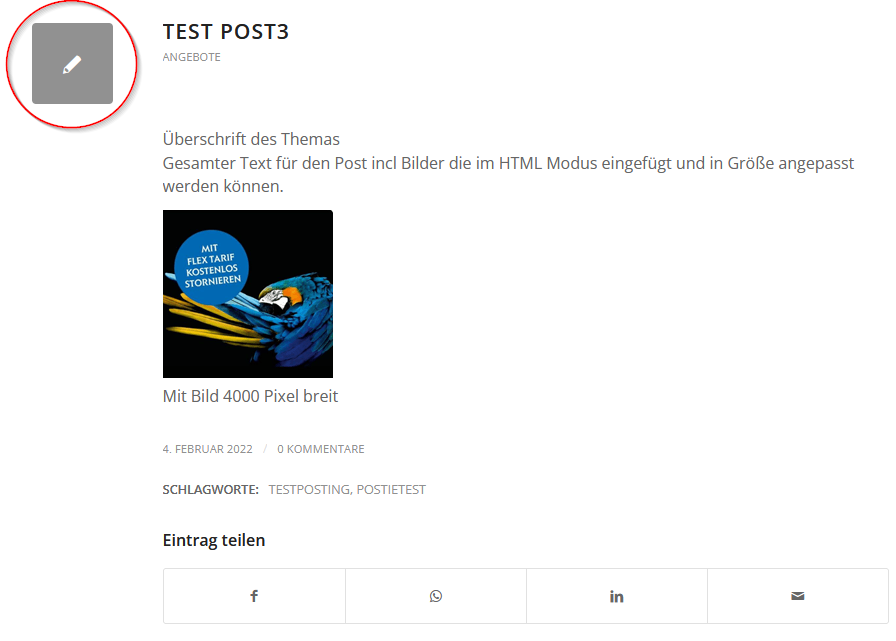
I want to keep the featured image on the blog archive page but not on the single post pages.
https://mvservice.de/news/ >> this page is OK.I Included in the enfold child functions.php following code:
Code snippets:
//——————————————————–
// PHP function – Remove featured image on all post page
//——————————————————–function wordpress_hide_feature_image( $html, $post_id, $post_image_id ) {
return is_single() ? ” : $html;
}
// add the filter
add_filter( ‘post_thumbnail_html’, ‘wordpress_hide_feature_image’, 10, 3);This code only removed the featured image but not the link with the placeholder image
Next step: I tried from Kriesi Documentation following change:
Remove featured image link from single post
To remove featured image link on single post, please add following code to bottom of Functions.php file of your child theme in Appearance > Editor
add_filter(‘avf_post_featured_image_link’,’av_remove_featured_image_link’);
function av_remove_featured_image_link(){
if(is_single()){
echo get_the_post_thumbnail( $current_post[‘the_id’], ‘featured’ );
}>> This code removes the the featured images on the archive page !! and in the single post pages the link with placeholder image is still visible.
Can you help?
Hello,
On an e-commerce website I’m building for a client, we would like to use badges on product images. It works fine for the product gallery or the catalog ; but we would also like to use the product slider. But there, for some reason, the ‘woocommerce_product_thumbnails’ action (to which the badges are tied) is not called in the product slider
Would it possible to add this possibility in what is now class-avia-product-slider ? I noticed that if I slip in the action on line 417, it works and the badges appear on the product picture in the slider. But I4m sure there is a more elegant (and viable…) way to do this…Thanks for the help !
What my modification looks like (around line 417) :
$image = get_the_post_thumbnail( $product_id, 'square', array( 'class' => "av-catalogue-image av-cart-update-image av-catalogue-image-{$show_images}" ) ); $text = $image; do_action( 'woocommerce_product_thumbnails' ); $text .= '<div class="av-catalogue-item-inner">'; $text .= '<div class="av-catalogue-title-container">'; $text .= "<div class='av-catalogue-title av-cart-update-title'>{$title}</div>"; $text .= "<div class='av-catalogue-price av-cart-update-price'>{$price}</div>"; $text .= '</div>'; $text .= "<div class='av-catalogue-content'>{$content}</div>"; $text .= '</div>';I’m adding new videos to my site daily. Is there a way to automatically add the current date under the thumbnail for the video? Is there an Enfold Element I can use or HTML/CSS/Javascript?
So what I’m envisioning is adding the Daily Video thumbnail and including the date for that day under the video. Then I will create a See All page (see below) where all the Daily Videos are stored and would like the same date to carry over here.
Any guidance on this would be greatly appreciated.
Best Regards,
JulioHi,
When entering the URL from my client (link in the private content) in the Facebook status field, the page loads, but the thumbnail is not displayed.
Do you have any ides or solution?Thank you so much and sunny greetings
Sabine
Hello,
I have the situation, that product images in the cart are not shown if I have a device with less than 425px width. They are displayed perfectly in wider resolutions.
The shop uses WooCommerce 6.0.0 and Enfold 4.8.2 with a Child Theme.
I tried the solution from a past thread in 2017, but the solution from back then did not change anything.
Any ideas what I could try?
regards,
KarinOn the ‘../portfolio-item/page – the image shown (from the feature image of that item) is not the full image but a thumbnail (x321) version. How do we change this so that the full feature image is shown and not some half hacked thumbnail image?
Thanks.
Hi,
Problem om iphone with:
– Works fine on PC and AndroidHover effect on Overview Pages
Do you want to display a hover effect on overview pages and replace the default thumbnail with the first image of the gallery?The user has to click twice on the image to enter the item, how do we solve it?
Se ex. in private content
Hey Gunter,
Sorry, the other thread got closed or would I have continued there ( https://kriesi.at/support/topic/missing-scrset-in-alb-gallery/ ) but I have discovered 2 more ALB elements that produce image sizes problems with image proxy services like Imgix.
One is when an image element has the setting turned on to link to the lightbox. In that case, it doesn’t return the right image size for the image (not the lightbox image). If you turn off linking to the lightbox, then the image returns the correct size.
The second one is with the Team Member element. Actually, this element is missing the image selector dropdown under the Styling tab like most other elements have now (that’s just a side issue). But this element also returns the wrong value for image proxy services. It seems to be getting the image size using a whole other method to the other elements we’ve looked at.
Is it possible to add the filter that you added for the masonry elements for these (and any other elements you suspect might have the same issues) for us please?
If you have any questions please let me know.
Thanks so much,
Tim
P.s. The updated srcset that you did the for Gallery thumbnails on hover doesn’t seem to be mentioned in the upcoming changelog – it will be included in the next update though, right?
Topic: Portfolio with Ajax
Hello!
As you can see on my website media page (https://edwinvandenberg.com/media/) , I have setup a portfolio page with two items, a video and some images, using the Ajax option.Question 1: how do I set a text on hover on the thumbnails? And how do I get the thumbnails to be the same square size? Meaning like on this website: https://www.harrietkrijgh.com/media/
Question 2:
I have added the video short code for the Youtube video, but it doesn’t show the video itself. How come?Thank you.
BR EdwinLet me explain what I’m hoping to accomplish. I’m trying to create a page for a Training Course, with 12 video-based Lessons. Can I have the video play at the top of the page, and add 12 thumbnails for the Lessons below it where when someone clicks on any of the Lessons, the video would play at the top of the page?
Here is a basic mock-up for the Course Page . . .
* Lesson Video [display at the top of the page
* < Lesson Title >
* By clicking on arrows on either side of Lesson Title, it would take you back to the previous title or on to the next title.
* The Lesson Video, Lesson Title and brief text content for each would change as you switch between Lesson Videos.Here is a basic screenshot:
https://postimg.cc/Z98RFZ9tSorry if I’m not explaining this properly. Let me know if you need any additional information.
Thank you for any help you can offer.
Best Regards,
Julio