-
Search Results
-
Hello,
I am using the ‘Blog Posts’ element. The left and right of each thumbnail have a grey box around each post and I want to get rid of it. I have tried various sizes for thumbnails to see if it’s the size of each thumbnail but it’s not. Even if I add a thumbnail 300×300, it shows those borders on each thumbnail. I have set it to the orginal size in the ‘edit section’ and also tried automatic size and still get it. How do I remove those borders? With those borders, the page looks too ‘crowded’ with the template I am using. I have posted the link to the page in private as well as a screenshot.
Thank you once again,
BR,
MikeI am building a new website with a lot of photos and to save storage space I want to reduce the number of photo sizes created by Enfold.
I don’t need these sizes:
– 36×36 widget and other square image sizes
– 260×185 portfolio small
– 845×684 gallery
– 710×375 nagazine
– 845×321 entry with sidebar
– 1210×423 entry without sidebar
– 1500×430 featured
– 1500×630 featured largeIf I understood correctly I should then add the following code to my functions.php file (in my Child theme):
function ava_image_sizes() {
	remove_image_size('magazine');
	remove_image_size('widget');
	remove_image_size('featured');
	remove_image_size('featured_large');
	remove_image_size('portfolio_small');
	remove_image_size('gallery');
	remove_image_size('entry_with_sidebar');
	remove_image_size('entry_without_sidebar');
        remove_image_size('square');
}
add_action( 'after_setup_theme', 'ava_image_sizes', 11 );
– Is that above code correct like this?
– After adding this code I have read the advice to use the Regenerate Thumbnails plugin, but this plugin is not updated for a year, so is it still recommended?Thanks for your help!
Hello everyone,
I would like to change the category and tag archive pages to the style I use for my landing page. Is it possible to apply the blog grid layout to the archive pages?
I want the blog layout and the tag page to look the same. There is no thumbnail on the filtered page. How can I edit this?Thank you!
Cheers, JensIn our site https://mancusoricambi.eu/ when we add a new Woocommerce product, images files are uploaded with no problems but then Enfold is not able to correctly resize and use them.
For example the file https://mancusoricambi.eu/wp-content/uploads/2022/05/carrello-elettrico-mancuso-ricambi-5.jpg is uploaded and it’s working fine but its resized version https://mancusoricambi.eu/wp-content/uploads/2022/05/carrello-elettrico-mancuso-ricambi-5-450×450.jpg is not working (filesize is 0) so it the “product image” in our shop does not work. This is the product page: https://mancusoricambi.eu/prodotto/carrello-elettrico-usato/
this happens every time, with every new image added to the site.
Is there a fix to this issue or is there a way to set Enfold to just use the original file instead than many different resize versions? Thanks for your helpHi,
in my template I’m calling the Product Slider via shortcode like this:
echo do_shortcode("[av_productslider categories='48' items='-1' columns='4' image_size='woocommerce_thumbnail' autoplay='no']");The shortcode is working, because I get the output of the desired products.
But instead of having 4 items per row, it breaks after 3, so the 4th item is within a new row.
The problem is, that the shortcode processing somehow sets the wrong classes, therefore item number 4 gets “cleared”.Expected result should be like this:
Item 1 – css-class: first
Item 2 – css-class: none
Item 3 – css-class: none
Item 4 – css-class: lastBut my result is like this:
Item 1 – css-class: none
Item 2 – css-class: none
Item 3 – css-class: last
Item 4 – css-class: firstI’ve no idea why it’s getting mixed up like this….very strange behaviour.
Any ideas?Hi Enfold team,
The header is set to sticky header. When displaying a video (clicking on thumbnail) it displays the video player half hidden under the sticky header. In the past I used the CSS below to resolve the issue. And it worked very well. After Enfold updates (?) It no longer works. What am I doing wrong or what changed? See page in private.
aside.sidebar { z-index: 0 !important; }As always, thanks for your support.
Hello!
I love the content sorting of the portfolio.
Portfolio items are cool but not needed and get in the way with pop ups, lightbox etc.Is it possible to make direct links to posts and pages?
I would love to sort thumbnails from landing pages specifically.
Can’t seem to figure it out how to do this.Saludos de Mexico!
How can I change the portfolio thumbnail size so the entire image appears when using Portfolio Grid? – https://doniliaswimwear.com/swimwear/
I would like the this entire image to show in full – http://doniliaswimwear.com/wp-content/uploads/2022/05/2.1.jpg as the thumbnail instead. I am ok with the image being much taller in height
Topic: Remove Related Posts
Hi there,
I cannot seem to remove related posts from our portfolio pages. I’ve tried various css codes, our wordpress backend does not have an option to fully disable. I can only remove the date and thumbnails as the theme and wordpress allows, but not the tag links.
Please advise.
Hi!
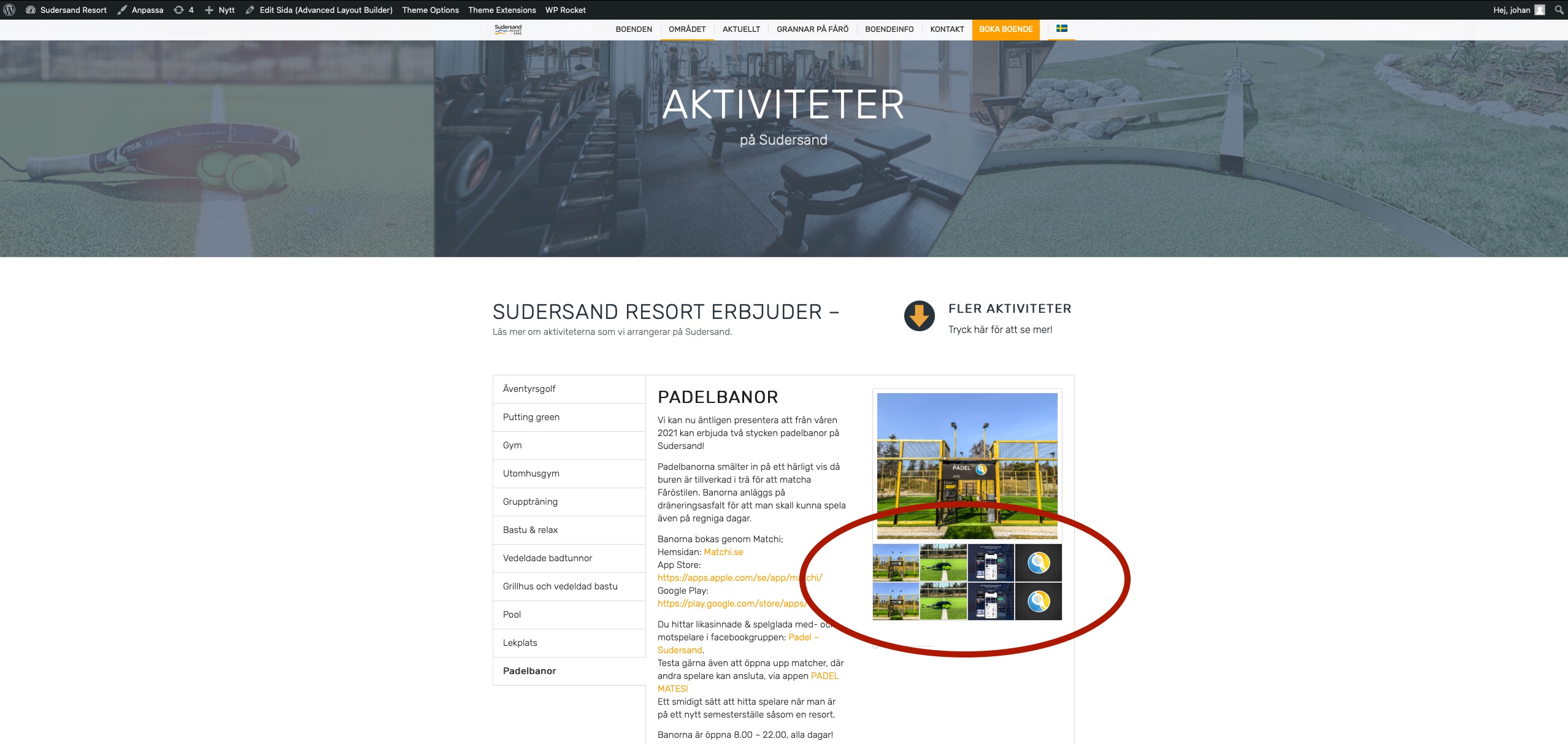
2 days ago I made a upgrade of my theme and after that ALL my gallery thumbnails are being duplicated. Se attached links to images.
But it only appears on the swedish site and not the english och german site.I tried to look through my custom CSS and I can not find (with the minor knowledge I have) anything that I think would be the cause.
Please help!
Regards Johan.