I am building a new website with a lot of photos and to save storage space I want to reduce the number of photo sizes created by Enfold.
I don’t need these sizes:
– 36×36 widget and other square image sizes
– 260×185 portfolio small
– 845×684 gallery
– 710×375 nagazine
– 845×321 entry with sidebar
– 1210×423 entry without sidebar
– 1500×430 featured
– 1500×630 featured large
If I understood correctly I should then add the following code to my functions.php file (in my Child theme):
function ava_image_sizes() {
	remove_image_size('magazine');
	remove_image_size('widget');
	remove_image_size('featured');
	remove_image_size('featured_large');
	remove_image_size('portfolio_small');
	remove_image_size('gallery');
	remove_image_size('entry_with_sidebar');
	remove_image_size('entry_without_sidebar');
        remove_image_size('square');
}
add_action( 'after_setup_theme', 'ava_image_sizes', 11 );
– Is that above code correct like this?
– After adding this code I have read the advice to use the Regenerate Thumbnails plugin, but this plugin is not updated for a year, so is it still recommended?
Thanks for your help!
Hello everyone,
I would like to change the category and tag archive pages to the style I use for my landing page. Is it possible to apply the blog grid layout to the archive pages?
I want the blog layout and the tag page to look the same. There is no thumbnail on the filtered page. How can I edit this?
Thank you!
Cheers, Jens
-
This topic was modified 3 years, 10 months ago by
 Jens-abroad.
Hi,
Glad that this helped, as I pointed out above the zoom-gallary thumbnail container has replaced the standard woo thumbnail container, so while we could try stabbing at it, I would recommend asking the plugin author for their recommended solution as they probably had to correct this for other customers.
I would point out that your images are not square, so while that may look good when it’s the featured image as the thumbnail it’s not square. Also note that the “thumbnail” is actually the full-size image, just shown smaller, so there is not a “cropped” thumbnail.
Best regards,
Mike
In our site https://mancusoricambi.eu/ when we add a new Woocommerce product, images files are uploaded with no problems but then Enfold is not able to correctly resize and use them.
For example the file https://mancusoricambi.eu/wp-content/uploads/2022/05/carrello-elettrico-mancuso-ricambi-5.jpg is uploaded and it’s working fine but its resized version https://mancusoricambi.eu/wp-content/uploads/2022/05/carrello-elettrico-mancuso-ricambi-5-450×450.jpg is not working (filesize is 0) so it the “product image” in our shop does not work. This is the product page: https://mancusoricambi.eu/prodotto/carrello-elettrico-usato/
this happens every time, with every new image added to the site.
Is there a fix to this issue or is there a way to set Enfold to just use the original file instead than many different resize versions? Thanks for your help
Hi,
in my template I’m calling the Product Slider via shortcode like this:
echo do_shortcode("[av_productslider categories='48' items='-1' columns='4' image_size='woocommerce_thumbnail' autoplay='no']");
The shortcode is working, because I get the output of the desired products.
But instead of having 4 items per row, it breaks after 3, so the 4th item is within a new row.
The problem is, that the shortcode processing somehow sets the wrong classes, therefore item number 4 gets “cleared”.
Expected result should be like this:
Item 1 – css-class: first
Item 2 – css-class: none
Item 3 – css-class: none
Item 4 – css-class: last
But my result is like this:
Item 1 – css-class: none
Item 2 – css-class: none
Item 3 – css-class: last
Item 4 – css-class: first
I’ve no idea why it’s getting mixed up like this….very strange behaviour.
Any ideas?
Hi,
If you have the theme option Product gallery set to WooCommerce 3.0 product gallery right now then your plugin Motif Product Image Zoom has replaced the Product gallery because the source code doesn’t match the our theme.
You can try disabling the lightbox for the theme at Enfold Theme Options ▸ Lightbox Modal Window
or try adding this code to the end of your functions.php file in Appearance ▸ Editor:
function custom_noLightbox_script() { ?>
    <script>
(function($){
  $("#thumbnail-slider a.thumb").addClass("noLightbox").removeClass("lightbox-added");
})(jQuery);
</script>
    <?php
}
add_action('wp_footer', 'custom_noLightbox_script');
Best regards,
Mike
Hi,
Thank you for your patience, I found another way to add the images without a plugin, I replaced the previous shortcodes with these:
[porsche-logo]
[kadewe-logo]
[fcbayern-referenzen-logo]
[fraunhofer-referenzen-logo]
then I added this function to your child theme functions.php
function pure_javascript_image_shortcode() { ?>
    <script>
var elements = new Array();
var elements = document.getElementsByClassName('av-masonry-entry-content');
for (var e = 0; e < elements.length; e++) {
    var newHTML = elements[e].innerHTML;
    newHTML = newHTML.replace('[porsche-logo]','<img class="avia_image" src="https://your-site.de/wp-content/uploads/2022/03/porsche-logo.svg" alt="" title="" itemprop="thumbnailUrl" style="height: 150px;margin:auto;">');
    newHTML = newHTML.replace('[kadewe-logo]','<img class="avia_image" src="https://your-site.de/wp-content/uploads/2022/03/kadewe-logo.svg" alt="" title="" itemprop="thumbnailUrl" style="height: 150px;margin:auto;">');
    newHTML = newHTML.replace('[fcbayern-referenzen-logo]','<img class="avia_image" src="https://your-site.de/wp-content/uploads/2022/03/fcbayern-referenzen-logo.svg" alt="" title="" itemprop="thumbnailUrl" style="height: 150px;margin:auto;">');
    newHTML = newHTML.replace('[fraunhofer-referenzen-logo]','<img class="avia_image" src="https://your-site.de/wp-content/uploads/2022/03/fraunhofer-referenzen-logo.svg" alt="" title="" itemprop="thumbnailUrl" style="height: 150px;margin:auto;">');
    elements[e].innerHTML = newHTML;
};
</script>
    <?php
}
add_action('wp_footer', 'pure_javascript_image_shortcode');
now the images show without messing up the other elements, please check.
Best regards,
Mike
ah yeah sorry that was still in there from all my tinkering and experimenting, I’ve removed it now.
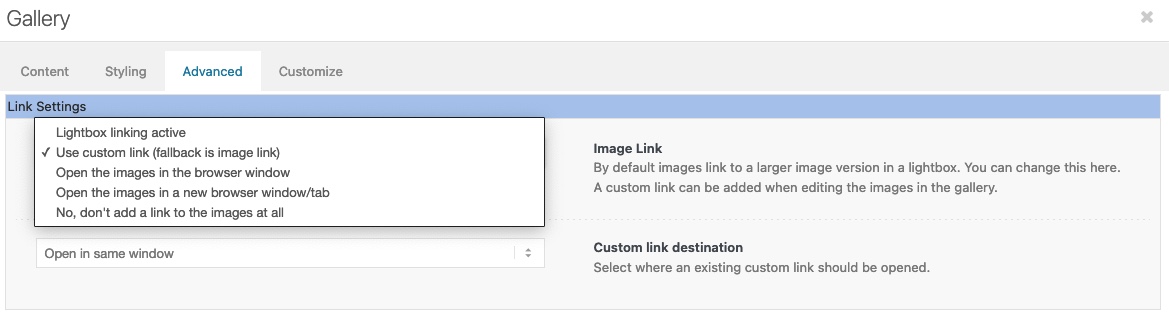
My settings are indeed exactly the same as what you propose, big image/thumbnails below, use custom link etc.
In other words, only option 1 gives me a lightbox, option 2 (which it is currently set to) does not.
First of all : do not enter the url with ?iframe=true
try that first
it is working with your gallery too ( big image – thumbnails below ) – see example page above.
And this is setting under Advanced Tab?
can you try to use the gallery on link settings as: “use custom link – fall back is image”
click to enlarge the image:
and btw: if you add some attributes after a youtube ID – the first one gets a question-mark – and than all others an ampersand!
________
this list is a bit confusing – that is right.
maybe it will be better if there is:
1) Lightbox active and opens the image link
2) Lightbox active and opens the custom link (fallback is image link)
3) Lightbox is inactive and will open the image link in same browser window
4) Lightbox is inactive and will open the image link in new window/tab
5) no link at all – just gallery
Hey,
thanks both! I tried that, but that prevents the lightbox from working.
Using the easyslider I got it to work exactly the way I wanted to except that the preview ‘images’ are small circles instead of actual thumbnails, but I can live with that. Little bit more work to configure everything correctly but I can live with that.
Thanks,
Hans
Hello!
I love the content sorting of the portfolio.
Portfolio items are cool but not needed and get in the way with pop ups, lightbox etc.
Is it possible to make direct links to posts and pages?
I would love to sort thumbnails from landing pages specifically.
Can’t seem to figure it out how to do this.
Saludos de Mexico!
NOT TO WORRY.
I have found the cause. There was an old function script that needed to be deleted:
add_filter(‘avf_avia_builder_gallery_image_link’, ‘avia_change_gallery_thumbnail_link’, 10, 4);
Thanks anyway!
Hi ArjanDenHaag,
Thanks for providing the link.
Please go to Appearance > Customize > Woocommerce > Product Images, then adjust the width as well as the thumbnail cropping and try to re-upload the banner image.
Hope this helps.
Best regards,
Nikko
How can I change the portfolio thumbnail size so the entire image appears when using Portfolio Grid? – https://doniliaswimwear.com/swimwear/
I would like the this entire image to show in full – http://doniliaswimwear.com/wp-content/uploads/2022/05/2.1.jpg as the thumbnail instead. I am ok with the image being much taller in height
Here is a new site we developed for UK Cyber Security Ltd
Cyber Essentials and IASME Governance Provider East Midlands
UK Cyber Security Ltd is a Cyber Security and IT Management company based in Swadlincote, Derbyshire, UK. They are a Cyber Essentials and IASME Governance Certification Body, offering a range of IT security services including penetration testing and network scanning.
The company had lost the original copy of their logo so we recovered their logo and fonts ready for use on their new website.
Built on an optimised version of Enfold with WooCommerce and TakePayments integration. The site includes a bespoke quote generator built using Cost Calculator WordPress purchased from Theme Forest / Code Canyon.
The site includes modifications to WooCommerce:
-Add widget to main menu area so search bar is available on desktops
-Add a widget to the top of the product page so search can be added to mobile pages
-Modified search so it only searches products and includes SKUs
-Changed the breakpoint so the sidebar disappears on tablets
-Seperate the categories from the main shop loop for better navigation
Pagespeed and Web Vitals
The home page under testing scores up to 93/100 in Google Web Vitals mobile device testing and 100/100 on desktops.
This is because the quote generator loads some files on every page a small tradeoff for extra functionality.
The Think Jarvis optimised web framework includes some extra optimisation:
– VPS hosting with maximum resource allocation from IONOS
– Unique modifications to .htaccess and functions.php
– Caching plugin
– Additional image thumbnail generation
– WebP image generation and compression
– Login screen moved and password protected to prevent brute force attacks
– Jetpack Brute Force Protection
– Advanced contact form spam protection without using Google Recaptcha
maybe you can read this: https://kriesi.at/support/topic/beitragsbild-eines-blogbeitrags-automatisch-anzeigen/#post-1198720
and in particular : https://kriesi.at/support/topic/beitragsbild-eines-blogbeitrags-automatisch-anzeigen/#post-1202606
I edited that snippet a bit to more look like the posts not generated with alb:
function avf_template_builder_content_postimage_mod($content = ""){
  if(  is_singular('post') || is_singular('portfolio') && ( '1' != get_post_meta( get_the_ID(), '_avia_hide_featured_image', true ) ) )  {
        $featuredImage = get_the_post_thumbnail( $the_id, 'entry_with_sidebar' );
        $content = '<header class="entry-content-header"><div class="page-thumb">' .$featuredImage. '</div></header>' . $content ;
      }
  return $content;
}
add_filter('avf_template_builder_content', 'avf_template_builder_content_postimage_mod', 10, 1);
but remember – it is only shown if you set the metabox to insert on single post – and try to avoid using full-width elements on those posts. – because otherwise the sidebar (if present) will go under this content.
_______________________
btw.: is that new on the metabox – to have a choice for svg’s ?

-
This reply was modified 3 years, 10 months ago by
 Guenni007.
Hi there,
I cannot seem to remove related posts from our portfolio pages. I’ve tried various css codes, our wordpress backend does not have an option to fully disable. I can only remove the date and thumbnails as the theme and wordpress allows, but not the tag links.
Please advise.
Hi
I’m facing the similar issue, couldn’t set thumbnail image? May I know what’s your solution? Thanks!
Hi,
Thank you for the update.
It seems to work better if we use a separate JSON-LD markup for the video element. In the video.php file, look for this block of code around line 704..
	$output = '';
				$output .= $style_tag;
				$output .= "
<div {$meta['custom_el_id']} class='{$container_class}' {$markup_video} data-original_url='{$src}'>";
				$output .=		$output_html;
				$output .= '</div>';
.., then replace it with this one.
				$json = '    <script type="application/ld+json">
				{
				  "@context": "https://schema.org",
				  "@type": "VideoObject",
				  "name": "Another video object.",
				  "thumbnailUrl": [
					"https://example.com/photos/1x1/photo.jpg",
					"https://example.com/photos/4x3/photo.jpg",
					"https://example.com/photos/16x9/photo.jpg"
				   ],
				  "uploadDate": "2016-03-31T08:00:00+08:00",
				  "duration": "PT1M54S",
				  "contentUrl": "https://www.example.com/video/123/file.mp4",
				  "embedUrl": "https://www.example.com/embed/123",
				  "interactionStatistic": {
					"@type": "InteractionCounter",
					"interactionType": { "@type": "WatchAction" },
					"userInteractionCount": 5647018
				  },
				  "regionsAllowed": "US,NL"
				}
				</script>';

				$output = '';
				$output .= $style_tag;
				$output .= "
<div {$meta['custom_el_id']} class='{$container_class}' {$markup_video} data-original_url='{$src}'>";
				$output .= $json;
				$output .=		$output_html;
				$output .= '</div>';
The validator should be able to recognize the video element as a separate object as shown in the screenshot below.
// https://1drv.ms/u/s!AjjTfXSRbKTvwGG1fhkWkkzFci3X?e=x3G9bb
This is based on the following documentation.
// https://developers.google.com/search/docs/advanced/structured-data/video
Best regards,
Ismael
Ok, maybe i forgot to save your new password – try the new one now. =)
But you couldn´t see the problem on the linked images?
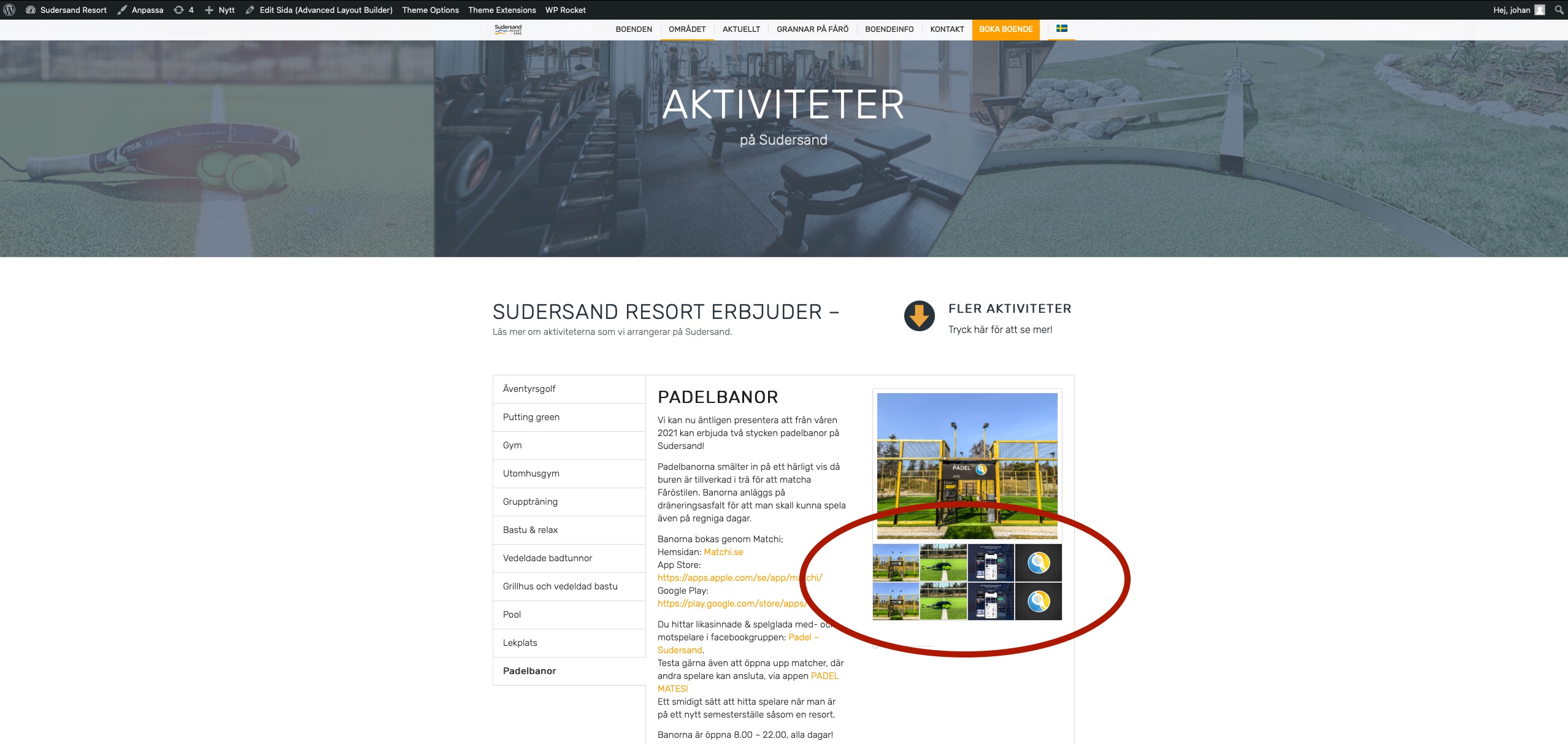
That there are a double set of thumbnail of each image?
See here again: https://www.sudersand.se/wp-content/uploads/2022/04/gallery_duplicate.jpg
The problem is on almost every page – see the first gallery that appear on example the linked pages below.
Regards Johan
Hi!
2 days ago I made a upgrade of my theme and after that ALL my gallery thumbnails are being duplicated. Se attached links to images.
But it only appears on the swedish site and not the english och german site.
I tried to look through my custom CSS and I can not find (with the minor knowledge I have) anything that I think would be the cause.
Please help!
Regards Johan.
Yes,
i wanted to use the horizontal gallery instead because I need the thumbnails to be scrollable.
The regular gallery does not have that option
I will try you code and let you know
Hi navindesigns!
Thank you for the inquiry.
Is this a duplicate of this thread?
// https://kriesi.at/support/topic/move-gallery-caption-below-thumbnails/#post-1348740
For the horizontal gallery, you have to edit the config-templatebuilder/avia-shortcodes/gallery_horizontal/gallery_horizontal.php and place this code after line 615.
$output .= "<span class='avia-gallery-caption'>{$caption}</span>";
After this code.
{
						$lightbox_attr = Av_Responsive_Images()->html_attr_image_src( $lightbox_img_src, false );
						$output .= "<a {$lightbox_attr} class='av-horizontal-gallery-link' {$display_char} title='{$lightbox_title}' alt='{$alt}'>";
						$output .= '</a>';
					}
Regards,
Ismael
On my page towards the middle – I have 2 galleries – http://balrajt9.sg-host.com/local-services/
1- Horizontal Gallery
2- Masonry Gallery
I would like to use the Horizontal Gallery but with the captions below and it should look like the caption on the Masonry Gallery. Also, on the Horizontal Gallery, I would like the lightbox to open up when the user clicks on any part of the thumbnail (not just on the bottom right with the arrows icon). I basically want to duplicate everything Masonry Gallery but make it into a slider which the Horizontal Gallery accomplishes.
Thanks in advance
Hi,
We have been create a gallery product.
We like that the thumbnail images was align to bottom not top.
And put the title on the bottom.
Could you help me?
Thanks advance.
Antonio.
Hey navindesigns,
Thank you for the inquiry.
This is possible but you have to modify the enfold/config-templatebuilder/avia-shortcodes/gallery/gallery.php around line 683.
				$thumbs .= "<a {$lightbox_attr} data-rel='gallery-" . self::$gallery . "' data-prev-img='{$prev[0]}' {$class} data-onclick='{$counter}' title='{$lightbox_title}' {$markup_url} {$rel}>";
				$thumbs .=		$img_tag;
				$thumbs .=		"
<div class='big-prev-fake'>{$prev_img_tag}</div>
";
				$thumbs .= '</a>';
Replace it with:
$caption = wp_get_attachment_caption( $attachment->ID );

				$thumbs .= "<a {$lightbox_attr} data-rel='gallery-" . self::$gallery . "' data-prev-img='{$prev[0]}' {$class} data-onclick='{$counter}' title='{$lightbox_title}' {$markup_url} {$rel}>";
				$thumbs .=		$img_tag;
				$thumbs .=      "<span class='avia-gallery-caption'>{$caption}</span>";
				$thumbs .=		"
<div class='big-prev-fake'>{$prev_img_tag}</div>
";
				$thumbs .= '</a>';
Then add this css code to display the avia-gallery-caption container.
#top .avia-gallery .avia-gallery-caption {
    display: block;
}
This modification should display the caption below the gallery thumbnails.
Best regards,
Ismael
On my site I have two test galleries (one regular gallery component and one masory gallery) – http://balrajt9.sg-host.com/community-2/ towards the middle of my page
GALLERY – NEED CAPTION BELOW THUMBNAILS – Gallery Component
MASONRY – THIS IS WHAT I NEED THE GALLERY CAPTION TO LOOK LIKE – Masonry Gallery Component
I like how the caption is on the second one however, I want to use the first gallery (because I want it to be a slider)
How can I make the caption appear below (exactly like the second masonry gallery) on the first gallery?
Hey BrendanG,
Thank you for the inquiry.
You can add this code in the functions.php file to override the default thumbnail size in the single post page.
add_action("ava_after_main_title", function() {
  global $avia_config;

  if( is_singular("post") ) {
    $avia_config['image_size'] = 'full';
    $avia_config['preview_mode']  = 'custom';
  }
}, 10);
Best regards,
Ismael
Hi Veloryana,
You can either re-upload the images, if there’s many images then you can still use this plugin: https://wordpress.org/plugins/regenerate-thumbnails/
Hope it helps.
Best regards,
Nikko