Hi erikatzen!
Thank you for using Enfold.
You can change the thumbnail size of the single product page on config-woocommerce > config.php. Find this code on line 16:
$avia_config['imgSize']['shop_single'] = array('width'=>450, 'height'=>999, 'crop' => false);
Replace the width then regenerate the thumbnails using this plugin: http://wordpress.org/plugins/regenerate-thumbnails/
Best regards,
Ismael
Hi!
You can use this plugin to regenerate thumbnails – https://wordpress.org/plugins/regenerate-thumbnails/
Please try and let us know so we can mark the thread as resolved :)
Regards,
Yigit
What I’d LOVE is…
to have the portfolio slider:
http://kriesi.at/themes/enfold/portfolio-item/single-portfolio-23-slider-3/
PLUS the thumbnails from the gallery:
http://kriesi.at/themes/enfold/portfolio-item/single-portfolio-23-gallery-3/
Any chance?!
The portfolio gallery page is great, but only works really well (IMO) on desktop> plus currently works best when the portfolio images are same size. The slider handles different sizes better, moving other page content down when needed.
This reply has been marked as private.
Hi!
Do you mind if we take a look at the website? Is this only use as an online shop page? You can delete the thumbnail sizes on functions.php, look for this code:
/*
 * Register additional image thumbnail sizes
 * Those thumbnails are generated on image upload!
 *
 * If the size of an array was changed after an image was uploaded you either need to re-upload the image
 * or use the thumbnail regeneration plugin: http://wordpress.org/extend/plugins/regenerate-thumbnails/
 */
Below are list of generated thumbnail size. Delete those that you don’t need.
Best regards,
Ismael
Hey!
Try the following:
1. Install this plugin: https://wordpress.org/plugins/simple-image-sizes/
2. Go to Settings > Media
3. Change the shop_thumbnail image size (set Cropping to No).
4. Regenerate the thumbnails by clicking the button at the bottom.
Cheers!
Josue
Hey!
Try the following, install this plugin, go to Settings > Media and change the image size of the featured image of your blog (this depends on the blog style you are using).
Remember to regenerate the thumbnails once you done that.
Best regards,
Josue
Hi Guys,
I have the columns set to 12 for desktop, but would like to change this to 6 on mobile as the thumbnails appear really small.
So, is it possible to change the gallery column count with css?
Cheers,
hughsieg5
Hi!!
I’m doing a book store woocommerce page. My client want that the thumbnails show all the book’s cover. Now it crop in square shape. It is possible to show all cover and restrict images height to give catalog a grid look?
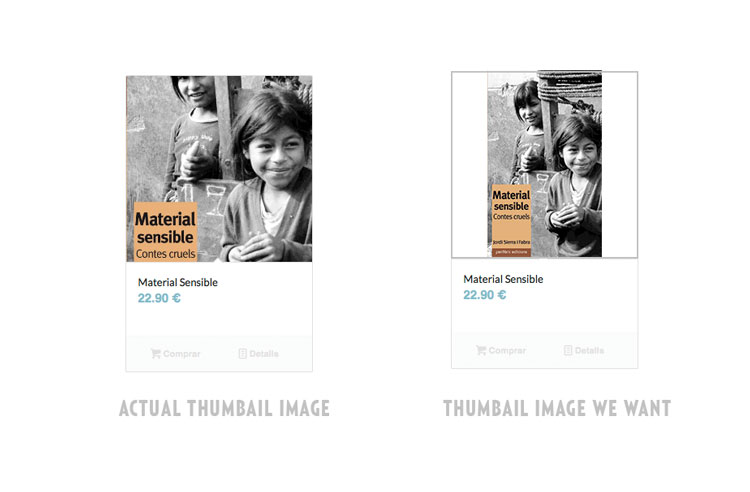
Thanks!!!!
Hey!
If you want to separately control the border of the product items, try this:
.inner_product {
border: none;
}

.inner_product .thumbnail_container {
border: 1px solid red;
border-bottom: none;
}

#top .inner_product_header {
border: 1px solid blue;
border-bottom: none;
}

.avia_cart_buttons {
border: 1px solid orange !important;
border-top: none;
}
Regards,
Ismael
Hi erkuto!
Looks like the single page image size has been changed to a 900px height max. Go to WooCommerce options and you can change the single product image size from their options.
After you’ll need to regenerate the images using this plugin: http://wordpress.org/extend/plugins/regenerate-thumbnails/
Best regards,
Devin
And a related question:
I’ve been looking for a third-party thumbnail gallery slider, but can’t find one that works well. Either they slow down the page-load, or they require a separate image upload and don’t use the image gallery thumbnails, or they screw-up the page layout, or their back-end interface is buggy… Basically I’m looking for a thumbnail gallery, with a featured image slider, and a play and pause button. Can you recommend a good one that works well with the theme?
Thanks.
Hello,
I would like to display thumbnails on archive pages while using the Advanced blog layout feature.
It’s working for categories using following code found :
add_filter('avf_blog_style','avia_change_archive_blog_layout', 10, 2);
function avia_change_archive_blog_layout($layout, $context){
if($context == 'archive') $layout = 'single-small';
return $layout;
}
How to to the same with TAG archives ?
Hi slui!
1) Use this code to change the border color of the preview image container:
.main_color .thumbnail_container img, .main_color div.thumbnail_container{
border-color: #444;
}
2) This code will change the style of the product name + price container:
#top .inner_product_header{
border-color: #444;
}
3) This code will change the border of the buttons bellow the product name/price:
#top #wrap_all .avia_cart_buttons{
border-color: #444;
}
Regards,
Peter
Hi there!
I changed one of our product’s thumbnail now. I was using another one until now. I checked it from Media and recognized that the size and set the new one with same size. But I have a problem with the product page picture. It is so big and unusable.
Can you please check it and let me know about the problem.
Thanks,
Orhan
Shop Page: https://www.insanayatirim.com/magaza
Product Page: https://www.insanayatirim.com/urun/online-mulakat-deneyimi/
Old picture link: https://www.insanayatirim.com/wp-content/uploads/2014/01/OnlineMulakatDeneyimi1.jpg
New picture link: https://www.insanayatirim.com/wp-content/uploads/2014/09/OMDx900.jpg
Hi,
thanks for the nice theme. It works very well.
But I need one information. How can I create square Portfolio thumbnails?
..like this example http://www.austinpsychfest.com/news-and-events
Best regards,
Sandy
Hi there,
Above the footer in my theme i have a scrolling partner/logo element
with several logos (at shop thumbnail size 120×120) rotating.
The problem is that when the logos scroll, the container seems to change size and so the rest of the page content moves up and down which is jarring.
I’ve tried to put the element within a color section with larger padding.
I’ve also tried putting a separater above it and below it.
And all the client logos are the same height
Any advice?
Kindest
Mick
Hi codecreative!
Thank you for using Enfold.
You can change the thumbnail container width using css:
.single-product-main-image {
width: 50%;
margin-right: 50px;
}
Make sure that you’re using Enfold 2.9.2.
Best regards,
Ismael
Hey!
Try the following:
1. Install this plugin: https://wordpress.org/plugins/simple-image-sizes/
2. Go to Settings > Media
3. Change the portfolio image size (increase its height and set cropping to Yes).
4. Regenerate the thumbnails by clicking the button at the bottom.
Cheers!
Josue
Hey!
Do the following:
1. Install this plugin: https://wordpress.org/plugins/simple-image-sizes/
2. Go to Settings > Media
3. Change the entry_without_sidebar image size (increase its height).
4. Regenerate the thumbnails, click the button at the bottom.
Cheers!
Josue
Hi sandboxes!
Thank you for using Enfold.
You can adjust the thumbnail size of the masonry image on functions.php. Look for this code on line 110:
$avia_config['imgSize']['masonry'] = array('width'=>705, 'height'=>705 , 'crop' => false); // images for fullscreen masonry
Adjust the width and height then regenerate the thumbnails. The image dimension will also depend on the size of the columns. You might want to disable the full width masonry by placing the masonry element inside a 1/1 column layout. Set the Size Settings to Perfect Manual Masonry.
Best regards,
Ismael
Hey Martin!
Thank you for using Enfold.
Try to use this at the very bottom of functions.php:
function add_custom_script2(){
?>
<script>
jQuery(window).load(function(){
	 jQuery(".av-magazine-entry-big .av-magazine-thumbnail").before(jQuery(".av-magazine-entry-big .av-magazine-title"));
});
</script>
<?php
}
add_action('wp_head', 'add_custom_script2', 10);
Regards,
Ismael
Hi!
You can edit each portfolio items then look for the Overwrite Portfolio Link setting. Set it to Define Custom Link. Add the url of the video on the Link portfolio item to external URL field. This will open the video on lightbox when you click on the portfolio thumbnail.
Regards,
Ismael
Hi evtilsley!
Thank you for using Enfold.
You need to change the thumbnail size on General Settings > Media > Thumbnail size. Regenerate the thumbnails using this plugin: http://wordpress.org/plugins/regenerate-thumbnails/
Best regards,
Ismael
Hey!
Do the following:
1. Install this plugin: https://wordpress.org/plugins/simple-image-sizes/
2. Go to Settings > Media
3. Change the entry_with_sidebar image size (increase it).
4. Regenerate the thumbnails, click the button at the bottom.
Best regards,
Josue
Hello Again,
I made what you said about wp-config file and try again…
but unfortunately that was not a solution! Still, I have upload problem from my portfolio item, easy slider image uploader….
when I try to upload an image, it tries to upload but there is no complete upload, when I turn back media library, I just seen an empty image thumbnail as it could been uploaded but not….
When I deactivate some of WPML plug-in my problem could be solved some. There is still media library upload problem. Especially, when i try to use screenshot image, media uploading is very big problem. I try to rename files and try to upload, some times it could, sometimes it could not..
I do not want to deactivate WPML plug-in and also would be use media uploading normally,
please help me about it…
thank you…
Hi Daniela!
I assume you meant “Enfold latest news” widget as “Recent posts” widget does not display thumbnails. Please go to Enfold/framework/php folder and open class-framework-widgets.php file and modify as needed.
Regards,
Yigit
ah, ok i see. i thought the theme was set up to do the centering and cropping of the image in the container div and i was choosing a wrong option or had messed something up with my images settings
that snippet above does constrain a uniform size, but it either stretches or squishes the images. i’d like to have them at original proportions, but cropped and centered inside the container. same with thumbnails.
looks like it’s time for some css fiddling on my end. if you have any quick ideas, i’d more than appreciate them. thank you!
Hi Ken!
Thank you for using Enfold.
Remove the borders with this:
.av-magazine-thumbnail, .news-thumb {
border: none;
}
Regards,
Ismael
Hey!
Did you regenerate the thumbnails?
Regards,
Ismael



