-
Search Results
-
Hello,
Thank you for the great help with my issue here
But now I looking for wider solution for it. Here what we need:1. We have it popup mentioned in my last thread with fields for information we need to gather for offer preparing. That’s ok. PopUp works and sends info to us.
2. But now we understand that it would be easier to give to our customers more freedom. I mean if he fill and send one form we must to show him somehow that site is remembered it and he can explore other site subpages and products. May be he will want to delete it after minute and so on
3. Of course in that case we need to use Cart. But we don’t like all this checkout pages and so on.
4. Ideally it would be to realise such functionality, that every time he fill and sends that form – cart is updated via ajax technology (no immediate redirection to the checkout or cart page). It looks like cart icon in the right side of menu with number (e.g. 3). And then when customer is done – he can press this cart reread his ‘products’ delete if smth is not need and confirm his choice.May be you can suggest some plugin or snippet, because actually all I need is:
1. Get visual presentation of cart on the page with possibility to see how many products is added (like it is realised here: Home v8: Frontpage Shop)
2. Get all this information from forms to the email
No any other advanced functionality.I tried to google also support forums, but I find no solution for it.
Topic: Shortcodes in Excerpts
Hello. I am using the Portfolio Grid to display a portfolio of real estate properties for a client. He will be creating new property listings himself, so I set up a number of custom fields using Advanced Custom Fields in order to simplify the process for him. He also doesn’t know much about WordPress or HTML, so I am trying to streamline what he has to do to create new portfolio entries / property listings.
The Advanced Custom Field shortcodes have worked well within the single portfolio entry, and most of the page content for new entries is easily entered by filling out a series of form fields.
But the client has asked for something that I’m having trouble doing – which is to display the property title information and property address that appears beneath the thumbnail image with a line break.
He wants:
Property Name
Property Address, City, State, ZipEach new portfolio / property entry currently uses the address as the title, and I will be modifying the titles to now include the property name, but I can’t create a line break in the title field after the Property Name so it displays above the address on the portfolio grid items.
Right now, I am using the excerpt field to display the price of the property (entered manually via text), but I figured I would try to use the excerpt field to display everything instead. I was going to add the Advanced Custom Field shortcodes for property name, address, and price to the excerpt field so I can achieve what he wants, style it, and keep his involvement in entering info to a minimum because all the info is being dynamically populated by the info he entered once in the ACF form fields.
I haven’t been able to implement it, though. I can’t get the shortcodes to work in the excerpt field.
I have read forum posts that instructed me to add the “do shortcode” filter to the child theme functions.php. I have also altered a line of code in the enfold/config-templatebuilder/avia-shortcodes/portfolio/portfolio.php, per another forum post suggestion.
After trying both of these, I haven’t had any luck.
Sorry for the long description, but I’m open to any suggestions you might have for how I can achieve this. Whether that involves using shortcodes in the excerpt field or not. Thank you!
Topic: custom types and fields
hi my trouble my main trouble is that i want to use custom types and fields and i am using the toolset plugin but i am posting here their response to some compability issues… i allready paid for that plugin but i can cancel i f you point me in the right direction…. which plugin is the best for using custom types and fields in enfold….. which one has the best compatibility?
this is the answer they gave me in the toolset types and posts….
————————–
Hi, there are several compatibility issues with the Enfold theme and at this time we have been unable to establish an ongoing working relationship with the theme authors. Content Templates simply won’t work in the Enfold theme, and there isn’t a good workaround right now. Unfortunately the theme is not currently compatible with Views and Content Templates because it uses many different functions to display the content, rather than relying on one single function like the_content. If you’d like to use Enfold successfully with Toolset, we recommend you reach out to their authors and let them know we are trying to work out a permanent solution. Until then, unfortunately I do not have a good solution for you.
Unfortunately I do not have a comprehensive list of features that do or do not work with Enfold and Toolset together. We typically respond to User reports of problems. So if no one has reported a problem, our team would not be aware of it. Instead, I can show you how to search for some of the other issues Enfold users have experienced and reported here in the forums. Copy + paste this text into Google search:
site:toolset.com/forums/topic enfold
This search will scan all the forum topics that include the word “Enfold.” You can see problems with AJAX search and filtering, problems with Enfold’s advanced editor, problems with content templates, and problems with Layouts have all been reported. Since editing Forms require the use of Content Templates or Template Layouts, I suspect you could run into issues with editing Forms as well.
My best advice is to not use the Enfold theme with Toolset, because we have not been able to communicate regularly with their developers. If a conflict between our systems is discovered during development of your project, it is likely that problem will not be fixed in a reasonable amount of time because we cannot collaborate with their developers.Hi,
We have a possibly theme-related problem. We’re having issues with confirmation mail that is sent after registration. On site, we don’t need any user interaction, no likes, comments, no user posts. Reason for registration is solely for license key generation that is used in our software, that is taken care of. We use wp-members for the registration form.
To be as brief as possible, when the user registers, he gets an email containing [link1] It used to work, but we updated theme after several versions of not updating it and now the link in emails comes like this [link2]. Weirdly enough, if you click on that link, you get logged in as a random user, so it seems that the key generation has been messed up in the update. We looked at code and issue seems to be here:
/var/www/html/wp-content/themes/enfold-child/functions.php
/* Customize the login process - send activation link instead of password */function my_activation_key_settings() {
    $settings = array(
        'email_text'      => 'Please activate your account: ',
        'return_url'      => 'https://frinx.io/user-account-2',
        'send_welcome'    => true,
        'show_success'    => true,
        'success_message' => 'Thank you for activating your account.',
        'send_notify'     => true,
    );
    return $settings;
}/**
 * Create an activation key for the
 * user at registration.
 */
add_action( 'wpmem_post_register_data', 'my_generate_key' );
function my_generate_key( $fields ) {
     // Generate a random key.
    $key = sha1( rand() );
    echo $key;
    // Save this for the new user account.
    add_user_meta( $fields['ID'], 'activation_key', $key, true );
}/**
 * Include the activation key in the new user
 * registration email as an activation link.
 */
add_filter( 'wpmem_email_filter', 'my_add_key_to_email', 10, 3 );
function my_add_key_to_email( $arr, $wpmem_fields, $field_data ) {
    $settings = my_activation_key_settings();
    $url = trailingslashit( $settings['return_url'] );
    // Only do this for new registrations.
    if ( $arr['toggle'] == 'newmod' ) {
        // Get the stored key.
        $key = get_user_meta( $arr['user_id'], 'activation_key', true );
        $name = $arr['user_login'];        // Add text and link to the email body.
        $greeting = "Hi ${name}! \n" . "Thank you for your interest in FRINX and for registering on our web page.\n\n";        // Concatenate so that the activation link is at the beginning of the activation email.
          $sprava = $greeting . $settings['email_text'] . add_query_arg( 'activate=', $key, $url ) . "\n\n" . $arr['body'];
        $arr['body'] = $sprava;
        echo "arr" . $sprava;
        echo "arr body" . $arr['body'];
    }    return $arr;
}/**
 * Check for an activation key and if one exists,
 * validate and log in user.
 */
add_action( 'template_redirect', 'my_validate_key' );
function my_validate_key(){
    $settings = my_activation_key_settings();
    // Check for activation key.
    if ( isset( $_GET['activate'] ) ) {
        // Get the user account the key is for.
        $users = get_users( array(
            'meta_key'    => 'activation_key',
            'meta_value'  => $_GET['activate'],
            'number'      => 1,
            'count_total' => false
        ) );
        if ( $users ) {
            foreach( $users as $user ) {
                // The provided activation key was valid, log in.
                wp_set_auth_cookie( $user->ID, true );
                wp_set_current_user( $user->ID );                // Delete activation_key meta and set active.
                delete_user_meta( $user->ID, 'activation_key' );
                update_user_meta( $user->ID, 'active', '1' );                if ( $settings['send_welcome'] ) {
                    // Send a welcome email
                    include_once( WPMEM_PATH . 'inc/email.php' );
                    wpmem_inc_regemail( $user->ID, '', 2 );
                }
                if ( $settings['send_notify'] ) {
                    // Send a welcome email
                    global $wpmem;
                    include_once( WPMEM_PATH . 'inc/email.php' );
                    wpmem_notify_admin( $user->ID, $wpmem->fields );
                }
                break;
            }
        }
    }
}
the problem occures mostly when getting key from metadata tried to debug if metadata was added but this piece of code works fine
add_user_meta( $fields['ID'], 'activation_key', $key, true);but after retrieving key using
$key = get_user_meta( $arr['user_id'],'activation_key, true)the key is not returned
when trying to use diffrent kind of functions to retrieve the array of metadata then critical error occure so it was hard to say what went wrong or try to do it another way
Function add_user_meta is stored correctly(due to documentation function is returning meta_id), but when we are retrieving user metadata under the parameters and user_id how we stored it , empty field is being returned. The activation key is not stored properly in user metadata, so it is lost in between its creating and outputting function.
Thanks for any tips
The credit card fields have become very small – see screen shot: https://www.dropbox.com/s/jhd92sq05n2oun1/credit%20card%20fields.png?dl=0
And they are dead. Customers can’t type anything in them.
PLEASE HELP!Hi. I have customized enfold/config-templatebuilder/avia-shortcodes/ac-helper-masonryx.php so that some custom fields are displayed.
When I move the customized file to my child theme, it is not used. The default version is used.
How do I fix this?
Hello supportteam,
first of all I find the theme absulutly successful and enjoy working with it.
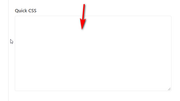
I can’t get any further at one point. I would like to hide a field in the Simple Membership registration form. I created a CSS class “hide-custom-class” in (Screen 1) and inserted .hide-custom-class display: none in Quick CSS (Screen 2). But it still shows the field. Somehow it doesn’t access it. Is that even possible? Sure, the error lies with me, but where?
Thank you very much!I’m redoing a site for an independent book publisher. Their old, creaky website uses a plugin called Toolset to have “Books” as a custom post type, with several (too many?) custom fields.
Rather than rely on another plugin, I wonder if I could rename “Portfolio Items” in the left nav bar so when they’re ready to publish a new book, they simply click Books (Portfolio Items), then Add New, then use a custom template I’ll build to create each new book.
Then when they’re done adding content, hopefully the new Book (Portfolio Item) would appear in the Portfolio (Book) Grid on the catalog page.
If it’s too complicated, do you guys recommend a specific plugin that’ll do what I’m looking for? Toolset does it, but is way overkill for what we need.
Old: jorvikpress.com
New dev site: jorvik.pressTopic: Mailchimp pre-filed fields
I use the newsletter registration in a member area for logged in users. The essential user data (email, first name, last name …) are known. This allows me to fill in the form. I simply copy and paste the form via shortcode according to the following pattern:
$email = $current_user->user_email;
<form action="..." method="post" data-av-custom-send="mailchimp_send" ...>
...
<input name="avia_0_1" class="text_input is_email" type="text" id="avia_0_1" value="' . $email . '" />
...
</form>
It works. However, I still need a hidden real layout builder form on the site to select the newsletters list.
Is there a more elegant method (filter) to fill the form automatically. Could you please show me the code snippets. I still have 2 extra fields (text and dropdown).
Regards
Günter