Additional question:
Please take a look again at https://www.sensity.pl/bookly-test-site/. I’ve set additional horizontal menu to use socket color scheme. Why the menu inherits only some of socket style, for ex. colors and font size, but does not inherit hoover effect (color change and underline)? How to make menu work like socket below?
Regards!
Chris
-
This reply was modified 4 years, 11 months ago by
 kwlodar.
Hi,
The problem is not between backend (visual editor) and frontend (online page https://birkinhotel.com). The problem is on the version of the preview page because it is different from the online frontend page.
The same problem occurs in the code editor, which is different from the work done on the visual editor. As if the code editor didn’t save anymore! This problem is present for all pages of the web site!
Other problems encountered:
1. The full-width submenu on the mobile no longer works. Menu links work perfectly on desktop, but on mobile you click to go back to the top of the page, as if the anchor text isn’t working.
2. On mobile, the block code present for example on the home page does not return the correct font (Side). On another Enfold site this does not happen to me (the code and the theme are the same).
3. In some pages (for example Collection) the filling between one section and another has some bugs. The correct size is never displayed between sections during installation. This problem occurs on both the desktop and mobile versions.
the example screenshots of the errors: https://drive.google.com/drive/folders/15moV6hQ4z1D1pFHSL9iFzM6RYxXj4Rlc?usp=sharing
I really need to resolve these issues before delivering the site to my client.
Thank you
-
This reply was modified 4 years, 11 months ago by
 EdoardoFadda.
Two questions:
1. I am using the default fonts that came with Enfold. I have changed the font size for some of the elements. Can you provide me with url where I can download whatever fonts I am using in my site? My site is: https://www.neotel2000.com/
2. Once I have imported/uploaded all the fonts, how do I stop from the theme to keep calling fonts.googleapis.com? Where is located the call? In which file?
I am using Enfold Child them BTW.
Many thanks
No that didn’t work Rikard
This is what I have in the Quick CSS field
/*Tab Section – Icon Title Upper and Lower Case*/
.av-tab-section-container .av-inner-tab-title {
text-transform: none;
font-size: 17px;
}
/*Tab Section – Icon, Image Padding*/
.av-tab-section-container .av-tab-section-tab-title-container a {
padding-left: 15px !important;
padding-right: 15px !important;
}
/*Tab Section – font margin, padding*/
av-tab-with-image .av-inner-tab-title {
display: table;
margin: 0 auto;
}
/*Tab Section – Icon, Image Size*/
.av-tab-section-container .av-tab-section-image {
height: 150px;
width: 150px;
}
We are using the Tab Section for the Team Members Descriptions on
– https://crestpointpsychology.com.au/make-a-booking/
– https://crestpointpsychology.com.au/crestpoint-psychology-team/
Hi Moescube,
For the dot, please add this CSS Code in Enfold > General Styling > Quick CSS:
#top #wrap_all ins:before {
    display: none;
}
For the new price, please add this CSS code:
#top .price ins .amount {
    font-size: 30px;
}<pre><code>
Just adjust the font size (default is 20px)
As for the position of the currency, please try this CSS code:
#top .price .amount bdi {
    position: relative;
    padding-left: 22px;
}

#top .price .amount .woocommerce-Price-currencySymbol {
    position: absolute;
    left: 0;
}
Best regards,
Nikko
I want to remove the dot between the old and new price.
Is there any css to do so?
Also I would like to know, how to change the fontsize only of the new price, to make it bigger.
The curreny stands before the price itself. How can I switch it to appear after the price number with a small space.
I found this Code , it works , the arrows are there.
But dont work it when i click it
How can i change it , the correctly use?
/* Arrow tabs section. */
.av-tab-section-outer-container:after, .av-tab-section-outer-container:before {
font-family: ‘entypo-fontello’;
font-size: 60px;
position: absolute;
top: 300px;
z-index: 1000;
padding: 30px 15px 30px 15px;
background: ;
-webkit-transition: all 0.4s ease-out;
-moz-transition: all 0.4s ease-out;
transition: all 0.4s ease-out;
color: grey!important;
pointer-events:none;
}
.av-tab-section-outer-container:after {
content: ‘\e879’;
right: 20px;
}
.av-tab-section-outer-container:before {
content: ‘\e878’;
left: 20px;
}
.av-tab-section-outer-container.av-start:before, .av-tab-section-outer-container.av-end:after {
opacity: 0;
visibility: hidden;
}
Php
function tab_section_arrows(){
?>
<script>
(function( $ ) {
var $ts = $(‘.av-tab-section-outer-container’);
var $tab = $ts.find(‘.av-section-tab-title’);
getActiveTab();
$tab.on(‘mouseup’, function() {
setTimeout(getActiveTab, 100);
});
function getActiveTab() {
if( $tab.first().hasClass(‘av-active-tab-title’) ) {
$ts.addClass(‘av-start’);
$ts.removeClass(‘av-end’);
} else if ( $tab.last().hasClass(‘av-active-tab-title’) ) {
$ts.addClass(‘av-end’);
$ts.removeClass(‘av-start’);
} else {
$ts.removeClass(‘av-start’);
$ts.removeClass(‘av-end’);
}
}
}(jQuery));
</script>
<?php
}
add_action(‘wp_footer’, ‘tab_section_arrows’);
We are having some trouble setting up our breadcrumb the way we are expected to have it.
– Need to make the breadcrumb menu not display on the homepage
– The trail needs to display on the top of the box, the current page should be larger font than the trail and be displayed underneath it
– Our trail currently always displays (Home / “Current Page”), Home needs to actually update depending on which dropdown they chose and then add a separator and each submenu they click through.
– Our trail currently uses ‘/’ and we need to it be ‘>’
Changes we intentionally made to our page to the box is it resizes to the size of the trail, and it is transparent. Other than that we need to be as close as possible to our HQs standard regarding the changes above.
-
This topic was modified 4 years, 11 months ago by
 arcofbutler.
Hey macjeffff,
Thank you for your patience, please try this css and try to adjust the first font size to suit.
/* change read more button */
a.more-link:before{
  content: "See More" !important;
  font-size: 16px !important;
}

a.more-link {
  font-size: 0 !important;
}
After applying the css, please clear your browser cache and check.
If this doesn’t help please include the url to the page in question so we can take a closer look.
Best regards,
Mike
Thanks! I actually used this code to achieve my goal! I had just forgot to use the “@media only…” at first!
@media only screen and (max-width:989px) {
.sub-menu li a .avia-menu-text {
font-size:20px!important;
color: #d99e45;
}}
You can close this!
Everything is said above. If you see this like me:
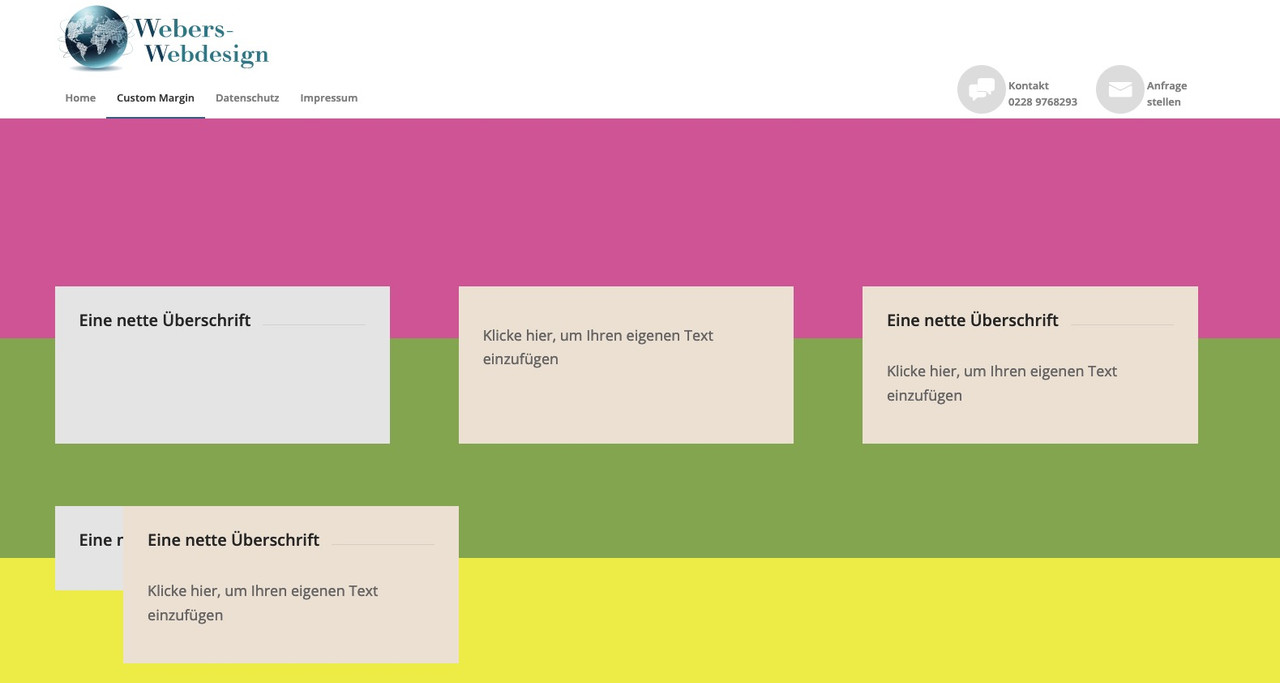
second color-section (green bg) with columns set to equal height and with negative shift of all columns to top – here everything is ok.
on bottom a color-section ( yellow one ) a copy of all columns – but set to individual height – same negative margin to shift to top – overlapping 3 columns – the fist looks out a bit – caused to margin-left : 0 – on mobile – totaly overlapping of all 3 columns.
for you to copy:
[av_section min_height='25' min_height_pc='25' min_height_px='500px' padding='default' custom_margin='0px' custom_margin_sync='true' color='main_color' background='bg_color' custom_bg='#d65799' background_gradient_color1='' background_gradient_color2='' background_gradient_direction='vertical' src='' attachment='' attachment_size='' attach='scroll' position='top left' repeat='no-repeat' video='' video_ratio='16:9' overlay_opacity='0.5' overlay_color='' overlay_pattern='' overlay_custom_pattern='' shadow='no-border-styling' bottom_border='no-border-styling' bottom_border_diagonal_color='#333333' bottom_border_diagonal_direction='' bottom_border_style='' custom_arrow_bg='' id='' custom_class='' template_class='' aria_label='' av_element_hidden_in_editor='0' av_uid='av-kn75k2l9' sc_version='1.0'][/av_section]

[av_section min_height='25' min_height_pc='25' min_height_px='500px' padding='default' custom_margin='0px' custom_margin_sync='true' color='main_color' background='bg_color' custom_bg='#83a846' background_gradient_color1='' background_gradient_color2='' background_gradient_direction='vertical' src='' attachment='' attachment_size='' attach='scroll' position='top left' repeat='no-repeat' video='' video_ratio='16:9' overlay_opacity='0.5' overlay_color='' overlay_pattern='' overlay_custom_pattern='' shadow='no-border-styling' bottom_border='no-border-styling' bottom_border_diagonal_color='#333333' bottom_border_diagonal_direction='' bottom_border_style='' custom_arrow_bg='' id='' custom_class='' template_class='' aria_label='' av_element_hidden_in_editor='0' av_uid='av-kn75k86o' sc_version='1.0']

[av_one_third first min_height='av-equal-height-column' vertical_alignment='av-align-top' space='' row_boxshadow_color='' row_boxshadow_width='10' custom_margin='aviaTBcustom_margin' margin='-200px,0px' mobile_breaking='' border='' border_color='' radius='0px' radius_sync='true' padding='30px' padding_sync='true' column_boxshadow_color='' column_boxshadow_width='10' background='bg_color' background_color='#e5e5e5' background_gradient_color1='' background_gradient_color2='' background_gradient_direction='vertical' src='' attachment='' attachment_size='' background_position='top left' background_repeat='no-repeat' highlight_size='1.1' animation='' link='' linktarget='' link_hover='' title_attr='' alt_attr='' mobile_display='' id='' custom_class='' template_class='' aria_label='' av_uid='av-kn75l7zt' sc_version='1.0']

[av_heading heading='Eine nette Überschrift' tag='h3' style='' subheading_active='' show_icon='' icon='' size='' av-medium-font-size-title='' av-small-font-size-title='' av-mini-font-size-title='' subheading_size='' av-medium-font-size='' av-small-font-size='' av-mini-font-size='' icon_size='' av-medium-font-size-1='' av-small-font-size-1='' av-mini-font-size-1='' color='' custom_font='' icon_color='' margin=',,,,' padding='10' icon_padding='10' link='' link_target='' av-desktop-hide='' av-medium-hide='' av-small-hide='' av-mini-hide='' id='' custom_class='' template_class='' av_uid='av-3khuw' sc_version='1.0'][/av_heading]

[/av_one_third][av_one_third min_height='' vertical_alignment='av-align-top' space='' row_boxshadow_color='' row_boxshadow_width='10' margin='0px' margin_sync='true' mobile_breaking='' border='' border_color='' radius='0px' radius_sync='true' padding='30px' padding_sync='true' column_boxshadow_color='' column_boxshadow_width='10' background='bg_color' background_color='#ede2d3' background_gradient_color1='' background_gradient_color2='' background_gradient_direction='vertical' src='' attachment='' attachment_size='' background_position='top left' background_repeat='no-repeat' highlight_size='1.1' animation='' link='' linktarget='' link_hover='' title_attr='' alt_attr='' mobile_display='' id='' custom_class='' template_class='' aria_label='' av_uid='av-kn75m2i6' sc_version='1.0']

[av_textblock size='' av-medium-font-size='' av-small-font-size='' av-mini-font-size='' font_color='' color='' av-desktop-hide='' av-medium-hide='' av-small-hide='' av-mini-hide='' id='' custom_class='' template_class='' av_uid='av-9k2g' sc_version='1.0']
Klicke hier, um Ihren eigenen Text einzufügen
[/av_textblock]

[/av_one_third][av_one_third min_height='' vertical_alignment='av-align-top' space='' row_boxshadow_color='' row_boxshadow_width='10' margin='0px' margin_sync='true' mobile_breaking='' border='' border_color='' radius='0px' radius_sync='true' padding='30px' padding_sync='true' column_boxshadow_color='' column_boxshadow_width='10' background='bg_color' background_color='#ede2d3' background_gradient_color1='' background_gradient_color2='' background_gradient_direction='vertical' src='' attachment='' attachment_size='' background_position='top left' background_repeat='no-repeat' highlight_size='1.1' animation='' link='' linktarget='' link_hover='' title_attr='' alt_attr='' mobile_display='' id='' custom_class='' template_class='' aria_label='' av_uid='av-1vw80' sc_version='1.0']

[av_heading heading='Eine nette Überschrift' tag='h3' style='' subheading_active='' show_icon='' icon='' size='' av-medium-font-size-title='' av-small-font-size-title='' av-mini-font-size-title='' subheading_size='' av-medium-font-size='' av-small-font-size='' av-mini-font-size='' icon_size='' av-medium-font-size-1='' av-small-font-size-1='' av-mini-font-size-1='' color='' custom_font='' icon_color='' margin=',,,,' padding='10' icon_padding='10' link='' link_target='' av-desktop-hide='' av-medium-hide='' av-small-hide='' av-mini-hide='' id='' custom_class='' template_class='' av_uid='av-1ed7c' sc_version='1.0'][/av_heading]

[av_textblock size='' av-medium-font-size='' av-small-font-size='' av-mini-font-size='' font_color='' color='' av-desktop-hide='' av-medium-hide='' av-small-hide='' av-mini-hide='' id='' custom_class='' template_class='' av_uid='av-rl7w' sc_version='1.0']
Klicke hier, um Ihren eigenen Text einzufügen
[/av_textblock]

[/av_one_third][/av_section][av_section min_height='25' min_height_pc='25' min_height_px='500px' padding='default' custom_margin='0px' custom_margin_sync='true' color='main_color' background='bg_color' custom_bg='#eeee22' background_gradient_color1='' background_gradient_color2='' background_gradient_direction='vertical' src='' attachment='' attachment_size='' attach='scroll' position='top left' repeat='no-repeat' video='' video_ratio='16:9' overlay_opacity='0.5' overlay_color='' overlay_pattern='' overlay_custom_pattern='' shadow='no-border-styling' bottom_border='no-border-styling' bottom_border_diagonal_color='#333333' bottom_border_diagonal_direction='' bottom_border_style='' custom_arrow_bg='' id='' custom_class='' template_class='' aria_label='' av_element_hidden_in_editor='0' av_uid='av-kn75tsfl' sc_version='1.0']

[av_one_third first min_height='' vertical_alignment='av-align-top' space='' row_boxshadow_color='' row_boxshadow_width='10' custom_margin='aviaTBcustom_margin' margin='-200px,0px' mobile_breaking='' border='' border_color='' radius='0px' radius_sync='true' padding='30px' padding_sync='true' column_boxshadow_color='' column_boxshadow_width='10' background='bg_color' background_color='#e5e5e5' background_gradient_color1='' background_gradient_color2='' background_gradient_direction='vertical' src='' attachment='' attachment_size='' background_position='top left' background_repeat='no-repeat' highlight_size='1.1' animation='' link='' linktarget='' link_hover='' title_attr='' alt_attr='' mobile_display='' id='' custom_class='' template_class='' aria_label='' av_uid='av-kn75tmau' sc_version='1.0']

[av_heading heading='Eine nette Überschrift' tag='h3' style='' subheading_active='' show_icon='' icon='' size='' av-medium-font-size-title='' av-small-font-size-title='' av-mini-font-size-title='' subheading_size='' av-medium-font-size='' av-small-font-size='' av-mini-font-size='' icon_size='' av-medium-font-size-1='' av-small-font-size-1='' av-mini-font-size-1='' color='' custom_font='' icon_color='' margin=',,,,' padding='10' icon_padding='10' link='' link_target='' av-desktop-hide='' av-medium-hide='' av-small-hide='' av-mini-hide='' id='' custom_class='' template_class='' av_uid='av-3zd4c' sc_version='1.0'][/av_heading]

[/av_one_third][av_one_third min_height='' vertical_alignment='av-align-top' space='' row_boxshadow_color='' row_boxshadow_width='10' margin='0px' margin_sync='true' mobile_breaking='' border='' border_color='' radius='0px' radius_sync='true' padding='30px' padding_sync='true' column_boxshadow_color='' column_boxshadow_width='10' background='bg_color' background_color='#ede2d3' background_gradient_color1='' background_gradient_color2='' background_gradient_direction='vertical' src='' attachment='' attachment_size='' background_position='top left' background_repeat='no-repeat' highlight_size='1.1' animation='' link='' linktarget='' link_hover='' title_attr='' alt_attr='' mobile_display='' id='' custom_class='' template_class='' aria_label='' av_uid='av-37i6s' sc_version='1.0']

[av_textblock size='' av-medium-font-size='' av-small-font-size='' av-mini-font-size='' font_color='' color='' av-desktop-hide='' av-medium-hide='' av-small-hide='' av-mini-hide='' id='' custom_class='' template_class='' av_uid='av-2l0rw' sc_version='1.0']
Klicke hier, um Ihren eigenen Text einzufügen
[/av_textblock]

[/av_one_third][av_one_third min_height='' vertical_alignment='av-align-top' space='' row_boxshadow_color='' row_boxshadow_width='10' margin='0px' margin_sync='true' mobile_breaking='' border='' border_color='' radius='0px' radius_sync='true' padding='30px' padding_sync='true' column_boxshadow_color='' column_boxshadow_width='10' background='bg_color' background_color='#ede2d3' background_gradient_color1='' background_gradient_color2='' background_gradient_direction='vertical' src='' attachment='' attachment_size='' background_position='top left' background_repeat='no-repeat' highlight_size='1.1' animation='' link='' linktarget='' link_hover='' title_attr='' alt_attr='' mobile_display='' id='' custom_class='' template_class='' aria_label='' av_uid='av-1wz18' sc_version='1.0']

[av_heading heading='Eine nette Überschrift' tag='h3' style='' subheading_active='' show_icon='' icon='' size='' av-medium-font-size-title='' av-small-font-size-title='' av-mini-font-size-title='' subheading_size='' av-medium-font-size='' av-small-font-size='' av-mini-font-size='' icon_size='' av-medium-font-size-1='' av-small-font-size-1='' av-mini-font-size-1='' color='' custom_font='' icon_color='' margin=',,,,' padding='10' icon_padding='10' link='' link_target='' av-desktop-hide='' av-medium-hide='' av-small-hide='' av-mini-hide='' id='' custom_class='' template_class='' av_uid='av-1enuo' sc_version='1.0'][/av_heading]

[av_textblock size='' av-medium-font-size='' av-small-font-size='' av-mini-font-size='' font_color='' color='' av-desktop-hide='' av-medium-hide='' av-small-hide='' av-mini-hide='' id='' custom_class='' template_class='' av_uid='av-uwqo' sc_version='1.0']
Klicke hier, um Ihren eigenen Text einzufügen
[/av_textblock]

[/av_one_third][/av_section]
Nun : das hier in das Quick CSS einfügen.
.anfrage a:before {
  content: "\e805";
}
.telefon a:before {
  content: "\e83c";
}

@media only screen and (min-width: 990px) {
  #header_main_alternate {
    border-top: none;
  }

  span.menu-break {
    display: block;
    line-height: 60px;
    bottom: 35px;
    position: relative;
  }

  .anfrage, .telefon {
    text-align:left;
    float: right !important;
    top: -15px;
    margin-left: 60px
  }

  .anfrage a:hover:before ,
  .telefon a:hover:before {
    background-color : #aaa !important;
  }

  .anfrage a:hover .avia-menu-fx ,
  .telefon a:hover .avia-menu-fx {
    display : none !important;
  }

  .anfrage a:before, .telefon a:before {
    display: table;
    font-family: entypo-fontello;
    font-size: 30px;
    color: #fff;
    position: absolute;
    left: -50px;
    top: 0;
    padding: 5px 10px;
    background-color: #ddd;
    width: 40px;
    height: 40px;
    border-radius: 50%;
    text-align: center;
    vertical-align: middle;
  }
}

@media only screen and (max-width: 989px) {
  #av-burger-menu-ul .anfrage a:before,
  #av-burger-menu-ul .telefon a:before {
    font-family: entypo-fontello;
    font-size: 30px;
    color: #ddd;
    position: absolute;
    left: 0;
    top: 10px;
    padding: 5px 10px;
    width: 40px;
    height: 40px;
  }
}
du siehst hier tauchen die benutzerdefinierten Klassen auf: anfrage und telefon
diese Menüpunkte floaten jetzt rechts. Wenn du die Positionen tauschen willst, dann ziehe im Menu die Positionen an die richtige Stelle
It would be nice if we could see a difference between bold text and links when reading our blog content here on kriesi board.
maybe a different color
.main_color strong {
    color: #4261bd;
    font-weight: 700;
}
or a little sign behind links f.e.:
#bbpress-forums .bbp-body div.bbp-reply-content a:after {
  content: "\e86b";
    font-family: entypo-fontello;
    font-size: 12px;
    font-weight: normal !important;
    position: relative !important;
    left: 2px;
    top: -3px;
    margin-right: 5px;
}

#bbpress-forums .bbp-body div.bbp-reply-content a {
  text-decoration: none !important
}
otherwise you can not differ between the this or the that case.
Hi,
yep, that look better. But how do you explain text width and left indent (next to the image) are smaller with every post? And font-size getting bigger with every post?
I think there is something else that causes the problem.
Regards,
Ariane
All right. That doesnt work for german language because the break will not be where it should be. The german grammar is to complicated. However i simply changed the h3 fonts size. Many thanks for your help. That´s one reason i choose alsways enfold. Youve got a great customer support.
You can close the request.
regards
Oliver
Hi, how can I change the color of the number in an animated number element? The option to change the font color within the element only changes the font color of the caption text, not the number itself. I tried changing the color in the shortcode below but that didn’t work.
I want to change the number and text to white (not for all animated numbers but for one in particular)
[av_animated_numbers number='100' icon_select='av-icon-before' icon='ue80a' font='entypo-fontello' font_size='' font_size_description='' link='' linktarget='no' color='custom' custom_color='#ffffff' custom_class='' admin_preview_bg='' av_uid='av-slqb2s'] Click here to add your own text [/av_animated_numbers]
Thanks!
Hi there,
I wanted to add on each single product page using woocommerce, a “go back” button – using theme shortcodes – redirecting to the main customized shop page.
After adding the button shortcode on the product description (see below)
[av_button label='Torna all'Orto' icon_select='yes' icon='ue830' font='entypo-fontello' link='manually,https://farmerella.it/crea-il-tuo-orto/#orto' link_target='' size='small' position='left' label_display='' title_attr='' color_options='' color='theme-color' custom_bg='#444444' custom_font='#ffffff' btn_color_bg='theme-color' btn_custom_bg='#444444' btn_color_bg_hover='theme-color-highlight' btn_custom_bg_hover='#444444' btn_color_font='theme-color' btn_custom_font='#ffffff' id='' custom_class='' template_class='' av_uid='' sc_version='1.0' admin_preview_bg='']
The av button label is not changing even if in the shortcode it says so, but the title is keep displayed like default “click me”.
Is it maybe a bug, or there is a way to solve it?
Same thing for another type of button, the full-screen one.
Thanks for your help!
Hi
If you go to this page its fine
https://investors.liveworkplay.community/step-1-identify-profitable-niche-interests-and-territories/
If you go this one its not so good
https://investors.liveworkplay.community/competitive-landscape/
I notice there is no ID that can be associated with a particular set of tabs so that font sizes can be different
What do you suggest ?
Hi onegreenoak,
Can you give us admin access on the live site as well? we won’t change anything but we’ll need to compare some settings.
I could see this CSS code in the live site but not on the staging site (I added it and it fixed the top part of the homepage)
.border-burger-img	{
	position:fixed;
	left:47%;
	top: 133px;
	display:none;
	z-index:1000;
}
.coso1	{
	text-align:right;
	margin-top:50px;
	line-height: 30px;
	font-weight:bold;
	color:#fff;
}
.coso2	{
	text-align:right;
	color:#fff;
	line-height:30px;
	font-weight:100;
}
.burger_coso ul li:hover a	{
	background:none !important;
}
.burger_coso ul li a	{
	color:#fff;
	font-size:30px !important;
}
.burger_coso ul li	{
	width:auto !important;
	margin-left:43.6px !important;
	padding: 5px 0 !important;
}
.burger_coso	{
	position:fixed;
	color:#000;
	z-index:1000;
	display:none;
	width:27%;
	top: 180px;
	left: 16%;
}
I believe it’s just lacking some CSS that’s why it looks broken.
Also, I suggest not adding tweaks to the enfold theme instead add it on the child theme.
Best regards,
Nikko
Hey,
Thanks for contacting us!
I added social icons to your menu using HTML and then added following code to bottom of Quick CSS field in Enfold theme options > General Styling for styling
#menu-item-1779 .avia-menu-text, #menu-item-1780 .avia-menu-text {
    font-size: 30px;
}
#menu-item-1779 .avia-menu-fx, #menu-item-1780 .avia-menu-fx {
     display: none;
}
#menu-item-1779 a:hover {
     background-color: #a67658;
}
#menu-item-1780 a:hover {
     background-color: #37589b;
}
Please review your website :)
Best regards,
Yigit
Hi hector1069,
Thanks for giving us admin access and the link is showing properly.
There are two reasons why it’s not working.
1. In Quick CSS, I found this js code on top of the CSS code I gave, since this is invalid CSS, the bottom CSS is ignored. (I have removed this code)
<script id="mcjs">!function(c,h,i,m,p){m=c.createElement(h),p=c.getElementsByTagName(h)[0],m.async=1,m.src=i,p.parentNode.insertBefore(m,p)}(document,"script","https://chimpstatic.com/mcjs-connected/js/users/7d87447c8a15511e19564fe25/d7f93ca2d4b26511a57d7642f.js");</script>
2. Cache (worked properly at this point when logged in, but not when logged out, flushing the cache fixes the issue).
Also, I modified the code a bit so it adapts with the design:
@media only screen and (max-width:767px) {
  #top.home #main #full_slider_1 .avia-slideshow-inner {
    height: 280px !important;
  }

  #top.home #main #full_slider_1 .slideshow_align_caption {
    padding-right: 120px;
  }

  #top.home #main #full_slider_1 .avia-caption-title {
    font-size: 28px !important;
  }

  #top.home #main #full_slider_1 .comhdossl {
    font-size: 24px !important;
  }

  #top.home #main #full_slider_1 img {
    height: 280px;
    width: auto;
    max-width: none;
    transform: translateX(-45%);
    left: 50% !important;
  }
}
Best regards,
Nikko
Hi gregcarrollLMG,
It can only be changed via CSS, you can add the following codes (and just change the font size) in Enfold > General Styling > Quick CSS:
For Tab Section titles:
#top .av-inner-tab-title {
    font-size: 16px;
}
For Tabs:
#top .tab_titles .tab {
    font-size: 16px;
}
Best regards,
Nikko
Hi,
1) ich hätte gerne die Social Media Icons neben der Navigation. Wie kann ich das erreichen?
2) wenn ich die Font-Size der Social Media Icons ändere, wie kann ich den Hover auch ändern? und den Abstand zwischen den Beiden Icons?
Bild: https://www.easy-marketing.de/images/123_images/Socialmedia.png
Danke und frohe Ostern
Hi Bettina,
The token used might not have the required permission, please make sure the following are checked:
- View and search Envato sites (checked by default)
- View your Envato account username
- View your email address
- View your account profile details
- Download your purchased items
- Verify purchases of your item
- List purchases you’ve made
https://kriesi.at/documentation/enfold/wp-content/uploads/sites/22/2017/07/Token-Permission.jpg
For further information please check our documentation: https://kriesi.at/documentation/enfold/theme-registration/ then check How to generate a Envato Personal Token?
Hope this helps.
Best regards,
Nikko
Hi Almudena,
We apologize for the delayed response.
Please add this CSS code in Enfold > General Styling > Quick CSS:
@media only screen and (max-width:767px) {
  #top.home #main #full_slider_1 .avia-slideshow-inner {
    height: 200px !important;
  }

  #top.home #main #full_slider_1 .avia-caption-title {
    font-size: 36px !important;
  }

  #top.home #main #full_slider_1 img {
    height: 200px;
    width: auto;
    max-width: none;
    transform: translateX(-50%);
    left: 50% !important;
  }
}
Best regards,
Nikko
Hey Antiquaritaly,
Thank you for your patience and the link to your site, do you want buttons that links to facebook and instagram in a footer widget, if so then add this shortcode to a custom html widget:
[av_buttonrow alignment='center' button_spacing='5' button_spacing_unit='px' alb_description='' id='' custom_class='' template_class='' av_uid='av-kn3eudx6' sc_version='1.0' admin_preview_bg='']
[av_buttonrow_item label='Facebook' icon_select='yes' icon='ue8f5' font='entypo-fontello' link='manually,http://' link_target='' size='small' label_display='' title_attr='' color_options='' color='theme-color' custom_bg='#444444' custom_font='#ffffff' btn_color_bg='theme-color' btn_custom_bg='#444444' btn_color_bg_hover='theme-color-highlight' btn_custom_bg_hover='#444444' btn_color_font='theme-color' btn_custom_font='#ffffff' av_uid='av-kn3etr2k' sc_version='1.0']
[av_buttonrow_item label='Instagram' icon_select='yes' icon='ue909' font='entypo-fontello' link='manually,http://' link_target='' size='small' label_display='' title_attr='' color_options='' color='theme-color' custom_bg='#444444' custom_font='#ffffff' btn_color_bg='theme-color' btn_custom_bg='#444444' btn_color_bg_hover='theme-color-highlight' btn_custom_bg_hover='#444444' btn_color_font='theme-color' btn_custom_font='#ffffff' av_uid='av-kn3eu7yf' sc_version='1.0']
[/av_buttonrow]
You can create and customize your own buttons using the Magic wand tool using the instructions in the theme documentation.
If you want to add the Social Share Buttons to a footer widget, you could add this shortcode to a custom html widget:
[av_social_share title='Share this entry' buttons='' share_facebook='aviaTBshare_facebook' yelp_link='https://www.yelp.com' style='' alb_description='' id='' custom_class='' template_class='' av_uid='av-1a8ccp' sc_version='1.0' admin_preview_bg='rgb(255, 255, 255)']
But adding this to the footer will lead to incorect back links when users use these because it is in the global footer and not in a specific post, and instagram is not an option in the Social Share Buttons.
Best regards,
Mike
Hi how do i change the font size of tab titles thanks
Hi,
Thank you for the update.
Did you follow the suggestion in the following thread?
// https://kriesi.at/support/topic/partnerlogo-element-no-tooltip-but-fixed-text-under-the-picture/#post-1290582
To style the caption, change its color or size, you can use the following css.
.custom-caption {
  color: red;
  font-size: 12px;
}
Best regards,
Ismael
I am trying to replace the Woocommerce cart image in the right-hand side of the header with FontAwesome.
I have succeeded, but need help with two little (big?) tweaks:
1. I need to remove the border around the box surrounding the Cart image. Still have narrow white band/border…not sure what selector to choose to get rid of it!
2. When I change to FontAwesome Icon from original Enfold cart image, I get a SECOND tiny copy of that Fontawesome icon in front of the counter of the following:
.av-active-counter
.av-cart-counter
I would like to get rid of the border and also that second Fontawesome icon.
Here is the CSS I’m using:
/*Move cart image to left just a little, leaving tiny margin on right*/
ul.menu-item.cart_dropdown{margin-right:18px!important;}
/*Change Cart image from CART to FontAwesome purse
If Font-weight is 900, get SOLID purse. If 400, get OUTLINE
Below is solid, but kinda like outline*/
a.cart_dropdown_link > span:before {
content: ‘\f290’!important;
font-family: ‘Font Awesome 5 Pro’!important;
font-weight: 900!important;
}
/*Woocommerce – Cart — make background same as header. Not sure how to get rid of border thingie. Also increase size of Icon*/
ul.menu-item.cart_dropdown li.cart_dropdown_first a.cart_dropdown_link{
background:#333!important;
color:pink!important;
font-size:32px!important;
}
/*These are the numbers tiny beside cart. Only colored them to see what they are.*/
ul.menu-item.cart_dropdown li.cart_dropdown_first a.cart_dropdown_link .av-active-counter{color:red!important;}
ul.menu-item.cart_dropdown li.cart_dropdown_first a.cart_dropdown_link .av-cart-counter{color:yellow!important;}
Hi Nikko:
I added the CSS code you sent me (see below) in the Quick CSS and the headlines are still italic.
To view the page, please go to ysblade.com and look for “Also on Your SOURCE”. I would like the font to be Arial, Helvetica, and I would like the ability to change the font size.
Thanks,
Kurt
#top .avia-builder-widget-area .widget li a {
font-style: normal;
font-family: Arial, Helvetica, sans-serif; }



