Viewing 30 results - 3,811 through 3,840 (of 18,733 total)
  • Author
    Search Results
  • #1212652

    In mine (fully updated) doesn’t have Desktop for either.
    icon box style

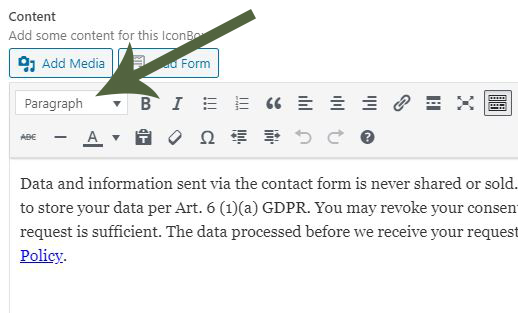
    Also let the dev deam know that we should be able to choose a font size for ALL screen sizes in the Content editor section:
    icon box content

    • This reply was modified 5 years, 10 months ago by milkytech. Reason: updated image links
    #1212610

    Hi,
    Please try this code in the General Styling > Quick CSS field or in the WordPress > Customize > Additional CSS field instead:

    h5.av-share-link-description.av-no-toc:before {
    	content: 'Deel dit verhaal';
    	color: #000;
    	font-size: 16px !important;
    } 
    h5.av-share-link-description.av-no-toc {
    	font-size: 0 !important;
        width: 100%;
    }

    Then clear your browser cache and check.

    Best regards,
    Mike

    #1212611
    miayuno
    Participant

    with the last release 4.7.4 of enfold we lose the ability to control h1 h2 h3 h4 h5 h6 font sizes in the “special heading” module of the avia page builder.
    Inspecting code in front end show that the font-size is applied to the wrapper div with the class: .av-special-heading
    but this css rule do not aply to the <h> child (with the class .av-special-heading-tag )
    So we can not control the size of our special headings ?

    #1212609

    Hi Mike,

    I see that the code is’nt working correctly on mobile. Also I’ve changed something to the social icons which are perfect on desktop but not on mobile. When I change on mobile nothing happens. Any ideas? This is the code I have:

    .av-share-link-description.av-no-toc {
    text-align: center !important;
    }
    
    .av-share-box .avia-related-tooltip {
    display: none !important;
    }
    
    #top .av-share-box ul {
    margin: auto !important; 
    width: 15%; 
    float: none !important; 
    }
    
    @media only screen and (max-width 767px) {
    #top .av-share-box ul {
    margin: auto !important; 
    width: 35% !important; 
    float: none !important; 
    }
    }
    
    .av-share-box ul li a {
    font-size: 18px !important;
    }
    
    .av-share-box ul li, #top .av-share-box ul {
    border: none !important;
    }
    
    h5.av-share-link-description.av-no-toc:before {
    content: 'Share this story';
    color: #333333;
    } 
    h5.av-share-link-description.av-no-toc {
    color: #ffffff;
    width: 109%;
    }
    #1212599

    Hi,
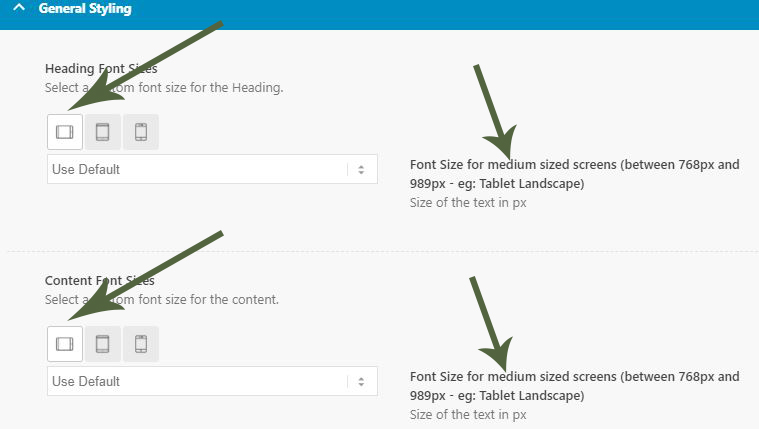
    I can see what you mean, in the “Icon List” the font sizes > content has a desktop option:
    2020-05-13_065313.png
    and the “Icon Box” General Styling > Content Font Sizes doesn’t:
    2020-05-13_065458.png
    I will submit this to the dev team to review.

    Best regards,
    Mike

    #1212589

    In reply to: Burger menu jumping

    Thanks Rikard,…spot on!!!
    The mobile menu works now!!

    Could you see why ‘only’ the English menu is different from the German menu (it slips 10px down) when I add this code?

    nav.main_menu .av-main-nav {
    	font-size: 1.3vw!important;
    	text-decoration: none;
    	margin-top: 10px!important;
    }

    I don’t get it as the styles.css is the same for both languages…? I need to place the main menu further down and the dropdon aligned with the slider image.

    txs a lot,
    Stefan

    #1212396

    In reply to: Footer Styling

    I haven’t set any of the fonts/sizes in the footer, they just are whatever the various plug-ins have them set as automatically, which is all across the board. How do I make them all consistent?

    #1212345

    @Luc_44 These guys are here to help, not steal your ‘data’. You don’t have to give them your login. You can create a new user for them to use temporarily. Not sure what ‘data’ you are trying to protect but WordPress is open source and if by ‘data’ you mean your ‘content’, you are putting it in a website for the world to see. Your custom css and html is also accessible to the world. Even your custom php can be figured out by a savvy user from the rendered html.

    Now that that is out of the way, I am having the same problem. The only options for the content of the icon box are “Paragraph” and a bunch of “Heading” sizes. I want to go smaller than “Paragraph”. In “General Styling” under the “Styling” tab, changing the font size for content doesn’t seem to have any effect. I changed it to 10px and it still looks exactly the same. In DevTools it shows the 10px being applied to the div surrounding the <p> but making changes to that div attribute right in DevTools has no effect on the content font size inside the <p>. I’m sure I can get around this with some custom CSS but I should be able to pick any font size I want from the dropdown in the advanced layout editor.

    #1212278
    Yigit
    Keymaster

    Hi,

    We wanted to create this thread as a channel to share the fixes that will be included in upcoming updates and known issues that are being worked on.

    Preview for upcoming version 7.2:

    • Feature: added support for WooCommerce Brands on single product pages
    • Feature: new ALB Element “Product Brands”
    • Feature: new ALB Element “Product Brands List”
    • fixed: CSS for WooCommerce lock symbols in password fields
    • Updated: css and js minification scripts without gulp in folder /dev

    Current fixes for upcoming version 7.1.4 are as following ( last update 2025-01-14 ):

    • tweak: force clear cache to reload css and js files after theme options update
    • fixed: Warning: Undefined array key “trail_end” in /enfold/includes/helpers/helper-template-logic.php on line 210
    • fixed: link notices in language files
    • Patchstack team Broken Access Control vulnerability report: fixed in ajax search
    • Patchstack team XSS vulnerability report: Iconbox link fixed

    DEVELOPERS:

    • added: filter ‘avf_default_container_tag_textblock’ – allows to modify the Text Block container tag
    • added: filter ‘avf_before_force_clear_caches’ – shortcut clear cache and use own functions
    • added: action ‘ava_force_clear_caches’ – called when finished with clear cache

    Fixes for released version 7.1.3 are as following:

    • tweak: Center reCaptcha V2 when Contact Form labels are centered
    • fixed: ALB Team Member CET cannot be saved
    • accessibility: add an option to replace section tag by div in ALB textblock
    • Patchstack team XSS vulnerability report: column and cell link fixed
    • PHP 8.3 compatibility: fixed filesize <= 0 problem in function avia_backend_create_file()
    • removed: Support for plugin “One Click Accessibility”

    Fixes for released version 7.1.2 are as following:

    • feature: added Product Review Tab to Enfold Combo Widget
    • accessibility: replace empty hidden cookie reload anchor link with span
    • tweak: add a check for options array to be an array in function avia_get_option()
    • tweak: Add padding and background color to ALB Textblock
    • tweak: ALB Postslider – fixed inconsistent postdate when excerpt contains whitespace characters
    • tweak: make the string “Please wait a few seconds and dont reload the page….” translatable
    • performance: refactor code in ..\config-templatebuilder\avia-template-builder\php\base-classes\class-popup-templates-base.php function replace_templates()
    • fixed: misaligned ALB Gallery Navigation Arrows
    • fixed: query monitor message avia_element_js missing dependency on theme options page
    • PHP 8.4 compatibility: fix deprecation notices for nullable types in function parameters
    • Updated: Layerslider 7.15.1

    DEVELOPERS:

    • tweak: add byRef to parameters array of apply_filters_ref_array() calls
    • fixed: BigCommerce Masonry issue

    Fixes for released version 7.1.1 are as following:

    • tweak: Clean up options descriptions in theme options – added “read more” – section
    • tweak: Clean up options descriptions in ALB modal popup – added “read more” – section
    • tweak: replace checkboxes with toggles in ALB modal popup
    • fixed: Uncaught TypeError: can’t access property “applyFilters”, obj is undefined in../enfold/js/avia-js.js (window[‘wp’].hooks)
    • fixed: Warning: Undefined property: stdClass::$ID in ../enfold/includes/config-enfold/functions-enfold.php on line 860 + 862
    • fixed: ALB Audio Player cannot edit playlist when bundled Layerslider is deactivated
    • fixed: CSS in preview in theme options page “Header”
    • fixed: CSS with cart icon and transparent header
    • fixed: CSS for svg icons in header to inherit Advanced Styling CSS options
    • fixed: class-modal-elements.php select endtag missing /
    • Updated: Layerslider 7.14.4
    • updated: sync all language files (7.1.1)

    DEVELOPERS:

    • added: theme support “avia_alb_checkbox_toggles”
    • added: filter ‘avf_theme_option_desc_chars’ – allows to modify svg icons for additional description text
    • added: filter ‘avf_theme_option_desc_read’ – allows to modify read more text for additional description text
    • added: filter ‘avf_alb_modal_desc_chars’ – allows to modify svg icons for additional description text
    • added: filter ‘avf_alb_modal_desc_read’ – allows to modify read more text for additional description text
    • removed: outdated code already in comment

    Fixes for released version 7.1 are as following:

    • tweak: replace Wp Media Library by WordPress Media Library in ALB icon selector modal popup
    • performance: avoid multiple db queries when using attachment_url_to_postid
    • added: Google Fonts Source Sans Pro and Poppins to default font list

    Fixes for released version 7.0 are as following:

    • feature: added option to various ALB elements to filter WooCommerce OnSale products
    • feature: support to upload custom SVG Icon sets, also colored svg icons (color scheme settings or custom color settings do not affect color of these icons)
    • feature: theme option to deactivate default iconfont entypo-fontello in “SVG Iconset and Iconfont Manager”
    • tweak: support german umlaut in URL of “Table of content” widget
    • tweak: added class content-* to grid row cell container .flex_cell
    • tweak: load google maps js API async
    • tweak: remove double HTML markup for “date” in ALB timeline
    • PHP 8.2 compatibility: fixed Uncaught TypeError in class MetaBoxBuilder line 311
    • fixed: Fold/Unfold button not hidden in responsive mode when fold container is hidden
    • WordFence vulnerablity fix: limit download of theme options to admin only (discovered by mikemyers)
    • WordFence vulnerablity fix: removed not needed function avia_ajax_get_image_color() (discovered by mikemyers)
    • updated: Google Maps API version to 3.59
    • updated: Italian language files it_IT (version 7.0, provided by BigBatT – (Email address hidden if logged out) )
    • updated: Dutch language files nl_NL (version 7.0 provided by EZWebdesign – Roger Hoen )
    • updated: French language files fr_FR (version 7.0, provided by comkapi – Patrick)

    DEVELOPERS:

    • tweak: splitted functions.php and functions-enfold.php in seperate files and restructured files in /includes folder
    • tweak: adjusted logic to connect ALB default icon font “fontello” to class avia_font_manager
    • tweak: moved default icon font entypo-fontello to subfolder ..\config-templatebuilder\avia-template-builder\assets\fonts\entypo-fontello\
    • tweak: added “SVG Entypo-Fontello” as default svg icon set to subfolder ..\config-templatebuilder\avia-template-builder\assets\fonts\svg_entypo-fontello\
    • tweak: improved aria and accessability support for svg icons
    • added: iconfont entypo-fontello-enfold containing icons needed by enfold core (e.g. for 3-rd party plugins)
    • removed: function $.fn.avia_color_picker_autodetection – not used by Enfold
    • removed: function avia_ajax_get_image_color() and css dependencies
    • added: filter ‘avf_svg_icon_set_config’ –
    • added: filter ‘avf_svg_icon_info’ –
    • added: filter ‘avf_svg_images_get_icon_html’ –
    • added: filter ‘avf_svg_images_local_to_url’ –
    • added filter ‘avf_svg_images_icon_as_img’ – allows to replace svg tag with < img src=' '>
    • added: filter ‘avf_switch_iconfont_to_svg’ –
    • added: filter ‘avf_use_svg_from_media_library’ – allows to skip svg from media library
    • added: filter ‘avf_queried_svg_from_media_library’ – filter queried svg files
    • renamed: filter ‘avb_backend_editor_element_data_filter’ to ‘avf_backend_editor_element_data_filter’
    • removed: filter ‘avia_post_nav_entries’ -> ‘avf_post_nav_entries’
    • added: attribute is-colored=”true” is added to svg tag of colored svg icons

    Fixes for released version 6.0.9 are as following:

    • tweak: Improve logic for /?avia_extended_shop_select= queries – use data-href attribute and js routing
    • tweak: add footer tag when Footer Setting: Select a page to replace both footer and socket
    • fixed: Uncaught TypeError: Cannot access offset of type string on string in ../includes/helper-asset.php
    • fixed: Enfold theme options translations do not work in 6.0.8
    • fixed: PHP Fatal error: Uncaught TypeError: strip_tags(): in ..\framework\php\widgets\widget-classes\class-avia-partner.php
    • WP 6.2.0 compatibility: fix missing bulk select checkboxes in backend menu page

    DEVELOPERS:

    • tweak: improve var ‘–enfold-header-height’ (provided by Guenni007)

    Fixes for released version 6.0.8 are as following:

    • WP 6.7.0 compatibility: fixed PHP Notice: The function _load_textdomain_just_in_time was called too early
    • PHP 8.2 compatibility: added stricter type checking to avoid warnings or errors

    DEVELOPERS:

    • tweak: add post metadata as classes to body tag
    • added: filter ‘avf_metadata_to_body_class’ – allows to filter post metadata like tags, category, … added to body tag

    Fixes for released version 6.0.7 are as following:

    • feature: add support for youtube shorts videos in lightbox (https://www.youtube.com/shorts/video-id)
    • feature: add support for youtube shorts videos in Easy Slider, Fullwidth Easy Slider, Fullscreen Slider, Section background
    • tweak: wrapped theme option Shop Description to allow use of shortcodes
    • fixed: Google Fonts preview link in the Enfold theme options broken
    • fixed: WP Block Embed element has extra height and padding
    • YOAST compatibility: added a check for WC()->session to product_snippet_tabs.php
    • WP 6.7.0 compatibility: fixed function wp_targeted_link_rel is deprecated since version 6.7.0
    • WP 6.7.0 compatibility: fixed function wp_targeted_link_rel_callback is deprecated since version 6.7.0
    • WP compatibility: fixed broken editor when layerslider plugin disabled
    • Updated: LayerSlider 7.14.0

    DEVELOPERS:

    • tweak: wrap usage of sessionStorage in try/catch blocks
    • tweak: added CSS var ‘–enfold-header-height’ to HTML tag

    Fixes for released version 6.0.6 are as following:

    • fixed: post css stylings not updated after importing theme settings from file
    • reverted: ALB Accordion – open a toggle when hash manually changed in browser search bar (might break element behaviour)

    Fixes for released version 6.0.5 are as following:

    • tweak: updated theme options description Google Measurement ID
    • tweak: added text-size-adjust property to base.css
    • tweak: changed CSS for X social icon
    • tweak: ALB Accordion – open a toggle when hash manually changed in browser search bar
    • added: missing text domain in ..\includes\admin\option_tabs\avia_menu.php
    • PHP 8.2 compatibility – fix: Allow usage of dynamic property for classes extending aviaFramework\base\object_properties and aviaBuilder\base\object_properties
    • Updated: LayerSlider 7.12.4 (fixed vulnerability report)

    Fixes for released version 6.0.4 are as following:

    • tweak: ?s=xxx is removed except for search page (no more 404 redirect)
    • fixed: image formats like jpg, png, … in pagination links open lightbox instead of page
    • fixed: Wordfence XSS Vulnerabilities reports with wrapper_class and class
    • removed: backwards compatibility 4.8.4. default white sonar effect for ALB icon on hover
    • removed: support for outdated Envato theme updater API < 3.0
    • PHP 8.2 compatibility – fix: Deprecated: Use of “self” in callables
    • Updated: LayerSlider 7.12.2

    Fixes for released version 6.0.3 are as following:

    • tweak: remove “Dismiss” from admin notice 6.0 and 6.0.1
    • tweak: ALB Akkordion adjust js logic to avoid unnecessary updating of toggle titles in DOM
    • added: Threads Social Icon to theme options and ALB Social Buttons
    • fixed: WooCommerce category banner image shows wrong image when no category image is selected
    • fixed: ALB Accordion toggle title does not allow 0
    • fixed: ALB Accordion toggle titles with numbers throw js error
    • accessibility: added aria-label expand/collapse to ALB toggle heading
    • accessibility: added aria-label to HTML heading tags in layout templates (e.g. loop-index.php, loop-page.php, …) and ALB elements
    • accessibility: added aria-label to HTML footer tag in footer.php
    • accessibility: added aria-label to HTML aside tags
    • accessibility: added “Contact Form” as default aria-label text to new added ALB Contact From element – already existing are not touched

    DEVELOPERS:

    • added: filter ‘avf_aria_label_for_header’ – allows to change the generated aria-label text before output
    • added: filter ‘avf_aria_label_for_footer’ – allows to change the default aria-label text before output
    • added: filter ‘avf_aria_label_for_sidebar’ – allows to change the default aria-label text before output

    Fixes for released version 6.0.2 are as following:

    • Compatibility: WP 6.6 fix for block editor hiding ALB button in header
    • accessibility: use aria-label=false for ALB icons with a link
    • accessibility: added role=”menu” aria-orientation=”vertical” to av-burger-overlay div

    DEVELOPERS:

    • tweak: ALB Heading added addition class av-font-size-is-xx to container

    Fixes for released version 6.0.1 are as following:

    • performance tweak: remove custom fields query from frontend and allow to limit result set in backend
    • tweak: extended ALB button elements with aria-label from custom title attribute
    • tweak: extended ALB button elements button title attribute option with dynamic content
    • tweak: ALB buttons move option “Button Title Attribute” to “Content” tab below “Icon Visibility”
    • tweak: ALB buttons removed condition for Button Title Attribute in modal popup
    • tweak: display 6.0 backend update message to administrators only
    • tweak: remove query for WP custom fields from frontend for dynamic content feature
    • tweak: extend theme option to show “Custom Layout” menus in WP menus to admins or all users
    • tweak: make Contact Form placeholders inherit body font family
    • fixed: missing default icons in ALB Button Row element in the backend
    • fixed: Shop banner warning “Array to string conversion in ../config-woocommerce/config.php on line 1773”
    • fixed: ALB Accordion title broken when using HTML markup
    • fixed: ALB masonry adds alt attribute to background image container – removed

    DEVELOPERS:

    • added: theme support ‘avia_builder_add_heading_type_size_class’ – adds option to add additional class to heading for custom styling
    • added: filter ‘avf_layerslider_order_by_select_alb’ – change the order of layersliders in selectbox in canvas of ALB
    • added: filter ‘avf_custom_layout_show_wp_menus’ – allows to filter, which users can see “Custom Layout” menus in WP menus

    Fixes for released version 6.0 are as following:

    • feature: extended options for shop banner location (above or below title/breadcrumb bar) and parallax or scroll
    • feature: added options for responsive shop banner image
    • feature: ALB Accordion added option to show toggle title below content
    • feature: ALB Accordion added option to set slide speed of toggle content for each toggle
    • feature: ALB Accordion added option for an open toggle title
    • feature: Theme options -> Layout Builder -> Custom Page Layout And Dynamic Content
    • feature: Dynamic content support in TinyMCE “ALB Magic Wand Button” dropdown
    • feature: new ALB element “Dynamic Data” (can be used in ALB Table element)
    • feature: new ALB element “Custom Layout”
    • feature: shortcode ‘av_dynamic_el’ – supports output of dynamic data also in non ALB areas
    • feature: added theme option Layout Builder -> Show advanced options -> Activate Your Custom Post Types For ALB
    • feature: CPT support to select default terms when saving post (WP Dashboard -> Settings -> Writing)
    • feature: CPT support to extend CPT Edit Page table with taxonomy column and thumbnail colum (WP Dashboard -> Settings -> Writing)
    • feature: Extended ALB video for portrait videos and better lightbox CSS for portrait, landscape and also for custom ratio videos
    • feature: added Dynamic Content support to various elements – see changelog
    • feature: ACF (Advanced Custom Fields) support with dynamic content for ACF types – see changelog
    • feature: Support for ACF post types and taxonomies
    • feature: Checkbox ACF -> Post Type -> Advanced Configuration -> Enfold Layouts to show Layout Metabox in edit screen
    • tweak: updated the “For Developers: Custom Tab ID” string to “Custom Toggle ID” in ALB Accordion element
    • weak: moved ALB “Page Content” to Layout Element Tab
    • accessibility: ALB tabs added better HTML support for European Accessibility Act
    • accessibility: started adding html markup aria-hidden=”true” tabindex=”-1″ for empty h* tags to several ALB elements
    • accessibility: added aria-label=’…’ to elements where user entered a “Custom Title Attribute” in addition to title=’….’
    • accessibility: ALB accordion added better HTML support for European Accessibility Act
    • fixed: warning undefined-array-key-medium-in-class-popup-templates-responsive-php
    • fixed: CSS for ALB audio player in audio post format
    • fixed: ALB table element delete icon for rows not visible for button rows
    • fixed: Theme option ‘Custom Post Type Screen’ not hidden when theme support ‘avia-custom-elements-cpt-screen’ is not set
    • fixed: CSS for ALB table when empty cells in the pricing table are hidden when “show empty cells” is enabled
    • fixed: Latest News widget might break backend
    • fixed: ALB icon box link title displayed instead of title when link is applied to icon and title
    • Updated: LayerSlider 7.11.1

    DEVELOPERS:

    • feature: dismissible admin notice boxes with possibility to include custom HTML templates
    • tweak: wrapped functions in ..\config-woocommerce\admin-options.php in function_exits()
    • tweak: redesign of theme options update logic with integration of dismissible admin notice boxes
    • tweak: ALB video add custom css class option and video format to lightbox wrap container .mfp-wrap (based on solution by Guenni007)
    • added: theme support ‘avia_disable_cpt_support’ to disable CPT support feature (does not load class file)
    • added: various filters for custom page layout, dynamic content support, admin notice box – see changelog
    • added: classes ‘avia-video-cookie-allowed’ and ‘avia-video-cookie-not-allowed’ to HTML
    • added: filter ‘avf_alb_magic_wand_button’ – allows to modify tinyMCE menu for ALB magic wand dropdown
    • added: filter ‘avf_force_alb_usage’ – allows to force ALB for a post (see https://github.com/KriesiMedia/enfold-library/blob/master/actions%20and%20filters/ALB%20core/avf_force_alb_usage.php)
    • added: filter ‘avf_shortcode_insert_button_backend_disabled’ – allows to enable/disable an ALB shortcode button in backend
    • added: filter ‘avf_cpt_support_post_types’ – allows to remove CPT’s from support by this feature (e.g. like products)
    • added: filter ‘avf_cpt_support_no_table_filters’ – allows to skip adding thumbnail and taxonomy columns to CPT table screens
    • added: filter ‘avf_cpt_wp_settings_writing’ – allows to create a custom output on WP Settings Writing screen
    • added: filter ‘avf_woocommerce_default_banner_image_size’ – change shop banner image size (intended for product category thumbs)
    • added: filter ‘avf_contact_form_datepicker_args’ – change contact form datepicker aguments e.g. like date range
    • added: template taxonomy.php to provide basic support for ACF custom taxonomies (based on taxonomy-portfolio_entries.php)
    • removed: avia_backend_admin_notice()
    • removed: avia_backend_reset_admin_notice()

    Regards,
    Yigit

    • This topic was modified 3 years, 10 months ago by Günter.
    • This topic was modified 3 years, 8 months ago by Günter.
    • This topic was modified 3 years, 6 months ago by Günter.
    • This topic was modified 3 years, 2 months ago by Günter.
    • This topic was modified 2 years ago by Günter.
    • This topic was modified 1 year, 9 months ago by Günter.
    • This topic was modified 1 year, 8 months ago by Günter.
    #1212177

    Topic: Burger Menu Issues

    in forum Enfold
    onedesignprint
    Participant

    Hi

    When clicking on the burger menu, menu only views when you click on the bottom (please see link provided http://keighleyvaults.co.uk/preview)

    There has been some CSS added to make the phone number larger, so not sure if this is causing the problem;

    .phone-info {
    font-size: 16px;
    padding: 0;
    }
    #header_meta .container {
    min-height: 80px;
    }
    #header_meta {
    min-height: 20px;
    height: 20px;
    }
    .sub_menu {
    top: 80px;
    }

    #1212119

    Hi flipper1960,

    Here is the code you can put in Enfold > General Styling > Quick Css,  if it does not work, put into themes/enfold/css/custom.css

    
    .togglecontainer .single_toggle p.toggler {
        font-size: 16px;
    }
    

    If you need further assistance please let us know.

    Best regards,
    Victoria

    #1212002

    Thanks for your quick reply.

    Take a look at the first <h1> and the following <p> below

    The computed font style for these elements different:
    <h1>:

    h1, h2, h3, h4, h5, h6, #top .title_container .main-title, tr.pricing-row td, #top .portfolio-title, .callout .content-area, .avia-big-box .avia-innerbox, .av-special-font, .av-current-sort-title, .html_elegant-blog #top .minor-meta, #av-burger-menu-ul li {
        font-family: open sans condensed,helveticaneue,helvetica neue,helvetica-neue,Helvetica,Arial,sans-serif;
    }

    <p>:

    html, body, div, span, applet, object, iframe, h1, h2, h3, h4, h5, h6, p, blockquote, pre, a, abbr, acronym, address, big, cite, code, del, dfn, em, img, ins, kbd, q, s, samp, small, strike, strong, sub, sup, tt, var, b, u, i, center, dl, dt, dd, ol, ul, li, fieldset, form, label, legend, table, caption, tbody, tfoot, thead, tr, th, td, article, aside, canvas, details, embed, figure, figcaption, footer, header, hgroup, menu, nav, output, ruby, section, summary, time, mark, audio, video {
        margin: 0;
        padding: 0;
        border: 0;
        font-size: 100%;
        font: inherit;
        vertical-align: baseline;
    }

    thus it read:

    :lang(zh-hant) body {
        font-family: open sans,Arial,Helvetica,microsoft jhenghei,微軟正黑體,pmingliu,新細明體,hiragino sans tc,冬青黑體,sans-serif!important;
    }

    Hi,
    I checked and the css should still work for the English side, for the Italian side please add this css:

    input.submit[value="Pubblica il commento"] {
        color: #ffffff!important;
        border-color: #062857!important;
        border-radius: 100px!important;
        border-width: 2px!important;
        font-size: 16px!important;
        font-weight: bold!important;
        background-color: #084a79!important;
    }
    input.submit[value="Pubblica il commento"]:hover {
    background: rgb(80,80,80) !important;
    }

    Then clear your browser cache and check.

    Best regards,
    Mike

    Hi,
    To add your rounded style to the “post comment” button, Please try this code in the General Styling > Quick CSS field or in the WordPress > Customize > Additional CSS field:

    input.submit[value="Post Comment"] {
        color: #ffffff!important;
        border-color: #062857!important;
        border-radius: 100px!important;
        border-width: 2px!important;
        font-size: 16px!important;
        font-weight: bold!important;
        background-color: #084a79!important;
    }
    input.submit[value="Post Comment"]:hover {
    background: rgb(80,80,80) !important;
    }

    After applying the css, Please clear your browser cache and check.
    2020-05-10_102645.png

    Best regards,
    Mike

    #1211543

    Hi,
    Sorry for the late reply and thanks for the login, I see for the “out of stock” text color you are using this css:

    div.product p.stock {color: red; font-size: 13px;}

    Please try this instead:

    #top.single-product p.stock.out-of-stock {color: red; font-size: 13px;}
    #top.single-product p.stock.available-on-backorder {color: orange; font-size: 13px;}

    After applying the css, Please clear your browser cache and check.

    Best regards,
    Mike

    #1211255

    i transfered it this way to another playground: https://webers-testseite.de/pureinstall/tada/
    and changed abit the css and had to adjust the media querry breakpoints due to different font-sizes etc. pp

    #1211126

    Thank you. Using that CSS worked for my font size problem

    However, on #1, I already have the mobile menu clicked to “Activate for smartphones and tablets” but its not working. Do you have a CSS trick?

    #1211083

    this at the end of the answer is the enfold shortcode for that grid-row with all classes and IDs preset.
    you can insert that on an empty page in the debug modus field.

    You know how to activate the debug mode?
    this to child-theme functions.php

    // Debug Modus Enfold
    add_action('avia_builder_mode', "builder_set_debug");
    function builder_set_debug(){
      return "debug";
    }

    the only thing to mention is that i use the little plugin of Günter here from the dev team : avia-special-characters
    to have special characters on input fields – that is the #amp# for the ampersand.

    next to know is my little snippet to use the grid-row alb not as full-width layout element:
    to child-theme functions.php:

    function grid_layout_notfull(){
    ?>
    <script>
    (function($){
        $('.av-layout-grid-container.grid-notfull' ).wrap( '<div class="main_color notfullsize color1"></div>');
        $('.notfullsize').css({"clear": "both", "width": "100%" , "float": "left" , "position": "static" , "min-height": "100px" });
        $('.grid-notfull').css({"max-width": "1510px", "margin": "0 auto" , "padding": "0 50px"});
    })(jQuery);
    </script>
    <?php
    }
    add_action('wp_footer', 'grid_layout_notfull');

    you have to synchronize the 1510px to your setting ( on your page it is 1440px )

    and then a lot of flex-box model css for your quick css.
    i use on the grid-row an ID : covid-beyond
    and a custom-class for not full-width: grid-notfull

    /*******************************************/
    /****** covid fields responsive behavior *****/
    /*******************************************/
    #covid-beyond {
        display: flex !important;
        flex-flow: row wrap;
        justify-content: stretch;
        background: transparent !important
    }
    
    #covid-beyond .av-subheading_below {
          margin-top:0.3em;
    }
    
    #covid-beyond .flex_cell.cell-one, 
    #covid-beyond .flex_cell.cell-two, 
    #covid-beyond .flex_cell.cell-three, 
    #covid-beyond .flex_cell.cell-four {
        display: flex !important;
        width: unset !important;
        flex: 1 1 23%;
        margin: 0 !important;
        padding: 1% !important;
    }
    
    #covid-beyond .flex_cell.cell-one .flex_cell_inner ,
    #covid-beyond .flex_cell.cell-two .flex_cell_inner ,
    #covid-beyond .flex_cell.cell-three .flex_cell_inner ,
    #covid-beyond .flex_cell.cell-four .flex_cell_inner {
      display: flex !important;
      flex-flow: column wrap;
      justify-content: space-between;
    }
    
    #covid-beyond .flex_cell.cell-one .flex_cell_inner .flex_column,
    #covid-beyond .flex_cell.cell-two .flex_cell_inner .flex_column,
    #covid-beyond .flex_cell.cell-three .flex_cell_inner .flex_column,
    #covid-beyond .flex_cell.cell-four .flex_cell_inner .flex_column {
      flex: 1 1 auto;
      border: solid #aaa;
      border-width: 2px 0
    }
    
    /******* comment this out if you don't like the bottom margin on the smaller columns *****/
    #covid-beyond .flex_cell.cell-three .flex_cell_inner .flex_column:first-child, 
    #covid-beyond .flex_cell.cell-four .flex_cell_inner .flex_column:first-child {
        margin-bottom: 20px;
    }
    
    #covid-beyond .flex_cell_inner .flex_column:nth-child(2) {
      margin-top: -2px !important;
    }
    
    #covid-beyond .flex_column {
        min-height: 250px;
    }
    
    #covid-beyond .cell-one .flex_column {
      background-color: transparent !important;
    }
    
    #covid-beyond .cell-one .flex_cell_inner {
      background: linear-gradient(rgba(235,134,78,0.18),rgba(235,134,78,0.6)) !important;
    }
    
    #covid-beyond .avia-button-wrap {
      position: absolute;
      bottom: 10px;
      right: 10px;
    }
    
    /***************  Media Querries *************************/
    @media only screen and (max-width:1085px) {
      #covid-beyond .flex_cell.cell-one  {
          flex: 1 1 100%;
      }
      #covid-beyond .flex_cell.cell-two, 
      #covid-beyond .flex_cell.cell-three, 
      #covid-beyond .flex_cell.cell-four {
          flex: 1 1 33.29%;
      }
      #covid-beyond .cell-one .flex_cell_inner {
        width: 100%;
      }
    } 
    
    @media only screen and (max-width:930px) {
      #covid-beyond .flex_cell.cell-one, 
      #covid-beyond .flex_cell.cell-two, 
      #covid-beyond .flex_cell.cell-three, 
      #covid-beyond .flex_cell.cell-four  {
          flex: 1 1 49%;
      }
      #covid-beyond .flex_cell.cell-two .flex_cell_inner .flex_column {
          border-width: 2px 0 0;
      }
    } 
    
    @media only screen and (max-width:767px) {
      #covid-beyond {
          justify-content: space-evenly;
      }
      #covid-beyond .flex_cell.cell-one, 
      #covid-beyond .flex_cell.cell-two, 
      #covid-beyond .flex_cell.cell-three, 
      #covid-beyond .flex_cell.cell-four {
          flex: 1 1 100%;
      }
      #covid-beyond .flex_cell.cell-two .flex_cell_inner .flex_column, 
      #covid-beyond .flex_cell.cell-three .flex_cell_inner .flex_column, 
      #covid-beyond .flex_cell.cell-four .flex_cell_inner .flex_column {
          border-width: 0 0 2px 0;
      }
      .responsive #top .container #covid-beyond .av-content-small, 
      .responsive #top #wrap_all #covid-beyond .flex_column, 
      .responsive #top #wrap_all #covid-beyond .av-flex-cells .no_margin {
              margin-bottom: 0px;
      }
        
      .responsive #top #wrap_all #covid-beyond.av-flex-cells .no_margin {
          padding-left: 20px !important;
          padding-right: 20px !important;
      }
      #covid-beyond .flex_column {
          min-height: 150px !important;
      }
    } 

    the shortcodes for that grid-row

    [av_layout_row border='' min_height_percent='' min_height_pc='25' min_height='0' color='main_color' mobile='av-flex-cells' mobile_breaking='av-break-at-tablet' id='covid-beyond' custom_class='grid-notfull big-screens' aria_label='' av_element_hidden_in_editor='0' av_uid='av-1jw1sp']
    [av_cell_one_fourth vertical_align='top' padding='20px' padding_sync='true' background='bg_color' background_color='' background_gradient_color1='' background_gradient_color2='' background_gradient_direction='vertical' src='' attachment='' attachment_size='' background_attachment='scroll' background_position='top left' background_repeat='no-repeat' link='' linktarget='' link_hover='' mobile_display='' custom_class='cell-one' av_uid='av-huwh']
    
    [av_one_full first min_height='' vertical_alignment='av-align-top' space='' margin='0px' margin_sync='true' link='' linktarget='' link_hover='' padding='20px' padding_sync='true' border='' border_color='' radius='0px' radius_sync='true' background='bg_color' background_color='#ffffff' background_gradient_color1='' background_gradient_color2='' background_gradient_direction='vertical' src='' attachment='' attachment_size='' background_position='top left' background_repeat='no-repeat' animation='' mobile_breaking='' mobile_display='' av_uid='av-6na81d' custom_class='']
    
    [av_heading heading='COVID-Beyond' tag='h2' link='' link_target='' style='blockquote modern-quote' size='' subheading_active='subheading_below' subheading_size='15' margin='' padding='10' color='' custom_font='' custom_class='' id='' admin_preview_bg='' av-desktop-hide='' av-medium-hide='' av-small-hide='' av-mini-hide='' av-medium-font-size-title='' av-small-font-size-title='' av-mini-font-size-title='' av-medium-font-size='' av-small-font-size='' av-mini-font-size='' av_uid='av-2sx44h3'][/av_heading]
    
    [av_textblock size='' av-medium-font-size='' av-small-font-size='' av-mini-font-size='' font_color='' color='' id='' custom_class='' av_uid='av-2wp1dvr' admin_preview_bg='']
    Krise als Chance zum Neuanfang auf höherer Ebene
    [/av_textblock]
    
    [/av_one_full][/av_cell_one_fourth][av_cell_one_fourth vertical_align='top' padding='20px' padding_sync='true' background='bg_color' background_color='' background_gradient_color1='' background_gradient_color2='' background_gradient_direction='vertical' src='' attachment='' attachment_size='' background_attachment='scroll' background_position='top left' background_repeat='no-repeat' link='' linktarget='' link_hover='' mobile_display='' custom_class='cell-two' av_uid='av-wk8rt']
    
    [av_one_full first min_height='' vertical_alignment='av-align-top' space='' row_boxshadow_color='' row_boxshadow_width='10' margin='0px' margin_sync='true' mobile_breaking='' border='' border_color='' radius='0px' radius_sync='true' padding='20px' padding_sync='true' column_boxshadow_color='' column_boxshadow_width='10' background='bg_color' background_color='#f8edff' background_gradient_color1='' background_gradient_color2='' background_gradient_direction='vertical' src='' attachment='' attachment_size='' background_position='top left' background_repeat='no-repeat' highlight_size='1.1' animation='' link='' linktarget='' link_hover='' title_attr='' alt_attr='' mobile_display='' id='' custom_class='' aria_label='' av_uid='av-65k3td']
    
    [av_heading heading='Leaders #amp# Organisationen' tag='h3' link='' link_target='' style='blockquote modern-quote' size='' subheading_active='subheading_below' subheading_size='15' margin='' padding='10' color='' custom_font='' custom_class='' id='' admin_preview_bg='' av-desktop-hide='' av-medium-hide='' av-small-hide='' av-mini-hide='' av-medium-font-size-title='' av-small-font-size-title='' av-mini-font-size-title='' av-medium-font-size='' av-small-font-size='' av-mini-font-size='' av_uid='av-2n5g4o7'][/av_heading]
    
    [av_textblock size='' av-medium-font-size='' av-small-font-size='' av-mini-font-size='' font_color='' color='' id='' custom_class='' av_uid='av-2g5fcav' admin_preview_bg='']
    Zukunftsbild und Strategie. Komplexität auf den Punkt. Treffende Entscheidungsfindung.
    
    Entwicklung at once;
    Persönlichkeit, Team, Leadership, Kultur, Organisation und Realität
    [/av_textblock]
    
    [/av_one_full][/av_cell_one_fourth][av_cell_one_fourth vertical_align='top' padding='20px' padding_sync='true' background='bg_color' background_color='' background_gradient_color1='' background_gradient_color2='' background_gradient_direction='vertical' src='' attachment='' attachment_size='' background_attachment='scroll' background_position='top left' background_repeat='no-repeat' link='' linktarget='' link_hover='' mobile_display='' custom_class='cell-three' av_uid='av-12q1c9']
    
    [av_one_full first min_height='' vertical_alignment='av-align-top' space='no_margin' row_boxshadow_color='' row_boxshadow_width='10' margin='0px' margin_sync='true' mobile_breaking='' border='' border_color='' radius='0px' radius_sync='true' padding='20px' padding_sync='true' column_boxshadow_color='' column_boxshadow_width='10' background='bg_color' background_color='#fffae0' background_gradient_color1='' background_gradient_color2='' background_gradient_direction='vertical' src='' attachment='' attachment_size='' background_position='top left' background_repeat='no-repeat' highlight_size='1.1' animation='' link='' linktarget='' link_hover='' title_attr='' alt_attr='' mobile_display='' id='' custom_class='' aria_label='' av_uid='av-5obfoh']
    
    [av_heading heading='Leaders’ Familien #amp# Freunde' tag='h3' link='' link_target='' style='blockquote modern-quote' size='' subheading_active='subheading_below' subheading_size='15' margin='' padding='10' color='' custom_font='' custom_class='' id='' admin_preview_bg='' av-desktop-hide='' av-medium-hide='' av-small-hide='' av-mini-hide='' av-medium-font-size-title='' av-small-font-size-title='' av-mini-font-size-title='' av-medium-font-size='' av-small-font-size='' av-mini-font-size='' av_uid='av-25d8pvr'][/av_heading]
    
    [av_button label='Click me' icon_select='yes-right-icon' icon='ue832' font='entypo-fontello' size='small' position='right' label_display='' title_attr='' color='silver' custom_bg='#444444' custom_font='#ffffff' link='manually,http://' link_target='' id='' custom_class='' av_uid='av-k9xvb024' admin_preview_bg='']
    
    [/av_one_full][av_one_full first min_height='' vertical_alignment='av-align-bottom' space='no_margin' row_boxshadow_color='' row_boxshadow_width='10' margin='0px' margin_sync='true' mobile_breaking='' border='' border_color='' radius='0px' radius_sync='true' padding='20px' padding_sync='true' column_boxshadow_color='' column_boxshadow_width='10' background='bg_color' background_color='#edf8ff' background_gradient_color1='' background_gradient_color2='' background_gradient_direction='vertical' src='' attachment='' attachment_size='' background_position='top left' background_repeat='no-repeat' highlight_size='1.1' animation='' link='' linktarget='' link_hover='' title_attr='' alt_attr='' mobile_display='' id='' custom_class='' aria_label='' av_uid='av-440hrt']
    
    [av_heading heading='Individuen, Paare, Familien, Coaches #amp# Consultants' tag='h3' link='' link_target='' style='blockquote modern-quote' size='' subheading_active='' subheading_size='15' margin='' padding='10' color='' custom_font='' custom_class='' id='' admin_preview_bg='' av-desktop-hide='' av-medium-hide='' av-small-hide='' av-mini-hide='' av-medium-font-size-title='' av-small-font-size-title='' av-mini-font-size-title='' av-medium-font-size='' av-small-font-size='' av-mini-font-size='' av_uid='av-1t8tzgn'][/av_heading]
    
    [av_button label='Click me' icon_select='yes-right-icon' icon='ue832' font='entypo-fontello' size='small' position='right' label_display='' title_attr='' color='silver' custom_bg='#444444' custom_font='#ffffff' link='manually,http://' link_target='' id='' custom_class='' av_uid='av-k9xvb024' admin_preview_bg='']
    
    [/av_one_full][/av_cell_one_fourth][av_cell_one_fourth vertical_align='top' padding='20px' padding_sync='true' background='bg_color' background_color='' background_gradient_color1='' background_gradient_color2='' background_gradient_direction='vertical' src='' attachment='' attachment_size='' background_attachment='scroll' background_position='top left' background_repeat='no-repeat' link='' linktarget='' link_hover='' mobile_display='' custom_class='cell-four' av_uid='av-tjj6x']
    
    [av_one_full first min_height='' vertical_alignment='av-align-top' space='no_margin' row_boxshadow_color='' row_boxshadow_width='10' margin='0px' margin_sync='true' mobile_breaking='' border='' border_color='' radius='0px' radius_sync='true' padding='20px' padding_sync='true' column_boxshadow_color='' column_boxshadow_width='10' background='bg_color' background_color='#ffe8ef' background_gradient_color1='' background_gradient_color2='' background_gradient_direction='vertical' src='' attachment='' attachment_size='' background_position='top left' background_repeat='no-repeat' highlight_size='1.1' animation='' link='' linktarget='' link_hover='' title_attr='' alt_attr='' mobile_display='' id='' custom_class='' aria_label='' av_uid='av-4zyukx']
    
    [av_heading heading='Methoden der Zukunft #amp# Strategische Intuition' tag='h3' link='' link_target='' style='blockquote modern-quote' size='' subheading_active='' subheading_size='15' margin='' padding='10' color='' custom_font='' custom_class='' id='' admin_preview_bg='' av-desktop-hide='' av-medium-hide='' av-small-hide='' av-mini-hide='' av-medium-font-size-title='' av-small-font-size-title='' av-mini-font-size-title='' av-medium-font-size='' av-small-font-size='' av-mini-font-size='' av_uid='av-13ft747'][/av_heading]
    
    [av_button label='Click me' icon_select='yes-right-icon' icon='ue832' font='entypo-fontello' size='small' position='right' label_display='' title_attr='' color='silver' custom_bg='#444444' custom_font='#ffffff' link='manually,http://' link_target='' id='' custom_class='' av_uid='av-k9xvb024' admin_preview_bg='']
    
    [/av_one_full][av_one_full first min_height='' vertical_alignment='av-align-bottom' space='no_margin' row_boxshadow_color='' row_boxshadow_width='10' margin='0px' margin_sync='true' mobile_breaking='' border='' border_color='' radius='0px' radius_sync='true' padding='20px' padding_sync='true' column_boxshadow_color='' column_boxshadow_width='10' background='bg_color' background_color='#f2ffe5' background_gradient_color1='' background_gradient_color2='' background_gradient_direction='vertical' src='' attachment='' attachment_size='' background_position='top left' background_repeat='no-repeat' highlight_size='1.1' animation='' link='' linktarget='' link_hover='' title_attr='' alt_attr='' mobile_display='' id='' custom_class='' aria_label='' av_uid='av-4llc6h']
    
    [av_heading heading='Lern-Community der HyperTransformatoren, Frühaufstehern #amp# Rulebreakern' tag='h3' link='' link_target='' style='blockquote modern-quote' size='' subheading_active='' subheading_size='15' margin='' padding='10' color='' custom_font='' custom_class='' id='' admin_preview_bg='' av-desktop-hide='' av-medium-hide='' av-small-hide='' av-mini-hide='' av-medium-font-size-title='' av-small-font-size-title='' av-mini-font-size-title='' av-medium-font-size='' av-small-font-size='' av-mini-font-size='' av_uid='av-6mpmv'][/av_heading]
    
    [av_button label='Click me' icon_select='yes-right-icon' icon='ue832' font='entypo-fontello' size='small' position='right' label_display='' title_attr='' color='silver' custom_bg='#444444' custom_font='#ffffff' link='manually,http://' link_target='' id='' custom_class='' av_uid='av-k9xvb024' admin_preview_bg='']
    
    [/av_one_full][/av_cell_one_fourth]
    [/av_layout_row]
    

    Hi,

    here the screenshott: Screenshot
    The output text starts with the symbol box, but the “<” char in the content text of the symbol box triggers the issue
    after 2 times saving the page.

    The full borwser output is:

    
    Schadenslage
    
    Brand eines Wohnraumes
    
    Einfamilienhaus, max. 3. oberirdische Geschoße (Fluchtniveau < 7 m) – vgl. OIB Eine gefährdete Person an einem Fenster, Selbstrettung nicht möglich. [/av_icon_box] [/av_one_half][av_one_half min_height='' vertical_alignment='' space='' custom_margin='' margin='0px' row_boxshadow='' row_boxshadow_color='' row_boxshadow_width='10' link='' linktarget='' link_hover='' padding='0px' highlight='' highlight_size='' border='' border_color='' radius='0px' column_boxshadow='' column_boxshadow_color='' column_boxshadow_width='10' background='bg_color' background_color='' background_gradient_color1='' background_gradient_color2='' background_gradient_direction='vertical' src='' background_position='top left' background_repeat='no-repeat' animation='' mobile_breaking='' mobile_display='' av_uid='av-bre719'] [av_icon_box icon='ue81d' font='entypo-fontello' title='Eigene Lage' position='left' icon_style='' boxed='' font_color='' custom_title='' custom_content='' color='custom' custom_bg='' custom_font='#b02b2c' custom_border='' av-medium-font-size-title='' av-small-font-size-title='' av-mini-font-size-title='' av-medium-font-size='' av-small-font-size='' av-mini-font-size='' heading_tag='' heading_class='' link='' linktarget='' linkelement='' id='' custom_class='' av_uid='av-k9v639i9' admin_preview_bg=''] 24 Funktionen werden benötigt, davon mind. 6 mit Atemschutz. Zur Verhinderung der Brandausbreitung und für die Brandbekämpfung sind mind. 200 l/min Wasser über eine Zeitspanne von 10 Minuten erforderlich. Für die Fremdrettung der Person ist eine tragbare Leiter mit einer Länge von mind. 8 m erforderlich. [/av_icon_box] [/av_one_half] [av_one_half first min_height='' vertical_alignment='' space='' custom_margin='' margin='0px' row_boxshadow='' row_boxshadow_color='' row_boxshadow_width='10' link='' linktarget='' link_hover='' padding='0px' highlight='' highlight_size='' border='' border_color='' radius='0px' column_boxshadow='' column_boxshadow_color='' column_boxshadow_width='10' background='bg_color' background_color='' background_gradient_color1='' background_gradient_color2='' background_gradient_direction='vertical' src='' background_position='top left' background_repeat='no-repeat' animation='' mobile_breaking='' mobile_display='' av_uid='av-2xsih8d'] [av_icon_box icon='ue81d' font='entypo-fontello' title='Allgemeine Lage' position='left' icon_style='' boxed='' font_color='' custom_title='' custom_content='' color='custom' custom_bg='' custom_font='#b02b2c' custom_border='' av-medium-font-size-title='' av-small-font-size-title='' av-mini-font-size-title='' av-medium-font-size='' av-small-font-size='' av-mini-font-size='' heading_tag='' heading_class='' link='' linktarget='' linkelement='' id='' custom_class='' av_uid='av-k9v639i9' admin_preview_bg=''][/av_icon_box] [/av_one_half] [av_one_half min_height='' vertical_alignment='' space='' custom_margin='' margin='0px' row_boxshadow='' row_boxshadow_color='' row_boxshadow_width='10' link='' linktarget='' link_hover='' padding='0px' highlight='' highlight_size='' border='' border_color='' radius='0px' column_boxshadow='' column_boxshadow_color='' column_boxshadow_width='10' background='bg_color' background_color='' background_gradient_color1='' background_gradient_color2='' background_gradient_direction='vertical' src='' background_position='top left' background_repeat='no-repeat' animation='' mobile_breaking='' mobile_display='' av_uid='av-kbog2l'][/av_one_half] [av_section min_height='' min_height_pc='25' min_height_px='500px' padding='default' custom_margin='0px' custom_margin_sync='true' color='footer_color' background='bg_color' custom_bg='#42352c' background_gradient_color1='' background_gradient_color2='' background_gradient_direction='vertical' src='' attachment='' attachment_size='' attach='scroll' position='top left' repeat='no-repeat' video='' video_ratio='16:9' overlay_opacity='0.5' overlay_color='' overlay_pattern='' overlay_custom_pattern='' shadow='no-border-styling' bottom_border='no-border-styling' bottom_border_diagonal_color='#333333' bottom_border_diagonal_direction='' bottom_border_style='' custom_arrow_bg='' id='' custom_class='' aria_label='' av_element_hidden_in_editor='0' av_uid='av-k9v75rhk'] [av_heading heading='Ressourcenplan' tag='h3' link='manually,http://' link_target='' style='blockquote modern-quote modern-centered' size='' subheading_active='' subheading_size='15' margin='' padding='10' color='custom-color-heading' custom_font='#ffffff' custom_class='' id='' admin_preview_bg='' av-desktop-hide='' av-medium-hide='' av-small-hide='' av-mini-hide='' av-medium-font-size-title='' av-small-font-size-title='' av-mini-font-size-title='' av-medium-font-size='' av-small-font-size='' av-mini-font-size='' av_uid='av-196rixp'][/av_heading] [av_textblock size='' av-medium-font-size='' av-small-font-size='' av-mini-font-size='' font_color='custom' color='#ffffff' id='' custom_class='' av_uid='av-k9v79jn6' admin_preview_bg=''] Eine SEM beschreibt das Mindestmaß für die notwendigen Rollen und Maßnahmen die zu einem erfolgreichen Einsatz führen. Jede Feuerwehr in Österreich kann in der „1. Welle“ Sofortmaßnahmen setzen und damit die Lage stabilisieren und in vielen Fällen auch alleine erledigen. Werden weitere Kräfte benötigt, so sind in Alarmplänen die notwendigen personellen und technischen Ressourcen darzustellen. Die Nachbarfeuerwehr(en) werden zeitgleich oder auch nachalarmiert. x = Eintreffzeit erster Kräfte am Einsatzort x+5 = Eintreffzeit weiterer Kräfte zwischen 3 - 8 Minuten x+10 = Eintreffzeit weiterer Kräfte zwischen 8 - 15 Minuten [/av_textblock] [av_codeblock wrapper_element='' wrapper_element_attributes='' codeblock_type='' alb_description='' id='' custom_class='' av_uid='av-k9v8b0st'][/av_codeblock] [/av_section] [av_heading heading='Gefahren' tag='h3' link='manually,http://' link_target='' style='blockquote modern-quote modern-centered' size='' subheading_active='' subheading_size='15' margin='' padding='10' color='' custom_font='' custom_class='' id='' admin_preview_bg='' av-desktop-hide='' av-medium-hide='' av-small-hide='' av-mini-hide='' av-medium-font-size-title='' av-small-font-size-title='' av-mini-font-size-title='' av-medium-font-size='' av-small-font-size='' av-mini-font-size='' av_uid='av-mkj447'][/av_heading] [av_textblock size='' av-medium-font-size='' av-small-font-size='' av-mini-font-size='' font_color='' color='' id='' custom_class='' av_uid='av-k9v79jn6' admin_preview_bg='']
    
    Als Gefahr wird die Möglichkeit, dass jemandem etwas zustößt, dass ein Schaden eintritt oder ein drohenden Unheil bevorsteht, bezeichnet. Die folgende Matrix beschreibt für wen und wofür und wodurch Gefahren auftreten oder entstehen können.
    
    [/av_textblock]
    

    Since it happens in the latest ENFOLD version too, it should be easy to re-produce on your test system.

    Regards,
    Michael

    #1210966
    futur22
    Participant

    Hello,
    I added a timeline to a site and I want to change the sizes of different elements.
    Timeline Screenshot
    You can see the red bubbles in the screenshot. I changed (1) and (2) but can’t see an effect after saving. When I reopen this dialog I can see the fontsizes (1) and (2) are standard again.

    I want to decrease the sizes of (3), (4) and (5). The timeline is too big for my purposes.

    I installed Enfold with child theme yesterday on a fresh WordPress. Enfold version is 4.7.4. I searched for an update but WordPress doesn’t find 4.7.4.1.

    Thanks for help.

    #1210943

    Hey Marcus,

    Please try the following in Quick CSS under Enfold->General Styling:

    .avia_textblock a {
      font-size: 18px;
    }

    Best regards,
    Rikard

    #1210824

    Hey ginnywills,

    1. Go to Enfold > Main Menu > General (tab) > Menu Items for mobile set this to Activate for Ipad.
    2. Go to Enfold > General Styling > Quick CSS, then add this CSS code:

    @media only screen and (max-width:767px) {
      #top.home #wrap_all #full_slider_2 .avia-slideshow-button {
        font-size: 16px;
        line-height: 1.4;
      }
    }

    This code only affects the 2nd slider of the homepage.

    Best regards,
    Nikko

    #1210809
    ginnywills
    Participant

    1) How can I get the mobile/hamburger menu to show up on the iPad? I have it checked in the Enfold settings, but it does not seem to respond.

    2) I have created two full screen sliders on the home page – one for the phone and one for the other screens. How can I change the font size of the button (underneath the caption) just for the phone?

    Thanks

    #1210582
    felipe-mello
    Participant

    I’ve been using the Enfold theme professionally for a long time and I consider it the best theme on the market.
    It’s really possible to earn money by developing websites with the theme.
    But we always discover some problems that make our job a little more difficult.
    For this reason, I decided to post this topic, since I didn’t find any link to send suggestions.

    Suggestions for improving the Enfold theme:
    1. The area for inserting extra CSS should occupy an entire tab, since it is used a lot after i finish my websites. I insert a lot of CSS styles, mainly for the responsiveness control on tablets and mobile.

    2. Scroll down to anchor links don’t work properly on tablets. This problem has been around for a while and has never been resolved. We have to add extra code on all sites to solve it. When we click on a link in the main menu that scrolls down to an anchor link, the stopping point is never the right one.

    3. On some tablets, the drop down submenu in the main menu never disappears, even after we click on the link. This is also an old problem.

    4. There should be a separate tab for Top Bar styles only where we could choose background color and fonts, links and hover, behavior…

    5. The options for automatically changing the style of the media queries (Eg.: changing the font size for viewing on mobile) do not work properly. I always test my websites on desktop, notebook, ipad 2, ipad air 2, samsung mobile and iphone 6 and have to do everything with extra CSS.

    6. When we remove categories and tags from posts, the separator bar keeps showing and we have to use extra CSS to remove them.

    I think that’s it…

    #1210551

    Topic: irregular font size

    in forum Enfold
    Fibou
    Participant

    Hi Guys,

    Got some problem with the font size.
    I use the same settings ( H5 ) on all sites, but it will look different on the ONE SHOTS site.
    If you look at the heading of the ONE SHOT site ( Personal Theme Packs ) for example and compare it with one heading on
    the HOME site like NEW SAMPLE PACKS or EXCLUSIVE BEAT SPOTLIGHT for example where i used also the H5
    you can see the difference. I already refreshed completely the whole section of Advanced styling,
    checked the child theme and cleared and refreshed also the cache a view times.
    No success at all.

    Would be so glad if you could help me out of this mess.

    All the best
    Max

    • This topic was modified 5 years, 10 months ago by Fibou.
    #1210542

    Hi,

    Add this to quick css:

    @media only screen
    and (min-device-width : 768px)
    and (max-device-width : 1024px)  {
    .logo a img{
        padding: 12px!important;
        margin-top: 15px!important;
    }}
    
    @media only screen and (max-width: 767px)  {
    .avia_message_box_content p{
    font-size:10px!important;
    }}

    Best regards,
    Jordan Shannon

    #1210452

    Hi,

    Is not changing de height! if i add 30 or 50 px it stays the same.

    How can I change the font size in the footer? and how can i reduce the line spacing in the footer?

    Thanks for your help

    Regards

    #1210401
    flipper1960
    Participant

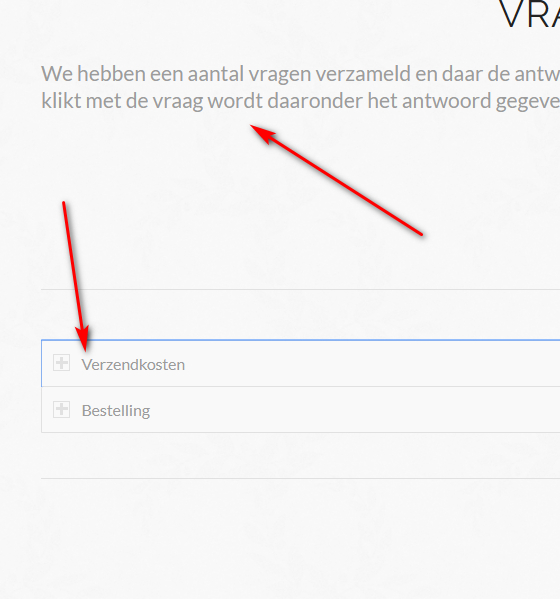
    How can I change the font size of my accordion title.in the Enfold theme.
    Tried a lot of solutions found in this forum, but no one works…
    Fontsize of the title should be like the text above. See arrows

    Please see the link
    Accordion

    Thanks for your help.

    • This topic was modified 5 years, 10 months ago by flipper1960.
    #1210143

    In reply to: Problem with button

    Hi kikosanchezestudio,

    Please add this CSS code in Quick CSS, located in Enfold > General Styling:

    #top #main .entry-summary .price .amount, 
    #top #main .entry-summary .price .woocommerce-Price-currencySymbol {
        font-size: 32px;
    }

    Best regards,
    Nikko

    Hi,
    I adjusted your layerslider slide for mobile, first I copied your layers:
    2020-05-05_064224.png
    then I set the slide preview window to show the mobile view:
    2020-05-05_065338.png
    Then I set the new layers to only show for mobile:
    2020-05-05_064440.png
    and the old layers to not show on mobile:
    2020-05-05_064610.png
    then for the new mobile layers I adjusted the font size, I set to 80px as a guess, but you can adjust to suit:
    2020-05-05_064830.png
    Now on mobile it looks much better:
    2020-05-05_065002.png
    Please clear your browser cache and check.

    Best regards,
    Mike

Viewing 30 results - 3,811 through 3,840 (of 18,733 total)