

Forum Replies Created
-
AuthorPosts
-
Hi,
Ok, removed my menu change, and added this code instead:#av-burger-menu-ul li {background: #e4d7bf url(https://static.campbellhillsguestranch.com/themes/CampBell17/images/layout/leatherBG.jpg) no-repeat right top !important;}Please check
Best regards,
MikeHi,
For the hr:after part of the css, it should also include the class, like this:hr.hr-text:after {I corrected the example above. For your css please use these:
hr.newsletter:after
hr.instagram:after
Best regards,
MikeHey ciprianibob,
If I understand correctly, right now the site looks correct and the child theme is activated.
First please export a copy of your theme settings, for a backup for yourself.
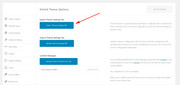
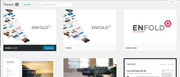
Ok, now you have a child theme and two enfold’s like this:
To see which theme is the parent, please use FTP to look at the style.css of the child theme, on the “Template” line it will say which theme is being used.
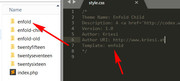
In this case “enfold” is being used, note the second theme is named “enfold-old” (please ignore the word “old” for you it could say “new” or “copy” or something else, this is for example)
You can change the parent by changing the name in the “Template” line to match the folder you want to use.
To know which theme is in which folder, simply open the style.css in one of the folders and look for the “Version” line, in this case the “enfold-old” is v4.2.6
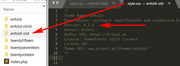
So now we know which theme folder the child theme is using, and which theme version is inside that theme folder, and how to change the theme being used.
Hope this has helped :)Best regards,
MikeHi,
Thank you, we are happy to help :)
Is there anything else we can assist with on this issue, or shall we close this then?Best regards,
MikeHi,
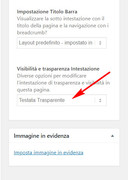
Oh I see you would like your header transparent, with the image up and behind the logo.
I made the change in the edit setting of the page at: Layout > Visibilità e trasparenza Intestazione > Testata Trasparente
Please clear your browser cache and check.
Best regards,
MikeHi,
For the mobile menu, I changed the code from:.header_color .main_menu ul ul {background: #e4d7bf url(https://static.campbellhillsguestranch.com/themes/CampBell17/images/layout/leatherBG.jpg) no-repeat right top !important;}to this…
.header_color .main_menu ul ul,.header_color .main_menu ul li {background: #e4d7bf url(https://static.campbellhillsguestranch.com/themes/CampBell17/images/layout/leatherBG.jpg) no-repeat right top !important;}For the header logo I changed your code to this….
@media only screen and (max-width: 767px) { .av-logo-container .logo img { margin-bottom: 20px !important; } } Best regards, MikeHi,
I tested in Chrome, Firefox, & Edge on Windows 10, and I could see the image in the pin each time:
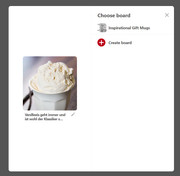
Did you try clearing your cache and history, perhaps it’s just a cache issue?Best regards,
MikeHey scampbase,
We can hide your menu with css, but do you want it hidden for all screen sizes? If you do, have you tried removing all of the menu items from the menu?
If you only want to hide it for some screen sizes, Please include the url to the menu in question so we can assist.Best regards,
MikeHi,
OK, I removed the use of the child theme shortcodes.js from your child theme functions.php
Please clear your browser cache and check.Best regards,
MikeHi,
For the footer social icons, we also needed to add this to quick css:.widget .social_bookmarks li { clear: none !important; }I did so, please check.
For the menu background, perhaps try clearing your browser cache, as it seems full length to me. Please see screenshot in Private Content area.
For footer spacing on desktops, I added this to reduce the space, note the 3% margin-left, the standard is 6%, you can adjust this more if you wish.@media only screen and (min-width: 787px) { #footer .flex_column.av_one_third.el_after_av_one_third { margin-left: 3%!important; } #footer .container { width: 80%!important; display: flex!important; justify-content: center!important; } }For the mobile footer widgets, when they are stacked, you have a extra empty widget that is adding margin and space. With this code it is hidden, along with other element’s margin:
@media only screen and (max-width: 765px) {
#footer #custom_html-5 {
display: none !important;
}
#footer #media_image-2,#footer .container .flex_column:nth-child(2),#footer .container .flex_column:nth-child(1) {
margin: 0px !important;
}
}
Please check.
Best regards,
MikeHey Monica,
Sorry, I’m not sure I understand, I see your transparent logo, but I don’t see a menu.
Can you provide some mock-ups of what you would like to see?Best regards,
MikeHi,
Ok, I believe I have solved your issue. Please clear browser cache and check.
The issue is when you update your site via FTP, you need you remove your old theme folder first, otherwise old files are left in the folder that brake the theme.
I see your theme folder is named enfold2, so I renamed the folder to “enfold2-old” and uploaded a new “enfold2” everything seems to be working now, after you check and find everything is working correctly, please delete “enfold2-old”.Best regards,
MikeHi,
Unfortunately this is the intended behavior, normally you have to click to open & click to close. We have only replaced the click action for mouseover, but there is nothing in place to have a default no action presence. If there was there is a good chance it would interfere with the normal actions.
You can request customization here, as this kind of customization as it is beyond the scope of support we can provide here.Best regards,
MikeHi,
Please include the url to the page in question so we can take a closer look.
Best regards,
MikeApril 25, 2018 at 1:27 am in reply to: external links are not opened in new tab, even though it is configured correctly #946317Hi,
Glad we were able to help, we will close this now. Thank you for using Enfold.For your information, you can take a look at Enfold documentation here
and the video tutorials here
And if there are features that you wish Enfold had, you can request them and vote the requested ones here
For any other questions or issues, feel free to start new threads under Enfold sub forum and we will gladly try to help you :)Best regards,
MikeHi,
Glad we were able to help, we will close this now. Thank you for using Enfold.For your information, you can take a look at Enfold documentation here
and the video tutorials here
And if there are features that you wish Enfold had, you can request them and vote the requested ones here
For any other questions or issues, feel free to start new threads under Enfold sub forum and we will gladly try to help you :)Best regards,
MikeHey vadikcoma,
We can help you achieve this, but right now I see that you are using 4 1/4 columns to put them in one line. Lets start by putting them all in one column.
First ensure that custom classes are enabled by going to: Enfold Theme Options > Layour Builder > Show element options for developers and checking the box.
Then add the class “icon-column” to the column you will have the 4 icons in:
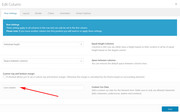
Then add the class “icons-inline” to the 4 icons the same way. In my example, the icons were aligned center.
Then add this code in the General Styling > Quick CSS field:.icons-inline { display: inline-block !important; margin-left: 10% !important; } .icon-column { display: flex !important; justify-content: center !important; }Expected results:
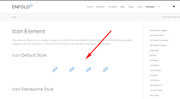
The 4 icons will be in-line and centered for all screen sizes. But you may want to adjust the margin-left in the code above to work for your small column, try different values that look good to you for all screen sizes.Best regards,
MikeHi,
In this case, the “Title Here”, is plain text in a text block element, so it would be best to add a custom class to it so we can target it. I added the class “text-title” to it in the “custom css class” box, please look for this, here is a screenshot:
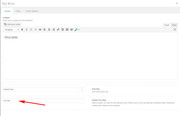
You can use this class as many times as you like, anywhere on your site. Then add this css to control the size of the text:/*mobile*/ @media only screen and (max-width: 767px) { .text-title { font-size: 44px !important; } } /*tablet-desktop*/ @media only screen and (min-width: 768px) { .text-title { font-size: 70px !important; } }Please adjust the font-size to suit.
Best regards,
MikeHi,
Try this css to hide the captions:.avia-tooltip.avia-tt {display: none !important;}For transparent spacing in your gallery, I change the code to:
#top div .avia-gallery img {
    border-style: none!important;
    border-width: 0px!important;
    background-color: transparent;
}
Please check.
For your footer width, please try this code that changes the width from 100% to 80%, making the items closer:#footer .container {width: 80%!important; }For the background of the menu, please try:
.html_av-overlay-side #top .av-burger-overlay-scroll {
background:url(//static.campbellhillsguestranch.com/themes/CampBell17/images/layout/leatherBG.jpg) no-repeat right top !important;
}
To add the social icons to the footer, please try adding this code to a HTML widget in your footer:
<ul class="noLightbox social_bookmarks icon_count_5"><li class="social_bookmarks_youtube av-social-link-youtube social_icon_1"><a target="_blank" href="https://www.youtube.com/channel/UCsaXEoWO2zFOaD5h3QjRCGg" aria-hidden="true" data-av_icon="" data-av_iconfont="entypo-fontello" title="Youtube"><span class="avia_hidden_link_text">Youtube</span></a></li><li class="social_bookmarks_facebook av-social-link-facebook social_icon_2"><a target="_blank" href="https://www.facebook.com/campbellhillsguestranchkamloops/" aria-hidden="true" data-av_icon="" data-av_iconfont="entypo-fontello" title="Facebook"><span class="avia_hidden_link_text">Facebook</span></a></li><li class="social_bookmarks_instagram av-social-link-instagram social_icon_3"><a target="_blank" href="https://www.instagram.com/campbell_hills_guest_ranch/" aria-hidden="true" data-av_icon="" data-av_iconfont="entypo-fontello" title="Instagram"><span class="avia_hidden_link_text">Instagram</span></a></li><li class="social_bookmarks_gplus av-social-link-gplus social_icon_4"><a target="_blank" href="https://plus.google.com/+Campbellhillsguestranch" aria-hidden="true" data-av_icon="" data-av_iconfont="entypo-fontello" title="Gplus"><span class="avia_hidden_link_text">Gplus</span></a></li><li class="social_bookmarks_mail av-social-link-mail social_icon_5"><a href="mailto: (Email address hidden if logged out) " aria-hidden="true" data-av_icon="" data-av_iconfont="entypo-fontello" title="Mail"><span class="avia_hidden_link_text">Mail</span></a></li></ul>Best regards,
MikeHi,
Which text block title would you like to change?
This works on the h3 headings that you have on your page.Best regards,
MikeHi,
When you updated, did you update via ftp, or the admin panel?
If you updated via ftp, please include ftp access in the Private Content area.Best regards,
MikeApril 24, 2018 at 3:43 am in reply to: SSL-Umstellung, AVIA Java-Script lädt unsicheres Bild nach #945647Hi,
Froh, dass wir helfen konnten, schließen wir das jetzt. Danke für die Benutzung von Enfold.Zu Ihrer Information können Sie sich die Dokumentation hier herunterladen
und die Video-Tutorials hier
Und wenn es Funktionen gibt, die Enfold haben möchte, können Sie diese anfordern und die gewünschten abstimmen
Für weitere Fragen oder Probleme, können Sie neue Threads unter Enfold Sub Forum starten und wir werden gerne versuchen, Ihnen zu helfen :)———————
Glad we were able to help, we will close this now. Thank you for using Enfold.For your information, you can take a look at Enfold documentation here
and the video tutorials here
And if there are features that you wish Enfold had, you can request them and vote the requested ones here
For any other questions or issues, feel free to start new threads under Enfold sub forum and we will gladly try to help you :)Best regards,
MikeHi,
@Gashland Evangelical Presbyterian Church,
Please open a new thread so we can assist, we will want communicate in the Private Content area, such as your URL & admin login, but as this is not your thread your info will not be private. Thanks for your patience and understanding.
In your new thread please provide admin login info, FTP access, & which demo you would like assistance with.Best regards,
MikeApril 24, 2018 at 3:38 am in reply to: external links are not opened in new tab, even though it is configured correctly #945643Hi,
Thank you for that, but that was not the issue. I found that the issue is the plugin “Google Analytics Germanized” if you deactivate it the links work correctly, please try.Best regards,
MikeHi,
I see your webhost has PHP Version: 5.4.45 installed, please ask them to update your PHP version to v7.Best regards,
MikeApril 24, 2018 at 2:47 am in reply to: Please read – Regarding Wordfence LayerSlider warning on Enfold 4.0.3 #945636Hi,
How did you try to disable the layerslider? I take it that your site was working fine, and then one day it didn’t, was that after a update or something else? It looks like the login page is working, Can you please include a admin login in the private content area so we can take a closer look.
Please provide FTP access so we can assist more.Best regards,
MikeHi,
Sorry the image is not helping, what we really need is the sectors, classes, & elements to write the right code for you.
Is the site on your localhost, or not published?
Can you send us a copy of it using the plugin above?Best regards,
MikeHi,
No that code is not right.
also, the code has the max-width of (max-width: 1023px) I will change.
New code:/*TITULOS PARA DEVICES E DESKTOP*/ /*DEVICES*/ @media only screen and (max-width: 767px) { .av-special-heading.av-special-heading-h3 h3.av-special-heading-tag { font-size: 44px !important; } } /*DESKTOP*/ @media only screen and (min-width: 768px) { .av-special-heading.av-special-heading-h3 h3.av-special-heading-tag { font-size: 70px !important; } }new code in Instagram Feed
@media only screen and (max-width: 767px) {
.eapps-instagram-feed-title-visible {
    font-size: 44px !important;
}
}

@media only screen and (min-width: 768px) {
.eapps-instagram-feed-title-visible {
    font-size: 70px !important;
}
}
Best regards,
MikeApril 23, 2018 at 1:43 pm in reply to: external links are not opened in new tab, even though it is configured correctly #945391 -
AuthorPosts
