

Forum Replies Created
-
AuthorPosts
-
Hey sberendss,
I see that you are using a older version that was known to have this issue, please try to update, or install a updated localhost version, because the theme now includes a “shortcode parser” to check for un-closed sections.
You must have the advanced layout builder debugger on, and the shortcode parser will be below.
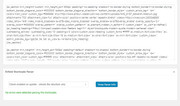
Yet as you can see I tested your code and found no errors, but please try yourself.
Perhaps try disabling your plugins?
*Please note, that if you update via FTP, please delete your current enfold parental folder, and then upload the new one, so older files are not left over.Best regards,
MikeHey HypnosisPraxis,
Please try adding this code to the end of your functions.php file in Appearance > Editor:function add_custom_meta(){ ?> <meta name='bingbot' content='NOODP NOARCHIVE,'> <meta name='ROBOTS' content='NOARCHIVE, NOODP, NOYDIR'> <meta name='GOOGLEBOT' content='NOARCHIVE, NOODP'> <?php } add_action('wp_head', 'add_custom_meta');Best regards,
MikeHi,
Thanks, For Android I use a free app called “Screen Recorder” surely there is one for ios / iPhone?
You can then upload it to DropBox or Google Drive and post in the Private Content area.Best regards,
MikeHi,
Glad we were able to help, we will close this now. Thank you for using Enfold.For your information, you can take a look at Enfold documentation here
and the video tutorials here
And if there are features that you wish Enfold had, you can request them and vote the requested ones here
For any other questions or issues, feel free to start new threads under Enfold sub forum and we will gladly try to help you :)Best regards,
MikeHi,
The element is tied to the width of the page, so just as the text wants to fill the area, so dose the image.
I could see the natural width of the image was 850px so I wrote this css to make that the max-width. I was unsure if this change would be for this one page, so this css is for the one page:#top.postid-950 .big-preview.single-big { max-width: 850px !important; margin: auto !important; }Use this css for all single posts:
#top.single-post .big-preview.single-big {
    max-width: 850px !important;
    margin: auto !important;
}
Best regards,
MikeHi,
If you don’t mind, can we go back a step. So are you saying that with Safari mobile users are able to drag mobile menu items to a new location in the menu while trying to scroll the mobile menu? Even on our demo site: Enfold 2017 Demo?
Can you create a video doing this?Best regards,
MikeHey Freek,
Please try adding this code to WordPress > Customize > Additional CSS:@media only screen and (max-width: 989px) { .responsive #top #wrap_all .av_mobile_menu_tablet .main_menu { display: none !important; } }Best regards,
MikeHi,
Please open a new thread so we can assist, I see you included your login details but the domain seems to be incorrect as I get the error “server IP address could not be found”
Please check and please provide in your new thread.
Please note that as this is not your thread your info will not be private in this thread.
Also include which demo you are trying to import so we can send you the correct images.Best regards,
MikeHey newki75,
Please try this solution: https://kriesi.at/support/topic/move-date-and-author-meta-to-under-title/#post-717283Best regards,
MikeApril 27, 2018 at 12:15 pm in reply to: Transparent header on mobile screen: logo position issue #947902Hey Demaup,
Try this code in the General Styling > Quick CSS field:@media only screen and (max-width: 767px) { #top #wrap_all .av_header_transparency { background-color: #0984e3!important; } .header_color div .av-hamburger-inner, .header_color div .av-hamburger-inner::before, .header_color div .av-hamburger-inner::after { background-color: #fff!important; } .header_color div .is-active .av-hamburger-inner, .header_color div .is-active .av-hamburger-inner::before, .header_color div .is-active .av-hamburger-inner::after { background-color: #0984e3!important; } }Best regards,
MikeHey kiteboarder42,
Sorry I was not able to login, please check the login info.
But I do see a image in the top slider on that page. Please see screenshot in Private Content area.Best regards,
MikeHey Slade,
If you have more logos you would like to add, you can add more “if” statements like:add_filter('avf_logo','av_change_logo'); function av_change_logo($logo) { if(is_page(626) ) { $logo = "http://kriesi.at/wp-content/themes/kriesi/images/logo.png"; } if(is_page(632) ) { $logo = "http://kriesi.at/wp-content/themes/kriesi/images/logo2.png"; } return $logo; }Or if you want to use the same logo on more pages, you can add more pages using an array like this:
add_filter('avf_logo','av_change_logo');
function av_change_logo($logo)
{
    if(is_page( array(626, 632) ) )
    {
    $logo = "http://kriesi.at/wp-content/themes/kriesi/images/logo.png";
    }

    return $logo;
}
Best regards,
MikeApril 27, 2018 at 11:06 am in reply to: Add email icon/mailto to social icons in header menu #947823Hi,
Sorry you can’t switch the social icons like that, you need to use the methods above. But since you downloaded your custom icons from
fontello you can get the character codes in that zip.
If you link to the file you are using via dropbox I can help you. Hopefully you are using a child theme so your changes will not be lost with future theme updates Read about it & Get it hereBest regards,
MikeApril 27, 2018 at 6:37 am in reply to: Migrating Site using Enfold and WooCommerce to New Hosting Plan #947661Hey JZNAMZ,
If I understand correctly, your site is active. In this case I would recommend migrating your site as is with a plugin such as https://wordpress.org/plugins/duplicator/
Then if your host offers staging sites, you can create a staging copy of your site to upgrade to v4.3 and test.Best regards,
MikeHey BRempfer,
What webhost are you using?
We can try to manually install the demo for you, I see the admin login is working, but we will also need FTP access, please include in the private content area.
Please note that you will lose all content and setting with a manual install.Best regards,
MikeHey MarcavandenBroek,
Are you uploading the master Theme Forest file, or the enfold.zip that is inside the master Theme Forest file?
The master Theme Forest file that you typically download contains many extra files that are not a part of the working theme needed to install Enfold.
If this doesn’t help, Can you please include a admin login in the private content area so we can take a closer look.Best regards,
MikeHey trudiligence,
Sorry I have not seen anything regrading this, but I do see that the plugin allows you to exclude URLs from the cache, perhaps if you exclude /wp-content/uploads/dynamic_avia/ & /wp-content/themes/enfold/jsBest regards,
MikeHi,
Try this code in the General Styling > Quick CSS field:.cb1 {margin-top: -50px !important; }Please adjust to suit.
Best regards,
MikeHey igaudette,
Try this code in the General Styling > Quick CSS field:#top .fullsize .template-blog .post .entry-content-wrapper > *, #top .fullsize .template-blog .post .entry-content-wrapper { max-width: 100%!important; }Best regards,
MikeHey Mangal10,
If I understand correctly, users are able to drag mobile menu items to a new location in your menu while trying to scroll your mobile menu? I couldn’t recreate this on our demo site Enfold 2017 Demo Please include the url to your site so we can take a closer look, and which browser are you using?Best regards,
MikeHey rainmachine1,
Please try adjusting the maximum width of your site at: Enfold Theme Options > General Layout > Dimensions > Maximum Container width and Content Sidebar Ratio
Right now it looks like you are using a boxed layout with 70% width, Please try a stretched layout to maximize your page at Enfold Theme Options > General Layout > Layout.Best regards,
MikeHey MarcusEls,
I see you are using the new version 4.3 where the files have been merged for performance, please read: Enfold 4.3: Performance Update
in order to regenerate the merged css please save your theme settings, the big button “Save all Changes”
To demonstrate I added some css to your child theme style.css to make your post title red, and saved your theme settings.
If you are not able to click theme setting button, then try entering a space & backspacing in the General Styling > Quick CSS field.Best regards,
MikeHey Jasmer,
Importing demos will overwrite your current settings, the best way to copy pages from different demos and add them to your site is to create a localhost install on your computer and import the demos there.
Then Enable Avia Layout Builder Debug on both your localhost and your live site, and copy the shortcode to your live site.
The shortcode won’t include the images, so you’ll also need to upload the images to your live site too.
Then you can reset your localhost and download a different demo, repeating until you have all the pages you wish.Best regards,
MikeHi,
To change the social icons there are a couple of choices, one would be to upload a new Fontello icons, please see:
How to Add Custom Social Icons to the Theme Options
The other choice is to use css to change the icon with your image, which sounds like what you want to do. Please see the link above but scroll down near the bottom.Best regards,
MikeHi,
I adjusted the forms and added the page ID’s to the rules so there won’t be a chance of cross errors in the future. I only found the two forms, but I thought there was another, unless one had changed. Please check and let us know if there is another form..page-id-37 p#element_avia_1_1,.page-id-37 p#element_avia_3_1,.page-id-37 p#element_avia_5_1,.page-id-37 p#element_avia_7_1,.page-id-37 p#element_avia_8_1,.page-id-37 p#element_avia_9_1,.page-id-45 p#element_avia_3_1,.page-id-45 p#element_avia_1_1 { padding-right: 10px; }Best regards,
MikeHi,
Glad we were able to help, we will close this now. Thank you for using Enfold.For your information, you can take a look at Enfold documentation here
and the video tutorials here
And if there are features that you wish Enfold had, you can request them and vote the requested ones here
For any other questions or issues, feel free to start new threads under Enfold sub forum and we will gladly try to help you :)Best regards,
MikeHey JMDP,
You have the right code, only you also have another rule that declares a 0px border with !important; for the same page which is why you are having trouble. Please see screenshot in Private Content area.
Please try changing the other rule so it is more specific, such as adding the element ID, so it won’t interfere with other pages & rules, like this:#top.home #references figure.av-inner-masonry.main_color { border: 0px solid #333333!important; }Please use this more specific portfolio rule:
#top.home #portfolio figure.av-inner-masonry.main_color{
border:1px solid #808080!important;
}
Best regards,
MikeApril 26, 2018 at 12:20 pm in reply to: All of my colors changed when I adjusted 1 in the theme settings… #947226Hi,
I see in your Enfold Theme Options > Website Styling > Main Content > Alternate Content the color is set to green, is this correct?
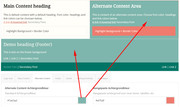
As we didn’t see your site before, can you please explain which color is not correct?Best regards,
MikeApril 26, 2018 at 12:03 pm in reply to: Add email icon/mailto to social icons in header menu #947221Hey patricknh,
To add a email icon, go to Enfold Theme Options > Social Profiles > Your social profiles and click the “+” below one of the current icons, then select “Special: Email Icon” and add your “mailto” and email address, or a link to your contact page.
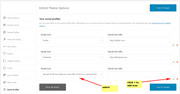
To change the size of the icon, try this code in the General Styling > Quick CSS field:#top #header .social_bookmarks li a { font-size: 20px !important; }adjust to suit.
Best regards,
Mike -
AuthorPosts
