

Forum Replies Created
-
AuthorPosts
-
Hi,
Thanks for the image, but can you please include a admin login in the private content area so we can take a closer look.Best regards,
MikeHi,
We are glad to help, the reason the photos were in a different folder was because the setting was incorrect. But it’s solved now, so that’s the important thing :)
As for the “spinning wheel” error, I checked a few pages & had no issues, but I did see a error in the console that pointed to a 404 at “/plugins/wordpress-seo/css/dist/inside-editor-761.min.css”
I believe this is the Yoast plugin. Try disabling your plugins. If that resolves the issue, reactivate each one individually until you find the cause.
Otherwise remove the plugin and reinstall.
Try checking if you can edit the pages better with all the plugins disabled. Please ensure to clear your browser cache, even try inconnedto mode (in private mode)
If none of this helps, please link to a page that you are having editor issues with and give us permission to disable everything so we can test.Best regards,
MikeHi,
I added a custom class to the column “center_column” by enabling Enfold Theme Options > Layour Builder > Show element options for developers
and changed the css to this:#top.home .center_column { margin-left: 0% !important; margin: auto !important; float: none !important; }Please clear your browser cache and check.
Best regards,
MikeHey Monique,
*Edit* I have tested your page and found that this script works after adding the correct class for your image, please try adding this code to the end of your functions.php file in Appearance > Editor:function add_sticky_script(){ ?> <script type="text/javascript"> (function($){ function a() { $(window).scroll(function(e){ var $sticky = $('.sticky_element'); var position = ($sticky.css('position') == 'fixed'); if ($(this).scrollTop() > 350 && !position){ $sticky.css({'position': 'fixed', 'top': '50px', 'width' : $sticky.innerWidth() }); $sticky.next().css('float', 'right'); $sticky.addClass('fixed_element_style'); } if ($(this).scrollTop() < 350 && position) { $sticky.css({'position': 'static', 'top': '0px', 'width' : '' }); $sticky.next().css('float', 'left'); $sticky.removeClass('fixed_element_style'); } }); } a(); })(jQuery); </script> <?php } add_action('wp_footer', 'add_sticky_script');Another option: you could try the plugin Sticky Menu (or Anything!) on Scroll
I tested this and it seems to work good with a easy to use options panel.Best regards,
MikeHi,
Glad we were able to help, we will close this now. Thank you for using Enfold.For your information, you can take a look at Enfold documentation here
And if there are features that you wish Enfold had, you can request them and vote the requested ones here
For any other questions or issues, feel free to start new threads under Enfold sub forum and we will gladly try to help you :)Best regards,
MikeJune 22, 2018 at 5:20 am in reply to: Adding a Facebook LIKE button/icon to small bar above logo area? #976088Hey Moondreamer21,
Try adding another social icon called “thumbs-up” from fontello.com
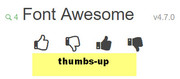
You can then create any link for it.
Here’s how to add custom social iconsBest regards,
MikeHey Sam,
Try this code in the General Styling > Quick CSS field:#top.home div.av_three_fifth.avia-builder-el-5 { margin-left: 0% !important; margin: auto !important; float: none !important; }Best regards,
MikeHey Moondreamer21,
Try this code in the General Styling > Quick CSS field:@media only screen and (max-width: 479px) { .responsive #top #wrap_all #header .social_bookmarks, .responsive #top #wrap_all #main .av-logo-container .social_bookmarks { display: block !important; } } @media only screen and (max-width: 989px) and (min-width: 768px) { .responsive.html_mobile_menu_tablet #top #header #header_meta .social_bookmarks { display: block !important; } }Best regards,
MikeHey navindesigns,
Try this code in the General Styling > Quick CSS field, it covers the 3 screen sizes most used:@media only screen and (min-width: 1080px) { #top.page-id-734 .avia-builder-el-21 .avia-icon-list li { padding: 0 0 9% 0!important; } } @media only screen and (min-width: 768px) and (max-width: 1023px) { #top.page-id-734 .avia-builder-el-21 .avia-icon-list li { padding: 0 0 20% 0!important; } } @media only screen and (min-width: 1024px) and (max-width: 1079px) { #top.page-id-734 .avia-builder-el-21 .avia-icon-list li { padding: 0 0 12% 0!important; } }Best regards,
MikeHey navindesigns,
Sorry this would involve quite a change in the core files, Please feel free to request – or vote if already requested – such feature on Enfold feature request form.Best regards,
MikeHi,
While I was looking into your image issue I reviewed your other posts, and I believe that you wanted to have the image of the home to link to the realtor site.
So I added the link to the column:
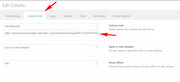
Feel free to remove if it is not what you wanted.Best regards,
MikeHi,
Thank you for the login, I found that your settings at “WordPress > Settings > Media >
Store uploads in this folder” was incorrect causing your uploaded images to be stored in a folder that WordPress was not using. I corrected the setting and uploaded two new images and added them to your page.
They show now, and I expect that you wont have any future issues.
Please clear your browser cache and check.Best regards,
MikeHi,
You seem to have a js error with the masonry:jquery-masionary.js?ver=3.2.0:12 Uncaught Error: No layout mode: packeryIt seems to be coming from the pintrest plugin, Try disabling all of your plugins. If that resolves the issue, reactivate each one individually until you find the cause.
If this doesn’t help can we try disabling your plugins and scripts to find the error?
I ask because sometimes disabling them will mean you would have to set them up again, not always, just sometimes.Best regards,
MikeHi,
I see the on your page /open-houses/ the images are producing 404 errors, I tried to login with the link you posted earlier, but It must have expired, please post a new login link or include a admin login in the private content area so we can take a closer look.
If I understand correctly from your earlier post these images show as gray boxes in your WordPress media folder, so please include a link to these two images via dropbox in the Private Content area.
I really would like to see your file structure via ftp to investigate what happened, but I understand you might not know how to post this access, so please post your webhost cPanel login in the Private Content area, if you feel comfortable with that.
(if you post this access, you won’t need to add the files to dropbox, as I can get them from your server)Best regards,
MikeHi,
Glad we were able to help, we will close this now. Thank you for using Enfold.For your information, you can take a look at Enfold documentation here
And if there are features that you wish Enfold had, you can request them and vote the requested ones here
For any other questions or issues, feel free to start new threads under Enfold sub forum and we will gladly try to help you :)Best regards,
MikeHi,
When I test your site I don’t see the strike though links:

I tested in Chrome, Firefox, Edge & IE11
Please try clearing your browser cache.Best regards,
MikeHi,
We will leave this open while you try this solution, let us know if we can be of more assistance.Best regards,
MikeHi,
Glad we were able to help, we will close this now. Thank you for using Enfold.For your information, you can take a look at Enfold documentation here
And if there are features that you wish Enfold had, you can request them and vote the requested ones here
For any other questions or issues, feel free to start new threads under Enfold sub forum and we will gladly try to help you :)Best regards,
MikeJune 21, 2018 at 4:14 am in reply to: LayerSlider claims it's not activated but Theme is up to date #975641Hi,
Unless there is anything else we can assist with, shall we close this then?Best regards,
MikeJune 21, 2018 at 4:10 am in reply to: "Load More"-Button – MASONRY GALLERY – Remove animation and show directly #975638Hi,
Glad Victoria was able to help, we will close this now. Thank you for using Enfold.For your information, you can take a look at Enfold documentation here
And if there are features that you wish Enfold had, you can request them and vote the requested ones here
For any other questions or issues, feel free to start new threads under Enfold sub forum and we will gladly try to help you :)Best regards,
MikeHi,
Using the advanced styling option for the H1 as pointed out above by Elliott is the GUI option. You may find that using custom CSS will offer a better solution if you wish it to be unique from the rest of your H1’sBest regards,
MikeHey Veronica,
Can you please include a admin login in the private content area so we can take a closer look.
I don’t see the pencil icon for the error, so I assume you have disabled it for right now and it should be appearing next to the NGLCC icon?Best regards,
MikeHi,
Glad to hear, we will close this now. Thank you for using Enfold.Best regards,
MikeHey karemalbash,
When I check your page the gallery is not opening in lightbox, the images are opening directly.
Please check that the Enfold Theme Options > Lightbox Modal Window option is still checked.
Or if you are using a child theme with a header.php in it, you will need to update the header.php to the latest one, as it has changed.
Since typically the only reason to have a header.php in a child theme is to add custom code to it, so it would be a good idea to save a copy of it and compare it to the new one to see what custom code was added.Best regards,
MikeHey Justin,
When I view your site with my Android phone your header video plays correctly.
Are you experiencing this with a iPhone?Best regards,
MikeHi,
A manual install of the demo involves uploading the demo content files via FTP and importing the database from a localhost install of the demo.
Here is further details if you wish to try this yourself.
Or if you wish we can assist.Best regards,
MikeJune 21, 2018 at 2:50 am in reply to: Enfold Theme – Blog Menu item does not appear to be pulling blog page correctly #975606Hi,
I assigned the “blog test” page to your “Enfold Theme Options > And where do you want to display the Blog?” option.
For some reason leaving it blank or choosing the “blog” page caused the theme to create a default blog page instead of using the one you created. Assigning the “blog test” page should not cause any issues because your actual blog page is linked in the main menu.
I can’t reproduce this on my localhost and I didn’t see any scripts or plugins on your site that might cause this, but if I understand you correctly you are having this issue on other sites?Best regards,
MikeHi,
Glad we were able to help, we will close this now. Thank you for using Enfold.For your information, you can take a look at Enfold documentation here
And if there are features that you wish Enfold had, you can request them and vote the requested ones here
For any other questions or issues, feel free to start new threads under Enfold sub forum and we will gladly try to help you :)Best regards,
MikeHi,
Glad we were able to help, we will close this now. Thank you for using Enfold.
For your information, you can take a look at Enfold documentation here
And if there are features that you wish Enfold had, you can request them and vote the requested ones here
For any other questions or issues, feel free to start new threads under Enfold sub forum and we will gladly try to help you :)Best regards,
MikeHi,
enlarging this image will not remove the “cut off” it’s apart of the thumbnail
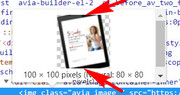
can you link to the full size image, such as dropbox, so we can advise, perhaps include a admin login in the private content area so we can take a closer look at your thumbnail media settingsBest regards,
Mike -
AuthorPosts
