

Forum Replies Created
-
AuthorPosts
-
Hi,
Please try this code in the General Styling > Quick CSS field:.html_header_transparency #top .avia-builder-el-0 { top: -74px !important; } #main { background-color: #000 !important; }It moves the slider up & changes the background black.
Best regards,
MikeHi,
Thanks for the login, but please include the login url
In your new image the text block looks larger, so my solution is probably not very good. If you don’t see the “Editor” then it could be disabled, are you using a security plugin? We may also need ftp access to assist.
I have a new solution, we will add a widget to that area so you can easily update the text, this will be the location:
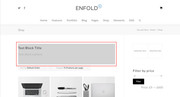
We will add a custom widget area called “textblock” that will only show on the shop page
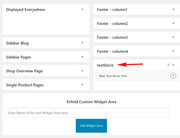
by adding this code to your functions.php, once we get access:add_action( 'woocommerce_before_shop_loop', 'enfold_customization_header_widget_area' ); function enfold_customization_header_widget_area() { dynamic_sidebar( 'textblock' ); }Then we will need to add some css if you want some styling like in your image, or was the background color just to point out the location?
So please include the admin url to your site & ftp access in the Private Content area so we can assist in setting this up for you.Best regards,
MikeHi,
I assume that you would like to remove this for the whole site, in that case, Please try this code in the General Styling > Quick CSS field:.avia-tooltip.avia-tt {display: none !important;}Best regards,
MikeHi,
Glad we were able to help, we will close this now. Thank you for using Enfold.For your information, you can take a look at Enfold documentation here
For any other questions or issues, feel free to start new threads under Enfold sub forum and we will gladly try to help you :)Best regards,
MikeHey Camilla,
If this is for a message or a title, then perhaps this will work for you:
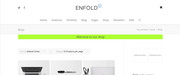
Try adding this code to the end of your functions.php file in Appearance > Editor:function custom_shop_message(){ ?> <script> (function($){ $(document).ready(function(){ $( "<div class='shopbanner'>Welcome to our shop</div>" ).insertBefore( ".container_wrap_first.template-shop" ); }); })(jQuery); </script> <?php } add_action('wp_footer', 'custom_shop_message');you will need to add some css, here’s what I used in the image, just add this code in the General Styling > Quick CSS field:
.shopbanner {
    text-align: center;
    background-color: greenyellow;
    width: 80%;
    margin: auto;
}
If this doesn’t help, please include a admin login in the private content area so we can take a closer look at your page.
Best regards,
MikeHey DesignPOD,
Please see this page in our documentation: Change the logo image on some pagesBest regards,
MikeHey Eefke,
You would need to get a SSL certificate so your site would start with “https” and have your webhost install it for you.
Some webhosts offer this for free with Let’s EncryptBest regards,
MikeOctober 9, 2018 at 5:31 am in reply to: We are having difficulty getting custom CSS to display on our site #1019326Hey hostworks,
Sorry, due to CORS you can not change the style of a page that is in a iframe.Best regards,
MikeHey Roger,
Try adding this code to the end of your child theme functions.php file in Appearance > Editor:add_action('admin_head', 'remove_reset_button'); function remove_reset_button() { echo '<style> .avia_footer_reset{ display: none !important; } </style>'; }Best regards,
MikeHi,
I see, sorry I got mixed up there. Unless there is anything else we can assist with on this issue, shall we close this then?Best regards,
MikeHi,
Glad to hear, unless there is anything else we can help with on this issue, shall we close this then?Best regards,
MikeHi,
To do this I had to make the mobile image not parallax, but your desktop image is parallax.
But your desktop image already looks full size, so I don’t see how this would help, especially when you will lose the parallax?
Which image isn’t sharp, they both look sharp to me?Best regards,
MikeHi,
I tried to login to assist but the password is not working for me, please check.
Ok, so I thought it though a little more and think we should add a class to the image on click so we can target the one image with the css. This works in my tests.
Try adding this code to the end of your functions.php file in Appearance > Editor:function add_menu_img_class(){ ?> <script> (function($){ $(document).click(function() { $("img[src*=LargeMenuSept19_OL-web-ready-update]").addClass("LargeMenu"); }); })(jQuery); </script> <?php } add_action('wp_footer', 'add_menu_img_class');then add this code in the General Styling > Quick CSS field or in the WordPress > Customize > Additional CSS field:
img.mfp-img.LargeMenu {
    width: 1200px !important;
    max-width: 1200px !important;
    height: 1976px !important;
    max-height: 1976px !important;
}
This will add a class to only the one image so the css can target just the one image. If you change the image you will need to change the script. You can also use this to model for your other menu, you will need to change the function, script, and css to the other image.
Best regards,
MikeHi,
To update the bundled layerslider, either the child theme, or as the parent theme, no api key is needed.
I took another look at the “How to update LayerSlider” link, but I don’t see a api key posted there.
If you found one there it was not intend.Best regards,
MikeHi,
When I tested before I copied your contact form element and tried different changes to it until it was working with my email, this is why I thought it was the html tags the title field. We have also seen this issue with other title fields in other elements.
So this time I tried making changes to your original contact form element, and it seems once I deactivated all of your mandated fields and then mandated them again your form began to work again.
Please try your form now.Best regards,
MikeHi,
I tried to recreate this issue on my localhost, I installed the Law Demo and then when to Import / Export and saved the theme settings file, then I went to General Styling and choose a predefined color scheme “Elegant Red” which gave me this on the homepage:

Then I went to Enfold Theme Options and used the “reset all options” button at the bottom, which removed the demo styling:

Then I used the Import Theme Settings File to upload the theme settings file, and saved the theme settings one more time to rebuild the merged files, and the demo was restored after clearing my browser cache:

I did this twice so I could get the screenshots, and on my second attempt the “Save all changes” button in the theme options panel was not activated, so I added a blank space in the Quick CSS field to activate the “Save all changes” button, and then clicked it, and cleared my browser cache.
Please try these steps.Best regards,
MikeHi,
Thank you, please include a link to your gallery so we can ensure it will work for you and your classes. Will this be for one gallery, or the whole site?Best regards,
MikeOctober 8, 2018 at 1:46 pm in reply to: "Couldn't Add the Font Because The Server Didn't Respond" Error #1018979Hi,
Thank you for sharing your zip file, I found the file is not correct, it doesn’t contain any fonts, here is your file:
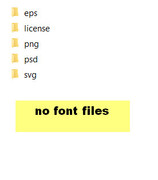
This is a correct file:
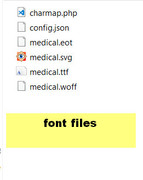
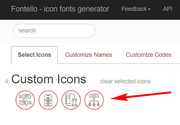
Please go to fontello.com and drag your svg images into the “Custom Icons” at the top to create the correct file, I tested a few of your images and it worked fine: (Please note that after you drag them, you will also need to click them to activate them)
Best regards,
MikeHi,
Sorry, the Enfold contact form is not connected to the Mailchimp service, perhaps the Mailchimp service offers a contact form with the option to allow a checkbox for the Mailchimp newsletter.
Please see if you can create a dual form at Mailchimp, and then use the Mailchimp element instead of the Enfold contact form.Best regards,
MikeHi,
Glad we were able to help, we will close this now. Thank you for using Enfold.For your information, you can take a look at Enfold documentation here
For any other questions or issues, feel free to start new threads under Enfold sub forum and we will gladly try to help you :)Best regards,
MikeHi,
Thanks for the login, I took another look and believe it’s the html in the title field of the last check box, once I removed the link to your privacy page and the email address the mail was sent & received correctly. Please try this.Best regards,
MikeOctober 7, 2018 at 10:44 pm in reply to: Text lines get too mutch spaces between words on mobile #1018721Hey Mike,
It looks like you have the text alignment set to justify, which adds spaces to the text. Please try setting to left or right.
If this doesn’t help please include the url to the page in question so we can take a closer look.Best regards,
MikeHey gatehealing,
The layerslider is updated with the theme updates, as it’s a bundled plugin.
Please see our documentation: How to update LayerSliderBest regards,
MikeOctober 7, 2018 at 10:31 pm in reply to: I want to change the phone number's text color on the secondary menu FOR MOBILE #1018713Hi,
Glad we were able to help, we will close this now. Thank you for using Enfold.For your information, you can take a look at Enfold documentation here
For any other questions or issues, feel free to start new threads under Enfold sub forum and we will gladly try to help you :)Best regards,
MikeHi,
The white bar is your title container, to remove please add this css:.title_container {display: none !important;}Best regards,
MikeHi,
Glad we were able to help, we will close this now. Thank you for using Enfold.For your information, you can take a look at Enfold documentation here
For any other questions or issues, feel free to start new threads under Enfold sub forum and we will gladly try to help you :)Best regards,
MikeOctober 7, 2018 at 9:24 pm in reply to: demo import erro again and again where can i download the demo site zip file? #1018698Hi,
Thank you for the login & ftp access. I reset your site and installed the “2017 Demo” and all is working good now.
Please check your settings such as email, site title, etc to ensure it’s correct.Best regards,
MikeHey DianaLoola73,
This was because the position for the sub-menu was relative, it should be absolute, like this:.av-main-nav li#menu-item-3423 ul.sub-menu { left: 0px !important; top: 20px !important; position: absolute !important; } .av-main-nav li#menu-item-3424 ul.sub-menu { left: 0px !important; top: 20px !important; position: absolute !important; }Best regards,
MikeHey alexcouto11,
Sorry for the late reply,
1: to add the Site Name and Title Tag below the Logo, please see Image logo with subtext
2: The breakpoints could be adjusted with css, are you referring to the menu or column grid?
3: the typography is responsive when using “em” instead of “px” were you having trouble with a certain text element?
4: to use a different logo on mobile please see this documentation
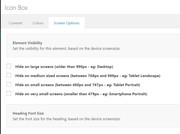
5: you can use the screen options of most elements to hide or show on different elements.
Best regards,
Mike -
AuthorPosts
