

Forum Replies Created
-
AuthorPosts
-
Hi,
I took a look at your site and saw the error in Firefox only, with a jQuery error from Youtube:Failed to execute 'postMessage' on 'DOMWindow': The target origin provided ('https://www.youtube.com') does not match the recipient window's origin - The YouTube player is not attached to the DOMI wonder if this is YouTube’s way of getting around the auto play restrictions, just guessing. All of my research points to using SSL (https).
If I load your site with https the error doesn’t occur, but you do get other mixed content errors, which would be a easy fix if you had SSL, but you don’t.
I assume you tried disabling your plugins, you could try using the ecver=2 attribute for getting rid of advertising on pause YouTube videos. Like this:https://www.youtube.com/embed/YrHeQJpCfRk?ecver=2or:
https://www.youtube-nocookie.com/embed/ID?enablejsapi=1&ecver=2Sorry this wasn’t more helpful.
Best regards,
MikeHi,
Sorry for the late reply, I’m asking the rest of the team for their thoughts.Best regards,
MikeOctober 31, 2018 at 3:06 am in reply to: How to make same page link work on open burger menu #1028340Hi,
The easiest solution so far has been to use this plugin: Update Theme and Plugins from Zip FileHere are the steps:
First please ensure your “PHP Max Upload Size” is at least 20mb, because Enfold is 16.7mb.1: please install the plugin: Update Theme and Plugins from Zip File

2: then go to WordPress > Themes > Add New > Upload
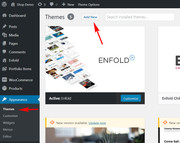
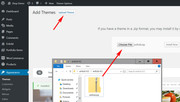
3: after the install, click “Return to Themes page” (NOT Activate)
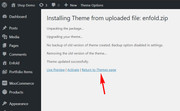
4: success:

But if you wish I will assist with updating your site via FTP, Please include a admin login & FTP access in the Private Content area.
Best regards,
MikeHi,
Glad to hear you were able to successfully update via FTP, odd the plugin didn’t work for you though, but being done is good. Shall we close this then?
@qtinfo please open a new thread with a admin login & FTP access in the Private Content area so we can assist.
I assume you have tried this solution
Since this is not your thread your login info will not be private here.Best regards,
MikeHi,
@jancecile
Please include a admin login & FTP access in the Private Content area so we can try to update for you, and allow us to see the error.
I don’t know why Theme Forest has created the token system.Best regards,
MikeHi,
I believe @Basilis reported this and it’s going to be included in the next update. So you can apply it to the parent theme files.
I will check though.Best regards,
MikeHi,
@classywebsites
I believe we cross posted – I just finished solving your issue, I will look for your reply in your thread.Best regards,
MikeHi,
Glad to hear, we will close this now. Thank you for using Enfold.For your information, you can take a look at Enfold documentation here
And if there are features that you wish Enfold had, you can request them and vote the requested ones here
For any other questions or issues, feel free to start new threads under Enfold sub forum and we will gladly try to help you :)Best regards,
MikeHi,
Please try adding @Guenni007 css to \enfold\config-templatebuilder\avia-shortcodes\icongrid\icongrid.css around line 250.avia-icongrid-flipbox li .avia-icongrid-front, .avia-icongrid-flipbox li .avia-icongrid-flipback, .avia-icongrid-flipbox li .avia-icongrid-front .avia-icongrid-inner, .avia-icongrid-flipbox li .avia-icongrid-flipback .avia-icongrid-inner { backface-visibility: hidden; -webkit-backface-visibility: hidden; -moz-backface-visibility: hidden; -webkit-transition: 0.6s; -o-transition: 0.6s; transition: 0.6s; -webkit-transform-style: preserve-3d; transform-style: preserve-3d; height: 100%; }Or try this css at the same location:
.avia-icongrid-flipbox li .avia-icongrid-flipback {
    opacity: 0;
    visibility: hidden;
}
 .avia-icongrid-flipbox li:hover .avia-icongrid-front,
 .avia-icongrid-flipbox li.av-flip .avia-icongrid-front{
    opacity: 0;
    visibility: hidden;
}
.avia-icongrid-flipbox li:hover .avia-icongrid-flipback,
.avia-icongrid-flipbox li.av-flip .avia-icongrid-flipback{
    -webkit-transform: rotateY(0deg);
    transform: rotateY(0deg);
      opacity: 1;
    visibility: visible;
}
Best regards,
MikeHi,
Thanks for the FTP access, somehow the headings of the style.css got switched around, I corrected it for you and added the child theme image, you may need to clear your browser cache for the image to show.
In your child theme css you had a error on line 143 that I commented out:media="screen"::selection { background-color: transparent; color: transparent; }please compare this to your live site to see if you can find the correct code, because this is not valid.
media="screen"::selectionPlease check your site, it seems to look good.
Best regards,
MikeHi,
As I understand, each license requires a unique token. Please see this postBest regards,
MikeHi,
Glad to help, unless there is anything else we can help with on this issue, shall we close this then?Best regards,
MikeHi,
Opps, I didn’t look at the top of this thread :)Best regards,
Mike-
This reply was modified 7 years, 5 months ago by
Mike. Reason: solution already posted
Hi,
I tried to look at your site, but you must have been updating because I saw this message:Briefly unavailable for scheduled maintenance. Check back in a minute.This would be the solution, because the Custom Font Manager in the Import/Export page has been a option for a few versions now.
After updating if you still don’t see the option, please include a admin login in the Private Content area so we can take a closer look.Best regards,
MikeHi,
@prabhsandhu
Please see this post
If this doesn’t help, open a new thread so we can assist, and include your admin login and ftp access in the private content area so we can take a closer look, but as this is not your thread your login info will not be private.Best regards,
MikeHey tremblayly,
Sorry for the late reply, Please ensure your “PHP Max Upload Size” is at least 20mb, because Enfold is 16.7mb.
This has been the only issue I have seen thus far, but if you can include a admin login I would like to take a look.
To solve this right away for you, please also include your FTP access and we will update it for you via FTP.Best regards,
MikeHey Martrix86,
Sorry for the late reply, I believe that you are referring to the “add to cart” button of a product page. Using Edge I went to our shop demo, that you linked to and added a item to the cart:
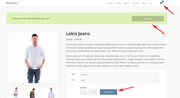
Then I went to your site and did the same, Please see the screenshot in Private Content area.
Is this the same “add to cart” that you are talking about?Best regards,
MikeHi,
Glad to help, unless there is anything else we can help with on this issue, shall we close this then?Best regards,
MikeHi,
I’m glad that you have found it.
If this is working for you now, shall we close this then?Best regards,
MikeHey thanp73,
I believe you are referring to have conditional widgets that are also conditional in their order, is this correct?
Unfortunately this is not a feature at this time, but please try the Widget Options plugin, which I believe can do this.Best regards,
MikeHi,
Glad Nikko was able to help, unless there is anything else we can help with on this issue, shall we close this then?Best regards,
MikeHey Tommy,
Please go to Enfold Theme Options > Import/Export > Custom Font Manager and upload the font.
Please read more about it here.Best regards,
MikeHi,
@admindietz yes you will need a license for every new domain, licenses are managed though envato tokens.Best regards,
MikeOctober 30, 2018 at 5:21 am in reply to: How is the "Hover Circle" at kriesi.at homepage done? #1027850Hi,
Sorry, I have seen this question a few times now, this was custom written by Kriesi and when asked he was not ready to share the files for this element. (or magic trick)Best regards,
MikeHi,
@jancecile
Please include a admin login & FTP access in the Private Content area, I will assist.
I believe the reason you got the “The package could not be installed. The theme is missing the style.css stylesheet”
error is because the zip file has the theme inside another folder.Best regards,
MikeHi,
@classywebsites I replied in your thread.Best regards,
MikeHi,
I believe I found your problem, your parent theme is installed as /enfold/enfold/
so the child theme is only looking in the first /enfold/ directory
please fix your parent theme to be in the first directory.Best regards,
MikeHi,
Thank you for the logins, I was able to login to your WordPress, but not your FTP,
When I try as FTP it times out with no connection, and when I try with SFTP it connects but fails to login.
Please check the FTP info.Best regards,
MikeHey donionline,
Theme Forest has changed their API for Token keys, v4.5 fixes this, it is recommend to update manually.
There is a free plugin that will allow you to manually update via the WordPress Theme panel by uploading the enfold.zip file, otherwise you can update via FTP, please remember to delete the current enfold folder and then upload the new one. Please don’t try to overwrite the theme folder, as this will leave old files behind and cause errors.
My recommendation is to go to your Theme Forest account and download the updated Enfold v4.5 and manually update it, then going forward it will use the new Token keys. All users will need to generate a new token for updates. Please see this post
Please let us know if you would like some help updating.Here are the steps to update with the plugin
*Please ensure your “PHP Max Upload Size” is at least 20mb, because Enfold is 16.7mb.
1: please install the plugin: Update Theme and Plugins from Zip File
2: then go to WordPress > Themes > Add New > Upload
3: after the install, click “Return to Themes page” (NOT Activate)
4: success:
Best regards,
Mike -
This reply was modified 7 years, 5 months ago by
-
AuthorPosts
