

Forum Replies Created
-
AuthorPosts
-
Hi,
Glad to hear, thanks for using Enfold.
For your information, you can take a look at Enfold documentation here
For any other questions or issues, feel free to start new threads under Enfold sub forum and we will gladly try to help you :)Best regards,
MikeHi,
Thanks for the login, please see this article about phone number links for reference.
When I look at your site I see your phone number in the “Phone Number or small info text
” area in not a link, I see that you added a link in the Quick CSS, but it actually needs to be in the “Phone Number or small info text
“to work, so I used this format to make it a link:<a href="tel://555-555-5555">(555) 555-5555</a>(I assume for the UK there is no “1” county code in the number, but please check for yourself)
It is now a link.
To increase it’s font size I added this code in the General Styling > Quick CSS field field:.phone-info span,.phone-info span a { font-size: 20px !important; }Please adjust the number to suit & clear your browser cache.
Best regards,
MikeHi,
Glad Jordan could help, and thank you for the kind words, unless there is anything else we can help with on this issue, shall we close this then?Best regards,
MikeHey Dee007,
Assuming that this is the element that you would like to be 10px
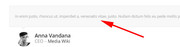
Please try this code in the General Styling > Quick CSS field or in the WordPress > Customize > Additional CSS field:div.avia-testimonial-content P { font-size: 10px !important; }If this doesn’t help, please include a admin login and ftp access in the private content area so we can take a closer look.
Best regards,
MikeHi,
Thank you for the login, I didn’t have access to the WordPress > Customize > Additional CSS or the WordPress > Appearance > Editor > style.css so I couldn’t check for errors, but I ws able to check Enfold Theme Options > General Styling > Quick CSS were I found that your arrows ” > ” were actually html code ” > ”
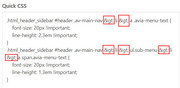
I suspect that you copied the code from a email rather that the code block in the forum, no mater I replaced with the correct css and cleared the cache plugin and my browser cache, and found it to work fine:

Please remove any rouge code in the areas listed above and clear your browser cache and check.Best regards,
MikeNovember 21, 2018 at 4:07 am in reply to: Modify Post titles to use two lines with hard return #1035889Hi,
Glad we were able to help, we will close this now. Thank you for using Enfold.For your information, you can take a look at Enfold documentation here
For any other questions or issues, feel free to start new threads under Enfold sub forum and we will gladly try to help you :)Best regards,
MikeNovember 20, 2018 at 2:48 pm in reply to: any product detail page layout in woocommerce appears narrow. #1035599Hi,
Glad we were able to help, we will close this now. Thank you for using Enfold.For your information, you can take a look at Enfold documentation here
For any other questions or issues, feel free to start new threads under Enfold sub forum and we will gladly try to help you :)Best regards,
MikeHi,
Thanks for the link, please try this css, the first rule is for the main menu & the second rule is for the sub-menu, should you want to adjust the font size there as well:.html_header_sidebar #header .av-main-nav > li > a .avia-menu-text { font-size: 20px !important; line-height: 1.3em !important; } .html_header_sidebar #header .av-main-nav > li > ul.sub-menu > li > a span.avia-menu-text { font-size: 20px !important; line-height: 1.3em !important; }Please feel free to adjust & then clear your browser cache and check.
Best regards,
MikeNovember 20, 2018 at 2:28 pm in reply to: Problem with the highlighting of the mainmenu with onpage links (Anchor) #1035589Hi,
Glad we were able to help, we will close this now. Thank you for using Enfold.For your information, you can take a look at Enfold documentation here
For any other questions or issues, feel free to start new threads under Enfold sub forum and we will gladly try to help you :)Best regards,
MikeHi,
Do you mean this plugin: Woocommerce Polylang Integration I have not seen this plugin before, but if you include a admin login in the private content area I will try to take a closer look.
Perhaps the plugin author support page would have a solution.Best regards,
MikeNovember 20, 2018 at 8:27 am in reply to: any product detail page layout in woocommerce appears narrow. #1035471Hi,
Sorry I for got to say that you would want to remove the css code I gave you earlier, when I didn’t understand what you wanted.
I removed it for you. Please clear your browser cache and check.Best regards,
MikeHi,
Glad we were able to help, we will close this now. Thank you for using Enfold.For your information, you can take a look at Enfold documentation here
For any other questions or issues, feel free to start new threads under Enfold sub forum and we will gladly try to help you :)Best regards,
MikeHi,
Glad to hear you found the issue, unless there is anything else we can help with on this issue, shall we close this then?Best regards,
MikeHi,
What font size would you like? Please undue the font size change in the Advanced Styling and include a link to your site, so I can assist with some css.Best regards,
MikeNovember 20, 2018 at 7:56 am in reply to: Problem with the highlighting of the mainmenu with onpage links (Anchor) #1035457Hi,
I believe I have solved the issue, in the color sections there is a new setting called “custom top and bottom margin” and when I change to top margin to 150px, to match your header height, the menu anchors hit the right spot and light up the menu.
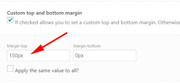
I adjusted the “en” page and it seems to work correctly now, Please clear your browser cache and check.Best regards,
MikeHi,
@LodiPlanting We are happy to help.@web4698 is there any assistance we can offer, or is your issue resolved?
Best regards,
MikeHi,
To remove the border at the top of the dropdown, Please try this code in the General Styling > Quick CSS field or in the WordPress > Customize > Additional CSS field:#avia-menu .sub-menu { border-top: 0px none #7A1E16!important; }The only draw back is that the border below the menu items is only as wide as the menu item is:

Please let us know if this is acceptable.Best regards,
MikeNovember 20, 2018 at 5:30 am in reply to: Change size of text at footer ( sub menu ), but not in rest of website #1035421Hi,
Glad we were able to help, we will close this now. Thank you for using Enfold.For your information, you can take a look at Enfold documentation here
For any other questions or issues, feel free to start new threads under Enfold sub forum and we will gladly try to help you :)Best regards,
MikeHi,
While I was able to make the blue overlay stay within the box, I was not able to get the “content: attr(title);” to work and show the title within the blue box, which I’m sure is important to you.
This might require a little more time & coding than we can achieve here, However, if it’s really important for you to get this done, you can always hire a freelancer to do the job for you.Best regards,
MikeHi,
Try replacing your text in sections, such as the top half of the page first, then half of the bottom half of the page.
This way you don’t have to keep trying to change the same text and you can find the section that is breaking the layout.
once you find the sentence or code that is causing the issue you will be able to correct it.Best regards,
MikeNovember 20, 2018 at 4:48 am in reply to: No access to Website and WP-Admin page after theme update to 4.5!! #1035397Hi,
That is great news!
Glad we were able to help, we will close this now. Thank you for using Enfold.For your information, you can take a look at Enfold documentation here
For any other questions or issues, feel free to start new threads under Enfold sub forum and we will gladly try to help you :)Best regards,
MikeHi,
The settings in the woocommerce > general options, are set for your entire store, while the plugin allows you to make these options for individual products.
So if you want to set different options for each product, then the plugin may be best for you.Best regards,
MikeHi,
Ich sehe, ja, der Code zum Erstellen dieser Seiten kann zu Enfold hinzugefügt werden. Die Skripte, die sich im Kopf des HTML-Codes befinden müssen, können mit dieser Funktion in der Datei functions.php in Appearance> Editor:function add_custom_code(){ ?> YOUR CODE GOES HERE <?php } add_action('wp_head', 'add_custom_code');und der Seitencode, wie folgt:
<div class="yf-main-wrapper yf-banner-wrapper" id="YFPage"></div>kann mit einem” Code Block “-Element auf Ihrer Seite oder hinzugefügt werden Sie können einen WordPress Shortcode erstellen
— Translated with Google —
I see, yes the code to create these pages can be added to Enfold, the scripts that need to be in the head of the HTML can be added with this function in the functions.php file in Appearance > Editor:
function add_custom_code(){ ?> YOUR CODE GOES HERE <?php } add_action('wp_head', 'add_custom_code');and the page code, such as this:
<div class="yf-main-wrapper yf-banner-wrapper" id="YFPage"></div>can be added with in a “code block” element on your page, or you can create a WordPress Shortcode
Best regards,
MikeNovember 20, 2018 at 4:08 am in reply to: any product detail page layout in woocommerce appears narrow. #1035391Hi,
So you would like 2 columns above and 1 column below, like in this screenshot:
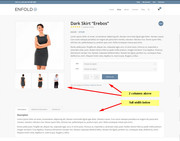
This was done by adding this code to the end of the functions.php file in Appearance > Editor:function av_woo_tabs_below() { remove_action( 'woocommerce_after_single_product_summary', 'woocommerce_output_product_data_tabs', 1 ); add_action( 'woocommerce_after_single_product_summary', 'woocommerce_output_product_data_tabs', 20 ); } add_action( 'init', 'av_woo_tabs_below');Best regards,
MikeHi,
Thanks for the login, I made some adjustments, Please clear your browser cache and check.Best regards,
MikeHi,
I’m not sure I understand, what do you mean it doesn’t show correctly at 100% but 90% and below is correct?
What is the screen width of 100%?Best regards,
MikeHey briandeeney,
This is something I had not noticed, that there is no author for portfolio items. But I did find a solution that is reported as working: Portfolio Items AuthorBest regards,
MikeHey Martin Reiner,
Vielen Dank für Ihre Kontaktaufnahme. Wenn Sie “Fremdcodes” sagen, meinen Sie fremde Zeichen, wie in einer anderen Sprache? Ich habe mir Ihren Link angeschaut, aber nichts gesehen, das über “Fremdcodes” gesprochen hat. Bitte versuchen Sie, etwas mehr zu erklären, Möglichkeit mit Screenshots.— Translated with Google —
Thank you for contacting us, when you say “foreign codes” do you mean foreign characters, as in a different language?
I took a look at your link, but didn’t see anything that talked about “foreign codes”
Please try to explain a little more, possibility with screenshots.Best regards,
MikeHey fabiomagliozzi,
Perhaps a plugin such as this one would help: Product Country RestrictionsBest regards,
Mike -
AuthorPosts
