

Forum Replies Created
-
AuthorPosts
-
Hi,
Glad we were able to help, we will close this now. Thank you for using Enfold.For your information, you can take a look at Enfold documentation here
For any other questions or issues, feel free to start new threads under Enfold sub forum and we will gladly try to help you :)Best regards,
MikeHi,
Glad this is sorted out, we will close this now. Thank you for using Enfold.For your information, you can take a look at Enfold documentation here
For any other questions or issues, feel free to start new threads under Enfold sub forum and we will gladly try to help you :)Best regards,
MikeHi,
Glad to help, unless there is anything else we can help with on this issue, shall we close this then?Best regards,
MikeHi,
If the image for mobile is still not working, let us know which one and where so we can take a look.
The plugins to reduce the image sizes typically helps a lot without losing quality, a caching plugin should also help.
Thanks for the offer, but I’m just happy to help you get your site up and running :)Best regards,
MikeHi,
Glad to help, I notice that your
PHP Post Max Size is 8M &
PHP Max Upload Size is 2M
you may want to ask your webhost to change these to 20M each, there are a few ways to do this and your webhost will know the right way to do it for your server.
Do you plan to import one of the demos?
If so we’ll leave this open until you have successfully done so.Best regards,
MikeHey mariellecv,
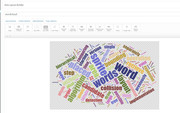
To add a wordcloud like this to your page or post using the advanced layout builder,

First install the SVG Support plugin.
Then go to this wordcloud generator and create your wordcloud and download it.
You will then need to open it with a plain text editor, such as VS Code, NotePad++, etc and add this code to the very first line of the file:<?xml version="1.0" encoding="utf-8"?>You will then be able to upload it to your media library and use it like a image, for this example I added it to a image element.
Best regards,
MikeHey mollystewart,
I see that in your child theme css you have this css to set the background color for the active tab:.av-active-tab-title { background: #977d32 !important; }Please remove this and use this css instead:
a.av-active-tab-title[data-av-tab-section-title="1"] {
background-color: #977d32 !important;
}
a.av-active-tab-title[data-av-tab-section-title="2"] {
background-color: #c1b63c !important;
}
a.av-active-tab-title[data-av-tab-section-title="3"] {
background-color: #8e1b20 !important;
}
Then please clear your browser cache and check.
Best regards,
MikeHey Andrea,
Please try this code in the General Styling > Quick CSS field or in the WordPress > Customize > Additional CSS field:.av-marked-text span.av-rotator-text-single { background-color: transparent !important; color: #fff !important; }Best regards,
MikeHi,
Thank you for the login, I enabled the custom classes for your elements at: Enfold Theme Options > Layout Builder > Show element options for developers

Then I added the custom class “accordion-icons” in your accordion element, so that we can add some custom css that will only effect the icons within the accordion element.

Then I added this css to your Enfold Theme Options > General Styling > Quick CSS field.accordion-icons .iconlist_content_wrap p { margin: 0em !important; } .accordion-icons .iconlist_content_wrap br { display: none !important; }Please clear your browser cache and check.
Best regards,
MikeHi,
I uploaded the Enfold theme for you and activated it, it seems to be working correctly.
You can start creating your site, or you can choose one of the demos to import.
Please let us know if this is working for you.Best regards,
MikeHi,
Sorry, the solution I found above was for a different version, but I did find the setting for forcing mediaelement.js to load, it is under the Enfold Theme Options > Performance > Self hosted video and audio

I set it to “always load” and enabled your plugin, then tested for the errors above. Everything seems to be running correctly.
Please check.Best regards,
MikeHi,
Please try to edit the functions.php, find this line of codes.wp_register_script( 'avia-html5-video', $template_url.'/js/mediaelement/mediaelement-and-player.min.js', 'jquery', "1", true); and wp_enqueue_script( 'avia-html5-video' );Replace them with
//wp_register_script( 'avia-html5-video', $template_url.'/js/mediaelement/mediaelement-and-player.min.js', 'jquery', "1", true);

and

//wp_enqueue_script( 'avia-html5-video' );
Best regards,
MikeHi,
At the top of the Fontello website is the option to upload icons that you have created, the site will then create the correct font file and package it in the correct format for the theme.Best regards,
MikeHi,
That is great news, so I take it that this is solved, shall we close this then?Best regards,
MikeHi,
I believe that when the form sends the email to your inbox your spam filter sees what the domain of the site is, but the different “from” domain that you are adding is triggering the spam filter, which trashes it before the spam folder.
Please try making the “from” address the same as the site domain and your inbox, to confirm that you site is sending the message and your inbox will receive it.Best regards,
MikeHey MarcusJeroch,
Sorry for the late reply, Please try this code in the General Styling > Quick CSS field or in the WordPress > Customize > Additional CSS field:li.product.product-type-simple .avia_cart_buttons a.add_to_cart_button,li.product.product-type-simple .avia_cart_buttons span.button-mini-delimiter { display: none !important; } li.product.product-type-simple .avia_cart_buttons a.button.show_details_button { width: 100% !important; }
Best regards,
MikeHey profumopuntoit,
Sorry for the late reply, I tried to find your site from the error log above, and if I looked at the correct domain it looks like you are using Enfold version 4.4, are you currently having the error, or did you roll back to avoid the error?Please check your webhost to see if you have the one click staging site option, this is a option in most cPanels to create a staging clone of your site so we can test on it and you site will stay up and running. You can always ask your webhost to help you with setting this up if you want.
Here are some screenshots of what it would look like:

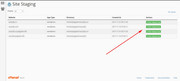
If you have this option, Please include a admin login & FTP access in the Private Content area for the staging site (test site) so we can update it and see the error.
From your error log above it looks like you are using PHP 7.3, I’m not sure that this is as stable as PHP 7.0, there is a good chance that downgrading to PHP 7.0 will solve this, but we should test this on a testing site.Best regards,
MikeHi,
Your provider could be marking it as spam at the server level because it’s coming from a different domain than the email is.
It is common for the email filter to trash it before it gets to your inbox.
Is your email server the address in the functions.php?
did you try this function?// set contact form "from" address to SMTP domain to receive emails // AND allow vistor address to be in the "to" address in the autoresponder add_filter('avf_form_from', 'avf_form_from_mod', 10, 3); function avf_form_from_mod($from, $new_post, $form_params) { global $enfold_custom_from_header; $enfold_custom_from_header = $from; $from = " (Email address hidden if logged out) "; return $from; } add_filter('avf_form_autoresponder_from', 'avf_form_autoresponder_from_mod', 10, 3); function avf_form_autoresponder_from_mod($from, $new_post, $form_params) { global $enfold_custom_from_header; return $enfold_custom_from_header; }Best regards,
MikeHi,
Glad we were able to help, we will close this now. Thank you for using Enfold.For your information, you can take a look at Enfold documentation here
For any other questions or issues, feel free to start new threads under Enfold sub forum and we will gladly try to help you :)Best regards,
MikeHey Dani,
Thanks for the login, your PHP version is 5.4.45 – Recommend minimum PHP version is 5.6
your MySQL version is 5.5.62 – We recommend a minimum MySQL version of 5.6
your PHP Time Limit is 30 seconds, please try to update to much higher like “nolimit” or 2000 seconds
Please ask your webhost to assist with these settings.
You will still need to update via FTP, Please note that if you update via FTP, you will need to remove the old theme folder “enfold” first (via FTP) then upload the new “enfold” folder at /wp-content/themes/enfold/
Please don’t try to overwrite the theme folder, as this will leave old files behind and cause errors.Best regards,
MikeHey web6s,
Your mockup looks very similar to the construction demo, you can find the custom css for this in our documentation
After you get the menu sorted out, you can add a header widget area and then add a search bar shortcode in it. Then if you need help with some css to adjust the search bar, let us know with a link to your page so we can assist.Best regards,
MikeHi,
Please try going to Enfold Theme Options > Import/Export > Iconfont Manager and follow the link next to it for the Fontello website Then download the icons you like and install them with the Iconfont Manager.
They will then show in the icon list and you can use them.
Please read more about it here.Best regards,
MikeHey kroskopf,
I took a look at your site and found the “Series Engine” plugin is giving an error.
All of your errors above are corrected when the plugin is deactivated.
Please check.Best regards,
MikeHi,
To lighten images, please try some plugins like WebP Express or Compress JPEG & PNG imagesBest regards,
MikeHi,
Thank you for the login, but I didn’t see a contact form on any of the pages to test, which page is it on?
Did you see this error in your Forms setting?
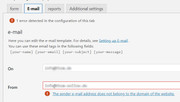
If fixing the error doesn’t solve, please install WP Mail Logging plugin, for us, it helps with finding errors when we send test messages though your site.Best regards,
MikeHi,
For your product variations images I corrected it by going to: Enfold > Shop Options panel, and set the “Product gallery” settings to the woocommerce 3.0 product gallery.
Please clear your browser cache and check.Best regards,
MikeHi,
That’s odd that $template_url didn’t work for you, because I tested it before I posted it, but I’m glad that you were able to adjust it. What is important is that it’s working for you :)
Unless there is anything else we can assist with on this issue, shall we close this then?Best regards,
MikeHi,
The dev team has corrected this issue, please download this productslider.php file and replace the one at:
/enfold/config-templatebuilder/avia-shortcodes/productslider/productslider.php
Then clear your browser cache and any cache plugin, and check.Best regards,
Mike -
AuthorPosts
