

Forum Replies Created
-
AuthorPosts
-
Hi,
Typically that means that you need to include the style.css file in your enfold directory.
I took a look at your site, but didn’t see this error, and I couldn’t login or FTP in to confirm.Best regards,
MikeFebruary 7, 2019 at 5:34 am in reply to: Scroll on Drop Down in Main Menu for Specific label #1063821Hi,
Glad we were able to help, we will close this now. Thank you for using Enfold.For your information, you can take a look at Enfold documentation here
For any other questions or issues, feel free to start new threads under Enfold sub forum and we will gladly try to help you :)Best regards,
MikeFebruary 7, 2019 at 5:33 am in reply to: Form styling issue in custom header widget – Hopefully a simple CSS fix? #1063819Hi,
Glad we were able to help, we will close this now. Thank you for using Enfold.For your information, you can take a look at Enfold documentation here
For any other questions or issues, feel free to start new threads under Enfold sub forum and we will gladly try to help you :)Best regards,
MikeFebruary 7, 2019 at 5:30 am in reply to: Pushing submission datalayer event with form ajax response #1063818Hi,
Glad to hear. Thanks for sharing your solution.
I assume we can close this now, but I like to ask. Shall we close this then?Best regards,
MikeFebruary 7, 2019 at 5:25 am in reply to: Enfold 4.5 Theme Update "Update Failed: Download failed. A valid URL was not pro #1063817Hi,
@ProTravelGolf Typically “The theme is missing the style.css stylesheet.” is a error that the zip file you are using is not correct. Please try ensuring that you are using the zip file from the link “Installable WordPress file only”

If you open the zip file it should have this structure:

If this doesn’t help please upload the zip file to DropBox or Google Drive so we can examine it.Best regards,
MikeFebruary 7, 2019 at 5:10 am in reply to: Can't suppress "related products" on a Enfold / WC product page #1063815Hi,
Glad to help, we will close this then, but please open a new thread if there is anything we can help with.
Have a great day and thanks for using Enfold.Best regards,
MikeHi,
Thanks, I found bold headers (H2) but no bold paragraphs. Am I looking in the correct section?
Please see the screenshot in Private Content area.Best regards,
MikeHi,
Seems That I found a css issue, I will see if I can reproduce it and then report it so I doesn’t reoccur.
Please clear your browser cache and check.Best regards,
MikeHi,
Thank you for the feedback, I added this note to the bug thread for the dev team about this solution.Best regards,
MikeHey codecreative,
Please try this code in the General Styling > Quick CSS field or in the WordPress > Customize > Additional CSS field:@media only screen and (max-width: 989px) { .html_mobile_menu_tablet #top #wrap_all .av_header_transparency { background-color: transparent!important; } .responsive #top #main {margin-top: -93px!important;} }Best regards,
MikeHey codecreative,
Please try this code in the General Styling > Quick CSS field or in the WordPress > Customize > Additional CSS field:@media only screen and (max-width: 989px) { .html_av-overlay-side #top #wrap_all div .av-burger-overlay-scroll #av-burger-menu-ul a:hover { background-color: #1db8f0 !important; } .html_av-overlay-side #top #wrap_all .av-burger-overlay-scroll #av-burger-menu-ul a:focus,.html_av-overlay-side #top #wrap_all .av-burger-overlay-scroll #av-burger-menu-ul a:hover { color: #fff !important; } }Best regards,
MikeHi,
Glad to help, we will close this then.
Have a great day and thanks for using Enfold.Best regards,
MikeHi,
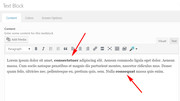
Please include the url to the page in question so we can take a closer look.
Both css above is working for me

Best regards,
MikeFebruary 6, 2019 at 2:21 pm in reply to: Pushing submission datalayer event with form ajax response #1063630Hi,
It sounds like changing the path from AviaBuilder::$path[‘pluginUrlRoot’] to $path[‘pluginUrl’] is not working correctly on you live site. But as you note it is working on the localhost.
A similar issue came up last week and the solution was to change the path to get_template_directory()
I’m not sure why a localhost path would be different than a live host, but if you include FTP access & admin login I will take a look.
I guess worse case we could change the path to a absolute path.
** I did a quick search and found some tips on using dirname(__FILE__) instead, but it would have to be tested first.Best regards,
MikeHi,
Thanks for the feedback, it was worth a try, please restore your backup functions-enfold.php file and use the temp solution of deactivating Yoast while the dev team works on this.Best regards,
MikeFebruary 6, 2019 at 1:40 pm in reply to: Disable 'Add to Cart' Button on Shop & Category Pages, Display on Product Page #1063614Hi,
In this case, please try this code in the General Styling > Quick CSS field or in the WordPress > Customize > Additional CSS field:#top.archive button.single_add_to_cart_button { display: none !important; }Best regards,
MikeHi,
Glad we were able to help, we will close this now. Thank you for using Enfold.For your information, you can take a look at Enfold documentation here
For any other questions or issues, feel free to start new threads under Enfold sub forum and we will gladly try to help you :)Best regards,
MikeHi,
Glad we were able to help, we will close this now. Thank you for using Enfold.For your information, you can take a look at Enfold documentation here
For any other questions or issues, feel free to start new threads under Enfold sub forum and we will gladly try to help you :)Best regards,
MikeFebruary 6, 2019 at 7:06 am in reply to: Please reply to my question! Contact form not working #1063468Hey prissesje,
Sorry for the late reply, the email messages and addresses are not stored anywhere in your database.Best regards,
MikeFebruary 6, 2019 at 6:56 am in reply to: Can't suppress "related products" on a Enfold / WC product page #1063464Hey JanCre,
Try adding this code to the end of your functions.php file in Appearance > Editor:function remove_woo_relate_products(){ remove_action( 'woocommerce_after_single_product_summary', 'avia_woocommerce_output_related_products', 20); } add_action('init', 'remove_woo_relate_products', 10);Best regards,
MikeHey Bryn1,
I took a look at your page and found that this error only occurred on the first page load, if you cycle though the testimonies to the first one again the error doesn’t show.
I wrote this css to correct the error, Please try this code in the General Styling > Quick CSS field or in the WordPress > Customize > Additional CSS field:@media only screen and (min-width: 999px) { #top.page-id-6600 #av_section_3 .avia-testimonial-wrapper { max-height: 187px !important; height: 187px !important; } }Best regards,
MikeFebruary 6, 2019 at 5:23 am in reply to: Scroll on Drop Down in Main Menu for Specific label #1063452Hey Dee,
Please try this code in the General Styling > Quick CSS field or in the WordPress > Customize > Additional CSS field:.main_menu .menu #menu-item-399 ul { height: 500px; overflow: hidden; overflow-y: scroll; }Best regards,
MikeHey codecreative,
I assume that by removing the gap between the buttons this is the effect you are looking for:

If so this try this css:#top.page-id-3008 .avia-buttonrow-wrap.homepage-button { border: 3px solid #fff !important; width: 288px; margin: auto; border-radius: 3px; } #top.page-id-3008 .avia-buttonrow-wrap.homepage-button a { margin: 0px !important; border: 0px none !important; border-radius: 0px !important; }Best regards,
MikeHey Matsmue,
Please include a admin login in the Private Content area so we can take a look.Best regards,
MikeHey restube,
You can use the icon grid to do this, place one image in the title field, and the other in the content field.
Please see this post on adding the image to the title fieldBest regards,
MikeFebruary 6, 2019 at 4:22 am in reply to: Disable 'Add to Cart' Button on Shop & Category Pages, Display on Product Page #1063440Hey Maike,
Please try going to Enfold Theme Options > Shop > Product layout on overview pages and choose “Default without buttons” or “Minimal (no borders or buttons)” both of these options hide the “add to cart” buttons except on the product pages.

Best regards,
MikeHey bemodesign,
If you have a backup of the site, then please deploy it, as there is no function to restore from this mistake.
The only safety precaution we have is the popup warning when it is clicked:
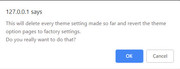
Going forward we have this function that will hide many of these options from your clients,
Try adding this code to the end of your functions.php file in Appearance > Editor:add_action('admin_head', 'hide_theme_options'); function hide_theme_options() { echo '<style> #wpbody-content #avia_options_page .avia_button.avia_button_grey.avia_reset,#wpbody-content #avia_options_page .avia_section_header.goto_update,#wpbody-content #avia_options_page .avia_section_header.goto_upload,#wpbody-content #avia_options_page .avia_section_header.goto_demo { display: none !important; } </style>'; }Best regards,
MikeHi,
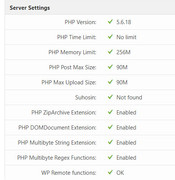
I suspect that your PHP max upload is less that 20mb, or your PHP time limit is too short.
Please go to WordPress > Dashboard > LayerSlider > Options and click “System Status” and look under “Server Settings” and take a screenshot like this:
One other thing, when you downloaded the theme file, was it from the “Installable WordPress file only” link?
Best regards,
MikeHi,
Thanks for the login, I took a look at your settings and everything looked fine, then I uploaded a couple of images, such as one that was:
File size: 6 MB
Dimensions: 5760 × 3840
and I didn’t find any errors with the uploading.
When you had the error what did it say? Are you still having the error?Best regards,
Mike -
AuthorPosts
