

Forum Replies Created
-
AuthorPosts
-
Hey mike.rav,
Sorry for the late reply, I tried to login but couldn’t, but I was able to take a look
To ensure I was looking at the correct section I added a screenshot below, What I see is that you would like is the search to find the links inside of a tab section on a page created with the advanced layout builder. The links in the tab section are saved in the database as shortcode which is hard for the search to read, there is no actual page for each link. I recommend adding a excerpt to the page that contains the text of the links for the search function to read. Another option would be to use a search plugin, such as
Relevanssi or one of the many others that improve the WordPress search options.Best regards,
MikeHi,
Sorry for the late reply, when I looked at your site I didn’t see the search icon that you wanted to move to the right, can you enable it so we can test?
For having your burger menu open on the left, I see right now it’s sliding across the screen, please try this css instead to have it appear on the left side:.html_av-overlay-side .av-burger-overlay-scroll { right: auto; left: 0; } .html_av-overlay-side .av-burger-overlay-scroll { -webkit-transform: translateX(-10px)!important; transform: translateX(-10px)!important; } .av_font_icon.av-icon-style-inline { float: none!important; display: inline-block!important; vertical-align: middle!important; margin: 0 8px!important; }Best regards,
MikeHey rbrenneman,
Sorry for the late reply, I took a look at your site on mobile but I’m not quite sure what the error is, on mobile when the burger menu is showing, I see this on the homepage: image 1, and this on the “getting here” page: image 2
The “getting here” page has no title or content.
When the burger menu flys out the text is a dark gray, so I can see it: image 3
I also checked your site at tablet size when the full size menu is showing, and on the homepage your menu is white, but there is a image behind it, and on the “getting here” page the menu is black.
Please explain what error I’m missing so I can help.Best regards,
MikeHi,
Thank you for updating, I have checked again and I’m not seeing the error I saw before, it is for mobile correct?
Please see the screenshot in Private Content area.Best regards,
MikeHi,
I was able to login, but I’m not sure what you want to do. Do you want to add a slider and diagonal section below your current contact form?
Perhaps some screenshots of what you would like would help.Best regards,
MikeHi,
Oh I see, I could give it a try. I think this might work:$time = time('h:i:s A', time()-25200);which removes 7 hours, but I can’t test on my localhost because I don’t have the same setup as you.
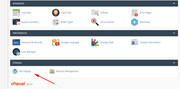
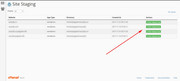
If you post ftp access in the Private Content area I could try. If your webhost offers the staging site option it might be better so your visitors don’t see my trials and errors.Please check if your webhost has the one click staging site option, this is a option in most cPanels to create a staging clone of your site so we can test on it and you site will stay up and running. You can always ask your webhost to help you with setting this up if you want.
Here are some screenshots of what it would look like:
Best regards,
MikeHi,
Glad to hear, I assume we can close this now, but I like to ask first. Shall we close this then?Best regards,
MikeHi,
Glad we were able to help, we will close this now. Thank you for using Enfold.For your information, you can take a look at Enfold documentation here
For any other questions or issues, feel free to start new threads under Enfold sub forum and we will gladly try to help you :)Best regards,
MikeHi,
I believe Jordan is saying that you should add a custom css class for all of the sections you do want the css to work on, and not to the fifth one. Try adding the class “flip” to the columns to do want to flip, and adjust your css like this:.responsive #top .flex_column_table.flipor if you add it to the color sections your css would be like:
.responsive #top .flip .flex_column_tableBest regards,
MikeHi,
I see that you included a admin login, but I don’t see the URL to your site, please include.
What is your webhost, some managed WordPress hosts have some settings that either limits the time needed to install the demo.
Please ensure your PHP is at least version 5.6 or 7.0.x
PHP Time Limit: No limit
PHP Memory Limit: 256M
PHP Post Max Size: 50M
PHP Max Upload Size: 20MAlso check your PHP settings to see if the secure options are activated.
“allow_url_fopen, “allow_url_include” and “register_globals” are “off”
Try turning these “on”.
If you are unsure of these settings your webhost cancheck for you.If this fails I could assist with a demo import if you provide a admin login & ftp access, but I will also need to reset your site, which I’m sure is fine if this is a new install.
Best regards,
MikeMarch 23, 2019 at 5:21 am in reply to: Updated Site and site went down – HTTP 500 Error, here #1082073Hey Eleina_Shinn,
How did you update the site, did you try to overwrite the theme directory? If so please don’t do that, it will leave old files behind and crash the site. Instead in ftp try this: rename your current theme to “enfold-old” then upload the new “enfold” and check that your site is working correctly.
Once you are happy you can delete the “enfold-old” via ftp, (not the WP theme page)
Should for some reason you wish to roll-back to the old version, it’s easy to do, simply rename the new “enfold” to “enfold-new” via ftp and then rename “enfold-old” to “enfold” then refresh your page.Also ensure that your PHP version is at least v5.6
Best regards,
MikeHey Mavone1,
I tried to take a look at your issue, but I couldn’t login without a user ID, please include.
So you can not upload images to your media library? Or the images are uploading but you can’t see the thumbnails in the media library?Best regards,
MikeHey Dean,
Sorry for the late reply, if I understand correctly you were working with a developer that was assisting with a timezone issue you were having in the events calendar plugin, after solving that you are now having a time zone issue in the events countdown element.
So this sounds like you need to adjust the events countdown element time zone independently.
I see that the config-templatebuilder > avia-shortcodes > events_countdown.php on about line 186 has $time = time(); which I believe can be adjusted to include a time zone using this code as a example
I’m not really good at that, but I’m sure your developer could adjust it. I hope this gets you going in the right direction.Best regards,
MikeHi,
Please try this css and check that it doesn’t cause issues on other pages. If it does we can adjust it so it works on this one page.@media only screen and (max-width: 767px) { #top #main main.content { padding-top: 0px !important; } #top #main .empty_title.title_container { height: 40px !important; } }Please see the screenshot in Private Content area.
Best regards,
MikeHi,
I took another look at the errors on your site and one of them is caused by a hidden script in your files:<!-- WiredMinds eMetrics tracking with Enterprise Edition V5.4 START --> <script type='text/javascript' src='https://count.carrierzone.com/app/count_server/count.js'></script> <script type='text/javascript'><!-- wm_custnum='302834cad613d361'; wm_page_name='avia-modal.js'; wm_group_name='/services/webpages/a/c/acordes6.com.mx/public/wp-content/themes/enfold/config-templatebuilder/avia-template-builder/assets/js'; wm_campaign_key='campaign_id'; wm_track_alt=''; wiredminds.count(); // --> </script> <!-- WiredMinds eMetrics tracking with Enterprise Edition V5.4 END -->My research shows that some webhosts automatically install this script, please ask if your webhost is doing this and ask them to stop it, it is braking the site.
Other delete your theme and install a clean version, hopefully the script won’t be added again.Best regards,
MikeMarch 23, 2019 at 3:49 am in reply to: Widgets (navigation) in sidebar have to stay visible #1082065Hi,
Glad we were able to help, we will close this now. Thank you for using Enfold.For your information, you can take a look at Enfold documentation here
For any other questions or issues, feel free to start new threads under Enfold sub forum and we will gladly try to help you :)Best regards,
MikeHi,
You can adjust the margin-top of the “MANUFAKTUR” in the code block in your page, this is what the css looks like:span.manufaktur strong { color: #d3d3d3 !important; margin-top: -53vh; opacity: .30; }To make your header transparent all of the time, try this css:
.header_color .header_bg, .header_color .main_menu ul ul, .header_color .main_menu .menu ul li a, .header_color .pointer_arrow_wrap .pointer_arrow, .header_color .avia_mega_div, .header_color .av-subnav-menu > li ul, .header_color .av-subnav-menu a {
background-color:transparent !important;
}
.header_color.av_header_transparency .header_bg, .header_color.av_header_transparency .main_menu ul ul, .header_color.av_header_transparency .main_menu .menu ul li a, .header_color.av_header_transparency .pointer_arrow_wrap .pointer_arrow, .header_color.av_header_transparency .avia_mega_div, .header_color.av_header_transparency .av-subnav-menu > li ul, .header_color.av_header_transparency .av-subnav-menu a {
background-color:transparent !important;
border-color: transparent !important;
}
#top .header_color #header_meta.container_wrap_meta {
    background: transparent !important;
border-bottom-width: 0 !important;
}
#top #header_main {
    border-bottom-width: 0 !important;
}
#top .av_header_transparency #header_meta {
    border-bottom: 0 !important;
}
#top #header_main.container_wrap {
border-top-width: 0 !important;
}
Best regards,
MikeHi,
Glad we were able to help, we will close this now. Thank you for using Enfold.For your information, you can take a look at Enfold documentation here
For any other questions or issues, feel free to start new threads under Enfold sub forum and we will gladly try to help you :)Best regards,
MikeHi,
I was able to open your shortcode topic. Are you able to create a staging site so we can investigate your shortcode issue without affecting your site traffic?
We should test the shortcodes without your custom plugin activated so we can isolate the issue.Best regards,
MikeMarch 23, 2019 at 2:44 am in reply to: Clickable elements too close together / Content wider than screen Errors Google #1082055Hi,
Thanks, when I check now I don’t see the 404 error.
Why do you think the merged styles are not updating?
If it is because you are adding css changes to the custom.css file directly and you don’t see the changing on your site while your merged css in on, this is because the merged css doesn’t update until the theme settings are saved. So this means the after you add css to the theme stylesheet, you will need to go to the theme options and click the big “Save all changes” button.
Then you will need to clear your browser cache.
If your issue is something else please explain.Best regards,
MikeMarch 23, 2019 at 2:28 am in reply to: Enfold 4.5 Theme Update "Update Failed: Download failed. A valid URL was not pro #1082053Hi,
@Cherryadvertising Thanks for explaining a little more, I see that you are using v4.4.1
Please update to v4.5.5 and them check again.Best regards,
MikeMarch 23, 2019 at 2:15 am in reply to: Enfold 4.5 Theme Update "Update Failed: Download failed. A valid URL was not pro #1082050Hi,
@Dr-Design, glad we could help :)
Thank you for using Enfold.Best regards,
MikeHi,
Thanks for your feedback, we kept talking about “pages” that I missed that it was a “post”, sorry German is not my native language.
Anyways, I summited a bug report with this information to the dev team so they can reproduce the error and investigate a solution.
They may post here directly, if they don’t I will post their findings here for you.
Thank you for your patience.Best regards,
MikeHi,
Glad to hear, we will close this now. Thank you for using Enfold.For your information, you can take a look at Enfold documentation here
For any other questions or issues, feel free to start new threads under Enfold sub forum and we will gladly try to help you :)Best regards,
MikeHi,
Thank you for updating, I see that you have many javascript errors and you are using WordPress v4.9.10
which is 2 major updates behind, there have been a lot of changes in WordPress that we had to Enfold change for.
Please update your WordPress also.Best regards,
MikeHi,
Glad to hear, I assume we can close this now, but I like to ask first. Shall we close this then?Best regards,
MikeHi,
I’m not sure that I explained the logo options well, so I created a logo for you in white, as an example.
So the white logo is for before scroll, and the black one is after scroll. I also included the screenshot of the theme option for each.
Please see the screenshot in Private Content area.
This shows that you can have any two logos for before & after scroll.
Please note that I created the logo quickly, you may want to improve on it.Best regards,
Mike -
AuthorPosts
