

Forum Replies Created
-
AuthorPosts
-
Hi,
Sorry for the late reply, did you see this css to block all animations at the above link?.avia_transform .avia_start_animation.left-to-right.avia_image, .avia_transform .avia-icon-list .avia_start_animation .iconlist_icon, .avia_transform .avia_start_animation.avia-testimonial .avia-testimonial-image { -webkit-animation: none!important; -moz-animation: none!important; -o-animation: none!important; animation: none!important; opacity: 1!important; -webkit-transform: scale(1)!important; -moz-transform: scale(1)!important; -o-transform: scale(1)1important; transform: scale(1)!important; }But I believe that this will not allow you to use a alternative animation because you will not be able to use these classes, you will have to add new classes to your elements for the animation.
Another point is that each element css file has the animation added, so the cleanest way would be to edit each one of them and delete the animation css, and then add the theme classes to your animate.css file, but this would still be a lot of editing.
Perhaps the easiest way would be to add your new animation to each element with the !important; on the rule and then add it to your WordPress > Customize > Additional CSS which overrides all other css.
This would be easy if your only changing a few of them.
How many different elements do you want to change the animation on?Best regards,
MikeHi,
Thanks for the login, It looks like your spam is from the same bot because they all to have the same backlink.
You could add the link to your “Comment Blacklist” in WordPress > Dashboard > Settings > Discussion
Or try a plugin such as Banhammer
I see that you have not added a free API key for your “Akismet Anti-Spam” so all of your comments are marked “Awaiting spam check” Please try activating your free API key.
I was able to send 20 at a time to the trash and mark as spam, but the site crashed when I tried 999 which is the max
This video will show you how to delete all of them from your cPanel.Best regards,
MikeApril 21, 2019 at 3:38 pm in reply to: Translation issue in social media heading in blog post #1093049Hey guttogjente,
Sorry for the late reply, When your language stopped translating, was this after a update? Is the translation via WordPress or a translation plugin? We would need to see your site to see if it’s an error in the PO language file or something else.
But I’m sure we can change the text with jQuery and we can move it, but we will need to examine the page.Best regards,
MikeHi,
Sorry for the late reply,
1: I need to make the color of each page be blue when you’re on it? Do you mean the background color of the page? Please change this at Enfold Theme Options > General Styling > Main Content > Main Content background color
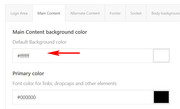
2: Try adding this code to the end of your functions.php file in Appearance > Editor:function custom_script(){ ?> <script> jQuery(window).load(function(){ jQuery( '.hr-custom.avia-builder-el-3' ).insertBefore( '.av-rotator-text.av-rotator-multiline-on.av-rotation-active' ); }); </script> <?php } add_action('wp_footer', 'custom_script');3: To have the team members link to a popup please see this solution.
Last: increase the top-padding of the navigation cell Please try this code in the General Styling > Quick CSS field or in the WordPress > Customize > Additional CSS field:.avia-menu.av-main-nav-wrap { margin-top: 20px !important; }please adjust to suit.
Best regards,
MikeHey heartbit,
Sorry for the late reply, Please try this code in the General Styling > Quick CSS field or in the WordPress > Customize > Additional CSS field:#top #searchform > div { right: 0px !important; }Best regards,
MikeHi,
Glad to help, Happy Easter :)
We will close this now. Thank you for using Enfold.For your information, you can take a look at Enfold documentation here
For any other questions or issues, feel free to start new threads in the Enfold forum and we will gladly try to help you :)Best regards,
MikeHi,
I assume you mean the dashboard colors for agentrising.com?
In each uses profile the colors can be changed for that one user, I don’t believe we are logging in as the same user, so we are not seeing the same thing. Try logging out and then login as the user you gave us, if you still see the issue please include a screenshot of the issue so I can look for it.Best regards,
MikeHi,
Sorry I’m not seeing that on your site, please link directly to the page in your screenshot.Best regards,
MikeHi,
I think we should rewrite it so we are not trying to add individual pages, since you only want the price on “single-product” pages, we should try:#top:not(.single-product) .inner_product_header_cell > .price,#top:not(.single-product) .inner_product_header_cell > .woocommerce-de_price_taxrate,#top:not(.single-product) .inner_product_header_cell > .woocommerce_de_versandkosten { display: none !important; }I added this for you, Please clear your browser cache and check.
Best regards,
MikeHi,
Thank you, so what I’m seeing is at 2051px there is a margin-left on the first footer of 500px:@media screen and (max-width: 2350px) and (min-width: 2051px) #footer .flex_column.first { margin-left: 500px !important;but then at 2350px there is no margin-left:
body div .first, body div .no_margin {
    margin-left: 0;
}
I believe since your rule ends at 2350px the browser looks for the next valid rule which is 0px. I recommend removing the top end of your rule and using a percentage instead of a pixel width, or adding one more open ended rule starting at 2351px using percentages.
From what I can see we don’t have any rules that high and our last one (0px) is open-ended which should go to infinity.
I should point out that I don’t have a screen that large and I don’t recall any questions about screens over 2350px, but this is a good point, thanks.Best regards,
MikeHi,
Thanks for sharing your solution and the screenshot. I’m sure this will help others out.
I assume we can close this now, thanks for using Enfold.For your information, you can take a look at Enfold documentation here
For any other questions or issues, feel free to start new threads in the Enfold forum and we will gladly try to help you :)Best regards,
MikeHi,
Glad we were able to help, we will close this now. Thank you for using Enfold.For your information, you can take a look at Enfold documentation here
For any other questions or issues, feel free to start new threads in the Enfold forum and we will gladly try to help you :)Best regards,
MikeHi,
Sorry for the late reply, the strings for the text are in
\enfold\lang\de_DE.po
around lines 29139 under#: enfold/includes/admin/register-admin-options.php:1164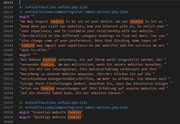
They are in the same place in de_DE_formal.poBest regards,
MikeHi,
Sorry for the late reply, I have not had any feedback on your “page loading behavior” but I do still expect to hear back. We thank you for your patience.
About your timeline animation which page is that on? I clicked through your pages but I didn’t see it.Best regards,
MikeHey Michael,
Sorry for the late reply, do you have a url to a demo page?
I tried to recreate this on my localhost with no luck.Best regards,
MikeHey guttogjente,
Sorry for the late reply, please change your code to this:var sidebar = document.getElementsByClassName("widget_nav_menu");Could you add your whole code here?
Best regards,
MikeApril 21, 2019 at 2:00 am in reply to: My header background image in the logo area is not displayed #1092994Hey Markus,
Sorry for the late reply, I adjust the css some and removed the trailing rules, it was showing as an error.
Please clear your browser cache and check.Best regards,
MikeHey alexbay,
Sorry for the late reply, Please try this code in the General Styling > Quick CSS field or in the WordPress > Customize > Additional CSS field:.header_color .header_bg { background-color: transparent !important; } @media only screen and (max-width: 766px) { .responsive #top #main {margin-top: -80px!important;} #top #wrap_all .av_header_transparency {background-color: transparent!important;} div#header_main > .container {display: block !important;} }Best regards,
MikeHey alexbay,
Sorry for the late reply, one way to add some text into the burger menu is to create a menu item with a custom class and only show it for screens smaller than 768px or mobile displays. Please read more here.
Or if your html/text is already on your page somewhere, you can add it to your burger menu with jQuery. But we will need to see your site to find the correct elements. Please read more here.
Or you can add a widget area inside of your header and hide it for desktops. Please read more here. But we’ll also need to see your site.
Please let us know if you would like some help with one of these methods.Best regards,
MikeApril 21, 2019 at 12:46 am in reply to: Enfold Design (Enfold 2017, Logo, Column inside distance) #1092990Hi,
I took a look at your columns in your screenshot that has the 80px padding for desktop, and that you want to be less for mobile.
I assume you tried using a percentage instead of a px size? But we can adjust these columns with css for mobile screens, it would be easier to add a custom class to all of the columns that you want to target. Without a custom class we have to find something in common with them all, so I see that most of them are “three fifth columns” and tested this css:@media only screen and (max-width: 767px) { div.flex_column.av_three_fifth { padding: 15px !important; } }which worked on your “leistungen-social-media” page. Please give it a try and adjust to suit. Be sure to clear your browser cache, and if it doesn’t work at first also try the css in the WordPress > Customize > Additional CSS field.
Best regards,
MikeHi,
I took a look at your page and I believe changing your css:#top .av_header_scrolldown.av_header_transparency { opacity: 0; margin-top: -250px !important; }to:
#top .av_header_scrolldown.av_header_transparency nav.main_menu {
    opacity: 0 !important;
}
would work better for you, but it’s hard to test with your css in place. Please try this but if it don’t work please include admin login in the Private Content area so we can be of more assistance.
Best regards,
MikeHi,
I took a look at your pages but some of them are not showing the product as I would expect, I understand that you want the paypal button to show on the checkout page, but not the product page.
Please try this code in the WordPress > Customize > Additional CSS field:#top.single-product .zoid-outlet { display:none !important; }Best regards,
MikeHi,
Please try this instead:#top .avia-gallery .avia-gallery-thumb a:after { content: '+'; color: #d89fde; font-size: 45px; font-weight: bold; position: absolute !important; width: 35%; height: 40%; display:flex!important; flex-direction:row!important; align-items: center!important; justify-content: center!important; }Best regards,
MikeHi,
Thanks for the icon zip file, but I see that it only contains svg files and no font files.
So you will need to convert these at the Fontello site as a custom font.
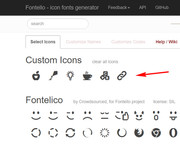
and then import the new zip file, I did this for you and your new icons are ready, please check:

Best regards,
MikeHi,
I took a look at your page and cloned your portfolio element then set it to only one image and then set the visibility to mobile only. I then changed the other one to desktop visibility only.
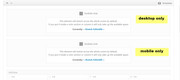
Please clear your browser cache and check, then examine the settings should you want to do this again in the future.Best regards,
MikeHey imriky,
I took a look at your page but I didn’t see the 1px line on the first tab item. Can you please include a screenshot of it so I’m sure I’m looking in the right place?
To solve your tab titles please try this css:@media only screen and (max-width: 767px) { #top .av-section-tab-title { padding: 10px 10px 0px 10px !important; } }As for your Quick CSS, perhaps you have an error in your css, such as a missing bracket. An easy way to check is to copy all of your Quick CSS and enter in into your WordPress > Customize > Additional CSS this will check for errors and alert you.
If this doesn’t help, then please include admin login in the Private Content area and list one css rule that is not working and what page we can see it on, so we can investigate.Best regards,
MikeHey webmonnik,
Here is a script that fires an alert box on the form success:function custom_script(){ ?> <script> //triger an alert when the contact form class "avia-form-success" is added the div "ajaxresponse" //this gives an alert box popup. $(function() { var button = $('.button') , response = $('.ajaxresponse') ; button.on('click', function() { response.addClass('avia-form-success'); $(document).trigger('ajaxAlert'); }); $(document).on('ajaxAlert', function() { alert("The response has been given"); }); }); </script> <?php } add_action('wp_footer', 'custom_script');so you can just modify the last trigger for your needs, without testing I believe it would look like this:
function custom_script(){
  ?>
  <script>
$(function() {
  var button = $('.button')
      , response = $('.ajaxresponse')
  ;

 button.on('click', function() {
    response.addClass('avia-form-success');
    $(document).trigger('ajaxAlert');
  });
  $(document).on('ajaxAlert', function() {
    dataLayer.push({'event' : 'formSubmitted', 'formName' : 'Name form});
  });
});
</script>
<?php
}
add_action('wp_footer', 'custom_script');
Please give this a try.
Best regards,
MikeHey Carolin,
Thanks for the login, I took a look at your page and found that at mobile you slider was only 92px high which is not enough room for your text, so I increased it to 150px and the text seems to fit good now. Please clear your browser cache and check.
You will see on your page a new code block with this code in it:<style> @media only screen and (max-width: 767px) { #full_slider_1 > div > ul > li > a > img { min-height: 150px !important; } } </style>This is what is making the changes, I added it here until you had a chance to review, if you want to delete it and add the css to your Quick CSS, that would be fine:
@media only screen and (max-width: 767px) {
#full_slider_1 > div > ul > li > a > img {
min-height: 150px !important;
}
}
Best regards,
MikeHi,
Thank for the login, I took a look at your post and found that the “Mozart’s Holiday Light Show” is the last active post, so there is no “Next” post to show on the right side, the next post is in draft status.
Your last post will always only have the left side “Prev” link. Similar to how the first post will only have the right side “Next” link.
I hope this explains how the Next & Prev links work.Best regards,
Mike -
AuthorPosts
