

Forum Replies Created
-
AuthorPosts
-
Hi,
Sorry for the late reply, I’m not sure I understand this last issue, Please see the first screenshot in Private Content area.
So compared to the page content, please explain how you would like to see the footer width/height, Please see the second screenshot in Private Content area.
Perhaps a mockup or screenshot would help.Best regards,
MikeHi,
Thank you for the login, but I don’t see the site url, please include.Best regards,
MikeHi,
Glad we were able to help, we will close this now. Thank you for using Enfold.For your information, you can take a look at Enfold documentation here
For any other questions or issues, feel free to start new threads in the Enfold forum and we will gladly try to help you :)Best regards,
MikeHi,
Thank you for clarifying, since I do not speak German I will ask the dev team to review.
Thank you for your patience.Best regards,
MikeHi,
Glad we were able to help, we will close this now. Thank you for using Enfold.For your information, you can take a look at Enfold documentation here
For any other questions or issues, feel free to start new threads in the Enfold forum and we will gladly try to help you :)Best regards,
MikeHi,
Ich bin froh, dass wir helfen konnten, wir werden dies jetzt schließen. Vielen Dank, dass Sie Enfold verwenden.Glad we were able to help, we will close this now. Thank you for using Enfold.
For your information, you can take a look at Enfold documentation here
For any other questions or issues, feel free to start new threads in the Enfold forum and we will gladly try to help you :)Best regards,
MikeHi,
Bitte versuchen Sie dieses CSS und passen Sie es an.Please try this code in the General Styling > Quick CSS field or in the WordPress > Customize > Additional CSS field:
#top .av-burger-overlay-inner #av-burger-menu-ul {
    padding-top: 20px !important;
    vertical-align: top !important;
}
Please adjust the “20px” to suit.
Best regards,
MikeHi,
We will close this now. Thank you for using Enfold.For your information, you can take a look at Enfold documentation here
For any other questions or issues, feel free to start new threads in the Enfold forum and we will gladly try to help you :)Best regards,
MikeHi,
Thanks for your feedback, sometimes when you try to download the latest version from Theme Forest the version numbers are not shown correctly. Please try downloading anyways and open the “style.css” in the root folder and look at line 4 to see the version number:
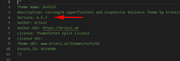
You will need to update this version via ftp.
Please don’t try to overwrite the theme folder, as this will leave old files behind and cause errors.
This is the easiest way to update, first, rename your current theme to “enfold-old” then upload the new “enfold” and checked that your site is working correctly.
Once you are happy you, can delete the “enfold-old” via ftp, (not the WP theme page)
Should for some reason you wish to roll-back to the old version, it’s easy to do, simply rename the new “enfold” to “enfold-new” via ftp and then rename “enfold-old” to “enfold” then refresh your page.
**This assumes that your current theme folder is “enfold”Best regards,
MikeHi,
Glad we were able to help, we will close this now. Thank you for using Enfold.For your information, you can take a look at Enfold documentation here
For any other questions or issues, feel free to start new threads in the Enfold forum and we will gladly try to help you :)Best regards,
MikeHi,
Glad we were able to help, we will close this now. Thank you for using Enfold.For your information, you can take a look at Enfold documentation here
For any other questions or issues, feel free to start new threads in the Enfold forum and we will gladly try to help you :)Best regards,
MikeMay 28, 2019 at 5:22 am in reply to: How to remove the Alt text in the Masonry gallery when hovering over an image #1104652Hi,
I believe I understand, please link to your page so I can test a custom script.Best regards,
MikeMay 28, 2019 at 5:17 am in reply to: Changing Phone Number/Extra Info background only on content pages #1104648Hi,
Glad we were able to help, we will close this now. Thank you for using Enfold.For your information, you can take a look at Enfold documentation here
For any other questions or issues, feel free to start new threads in the Enfold forum and we will gladly try to help you :)Best regards,
MikeHi,
Glad we were able to help, we will close this now. Thank you for using Enfold.For your information, you can take a look at Enfold documentation here
For any other questions or issues, feel free to start new threads in the Enfold forum and we will gladly try to help you :)Best regards,
MikeHi,
Thanks for your feedback, but perhaps I’m looking at the wrong page because I don’t see a sidebar on the right side, Please see the screenshot in Private Content area.Best regards,
MikeHi,
Thanks for the feedback, I was able to login to your cPanel once I used an RU VPN.
I added the “.$author_name.” as described above and now the author name is showing.
I also added this css to hide the second featured image in your Quick CSS:#top.archive .big-preview.multi-big { display: none !important; }Please see the link in the Private Content area.
Please clear your browser cache and check.Best regards,
MikeMay 28, 2019 at 4:40 am in reply to: General/Advanced Styling Issue With Animations/Rollovers/Counters #1104633Hi,
Thank you for your feedback, and I’m glad this helped. If you look at the bottom of the performance option page you will see the option: Delete old CSS and JS files? you can try checking this and saving, then re-enable the js merging and clearing your browser cache a couple of times.
But the merging, cache plugins, and autoptimize can make working on a site difficult, I recommend only using these once your site is compete.
Also note that the “Classic Editor” plugin is not needed because this option is built-in to the theme settings at the bottom of the first options page.
Please do reach out if you have any other issues, and thank you for using Enfold.Best regards,
MikeHi,
Thanks for the login, what I meant was that in the page source code the title seems correct, but I see that it is not.
This is not a default title, but I don’t know what is causing it. I tried creating a new contact form and it worked correctly, but copying your form carries the error over. I also tried debugging your form with no luck and looking for a script that would be doing this, again with no luck.
have you used this sentence anywhere else, or modified any theme files?
I checked many files but didn’t see that you did.
So short of recreating the form from scratch and not copying it from any other form, I wrote a script to correct this one form on this page and added this code to the end of your functions.php file in Appearance > Editor:function custom_script(){ ?> <script> (function($){ $(document).ready(function() { $("#top.page-id-5863 .contact-form-adjustment h3").replaceWith("<h3>Please provide the following</h3>"); }); })(jQuery); </script> <?php } add_action('wp_footer', 'custom_script');Another option is to update your theme to v4.5.7, perhaps this will correct.
I have never seen this type of error happen before.Best regards,
MikeHi,
So is the issue only the word Blog to Beiträge?
Try adding this code to the end of your functions.php file in Appearance > Editor:function custom_beitrage(){ ?> <script> (function($){ $(document).ready(function(){ $('.main-title.entry-title a').each(function() { var text = $(this).text(); $(this).text(text.replace('Blog', 'Beiträge')); }); }); })(jQuery); </script> <?php } add_action('wp_footer', 'custom_beitrage');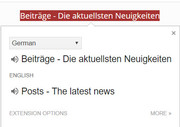
“Beiträge” seems to be “Posts”
but “Blog” doesn’t seem to translate
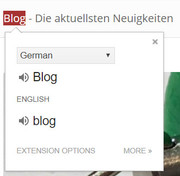
Best regards,
MikeHi,
Glad to hear, I assume we can close this now, but I like to ask first. Shall we close this then?Best regards,
MikeHi,
Oh I see, thanks for the screenshot, Please try this code in the General Styling > Quick CSS field or in the WordPress > Customize > Additional CSS field:.av-timeline-nav a { background-color: transparent !important; }Best regards,
MikeMay 28, 2019 at 2:24 am in reply to: Mobile transparent menu losing transparency on returning to the top #1104618Hi,
Thanks for the screenshot and telling us which browser.
I can’t reproduce this on Windows or Android, I will ask the team to look into this with an iPhone.
Thank you for your patience.Best regards,
MikeHi,
Glad to hear you got it sorted out, we will close this now. Thank you for using Enfold.For your information, you can take a look at Enfold documentation here
For any other questions or issues, feel free to start new threads in the Enfold forum and we will gladly try to help you :)Best regards,
MikeMay 27, 2019 at 12:34 am in reply to: enfold install failed txt document pops up php.update #1104380Hi,
Thanks for the link, I checked your zip file and it seems correct, I then installed a system info plugin and found that your PHP Post Max Size is 76mb, where the theme is 74mb not counting the extraction, so this is cutting it very close.
Please ask your webhost to change it to 200mb.
I also see that your PHP Time Limit is 120 seconds, which is low, please ask your webhost to set it to “unlimited” this is typical.
Then give it another try.
If this fails, please try uploading the extracted theme folder to /wp-content/themes/enfold/ manually via FTP or your cPanel “file manager”
If this fails, Please include FTP access or cPanel access or webhost access in the Private Content area so we can try.**Side note: I see that you have the plugin Update Theme and Plugins from Zip File installed, you don’t need to use this because Enfold is not installed yet, this plugin is only for updating, not installing.
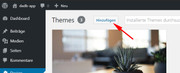
Please install via WordPress > Themes > add new
Best regards,
MikeMay 27, 2019 at 12:10 am in reply to: PayPal Buttons Have Stopped Working in Enfold Columns #1104376Hi,
Glad to hear, I checked your buttons again and they are working for me also.
Glad we were able to help, we will close this now. Thank you for using Enfold.For your information, you can take a look at Enfold documentation here
For any other questions or issues, feel free to start new threads in the Enfold forum and we will gladly try to help you :)Best regards,
MikeHi,
Please try including this css:.mfp-gallery .mfp-counter { display: none !important; }Best regards,
MikeHey Roger Gauthier,
Thanks for the link, but I was not able to login. I see that you are using Enfold v3.1.3 which is quite old, but we have taken good care to be backward compatible, so you should be able to update with minimal issues. You will need to ensure your PHP version is at least v5.6
The theme settings are stored in the database with an export option in the theme, please download this for safe keeping.
Depending on your developer your functions.php and header.php may contain customizations that you will need to save a backup of.
A safe way to update your theme is to rename your current theme to “enfold1-old” via ftp then upload the new “enfold1” and check that your site is working correctly.
Once you are happy you can delete the “enfold1-old” via ftp, (not the WP theme page)
Should for some reason you wish to roll-back to the old version, it’s easy to do, simply rename the new “enfold1” to “enfold1-new” via ftp and then rename “enfold1-old” to “enfold1” then refresh your page.
**Please note that I saw your current theme is “enfold1”, instead of “enfold” so I adjusted these instructions to reflect this**I would like to point out that hidden users can reside in the database, so I assume that LiquidWeb looked for this, or will.
I hope this helps.Best regards,
MikeHey vindon76,
Thanks for the login, but I was able to add text to your homepage and then remove it with no errors. Please explain what is not working for you.
I also see that you have this error: Cannot read property ‘includes’ of undefined which is due to a script in your Insert Headers and Footers plugin “MutationObserver”Best regards,
Mike -
AuthorPosts
