

Forum Replies Created
-
AuthorPosts
-
Hi,
I took a look at your page and found that your css seems to contain curly quotes:

But when I check your Quick CSS and other css locations I find no curly quotes
Perhaps this is in your site cache, please try clearing your browser, site, & server cacheBest regards,
MikeHi,
Glad we were able to help, we will close this now. Thank you for using Enfold.For your information, you can take a look at Enfold documentation here
For any other questions or issues, feel free to start new threads in the Enfold forum and we will gladly try to help you :)Best regards,
MikeHi,
Sorry, I typically write the css to be specific so as to not cause conflicts, please try adjusting to this:#top .slide-entry-wrap,#top .avia-content-slider { margin-bottom: 0px !important; }Best regards,
MikeJune 23, 2019 at 10:55 pm in reply to: Currently running Enfold 4.5.6.1-beta-1 – theme update #1112771Hey Marc,
I believe the 4.5.6.1-beta-1 can be updated, but I have not tried this, I can say that it was not created to not be updated, but we had an update issue with v4.5.5 so I’m not sure if this fix was in the beta.
If it’s not updating, please download the latest version from Theme Forest and manually update via ftp.**Please note that if you update via FTP, you will need to remove (or rename) the old theme folder “enfold” first (via FTP) then upload the new “enfold” folder at /wp-content/themes/enfold/
Please don’t try to overwrite the theme folder, as this will leave old files behind and cause errors.I believe the beta was focused more on other patches.
All of the fixes from v4.5.6.1-beta-1 are in v4.5.7, I have found nothing removed from the beta.I recommend creating a staging site, please check your webhost to see if you have the one-click staging site option, this is a option in most cPanels to create a staging clone of your site so we can test on it and your site will stay up and running. You can always ask your webhost to help you with setting this up if you want.
Here are some screenshots of what it would look like:

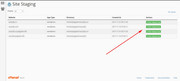
you can then update the staging site while your live site remains untouched.Best regards,
MikeHey extraeyes,
While icon fonts are monochrome, colors can be applied to them, please see here. But it’s not the same as colored icons. In many cases css can be used to replace the icon fonts with icon images and retain the colors.
Can you link to an example page and icon so we can try to help you with this and examine what your options may be?Best regards,
MikeHey AndreasSeydell,
I believe your question is to show the post featured image in the blog page only and not on the post single page.
Which we can with some css like this:#top.single .big-preview.single-big { display: none !important; }but since we have a few layouts this might not be the right css for you, if not please link to your page so I can adjust.
If I misunderstood your question, please link to your pages for no image & show image so I can adjust.Best regards,
MikeHi,
Glad we were able to help, we will close this now. Thank you for using Enfold.For your information, you can take a look at Enfold documentation here
For any other questions or issues, feel free to start new threads in the Enfold forum and we will gladly try to help you :)Best regards,
MikeHi,
Glad Victoria could help, I assume we can close this now, but I like to ask. Shall we close this then?Best regards,
MikeHi,
Glad we were able to help, we will close this now. Thank you for using Enfold.For your information, you can take a look at Enfold documentation here
For any other questions or issues, feel free to start new threads in the Enfold forum and we will gladly try to help you :)Best regards,
MikeJune 23, 2019 at 9:07 pm in reply to: Put GDPR checkbox & text under submit button not before – how? #1112751Hi,
Sorry, I don’t have a hardcoded solution. I checked your page again and see the jump, typically once caching is applied the scripts load before the first view of the site, but not always.
Are you using a caching plugin?
Another option to use the “preloader” option in the theme settings, this will mask the jump.Best regards,
MikeHi,
Unfortunately, you will need to recreate your site with Enfold, as with any other theme.
Before you buy a security plugin, please try the free version of Anti-Malware Security and Brute-Force Firewall I also like the free version of WP Hide & Security Enhancer to lock down the holes in WP.I hope this helps and buys you some time to start working on your new site.
Please let us know if we can be of further help.Best regards,
MikeJune 23, 2019 at 8:39 pm in reply to: Custom Styling of Social Media sharing icons on a single page #1112745Hi,
Glad we were able to help, we will close this now. Thank you for using Enfold.For your information, you can take a look at Enfold documentation here
For any other questions or issues, feel free to start new threads in the Enfold forum and we will gladly try to help you :)Best regards,
MikeHi,
Glad to hear, I assume we can close this now, but I like to ask first. Shall we close this then?Best regards,
MikeHi,
I checked your PHP version and found you are using v7.1.30, so this is good.
I tried installing Enfold for you and got the error: Cannot extract file from archive. enfold
I believe that your server doesn’t have the PHP ZipArchive Extension activated so WordPress can’t open the zip file.
Please ask your webhost to check and activate.Best regards,
MikeHi,
Thank you, Please try this code in the General Styling > Quick CSS field or in the WordPress > Customize > Additional CSS field:#top.home .avia-builder-el-22 .slide-entry-wrap,#top.home .avia-content-slider.avia-builder-el-22 { margin-bottom: 0px !important; }Then clear your browser cache and any cache plugin, and check.
Best regards,
MikeHey Phoenix,
Thanks for contacting us, it is true that our Angular theme will have no further updates and we are now only supporting our Enfold theme
But this is not exactly a “new” theme, we have been developing it for about six years now and is very versatile.
Here is a link to our Enfold demos
Unfortunately, Enfold is not compatible with the Angular theme. But Enfold does include our most advanced portfolio with 8 different styles, please see our demo here.Can you describe the nature of your attacks, there are quite a few plugins and tools available to protect sites now, perhaps one will help you.
Best regards,
MikeHi,
Glad to hear you have sorted this out, we will close as directed. Thank you for using Enfold.Best regards,
MikeHi,
Glad Rikard could help, we will close this now. Thank you for using Enfold.For your information, you can take a look at Enfold documentation here
For any other questions or issues, feel free to start new threads in the Enfold forum and we will gladly try to help you :)Best regards,
MikeHey Joe,
Unfortunately, your link to the page and the screenshot is not showing for me, please repost so we can be of more assistance.Best regards,
MikeHey peterolle,
Interesting idea, I believe this can be done with JQuery using .click() and .css()
How many steps do you plan to have? Does the form submit have to get feedback from the site or can the clicking of the submission count as a submit?
Have you looked for any plugins yet? In a quick search I found this one, perhaps there are others.Best regards,
MikeHi,
Perhaps this solution will work for you, this function adds the search bar to the menu and the css hides the ajax search icon.
Try adding this code to the end of your functions.php file in Appearance > Editor:add_filter( 'wp_nav_menu_items', 'avia_append_search_side_nav', 10, 2 ); function avia_append_search_side_nav( $items, $args ) { if (is_object($args) && $args->theme_location == 'avia') { global $avia_config; ob_start(); get_search_form(); $form = ob_get_clean(); $items .= '<li id="menu-item-search" class="noMobile menu-item menu-item-search-dropdown">'.$form.' </li>'; } return $items; }then add this code in the General Styling > Quick CSS field or in the WordPress > Customize > Additional CSS field:
#top .menu-item #searchform {
    top: 26px;
    position: relative;
}

#top #searchform > div {
    opacity: 1 !important;
    display: block !important;
}
#menu-item-search.menu-item-avia-special {
display: none !important;
}
This is the result I got on my localhost:

To answer your question, the code above can be found at line 134 in functions-enfold.phpBest regards,
MikeJune 23, 2019 at 6:34 pm in reply to: Custom Styling of Social Media sharing icons on a single page #1112725Hi,
Thanks for the feedback, in order to target only pages with a black background we will need to find something unique to them, so in this case you say that they are portfolio pages, so we will use the class single-portfolio like this:#top.single-portfolio .av-share-link a { color: #fff !important; }Please clear your browser cache and check.
Best regards,
MikeHey Ronald,
Please try this code in the General Styling > Quick CSS field or in the WordPress > Customize > Additional CSS field:#top.archive .page-thumb { display: none !important; }Best regards,
MikeHi,
In the css above the ID of “#after_layer_slider_1” in the inspector looks like this:
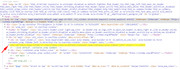
but this ID is on every page that has a layerslider, the only reason this css is not working on other pages is due to the page id class which is right after the body ID #top:
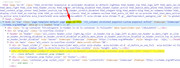
so if you remove the #top.page-id-3366 from the css it will work on every page and post, but I recommend first testing with #top.page to target all pages and no posts, to reduce possible future conflicts.#top.page #main #after_layer_slider_1 { background: #009aff; background: -moz-linear-gradient(left, #009aff 0%, #009aff 49%, #ffffff 49%, #ffffff 100%); background: -webkit-linear-gradient(left, #009aff 0%,#009aff 49%,#ffffff 49%,#ffffff 100%); background: linear-gradient(to right, #009aff 0%,#009aff 49%,#ffffff 49%,#ffffff 100%); filter: progid:DXImageTransform.Microsoft.gradient( startColorstr='#009aff', endColorstr='#ffffff',GradientType=1 ); } #top.page #main #after_layer_slider_1 .template-page.content { background-color: white; } #top.page #main .sidebar_left .sidebar { background-color: #009aff; } #top.page #main .sidebar_left .sidebar h3, #top.page #main .sidebar_left .sidebar a { color: white !important; }Best regards,
MikeHey jarred,
Please try this code in the General Styling > Quick CSS field or in the WordPress > Customize > Additional CSS field:#sub_menu1 { margin-left: 50px !important; }Then clear your browser cache and any cache plugin, and check.
Best regards,
MikeHey Alexander Berger,
Sorry, we don’t create websites, we create the software that allows you to create your own website.
So with a little time to learn the software you can create your own site for very little cost.
Or if you wish you can hire a freelancer to create your site with our software, we recommend the developers at Codeable, please summit a request with your details and time frame to get started.
But many people use our software to create their sites with very little experience, and we include a support forum should you have any questions.Best regards,
MikeJune 23, 2019 at 5:11 pm in reply to: Put GDPR checkbox & text under submit button not before – how? #1112715Hey coolicious,
Please try this code in the General Styling > Quick CSS field or in the WordPress > Customize > Additional CSS field:#top.home .avia_ajax_form .first_form.form_element_third { clear: right !important; margin-left: 5px !important; width: 31.6% !important; } #top.home #avia_0_1 { max-height: 44px !important; }Then add this code to the end of your functions.php file in Appearance > Editor:
function custom_gdpr_script(){
  ?>
  <script>
(function($){
  $(document).ready(function(){
$( 'fieldset' ).each(function() {
$( this ).find( '.form_element_third' ).insertBefore( $(this).find('.av_mailchimp_privacy_check') );
});
});
})(jQuery);
</script>
<?php
}
add_action('wp_footer', 'custom_gdpr_script');
Best regards,
Mike -
AuthorPosts
