

Forum Replies Created
-
AuthorPosts
-
Hi,
Thank you for the link, I see that you have added your anchor links into code block elements like so:<div id="Haus"></div>This works well for anchor links, but not so well for the menu highlights. Please add your IDs to the color sections instead.
If you are not sure what I mean, then please include admin login in the Private Content area so we can demonstrate.
Also, please use only lower case words as your IDs and menu links.Best regards,
MikeOctober 5, 2019 at 10:37 pm in reply to: The 1st Post in my search results and in Category Archives is missing the title #1145396Hey 2SPRO,
When I view your page the pic and title show very quickly then disappear. Your page error is:Uncaught SyntaxError: Unexpected token '<'from
</script <script type="text/javascript">var CollectChatWordpress = true;</script>please try correcting this script, or include admin login in the Private Content area so we can be of more assistance.
Best regards,
MikeHi,
Glad you found the ‘curly quote’ and this is sorted out for you. Glad we were able to help, we will close this now. Thank you for using Enfold.For your information, you can take a look at Enfold documentation here
For any other questions or issues, feel free to start new threads in the Enfold forum and we will gladly try to help you :)Best regards,
MikeHi,
Typically after you add the file to enfold-child/shortcodes/ folder you would need to add this code to your functions.php:function avia_include_shortcode_template($paths) { $template_url = get_stylesheet_directory(); array_unshift($paths, $template_url.'/shortcodes/'); return $paths; } add_filter('avia_load_shortcodes', 'avia_include_shortcode_template', 15, 1);But this is not working for me. We recently made some changes which may have broken this add-on.
I recommend using css like this:.team-img-container:hover img { opacity: 0 !important; transition: opacity .5s linear !important; } .team-img-container { background: url('https://test.kriesi.at/enfold-2017/wp-content/uploads/sites/24/2017/02/people-2.jpg') !important; background-size: contain !important; }Naturally, you will need to add a custom class to each team member and adjust the code so they can have a different hover image.
Best regards,
MikeHi,
Thank you, I see that the difference is that in my shortcode I was using the “currly quote”, please try using this shortcode:[ av_notification title='Murphy’s Law: A case study in stress' icon_select='yes' icon='ue83f' font='entypo-fontello' color='green' border='' custom_bg='#444444' custom_font='#ffffff' size='large' close_btn='' cookie_lifetime='60' custom_class='' av_uid='av-5vd8dd' admin_preview_bg=''] You’re buried under paperwork, are behind on bills, your car won’t start, you know there’s that famous Austin traffic, and you have a big meeting with your boss and a VP of the company in 10 minutes. And GPS says you’re 25 minutes away. [ av_hr class='invisible' height='5' shadow='no-shadow' position='center' custom_border='av-border-thin' custom_width='50px' custom_border_color='' custom_margin_top='30px' custom_margin_bottom='30px' icon_select='yes' custom_icon_color='' icon='ue808' font='entypo-fontello' id='' custom_class='' av_uid='av-4w2875' admin_preview_bg=''] Ug. Your mind is racing, you’re starting to sweat through your dress shirt, and now you cannot find your phone to call the mechanic, Uber, and your boss. But your phone is right where you left it: on the dashboard, but you forgot. Now, where are those keys? Probably in the ignition. [ /av_notification]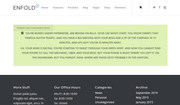
Best regards,
MikeOctober 5, 2019 at 7:06 pm in reply to: I Have Started Getting A New Phantom Page In My Menu…. #1145341Hi,
Glad to hear this helped, we will leave this open until we hear back from you, because it may help other Directorist plugin users to find the solution.Best regards,
MikeHi,
I checked your form in Chrome, Firefox, Edge & IE11 both as mobile and desktop, and the form is showing fine. I see that your form is loading within a iframe script, so what you saw in Chrome’s inspector, it is being placed directly in the <body> tag of the iframe:
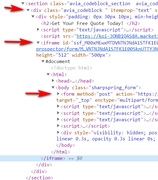
But here is a warning you are getting from your “rocket-loader” :A parser-blocking, cross site (i.e. different eTLD+1) script, <URL>, is invoked via document.write. The network request for this script MAY be blocked by the browser in this or a future page load due to poor network connectivity. If blocked in this page load, it will be confirmed in a subsequent console message. See <URL> for more details.This could explain why you are not seeing it, please try disabling your caching and plugins.
Best regards,
MikeHey Invoke_Media_Group,
Sorry, Enfold only ships with the LayerSlider, and the only other plugins we may suggest are listed on the Demo Import option page, which is typically woocommerce, the events calendar, & BBPress. These are only suggested for certain demos. Please see the Demo Import options page for the full list.Best regards,
MikeOctober 5, 2019 at 3:59 am in reply to: I Have Started Getting A New Phantom Page In My Menu…. #1145199Hi,
Thank you for the login, I believe that one of your plugins is trying to create a page automatically since you have two warnings from the Directorist plugin at the top of your admin pages I assume that it is this one. Please try following the warnings to correct them.
I have seen a similar menu item “#0” with a different plugin that was creating a default page for the plugin and it turned out that a “0” page is not an actual page but a redirect within the plugin.
So if after you correct the warnings and delete the menu item then deactivate all of your plugins and enable them again one at a time clearing your browser cache each time and looking for the menu item. Once it appears you should know which plugin created it.Best regards,
MikeHey alexbonesteel,
I see that your site has been updated and you are not using a child theme, I assume that you had made your customizations in the main theme or parent theme and now the update has overwritten them.
Does this sound correct? Please install a Child Theme and make your customizations to it so future updates won’t overwrite.Best regards,
MikeOctober 5, 2019 at 1:38 am in reply to: How to hide header and box-shadow on custom post types (using "Pods") ?? #1145191Hi,
Sorry for the late reply, do you mean the color and box shadow on the title container or the header? Please link to a an example page and perhaps a screenshot so we can be sure we are looking at the same thing, For the title container removing the classes “alternate_color & light_bg_color” will remove the css, but we will have a better answer for you once we see your page.Best regards,
MikeHey Munford,
To add a line between blog posts please try this code in the General Styling > Quick CSS field or in the WordPress > Customize > Additional CSS field:#top .fullsize .template-blog .post_delimiter { border: 2px solid #000 !important; display: block !important; padding: 0px !important; }I didn’t see the date below your posts, in order to move.
Best regards,
MikeHi,
OK, if they are both on the same server that would make sense to view it, but can we see if the option “Load jQuery in your footer” is missing from the theme options also?
I checked again and the site frontend is not loading for me. Is the site blocking any countries?
Thank you.Best regards,
MikeOctober 4, 2019 at 11:51 pm in reply to: Blog Posts Element not showing Date meta on first (top) displayed post #1145178Hi,
Thanks for the links, it looks like an error with your plugin “wpfc-minified” Please disable your cache and minifying plugins and also your Enfold Theme Options > Performance > JS & CSS file merging and compression then please clear your browser cache and check.
This can occur when you are using theme caching and minifying plus other caching and minifying.
Please see the screenshots in Private Content area.Best regards,
MikeHi,
Sorry for the late reply, to make all of the images on your page the same height, please upload them with the same settings that was creating a page that was too long for you, then try this code in the General Styling > Quick CSS field or in the WordPress > Customize > Additional CSS field:#top.page-id-8975 .avia-image-overlay-wrap > a { max-height: 200px !important; }Please adjust the “200px” to suit.
Best regards,
MikeHi,
@Steve, Sorry but making .webp work is outside of our support scope as it is not supported by WordPress and would require excessive customization to work, please use jpg instead.
If you really want to use this file format please contact Codeable and follow the link to discuss your project and time frame with them.
Sorry, I don’t wish to be rude, but I must close this thread now. Thank you for using Enfold.Best regards,
MikeHi,
To remove the “hone” menu item & the left border for “Leistungen” please try this code in the General Styling > Quick CSS field or in the WordPress > Customize > Additional CSS field:#menu-item-2500 { display: none !important; } li#menu-item-2197 > a > .avia-menu-text { border-left-width: 0px !important; }Then please clear your browser cache and check.
Best regards,
MikeHi,
@migduvednok thank you, that is a good tip.Best regards,
MikeHi,
Sorry, your client site is not loading for me, but we should continue with your mockup site instead of starting again with a new site.
I’m sorry to keep suggesting to ask your webhost, but I have seen this before… some “WordPress Managed Hosting” webhosts force the “jQuery in load in the footer” thinking that the site will load faster, they do this with different code snippets and they are the best source to remove this. If they refuse to correct this or to tell you how to correct this then it could be done at the “Root” level which means we can’t touch it.
Please answer:
Do you have a “WordPress Managed Hosting” plan?
are they forcing “jQuery in load in the footer”?
Who is your webhost?Best regards,
MikeOctober 4, 2019 at 6:36 am in reply to: show arrows in easy slider and full screen slider but not dot things #1144879Hi,
I checked your site but didn’t find any odd string of code across your site, but if you would please include ftp access to your site I can try to restore your site by removing the code above.Best regards,
MikeOctober 4, 2019 at 5:57 am in reply to: Change header cart icon / Change "Add to cart" button Text #1144866Hi,
I added this to your functions.php to change your “add to cart buttons”:add_filter('woocommerce_product_single_add_to_cart_text', 'woo_custom_cart_button_text'); function woo_custom_cart_button_text() { return __('Add to Calculation', 'woocommerce'); }I also added this css to your child theme styles.css to replace the woocommerce cart icon:
a.cart_dropdown_link > span:before {
    opacity: 0;
}
a.cart_dropdown_link > span:nth-child(1) {
    background-image: url(https://your-site/wp-includes/images/media/calculator_32px.png)!important;
    background-size: contain;
    background-repeat: no-repeat;
    background-position: 50% 50%;
}
These are both now working.
Please clear your browser cache and check.Best regards,
MikeHi,
Thanks for the image, in the first column of the row please choose “no Space between columns”
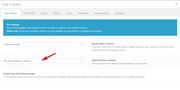
this will close the gap:

you can then manage the space between with the layout padding:
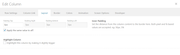
Best regards,
MikeHi,
Good catch @Guenni007, thanks.Best regards,
MikeOctober 2, 2019 at 6:29 am in reply to: When i Set Envold on Live the Theme Crushed totally #1144064Hi,
Thank you for the login and ftp access, I didn’t find your video of the issue, I looked in your media library and in your uploads directory via ftp. Where can I find it?
I checked your post and page and everything seems to be working correctly, even when disabling your maintenance mode.
Sorry, I’m not sure what the issue is.Best regards,
MikeOctober 2, 2019 at 5:58 am in reply to: show arrows in easy slider and full screen slider but not dot things #1144052Hi,
It sounds like this was a success, glad we could help. But did you want the images to show in a random order?
I believe this code at the end of your child theme functions.php file will help, please use ftp to add the code should it crash your site, you can then easily remove:add_filter('avia_masonry_entries_query','avia_order_by_random', 10, 2); function avia_order_by_random($query, $params) { $query['orderby'] = 'title'; $query['order'] = 'rand'; $terms = explode(',', $params['categories']); if (!empty($terms) && in_array(1, $terms)) { $query['orderby'] = 'date'; } return $query; }Best regards,
MikeHi,
Thanks for trying, I’m asking someone from the team to check with an iPhone, perhaps they will find a better solution.
Thank you for your patience.Best regards,
MikeHi,
Please try moving the menu up a little, to do so first look in your child theme stylesheet for this and remove it:/* Enfold mobile menu higher to top */ #top #av-burger-menu-ul { padding: 150px 0px !important; }then add this:
@media only screen and (max-width: 767px) {
.responsive.av-burger-overlay-active #top #wrap_all .main_menu {
    top: -70px !important;
    right: -80px !important;
}
.responsive.av-burger-overlay-active #top #av-burger-menu-ul {
    vertical-align: top !important;
    padding: 35px 0 0 0 !important;
}
}
Then clear your browser cache and any cache plugin, and check.
Please see the screenshot in Private Content area of the expected results.Best regards,
MikeHi,
Glad we were able to help, your adding of appearance seems to be working good 👍
As for the everest form css, most all of the elements have well-defined custom classes and a form container ID so it should be working fine. But I see that you are using the autoptimize plugin which seems to be serving different versions of the rules from different saves mixed together, I recommend disabling it and your Enfold Theme Options > Performance > JS & CSS file merging and compression and any other caching plugin, and then clearing all of them, and then once your edits and adjustments are done you can rebuild your cache. Another option is to copy your plugin’s css and add it to the WordPress > Customize > Additional CSS field so it will have priority, naturally you should test this with autoptimize disabled and then enable it to see if it still works.Best regards,
MikeHi,
Glad Victoria could help you find the issue. We will close this now. Thank you for using Enfold.For your information, you can take a look at Enfold documentation here
For any other questions or issues, feel free to start new threads in the Enfold forum and we will gladly try to help you :)Best regards,
Mike -
AuthorPosts
