

Forum Replies Created
-
AuthorPosts
-
September 28, 2019 at 11:20 pm in reply to: Enfold Site in un-responsive due to schedule time out #1143046
Hi,
Sorry for the late reply, it seems that your site is down. Try checking your DNS servers where your domain is registered and also asking your webhost to check that it is listed correctly there.Best regards,
MikeHey aboderc,
Sorry for the late reply, if you would like to add font awesome to your site localy please see this article: How to add FontAwesome.io Fonts to WordPress without any PluginBest regards,
MikeHey SandraSquires,
Sorry for the late reply, but thanks for the link to your site, I’m not sure that I understand correctly though, because your old site doesn’t have the red banner, but your new site does. So perhaps you have already resolved this?
Please see the screenshot in Private Content area.
If you do need help with this please try to explain a little more.Best regards,
MikeSeptember 28, 2019 at 10:08 pm in reply to: I can't run this code in place of the custom css class. What is the reason. #1143038Hi,
Sorry for the late reply and thanks for the login, I see that you already added the css to your child theme stylesheet so I added the custom class to your color section. It is now active, please clear your browser cache and check.Best regards,
MikeSeptember 28, 2019 at 8:56 pm in reply to: Own Content (image or text slogan) next to the Logo area #1143033Hi,
Sorry for the late reply and thanks for the admin login.
As I understand you would like your custom header widget area to the right of your logo and on the same line as it, so currently the “hook” (ava_main_header) you are using places the widget area before the logo so it shows above it and as a separate line, I adjusted the “hook” (ava_before_bottom_main_menu) to after the logo and before the menu. This is your new function:add_action( 'ava_before_bottom_main_menu', 'enfold_customization_header_widget_area' ); function enfold_customization_header_widget_area() { dynamic_sidebar( 'header' ); }I then added this css to align the header widget vertically & horizontally center, it also adjusts as the header shrinks.
#media_image-3 {
	display: flex;
	justify-content: center !important;
	padding: 0 !important;
	width: 100%;
}
.av-logo-container >.inner-container {
	display: flex;
	align-items: center;
	max-width: 100%;
}
Please clear your browser cache and check.
Best regards,
MikeHi,
Sorry for the late reply, I see that you are using a child theme with an old “header.php” file. Please try renaming this file to “header.php.old” via ftp so that the up-to-date header.php can load to see if this corrects the issue.
I corrected your mixed content warning by correcting the url in your header.php:<script src="https://maxcdn.bootstrapcdn.com/bootstrap/3.3.6/js/bootstrap.min.js"></script> <link rel="stylesheet" href="http://maxcdn.bootstrapcdn.com/bootstrap/3.3.6/css/bootstrap.min.css">I also found that you are getting this error:
Uncaught SyntaxError: Unexpected token '<'This is either coming from your out of date header.php or from one of your javascript files, but in order to find it I will need ftp access and permission to deactivate your plugins.
Best regards,
MikeSeptember 28, 2019 at 5:57 pm in reply to: anchor link placement off on iphone 8 in Safari. #1143020Hi,
Sorry for the late reply, unfortunately, I do not have an iPhone but I did test on Browser Stack Live which boasts that the tests are on real devices and not simulations.
Please see the screenshot in Private Content area and the test url. I understand that you were not able to recreate the error either, and I assume that you don’t have physical access to the client’s device. Have you tried to walk the client though clearing the device cache?Best regards,
MikeSeptember 28, 2019 at 5:03 pm in reply to: urls in catalogue items lead to non-savability of page (503) #1143017Hey viazenettiM,
Sorry for the late reply, I’m pretty sure that I understood where you couldn’t add a link without an error, but I was able to add a link without error. Please see the screenshot in Private Content area, and check the page.
So I didn’t see your 503 error, but if you get this error again I would recommend asking your webhost to check the server logs because the 503 error means: The server is currently unable to handle the request due to a temporary overload.Best regards,
MikeHi,
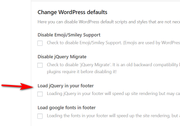
Thank you, I see that the option “Load jQuery in your footer” is missing from the theme options, this is a screenshot of the correct settings:
This is a screenshot of your settings, note the missing options:
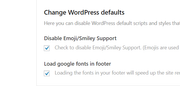
this typically means that this setting is already set by a command in the wp-config.php file or by a custom drop-in plugin from your webhost, who sometimes sets this on “WordPress Managed Hosting” plans. Please ask your webhost about correcting this.Best regards,
MikeHey wzshop,
Sorry for the late reply, in your link to the example while there is not a “max-width” the header width is still 100%
So if this is the setup you like but are having issues with it please link so we can see and perhaps adjust with css.
Otherwise, some other hooks you can try are:
ava_after_main_title
ava_after_main_container
ava_main_headerBest regards,
MikeHey rikv,
Sorry for the late reply, please go to Enfold Theme Options > Layout Builder > Automated Schema.org HTML Markup and deactivate.Best regards,
MikeHi,
Sorry, I didn’t explain well. I couldn’t reproduce the original issue on my localhost that requires you to need to use the script above. So I can not rewrite the script above while it is still active on your site because I need to be able to test, and since I’m not able to reproduce on my localhost there is a good chance that the script is not needed on your site and the real problem is something else, such as an out of date theme, a bad plugin, some other script, etc.
Please include admin login in the Private Content area after you update the theme and allow us to deactivate your plugins and scripts so we can be of more assistance.Best regards,
MikeHi,
Sorry, I think I’m getting confused here, the css doesn’t put the banner image in place, you must add it via the category options:
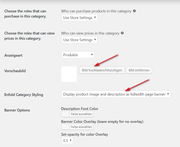
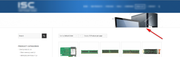
The css adjusts the image to show correctly:
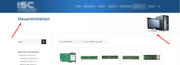
I hope this makes sense?Best regards,
MikeHi,
Sorry, I was unable to reproduce your error, so please try removing the script and updating the theme and deactivating your plugins.Best regards,
MikeHi,
We would be happy to help, but we will need you to login to your support account and open a support thread and include an admin login and FTP access in the Private Content area so we can be of more assistance.
Right now you are using our contact form and I can not find your email address in our support users list, if you have not registered your account yet please follow these steps:For technical support please register here kriesi.at/support/register with your item purchase code .
Then go to: https://kriesi.at/support/enfold
and scroll to the bottom of the page to open a new ticket.Best regards,
MikeHi,
When creating a lightbox popup with the Magnific Popup script you must add a trigger class to the link that matches the script, in your case it’s inline_popup, so for a simple link you had it correct in your example code above, but th problem is that the shortcode for a button doesn’t have a place for the class to be added to the “a” tag, which is the link of the button. The “custom_class” placeholder that you saw is actually for the button container, not the link.
So the solution is to use this button code below to create your lightbox popup buttons and adjust to suit.<div class="avia-button-wrap avia-button-center"><a class="avia-button avia-icon_select-no avia-color-theme-color avia-size-small avia-position-center inline_popup" href="#wheeloflife"><span class="avia_iconbox_title">WheelOfLife</span></a></div>Best regards,
MikeHi,
Thanks for the login, I took a look at your Quick CSS and found that the css you had added included > instead of >, so the css was not working. I replaced the css with the code above and added and image to your category Steuereinheiten and it seems to be working. Please see the link in the Private Content area.
Please clear your browser cache and check, and feel free to add images to your other categories.Mike
Hi,
Hopefully, we were able to help some, Thank you for using Enfold.For your information, you can take a look at Enfold documentation here
For any other questions or issues, feel free to start new threads in the Enfold forum and we will gladly try to help you :)Best regards,
MikeHey apicalmedia,
Sorry for the late reply, this function can be changed in the file: \enfold\js\avia-snippet-sticky-header.js
on about line 110 change the current “50” to suit:
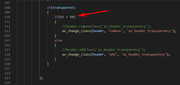
I would recommend copying this file to your Child Theme in a directory named /js/ so that you won’t lose changes during future updates.
Then add this code to the end of your child theme functions.php file in Appearance > Editor:function wp_change_sticky_header_js() { wp_dequeue_script( 'avia-default', $template_url.'/js/avia-snippet-sticky-header.js', array('jquery')); wp_enqueue_script( 'avia-default-child', get_stylesheet_directory_uri().'/js/avia-snippet-sticky-header.js', array('jquery')); } add_action( 'wp_enqueue_scripts', 'wp_change_sticky_header_js', 500 );and then ensure to clear your browser cache and any caching plugin, and also go to your Enfold Theme Options > Performance > JS file merging and compression and deactivate it and check the box at the bottom of the page Delete old CSS and JS files If it still is not working for you please check for any server side caching.
Best regards,
MikeHi,
Thanks, but I’m getting the error “Invalid username.”
Please check.Best regards,
MikeHi,
Unfortunately, the reason this doesn’t work correctly in IOS is due to a bug in web-kit which is out of our control.
The scrollbar being hidden when the code is activated is not intentional, it is just how the browsers handle the rule. Unfortunately, there is not an official rule to stop the scrolling and show the scrollbar, or the other way around.
This is because the css and javascript effects the content of the web browser, a webpage, not the browser itself.
For example, think of a MS Word document that would change the MS Word toolbar when opened.
I hope this makes sense.
Perhaps there is a different way to do this, but this would require excessive customization to work. Sorry, this would be more than we can offer here, If you really want this try hiring a freelancer, you could probably find one on Upwork for a fair price.Best regards,
MikeHi,
The following css will remove the next arrows and increase the size of the “wheel of life” at the link in the Private Content area.
Please try this code in the General Styling > Quick CSS field or in the WordPress > Customize > Additional CSS field:#top.postid-463 .mfp-arrow { display:none !important; } #top.postid-463 div.mfp-iframe-scaler { height: 100vh !important; width: 100vw !important; } #top.postid-463 .mfp-iframe-scaler iframe { left: -15vw !important; width: 90% !important; height: 90% !important; }Then clear your browser cache and check. Please let us know if you need help with this css on a different page or post.
The wand tool can have different options depending on the element, try opening a new page or post and from the plus sign in the block editor choose “classic”
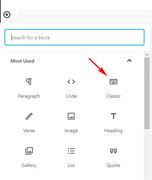
then the wand tool will show all of the options:
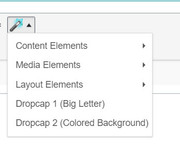
I took these screenshots from your site, to show that it is working correctly.
There may be cases when some options are not available within some elements, this means that the option is not supported in that case.Best regards,
MikeHi,
Glad to hear that it worked for you, for your promo button, you should find the editable field in the element:

If not Please include an admin login in the Private Content area so we can be of more assistance.Best regards,
MikeHi,
Glad we were able to help, we will close this now. Thank you for using Enfold.For your information, you can take a look at Enfold documentation here
For any other questions or issues, feel free to start new threads in the Enfold forum and we will gladly try to help you :)Best regards,
MikeHi,
Are you saying that the button is not working? It seems to work when I test it.The wand tool can have different options depending on the element, the screenshot from the documentation is from a “page”
Best regards,
MikeHi,
Glad to hear, we will close this now. Thank you for using Enfold.For your information, you can take a look at Enfold documentation here
For any other questions or issues, feel free to start new threads in the Enfold forum and we will gladly try to help you :)Best regards,
MikeHi,
Glad we were able to help, we will close this now. Thank you for using Enfold.For your information, you can take a look at Enfold documentation here
For any other questions or issues, feel free to start new threads in the Enfold forum and we will gladly try to help you :)Best regards,
MikeSeptember 24, 2019 at 9:20 am in reply to: Enfold Image Content Type to show PDF preview image #1141282September 24, 2019 at 9:16 am in reply to: Theme update error ('unable to copy some files') #1141280Hi,
When I look at the source code for your site it looks like the updates are disabled:

do you have your token code added the theme update page?
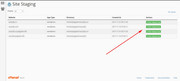
Please include admin login in the Private Content area so we can be of more assistance.Perhaps it would be a good idea to see if your webhost has the one click staging site option, this is a option in most cPanels to create a staging clone of your site so we can test on it and you site will stay up and running. You can always ask your webhost to help you with setting this up if you want.
Here are some screenshots of what it would look like:

Best regards,
Mike -
AuthorPosts
