

Forum Replies Created
-
AuthorPosts
-
Hi,
Glad we were able to help, we will close this now. Thank you for using Enfold.For your information, you can take a look at Enfold documentation here
For any other questions or issues, feel free to start new threads in the Enfold forum and we will gladly try to help you :)Best regards,
MikeHi,
Sorry for the late reply, I took a look at your page and code, but couldn’t find any javascript to make it work, plus the dropdown options didn’t match your anchor IDs, but after some research and tinkering I put it all together for you with an offset so the anchors land in view and not under your header, for desktop.
You can examine the new script and select code in a code block under your text block, which I hid with the visibility options in the element. You can delete your text element if you wish.<script> (function($){ $(document).ready(function(){ $('#select-anchor').change( function () { var targetPosition = $($(this).val()).offset().top-110; $('html,body').animate({ scrollTop: targetPosition}, 'slow'); }); }); })(jQuery); </script> <div style="float: right;"> <h4 style="display: inline; margin-right: 10px; color: #fff;">Select A Category</h4> <select id="select-anchor" class="select vendors" style="display: inline; margin-bottom: 0px;" name="dropdpown"> <option value="#bridal-shops">Bridal Shops</option> <option value="#cakes">Cakes</option> <option value="#dance-lessons">Dance Lessons</option> <option value="#disc-jockey">Disc Jockey</option> <option value="#flowers">Flowers</option> <option value="#harpists">Harpists</option> <option value="#officiants">Officiants</option> <option value="#photo-booth">Photo Booth</option> <option value="#pianists">Pianists</option> <option value="#salons">Salons</option> <option value="#string-quartets">String Quartets</option> <option value="#travel-transportation">Travel Transportation</option> <option value="#tuxedos">Tuxedos</option> </select> </div>Best regards,
MikeHi,
Perhaps try using “If” language statements, so your functions will only fire if your site is called in a certain language.
Please read this solution.Best regards,
MikeOctober 7, 2019 at 12:45 am in reply to: Options for text being cut off in customized/widget/footer section #1145570Hey ikaika72,
I would recommend removing the left & right footer padding so it’s 100% wide, and then remove the widget margin so there is very little space between the widgets. This will help, but I would point out that the email address will get harvested by bots and you will get more spam than if the email was an encrypted email link.
Another option would be to change the direction of your widgets, so they are stacked 100% wide, such as in mobile.Best regards,
MikeHi,
Glad we were able to help, we will close this now. Thank you for using Enfold.For your information, you can take a look at Enfold documentation here
For any other questions or issues, feel free to start new threads in the Enfold forum and we will gladly try to help you :)Best regards,
MikeHi,
Thanks for the feedback, I added the function as contributor css above and it is working for “Betty Jean”
Please try with your other contributor.
Please be sure to clear your browser cache.
The admin account “knothead” didn’t need the css fix, so I assume none of your admins will need it.Best regards,
MikeHi,
So assuming that it is certain user roles that is not getting the top element height, I have this function that will add the role as a class to the body:function add_role_to_body($classes) { global $current_user; $user_role = $current_user->roles; return array_merge( $classes, array( $user_role[0] ) ); } add_filter('body_class','add_role_to_body');This is added to the end of the functions.php file in Appearance > Editor
Then the css above can be written with the user role:
#top.contributor #main > div.container_wrap.container_wrap_first.main_color.fullsize > div > main {
	padding-top: 270px !important;
}
this would be added to the Quick CSS, and duplicated for each role, replacing “contributor” with “editor” “author”, etc.
Unfortunately the page-id seems to change with each user.Best regards,
MikeOctober 6, 2019 at 10:27 pm in reply to: Change header cart icon / Change "Add to cart" button Text #1145556Hi,
Glad we were able to help, we will close this now. Thank you for using Enfold.For your information, you can take a look at Enfold documentation here
For any other questions or issues, feel free to start new threads in the Enfold forum and we will gladly try to help you :)Best regards,
MikeHi,
Thanks, but in your screenshot the test user has the “admin-bar” so the css will not fire, with the Contributor account you gave us the “admin-bar” didn’t show so I assumed that all Contributors would not have the “admin-bar”
How many user types are you going to use?Best regards,
MikeHey npmcgrew,
Sorry for the late reply, the full-screen slider includes a caption and buttons the could be positioned on the screen with it’s own options or css, and jQuery could be used to add a delay before it showed.
Please try creating a demo page with the video and the caption and button.
I see your landing page above but it’s not created with the full-screen video and caption.Best regards,
MikeOctober 6, 2019 at 9:16 pm in reply to: Enfold Version 4.2.6 Printing CSS Issues in Firefox #1145536Hi,
I would recommend looking for a plugin to overcome this Firefox limitation. This thread is a year and a half old now so there is a good possibility that a better print.css plugin has been created now that lets you choose what you want the user to print, probably print to PDF would be the most universal between all browsers and OS’s.Best regards,
MikeOctober 6, 2019 at 9:01 pm in reply to: Modal cookie window shows "Footer Einstellungen" as headline??? #1145523Hi,
Glad we were able to help, we will close this now. Thank you for using Enfold.For your information, you can take a look at Enfold documentation here
For any other questions or issues, feel free to start new threads in the Enfold forum and we will gladly try to help you :)Best regards,
MikeHi,
Glad we were able to help, we will close this now. Thank you for using Enfold.For your information, you can take a look at Enfold documentation here
For any other questions or issues, feel free to start new threads in the Enfold forum and we will gladly try to help you :)Best regards,
MikeHi,
Thank you for the logins and screenshots, as a Contributor you do not have the filter bar or some of the other elements so the content moves up, so we should be able to add some padding to the top to correct, but the issue is that this is a different page-id and almost no different classes to hook into to apply css only to this one user type.
So I added this css based on being “logged-in” but not having the “admin-bar” This works fine for the Admin & Contributor but if you have other users types I’m not sure what will happen, please check.#top.page.logged-in:not(.admin-bar) #main > div.container_wrap.container_wrap_first.main_color.fullsize > div > main { padding-top: 270px !important; }I did add this css for you so please clear your browser cache and check and test as your different users.
Best regards,
MikeHi,
Thank you for the link and screenshot, this blue icon is optional from the theme to overlay external image links to show it is a link. But since your plugin is adding the images I don’t see the setting to remove the overlay from within the pages using the plugin. So I added this css to your Quick CSS to hide the overlay from all of your image links over your whole site:.overlay-type-extern { display: none !important; }This is probably easier to manage than changing each image individually anyways. Please clear your browser cache and check.
Best regards,
MikeOctober 6, 2019 at 7:42 pm in reply to: Modal cookie window shows "Footer Einstellungen" as headline??? #1145488Hi,
Thank you for the login, I couldn’t find where “Footer Einstellungen” was getting added so I added the css below to overwrite it with “Datenschutzrichtlinie” I assume this is the correct text, if not just let us know what you would like it to say, or nothing..mfp-content h3.av-special-heading-tag { visibility: hidden; } .mfp-content h3:before { content: 'Datenschutzrichtlinie' !important; font-size: 18px !important; visibility: visible; }Please see the screenshot in Private Content area.
Please clear your browser cache and check.Best regards,
MikeHi,
Thank you for the login, I reviewed your css in the Quick CSS and found you were missing two closing brackets, I fixed and also commented out your #search-3 css in the custom.css file, and disabled your CSS file merging and compression, to reduce caching conflicts while working on this.
I then added this css for desktop to pin the search bar to the bottom of the header with full-width:@media only screen and (min-width: 768px) { #search-3 { top: 100% !important; padding: 0 !important; } #header_main > div { padding: 0px !important; } }Please clear your browser cache and check, then you can enable your CSS file merging and compression if you wish, but I recommend leaving off until you are done with your site.
Best regards,
MikeHi,
Thank you for the link and screenshots, please try this css in the General Styling > Quick CSS field or in the WordPress > Customize > Additional CSS field and then clear your browser cache and any cache plugin, and check.
The css is in the order of your questions and is specific for your homepage so it will not interfere with other pages, except the logo & footer css. Also feel free to adjust to suit.#top.home .avia-content-slider-inner .slide-entry-excerpt { font-size: 12px !important; } #top.home .avia-content-slider-inner .blog-categories.minor-meta,#top.home .avia-content-slider-inner .slide-meta { display: none !important; } #footer #recent-posts-3 a { font-family:'quicksand'!important; font-size: 16px !important; font-style:normal !important; font-weight:400 !important; } .logo img,.logo a img { padding: 5px 0 !important; } #top.home #av_section_4 > div.container > div > div > div > div.avia-testimonial-wrapper.avia-slider-testimonials { min-height: 201px !important; }For your logo padding after scroll the header container has a max-height of 58px which skews the logo after adding the padding, I assume that you have set a custom height at: Enfold Theme Options > Header > Header Layout > Header Size please adjust this to allow for your new padding.
Best regards,
MikeHey Toni,
I have searched your page source code and found the script loaded in the footer, but there are a few places it could be installed at, Please include an admin login in the Private Content area so I can take a look and remove it for you, it would be quicker, and I will post where I found it.Best regards,
MikeHey Roger,
Thank you for reporting this, I have reported it to the dev team to check.
We will leave this open for the dev team.Best regards,
MikeHi,
Thanks for the feedback, so to be clear, you don’t care about the widths, correct?
Full-size and Large will be different for each image as Victoria had pointed out, unless each original image uploaded has the same width & height. In WordPress the resizing is done by “max-width” so it tries to find a width & height “best fit”
The medium shows same height because it is much smaller and is cropped more.
Please try editing the images before you upload them to be the exact same size.
I couldn’t login to see the natural uploaded sizes.Best regards,
MikeHey bobjonesdesigns,
Please try this code in the General Styling > Quick CSS field or in the WordPress > Customize > Additional CSS field:.breadcrumb-trail .trail-before, .breadcrumb-trail .trail-end, .breadcrumb-trail .sep, .breadcrumb-trail a, .breadcrumb-trail .bbp-breadcrumb-current { display: inline !important; float: none !important; padding: 0 !important; } .breadcrumb-trail .trail-before { display: none !important; } .breadcrumb.breadcrumbs.avia-breadcrumbs { width: 100%; margin: auto; }Then clear your browser cache and check.
Best regards,
MikeOctober 6, 2019 at 4:23 am in reply to: Custom CSS class in developer tab on text element has disappeared #1145419Hi,
Thanks for reporting this, I have reported it to the dev team and will reply here with their update.
Thank you for your patience.Best regards,
MikeOctober 6, 2019 at 3:17 am in reply to: small adjustments for the mobile version -responsive design #1145417Hi,
Glad you were able to sort this out, we will close this now. Thank you for using Enfold.For your information, you can take a look at Enfold documentation here
For any other questions or issues, feel free to start new threads in the Enfold forum and we will gladly try to help you :)Best regards,
MikeHey MiikkaSalminen,
Please try this code in the General Styling > Quick CSS field or in the WordPress > Customize > Additional CSS field:#avia-menu span.avia-menu-text { font-size: 16px !important; }Then clear your browser cache and check.
Best regards,
MikeHey Arrastia,
Thank you for the links, Please try this code in the General Styling > Quick CSS field or in the WordPress > Customize > Additional CSS field:#top .main_color li { color: #f05a1a !important; }Then clear your browser cache and check.
Best regards,
MikeOctober 6, 2019 at 2:41 am in reply to: Show Linked In Icon for Team Members Above the Name #1145412Hey geraldinetay27,
To have the team members images in a circle and have their icon links below, Please try this code in the General Styling > Quick CSS field or in the WordPress > Customize > Additional CSS field:.team-img-container img { border-radius: 100%; } #top .avia-team-member .team-social { background: transparent; border: none; opacity: 1 !important; visibility: visible; top: 100% !important; left: 0; right: 0; bottom: 5px; height: 60px; text-align: center; border-radius: 3px; border-top-right-radius: 0px; border-top-left-radius: 0px; font-size: 15px; z-index: 1; position: relative !important; } .team-social a { background: #f8f8f8 !important; }Please adjust to suit and clear your browser cache and check.

Best regards,
MikeHi,
Sorry for the late reply, do you wish to remove the filter drop down completely?
If so please try this code in the General Styling > Quick CSS field or in the WordPress > Customize > Additional CSS field:#top.woocommerce-page .product-sorting { display: none !important; }Please see the screenshot in Private Content area.
Or do you want only some choices in the drop down menu? If so which filter options do you want to show?
I have not used the filter plugin before, but if you include admin login in the Private Content area, I would take a look to see if I can help with it.Best regards,
MikeHi,
Thank you for the link, I have looked at your form and I believe you have added a check box in the contact form itself to use as your privacy policy check box. But this is not correct, please remove it and go to your Privacy and Cookies options and check Append a privacy policy message to template builder contact forms? and add your message there:
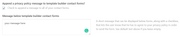
then add this css to your Quick CSS if you are hiding your form labels:.avia_ajax_form.av-form-labels-hidden .av_form_privacy_check label{ position: initial !important; top: initial !important; left: initial !important; }then your check box and text will show:
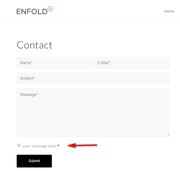
Then clear your browser cache and check. If this doesn’t help, please include an admin login in the private content area so we can be of more assistance.Best regards,
Mike -
AuthorPosts
