

Forum Replies Created
-
AuthorPosts
-
Hi,
Thanks for the update, I examined the&but also see that your quotes for the titles do not look correct„Demons“Please include an admin login in the Private Content area so we can examine closer.Best regards,
MikeOctober 18, 2019 at 6:31 pm in reply to: show arrows in easy slider and full screen slider but not dot things #1149381Hi,
Sorry for the late reply, please don’t include the code between the/*and*/this makes it inactive.
Your child theme functions.php should look like this:<?php /* * Add your own functions here. You can also copy some of the theme functions into this file. * WordPress will use those functions instead of the original functions then. */ add_filter('avia_masonry_entries_query','avia_order_by_random', 10, 2); function avia_order_by_random($query, $params) { $query['orderby'] = 'title'; $query['order'] = 'rand'; $terms = explode(',', $params['categories']); if (!empty($terms) && in_array(1, $terms)) { $query['orderby'] = 'date'; } return $query; }this part is only a comment and is not needed:
/*
* Add your own functions here. You can also copy some of the theme functions into this file.
* WordPress will use those functions instead of the original functions then.
*/
Best regards,
MikeHi,
Sorry for the late reply, unfortunately, we were not able to reproduce this. I’m using an LG Android and added a video in the Private Content area. I’m not sure what could be causing this, I also checked in Chrome Dev tools emulating as a mobile device, without success. It looks like your device is not handling the parallax transform as you scroll down, but I couldn’t find anything more about this, and it’s just a guess. Have you tried any other devices?
For updating the textblock.php I will need FTP access, this can’t be done through the WordPress dashboard.Best regards,
MikeHey Mike,
You could create a floor plan like this using Sketchup and then export it as an image. Please see this tutorial: https://youtu.be/aXS7D6lqusk
Or you could search YouTube for other tutorials.Best regards,
MikeHey Michael Nørgaard,
Thank you for contacting us, yes you can install the theme on a test domain while you are building the site, most people use a sub-domain of the domain you plan as your final domain for this.Best regards,
MikeHey kunzi,
Thank you, this issue has already been found and will be corrected with the next release, the dev team says we can replace the textblock.php file with the v4.6.2 version if really needed.
Please see Private Content area for download and save your current file as backup:
\enfold\config-templatebuilder\avia-shortcodes\textblock.phpBest regards,
MikeHey dudeto29,
To add a space between the header and the top element please try this code in the General Styling > Quick CSS field or in the WordPress > Customize > Additional CSS field:.html_header_top.html_header_sticky.html_large #main { padding-top: 316px !important; }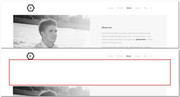
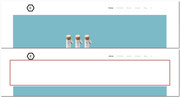
Best regards,
MikeHi,
Glad to hear, we will close this now. Thank you for using Enfold.For your information, you can take a look at Enfold documentation here
For any other questions or issues, feel free to start new threads in the Enfold forum and we will gladly try to help you :)Best regards,
MikeOctober 15, 2019 at 3:30 am in reply to: Change color desktop menu items when hovered or selected #1147929Hi,
If it is working with both the code and setting then that will be fine.Best regards,
MikeOctober 14, 2019 at 6:38 am in reply to: How to Add an Alternative Language Menu without using a Plugin #1147721Hi,
Glad to hear this helped, if I find anything helpful on this I will post it, we will leave this open as you have offered to assist with your tutorial. Thank you again for posting it and using Enfold.Best regards,
MikeHi,
Thanks for the code sample, but there were quite a few errors in it, I tried to put this together for you but I’m still unsure what icons you want to use. Please see the screenshot in Private Content area..family .toggle_icon:before { content: "\e816"; font-family: entypo-fontello; position: relative; font-size: 28px !important; } .family .toggle_icon { margin-top: -24px !important; } .family .activeTitle .toggle_icon:before { content: '\e806'; font-family: entypo-fontello; }Please replace your current css with this and clear your browser cache, then let us know how to proceed.
Best regards,
MikeHey flipper1960,
that looks about right, for the best output and the ability to adjust them please try the plugin Simple Image Sizes plugin. Or see:
\enfold\functions.phpstarting on line 174Best regards,
MikeHey Steve,
Sorry, I don’t think I see it, I see a gray color section below a white section below the slider, but I would not really call it a line?
Please see the screenshot in Private Content area.
If you are seeing something else please include a screenshot.Best regards,
MikeHi,
Thanks for the video, I’m not seeing this issue with Android, and I see that you already have the latest IOS patch v4.6.3.1 so I’m going to ask someone with an iPhone to take a look.
I’m not sure when the next release will be, if you really need this and provide ftp access I’ll do it for you :)Best regards,
MikeHi,
Glad to hear, I agree that an image of the book on top in mobile would be best, but breaking the column with the book image in half and splitting over and under the text column would be very hard, I would recommend adding an image of the book into the same column as the text and then using the screen options to show it only for mobile while hiding the other image the same way. Another option would be to use the same technique for the button under the image, that is to have two buttons and show / hide via screen width.
This can be simple and I would be happy to demonstrate if you provide an admin login in the Private Content area.Best regards,
MikeOctober 14, 2019 at 4:12 am in reply to: How to Add an Alternative Language Menu without using a Plugin #1147675Hi,
Thank you for the feedback and shortcode, I did see the rouge<br>in the html but not in the shortcode itself, and I’m not sure why my shortcode also had line breaks which didn’t result in<br>in the html.
The only instances of this that I could find were where someone would be using shortcodes in the default WordPress editor, such as using the shortcode wand to generate and build out their page instead of using the Advanced Layout Builder to build their page, but I didn’t think you were doing that.
Anyways I have a solution for you, try this css to hide the<br>in the content wrapper of the page but not in text block paragraphs, I tested it on the code you sent and it worked good. It should have no effect on your other pages..entry-content-wrapper br { display: none !important; }but if you want to be really strict with it I found my template included this class in the body
page-template-template-frenchyours should be the same, so then try this css:#top.page-template-template-french .entry-content-wrapper br { display: none !important; }then please clear your browser cache and check.
Best regards,
MikeOctober 14, 2019 at 3:09 am in reply to: Enfold contact form not sending mail – other problems ruled out #1147661Hi,
@2011apuchin, Sorry for the late reply I have taken a look at your site and tested your Google SMTP plugin from within the plugin settings. I found that the plugin automatically adds the correct email address to the email header from address, so there is no need to use the snippet above.
Then I tested your contact form and found that it didn’t send, after reading your plugins documentation and settings page I found that the email address used in the settings is part of the authorization needed to use the Google SMTP system. This is common for SMTP logins. I then tried your contact form again with the correct email address and it worked correctly.
I found that it works correctly using two email address if the first one is the authorization address, if you really need this.
Please see the Private Content area for the email details.Best regards,
MikeOctober 14, 2019 at 1:09 am in reply to: How to Add an Alternative Language Menu without using a Plugin #1147651Hi,
Sorry for the late reply and thanks for the great tutorial, I’m sure this will help many.
I followed your tutorial and created a template-french.php & header-french.php in my child theme, and created a page using many different elements and a french menu, not really french just in name, but I didn’t find the same error.
Even though I used text blocks and my shortcode has line spaces, I only have the normal padding and margins expected with the elements.
Here’s a screenshot of the page and the page shortcode is in the Private Content area for you to test.
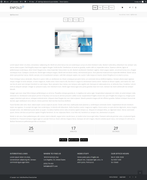
If you send me a copy of your shortcode in a text file I’ll test it on my site. Does the error always occur at the very top under the header before the first element? Your screenshot looks like its occurring under an image or slider so this seems to be after the first element of the page which doesn’t seem to follow the idea that the error is with the join of the header and template?Best regards,
MikeOctober 14, 2019 at 12:04 am in reply to: Change color desktop menu items when hovered or selected #1147648Hi,
Glad to hear, I believe you can try removing the css and then also check the other checkbox above the one the arrow points to for hover state.Best regards,
MikeHi,
Glad we were able to help, we will close this now. Thank you for using Enfold.For your information, you can take a look at Enfold documentation here
For any other questions or issues, feel free to start new threads in the Enfold forum and we will gladly try to help you :)Best regards,
MikeHi,
Glad to hear you figured it out, for the topbar it looks like there is a brown color it wants to be, please try this css:.responsive #top .av_header_transparency #header_meta { background-color: #ab6d4e !important; }I don’t see that the slider is poping out on scroll on mobile, can you make a video of this so we can see? There are a few free mobile screen recorders, I like Screen Recorder – No Ads for Android.
Sorry, there is no Pro Version, or should I say there is no Free Version :) But yes this issue has already been found and will be corrected with the next release which is improving this function for all of the elements, the dev team says we can replace the textblock.php file with the v4.6.2 version if really needed.
Please see Private Content area for download and save your current file as backup:
\enfold\config-templatebuilder\avia-shortcodes\textblock.phpBest regards,
MikeHey Charlotte,
Sorry for the late reply, the error message seems to be that you don’t have wp-config.php which is needed for wordpress, but I see that your site is working for me so I assume that you have restored from a backup?Best regards,
MikeHi,
Sorry for the late reply, I’m not sure that I understand the issue because your form seems to be reacting as you described you wanted
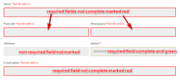
required fields not complete marked red
required fields complete marked green
non-required field not complete and not marked
Has this already been solved?Best regards,
MikeOctober 13, 2019 at 10:36 pm in reply to: Change color desktop menu items when hovered or selected #1147633Hi,
Thank you for the feedback, I adjusted this at Enfold Theme Options > Advanced Styling
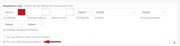
Please clear your browser cache and check.Best regards,
MikeHey Carolin,
I tried th look at your page but it is not loading for me, please check that the url is correct or that you are not blocking traffic for other countries.Best regards,
MikeHey barrystrauss,
Please try this code in the General Styling > Quick CSS field or in the WordPress > Customize > Additional CSS field:@media only screen and (max-width: 767px) { #top.page-id-12 .post-entry-12 .flex_column_table { display: flex !important; flex-wrap: wrap !important; } #top.page-id-12 .post-entry-12 .flex_column.avia-builder-el-first { order: 2 !important; } #top.page-id-12 .post-entry-12 .flex_column.avia-builder-el-last { order: 1 !important; } }Best regards,
MikeHey Bob,
Thank you for contacting us, but unfortunately we don’t create websites or landing pages, we create the software, or theme, used to create them. Here’s a quick video on how you can create your own site with Enfold: https://youtu.be/SwaA7NL4dV4
You may find it easier to create your own landing page using one of our many templates than trying to explain to a developer what your vision is, and convincing them to create it.
To manage the right SEO, we recommend using the Yoast pluginBest regards,
MikeOctober 13, 2019 at 9:36 pm in reply to: Change color desktop menu items when hovered or selected #1147628Hi,
Sorry, I’m confused, above you wrote that the hovered menu should be red?
Is this for the desktop menu only? Is the hover of the sub-menus ok, they are red with black text.Best regards,
Mike -
AuthorPosts
