

Forum Replies Created
-
AuthorPosts
-
Hi,
Glad we were able to help, we will close this now. Thank you for using Enfold.For your information, you can take a look at Enfold documentation here
For any other questions or issues, feel free to start new threads in the Enfold forum and we will gladly try to help you :)Best regards,
MikeHi,
It’s working in my install and a few others I’ve helped with, Please include an admin login in the Private Content area so we can check.Best regards,
MikeHi,
Perhaps you have a missing bracket in your css, it’s working in my tests, Please see the screenshot in Private Content area.
Please include an admin login in the Private Content area so we can check.Best regards,
MikeHey vonipeter,
Thanks for the links, please try this solution
I note that you request that for mobile that the topbar with your phone number and email address is empty, but this may be a problem because the mobile menu doesn’t exist until the burger menu is clicked and then the script grabs the elements you want and moves them to the mobile menu, so you may need to leave the phone number and email address in the topbar for mobile.Best regards,
MikeHey Jérôme,
Lazy Load can cause several issues, often disabling it is best, but in your case you can try this css to correct the logo.
Please try this code in the General Styling > Quick CSS field or in the WordPress > Customize > Additional CSS field:#top .av_header_transparency.av_alternate_logo_active .logo a>img { opacity: 1 !important; filter: alpha(opacity=1); }Best regards,
MikeHi,
Thank you for the links, Please include an admin login in the Private Content area so we can examine closer.Best regards,
MikeHey Wolfi,
Glad to hear you have solved this, we will close this now. Thank you for using Enfold.For your information, you can take a look at Enfold documentation here
For any other questions or issues, feel free to start new threads in the Enfold forum and we will gladly try to help you :)Best regards,
MikeHey minogig,
I see that you are using Enfold v4.5, there was an error with this version, please update via ftp to the latest version.
The easiest and safest way to do this is to download the newest version from Theme Forest and rename your current theme to “enfold-old” via ftp then upload the new “enfold” and check that your site is working correctly.
Once you are happy you can delete the “enfold-old” via ftp, (not the WP theme page)
Should for some reason you wish to roll-back to the old version, it’s easy to do, simply rename the new “enfold” to “enfold-new” via ftp and then rename “enfold-old” to “enfold” then refresh your page.
Please don’t try to overwrite the theme folder, as this will leave old files behind and cause errors.Best regards,
MikeHi,
It looks like you have several javascript errors that are typically from loading jQuery in the footer or from lazy loading, please ensure that Enfold Theme Options > Performance > Load jQuery in your footer is unchecked, then disable all caching and minifying. Also disable JetPack and Autoptimize.
If this doesn’t help please include admin login in the Private Content area so we can be of more assistance.Best regards,
MikeHi,
For the horizontal space between the two rows, please try this css:#top.page-id-4069 .hr.hr-invisible.avia-builder-el-9 { height: 11px !important; }Best regards,
MikeHi,
Thanks for the login, this css is the cause of the error:@media only screen and (max-width: 767px) { #top .header_color .av-hamburger-inner, #top .header_color .av-hamburger-inner::before, #top .header_color .av-hamburger-inner::after { background-color: #4b758a; } }But I can’t find it in the regular css places, please look for this code and change the color to white.
Best regards,
MikeHi,
Sorry for the late reply, your image doesn’t exist, it is a “404” please choose an image for your media library. Please see the links in the Private Content area.Best regards,
MikeHey Ben,
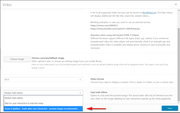
Sorry for the late reply, the lightbox popup is being improved for all elements and should be available in the next update.
For now please use the video element with the “lazy load” option “show in lightbox” this is working:
Best regards,
MikeOctober 26, 2019 at 8:35 pm in reply to: comment field on blogpost shows in german language #1151398Hi,
Sorry for the late reply, if I understand correctly this question is not about text in German language now and is about the comment field error highlighting? The comment box is actually the default WordPress element and it doesn’t add the error classes to the element like the contact form does so we can’t apply the same style to it.Best regards,
MikeOctober 26, 2019 at 7:54 pm in reply to: Layerslider – display a different image on mobile phone #1151397Hey mikabodesign,
Sorry for the late reply, to toggle single element visibility in your layerslider please go to your slider and select your element then click the visibility icons, please see this screenshot:
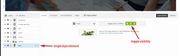
For more advanced visibility, click the “styles” tab and add your custom css.Best regards,
MikeOctober 26, 2019 at 7:16 pm in reply to: New featured image in portfolio grid is deeper than the older ones #1151394Hi,
Glad we were able to help, we will close this now. Thank you for using Enfold.For your information, you can take a look at Enfold documentation here
For any other questions or issues, feel free to start new threads in the Enfold forum and we will gladly try to help you :)Best regards,
MikeOctober 26, 2019 at 7:10 pm in reply to: How to insert an element in between 2 other elements #1151393Hi,
Thanks for the link, I see your “box” you said it works well as a grid, perhaps we could hide it for mobile and use your current “box” for mobile?
I see your current box could use less margin-left for mobile, this may help:@media only screen and (max-width: 767px) { .getStarted { margin: 34px 0 0px 4px !important; } }Best regards,
MikeHey Darren,
We should be able to remove it but I don’t see your accordions, I have checked most every page. Please provide a direct link to the page.Best regards,
MikeHey ppi37,
Please try this code in the General Styling > Quick CSS field or in the WordPress > Customize > Additional CSS field:#top.page-id-4069 .-flextable .flex_column.first { border-right: 10px solid #fff; }After applying the css, Please clear your browser cache and check.
Best regards,
MikeHey Ben canoe,
Sorry, there must be some misunderstanding, we are not offering free phones.Best regards,
MikeHey Fred,
Thanks for the login, I disabled your Enfold Theme Options > Performance > JS & CSS file merging and compression and it looks like your site is working correctly now, but your “site health” says that many WordPress files are not writable, please check your file permissions it also looks like wp_version_check() and your jQuery is loading incorrectly, perhaps your webhost has added commands in the wp-config.php, often webhosts will do this claiming the site will run faster or more secure, or it’s a part of their “managed hosting” custom install. I recommend asking them about this or reinstalling an official version of WordPress.Best regards,
MikeHi,
Glad we were able to help, we will close this now. Thank you for using Enfold.For your information, you can take a look at Enfold documentation here
For any other questions or issues, feel free to start new threads in the Enfold forum and we will gladly try to help you :)Best regards,
MikeHi,
Please try adding this code in the General Styling > Quick CSS field or in the WordPress > Customize > Additional CSS field:@media only screen and (max-width: 767px) { #top.page-id-5813 #av_section_2 > div > div > div > div > div > div.avia-data-table-wrap.avia_responsive_table > table > tbody > tr.avia-heading-row > th:nth-child(1), #top.page-id-5813 #av_section_2 > div > div > div > div > div > div.avia-data-table-wrap.avia_responsive_table > table > tbody > tr > td:nth-child(1), #top.page-id-5813 #av_section_2 > div > div > div > div > div > div.avia-data-table-wrap.avia_responsive_table > table > tbody > tr.avia-heading-row > th:nth-child(3), #top.page-id-5813 #av_section_2 > div > div > div > div > div > div.avia-data-table-wrap.avia_responsive_table > table > tbody > tr > td:nth-child(3) { margin: auto !important; } #top.page-id-5813 #av_section_2 > div > div > div > div > div > div.avia-data-table-wrap.avia_responsive_table > table > tbody > tr.avia-heading-row > th:nth-child(2), #top.page-id-5813 #av_section_2 > div > div > div > div > div > div.avia-data-table-wrap.avia_responsive_table > table > tbody > tr > td:nth-child(2) { margin: auto !important; } }Best regards,
MikeHi,
Thank you, I added this css:.header_color .av-subnav-menu li.current-menu-item a, .main_color .av-subnav-menu li.current-menu-item a{ color: #000 !important; } .av-subnav-menu > li > a { font-weight: 600 !important; } .main_color .av-subnav-menu a { color: #e0b13a !important; }It now seems to show correctly, please clear your browser cache and check.
Best regards,
MikeHi,
Sorry for the late reply, and thanks for the login. I added this code to your functions.php and it is now working on the one page:function custom_script(){ if ( is_page( '37145' ) ) { ?> <script> gtag('event', 'conversion', {'send_to': 'AW-yourID'}); </script> <?php } } add_action('wp_footer', 'custom_script');naturally I used your posted AW-ID
Best regards,
MikeOctober 26, 2019 at 3:08 pm in reply to: Remove TAG 'Landscape' and 'Portraits' from TAG List #1151360Hi,
Sorry for the late reply, Please try this code in the General Styling > Quick CSS field or in the WordPress > Customize > Additional CSS field:#top #cool_tag_cloud-3 a.tag-cloud-link[aria-label='portrait (2 elementi)'], #top #cool_tag_cloud-3 a.tag-cloud-link[aria-label='landscape (8 elementi)'], #top #cool_tag_cloud-2 a.tag-cloud-link[aria-label='portrait (2 elementi)'], #top #cool_tag_cloud-2 a.tag-cloud-link[aria-label='landscape (8 elementi)']{ display: none !important; }After applying the css, Please clear your browser cache and check.
Best regards,
MikeOctober 26, 2019 at 2:25 pm in reply to: Burger menu not working for blog post pages on mobile? #1151354Hi,
Sorry for the late reply and thanks for the explanation, I checked your site on mobile and with Chrome dev tools and see that your burger icon is a light gray which is hard to see, and when it is open your menu is transparent.
Please see the screenshot in Private Content area.
Please check on your device, I assume that if we change your burger icon to white it will be easier to see, what color would you like the fly-out mobile menu background to be?Best regards,
MikeOctober 26, 2019 at 1:46 pm in reply to: New featured image in portfolio grid is deeper than the older ones #1151353Hi,
Sorry for the late reply, Please try this code in the General Styling > Quick CSS field or in the WordPress > Customize > Additional CSS field:@media only screen and (min-width: 768px) { #top.page-id-92 img.size-portfolio_small { height: 169px !important; max-height: 169px !important; } }I wrote this to only work on this one page and only for tablet & desktop screens, After applying the css, Please clear your browser cache and check.
Best regards,
MikeHi,
Sorry for the late reply, I took a look at your page and added some css to go with Victoria’s css to adjust the size of the icons.@media only screen and (max-width: 767px) { .responsive #top #wrap_all #av_section_2 .flex_column.av_one_third { width: 28vw !important; } .responsive #top #wrap_all #av_section_2 .flex_column.av_one_third a.av-icon-char { font-size: 20px !important; line-height: 20px !important; width: 20px !important; } }please clear your browser cache and check.
Best regards,
MikeOctober 26, 2019 at 11:40 am in reply to: Create a Blog for the first time! Some questions… #1151335Hi,
Please try this code in the General Styling > Quick CSS field or in the WordPress > Customize > Additional CSS field:.pagination span, .pagination a,.pagination .current { font-size: 16px !important; } .main_color .pagination .current,#top .main_color .pagination a { background: #b41528 !important; color: #fff !important; }Then clear your browser cache and check.
Please see the screenshot in Private Content area for the expected results.Best regards,
Mike -
AuthorPosts
