

Forum Replies Created
-
AuthorPosts
-
Hi,
Thank you for the feedback, I tested on a Mac Mojave Safari, with the “Enable cookie consent messages” on the layerslider doesn’t show, with it off it does show.
I got this error on the Mac:
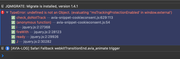
[Error] TypeError: undefined is not an Object. (evaluating ''msTrackingProtectionEnabled' in window.external')
	check_doNotTrack (avia-snippet-cookieconsent.js:629:113)
	(anonymous function) (avia-snippet-cookieconsent.js:54)
	i (jquery.js:2:27368)
	fireWith (jquery.js:2:28123)
	ready (jquery.js:2:29926)
	J (jquery.js:2:30282)
I also don’t see the “consent bar” on Safari do you?
I will have to submit this to the dev team to check, Thank you for your patience.Best regards,
MikeHi,
It looks like \enfold\functions-enfold.php line 348
get_the_time( $search_messages['time_format']Best regards,
MikeDecember 4, 2019 at 7:54 pm in reply to: Horizontal gallery one click to scroll horizontally #1162711Hi,
Ok, glad we now understand what the issue is, but I’m not sure we can make the horizontal gallery go to the last slide on click, skipping the second slide.
I will ask the rest of the team for suggestions.
Thank you for your patience.Best regards,
MikeHi,
Glad we were able to help, we will close this now. Thank you for using Enfold.For your information, you can take a look at Enfold documentation here
For any other questions or issues, feel free to start new threads in the Enfold forum and we will gladly try to help you :)Best regards,
MikeHi,
Thanks for the feedback, I see this form is the “Contact Form 7” please see this post
If you still have issues, Please include an admin login in the Private Content area so we can be of more assistance.Best regards,
MikeHi,
Sorry to see you go, but opening a support ticket with Envato, the parent company of ThemeForest is the correct step for a refund.
You will hear from them.
We do not have any control on how Envato handles your Envato account.
So we will close this support thread as you asked aboveBest regards,
MikeDecember 4, 2019 at 2:31 pm in reply to: Horizontal gallery one click to scroll horizontally #1162606Hi,
Glad this helped for you, as for the “scroll” issue I’m not sure we are understanding correctly, when I look at your site I see three images, two are shown on load, the first is active, so when we click the “next” button the second is centered, and the third shows half-way.
This is correct?
So I believe you want the third to be centered on the first click. If the element showed more than two on load this would not be an issue.
Am I understanding this correctly?Best regards,
MikeHi,
Sorry for the late reply and thanks for the admin login, I have disabled your jQuery script because I found flexbox css to work better.
So I added this css, please clear your browser cache and check.@media only screen and (max-width: 992px) { #top.home #wrap_all #main #av_section_3 > div > div > div > div > div:nth-child(2){ display: flex !important; flex-wrap: wrap !important; } #top.home #wrap_all #main #av_section_3 .col_floating_text { order: 2 !important; } #top.home #wrap_all #main #av_section_3 .col_floating_img { order: 1 !important; } }Best regards,
MikeHi,
Thank is good news that “WooCommerce German PRO” found their error and solved it, so shall we close this then?Best regards,
MikeHi,
Glad we were able to help, we will close this now. Thank you for using Enfold.For your information, you can take a look at Enfold documentation here
For any other questions or issues, feel free to start new threads in the Enfold forum and we will gladly try to help you :)Best regards,
MikeHi,
Thank you for the feedback, I have tested “Enable cookie consent messages” within the “Privacy and Cookies” option of Enfold’s settings, and your layerslider worked for me, but I was also logged in, so the consent could have already been set. I don’t have the password to view your page without logging in, I was not able to reproduce this on my localhost.
It looks like you are trying to use the setting “All cookies and services are accepted on first page load, user can opt out”.
How can I reproduce your error?Best regards,
MikeHi,
Thank you for the feedback, sorry I couldn’t help more with the revisions issue, I was not able to recreate this on my localhost, but this is a core WordPress function.
I did find that some hosts limit the number of revisions to save resources, because each revision is a complete copy of the page.
This is done in thewp-config.php filewith this code snippetdefine( 'WP_POST_REVISIONS', 3 );with the number “3” being the limit.
Some plugins that “clean” WordPress Transients have remove revisions in error, I notice your “WP Healthcheck” plugin cleans transients. I’m not saying this is the cause, but perhaps one or both of these could contribute to this. It’s really hard to say at this point.
I hope this is solved for you, but we will keep this open for a while for further feedback from you, or if you wish we can close it and you can always open a new thread about this in the future.As a side note, I recommend checking your web host options, “cPanel”, for full site backups. I’ve seen some that will take nightly backups on a rotating 30 day basis automatically, typically you have to turn this on yourself, but it could help with the many things that could happen to any modern web site.
Best regards,
MikeHi,
Glad we were able to help, I will add this to your feature request for the dev team to review.
For any other questions or issues, feel free to start new threads in the Enfold forum and we will gladly try to help you :)
We will close this now. Thank you for using Enfold.For your information, you can take a look at Enfold documentation here
Best regards,
MikeHi,
Thanks for the feedback, please check if your server has the Module PageSpeed turned on
The solution is to add a .htaccess rule, please see link, before adding the .htaccess rule, please ask your web host, as you don’t want to crash your site.If this doesn’t help, please include an admin login in the private content area, and allow us to deactivate your plugins temporarily, so we can be of more assistance.
Best regards,
MikeHi,
To reduce the text in the footer for all screen sizes, Please try this code in the General Styling > Quick CSS field or in the WordPress > Customize > Additional CSS field:#footer p,#footer a { font-size: 10px !important; }Please adjust the font-size to suit.
After applying the css, Please clear your browser cache and check.To do this only for mobile, please use this css instead:
@media only screen and (max-width: 767px) {
#footer p,#footer a {
	font-size: 10px !important;
}
}
Best regards,
MikeHi,
Please replace with this css and clearing your browser cache:@media only screen and (max-width: 479px) { .responsive #top #wrap_all #header > #header_meta .container > .social_bookmarks { display: block !important; } }Best regards,
MikeDecember 3, 2019 at 6:56 pm in reply to: Contact Form Element Not Being Sent To Email when filled out on phone #1162320Hi,
Please see this post, I don’t have InDesign so I can’t test.
But the idea is to use an iFrame to show the document.
Here is another article, and a video tutorial.Best regards,
MikeHi,
Please try this code in the General Styling > Quick CSS field or in the WordPress > Customize > Additional CSS field:@media only screen and (max-width: 479px) { .responsive #top #wrap_all #header .social_bookmarks, .responsive #top #wrap_all #main .av-logo-container .social_bookmarks { display: block !important; } }Please note that we encourage users to create new threads than to revive older threads, to better serve them. Thanks for your understanding.
Best regards,
MikeHi,
@BeeCee, Thanks for sharing your article.
@frankeee, earlier you wrote about hiring a freelancer, I found that many on Upwork.com are quite reasonable and quick, we recommend Codeable for their overall experience.
As I wrote earlier, I did submit this to the dev team as a feature request, but this could take a little while to make it into an update.Best regards,
MikeHi,
Thanks for the login, I examined your Quick CSS and found that the closing bracket for the first rule was missing. I have added it and your mobile “scroll to top” now shows. Please clear your browser cache and check.
Please see the screenshots in Private Content area.Best regards,
MikeDecember 3, 2019 at 5:31 pm in reply to: Latest update broken the Styling and will not save any changes #1162277Hi,
I found no missing stylesheets, I found two missing rules, I don’t believe the theme causes this to happen.
Are you still missing styles? Please include links and screenshots of what you are missing.Best regards,
MikeHi,
Glad to hear, yet it is still unclear which script you were having issue with, was the cookie consent bar waiting for user approval?
Please see the screenshot in Private Content area of your “Luister Live” popup, it seems to be working good, perhaps you can explain further.Best regards,
MikeHi,
Glad we were able to help, we will close this now. Thank you for using Enfold.For your information, you can take a look at Enfold documentation here
For any other questions or issues, feel free to start new threads in the Enfold forum and we will gladly try to help you :)Best regards,
MikeHi,
Please add your button to a demo page and include an admin login to check.Best regards,
MikeDecember 3, 2019 at 12:30 pm in reply to: Grid row mobile responsiveness not working properly #1162169Hi,
Sorry, I only have an Android and can’t reproduce this, I will ask a team member to check on an iPhone.
Thank you for your patience.Best regards,
MikeHi,
Try adding this code to the end of your functions.php file in Appearance > Editor:function custom_title_script(){ ?> <script> (function($){ $(window).load(function(){ $('a').removeAttr('title'); $('img').removeAttr('title'); }); })(jQuery); </script> <?php } add_action('wp_footer', 'custom_title_script');Best regards,
MikeHi,
Sorry, I’m not sure what you mean, the dev team has not turned anything off, they have added this function?Best regards,
MikeHi,
Glad we were able to help, we will close this now. Thank you for using Enfold.For your information, you can take a look at Enfold documentation here
For any other questions or issues, feel free to start new threads in the Enfold forum and we will gladly try to help you :)Best regards,
Mike -
AuthorPosts
