

Forum Replies Created
-
AuthorPosts
-
Hi,
Glad we were able to help, we will close this now. Thank you for using Enfold.For your information, you can take a look at Enfold documentation here
For any other questions or issues, feel free to start new threads in the Enfold forum and we will gladly try to help you :)Best regards,
MikeHi,
Thanks for the test page, so in my research the html5 video tag behaves like an image regarding size and fluidly stays within the width of the container. So putting the video tag inside of a text element offers no container, thus the next container is the column which is full-width. You can see this example with embedded YouTube videos and our own video element.
I also tested this on your page at the bottom under your 600px image, I copied your video tag in a 1/2 column.
So the solution is to wrap the video tag inside of a container:<div style="width: 600px; overflow: hidden;"> /*video*/ </div>I have applied this to your top video to show. I do admit that I expected the video to obey the 600px width attribute, but this is the explanation I kept finding.
As for the .ogv loading, I found that in browsers “First WebM is tried. If that can’t be played, then MP4 is tried. Finally, Ogg is tried” so this explains the lag.
Best regards,
MikeDecember 17, 2019 at 11:32 am in reply to: How do I show portfolio categories on a portfolio item? #1166782Hi,
Ok, that is good, now use this as your css, it will add the space after the comma:span.portfolio_cat:not(:last-child):after { content: ",\00a0" }Best regards,
MikeDecember 17, 2019 at 11:19 am in reply to: 2 images side by side (with full width button below) directly below the text #1166775Hi,
Sorry, I had misunderstood your question, so Ismael’s answer is the best solution, you should use that one.Best regards,
MikeHey jack000486,
The easiest way to do this is to add your icon to Enfold, you can see our documentation here.
So if your icon is in the .svg format you can create the “fontello” zip file to import into our Iconfont Manager by going to fontello.com and dragging it into the “custom icon” bar:

If your icon is in .png format go to pngtosvg.com and convert it into .svg and then go to fontello.com to create your icon pack.
I recommend adding all of your icons to create one icon pack, that way they will be grouped together in the icon picker in Enfold.Best regards,
MikeDecember 16, 2019 at 2:27 pm in reply to: How to insert an image in the widget title of the footer #1166398Hi,
Thank you, so if you remove your css:.flex_column .widget .widgettitle { margin-top: 90px; }and use this css instead:
#footer #text-5 {
	margin-top: 0px !important;
}
#footer h3.widgettitle {
    margin-top: 60px !important;
}
it will align the widget text blocks and have the titles and image close to the top.
Please see the screenshot in Private Content area, and note the red line showing what I thought you wanted aligned.Best regards,
MikeHi,
Glad we were able to help, we will close this now. Thank you for using Enfold.For your information, you can take a look at Enfold documentation here
For any other questions or issues, feel free to start new threads in the Enfold forum and we will gladly try to help you :)Best regards,
MikeHi,
Glad we were able to help, we will close this now. Thank you for using Enfold.For your information, you can take a look at Enfold documentation here
For any other questions or issues, feel free to start new threads in the Enfold forum and we will gladly try to help you :)Best regards,
MikeHi,
Glad we were able to help, we will close this now. Thank you for using Enfold.For your information, you can take a look at Enfold documentation here
For any other questions or issues, feel free to start new threads in the Enfold forum and we will gladly try to help you :)Best regards,
MikeHi,
Do you mean that you are using the DE “formal”?
I looked in the file I linked for you and the translation is this:We may request cookies to be set on your device. We use cookies to let us know when you visit our websites, how you interact with us, to enrich your user experience, and to customize your relationship with our website. Click on the different category headings to find out more. You can also change some of your preferences. Note that blocking some types of cookies may impact your experience on our websites and the services we are able to offer.DE:
Wir können Cookies anfordern, die auf Ihrem Gerät eingestellt werden. Wir verwenden Cookies, um uns mitzuteilen, wenn Sie unsere Websites besuchen, wie Sie mit uns interagieren, Ihre Nutzererfahrung verbessern und Ihre Beziehung zu unserer Website anpassen. Klicken Sie auf die verschiedenen Kategorienüberschriften, um mehr zu erfahren. Sie können auch einige Ihrer Einstellungen ändern. Beachten Sie, dass das Blockieren einiger Arten von Cookies Auswirkungen auf Ihre Erfahrung auf unseren Websites und auf die Dienste haben kann, die wir anbieten können.I see this is not translated in the DE “formal”, if you post the translation I will make the change for you.
Best regards,
MikeHi,
Glad we were able to help, we will close this now. Thank you for using Enfold.For your information, you can take a look at Enfold documentation here
For any other questions or issues, feel free to start new threads in the Enfold forum and we will gladly try to help you :)Best regards,
MikeHi,
Glad this helped, to hide the items in the desktop menu so they only show in the burger menu we will add a css class to those items as we did above in the menu backend, lets useno_desktop
and then this css:#avia-menu .no_desktop { display: none !important; }Best regards,
MikeDecember 16, 2019 at 1:09 pm in reply to: menu on two lines and the first and second line change position. How to fix. #1166352Hi,
Glad we were able to help, we will close this now. Thank you for using Enfold.For your information, you can take a look at Enfold documentation here
For any other questions or issues, feel free to start new threads in the Enfold forum and we will gladly try to help you :)Best regards,
MikeDecember 16, 2019 at 1:03 pm in reply to: Creating columns smaller than 1/5 to enable more in a row #1166349Hi,
I believe we can achieve this with css:

Basically this will create the above for desktop:#formula .flex_column_table .av-flex-placeholder:before { content: url(https://img.icons8.com/officel/80/000000/plus-math.png); display: inline-block; margin-top: 5em; }You can test this in your Quick CSS, the icon is a free hosted one, but you can change the url to your own icon.
But you will need media queries for it to look good in mobile, tablet, and desktop:@media only screen and (min-width: 1200px) { #formula .flex_column_table .av-flex-placeholder:before { content: url(https://img.icons8.com/officel/80/000000/plus-math.png); display: inline-block; margin-top: 5em; } } @media only screen and (min-width: 768px) and (max-width: 1199px) { #formula .flex_column_table .av-flex-placeholder:before { content: url(https://img.icons8.com/officel/40/000000/plus-math.png); display: inline-block; margin-top: 5em; } } @media only screen and (min-width: 670px) and (max-width: 767px) { #formula .flex_column_table .av-flex-placeholder:before { content: url(https://img.icons8.com/officel/80/000000/plus-math.png); display: inline-block; margin-left: 15.5em; } } @media only screen and (min-width: 427px) and (max-width: 669px) { #formula .flex_column_table .av-flex-placeholder:before { content: url(https://img.icons8.com/officel/80/000000/plus-math.png); display: inline-block; margin-left: 13em; } } @media only screen and (min-width: 377px) and (max-width: 426px) { #formula .flex_column_table .av-flex-placeholder:before { content: url(https://img.icons8.com/officel/80/000000/plus-math.png); display: inline-block; margin-left: 7em; } } @media only screen and (min-width: 322px) and (max-width: 376px) { #formula .flex_column_table .av-flex-placeholder:before { content: url(https://img.icons8.com/officel/80/000000/plus-math.png); display: inline-block; margin-left: 6em; } } @media only screen and (max-width: 321px) { #formula .flex_column_table .av-flex-placeholder:before { content: url(https://img.icons8.com/officel/80/000000/plus-math.png); display: inline-block; margin-left: 5em; } }This is only rough to get you started, please feel free to test and adjust to suit your needs.
Best regards,
MikeHi,
Please try this code in the General Styling > Quick CSS field or in the WordPress > Customize > Additional CSS field:.avia-image-container:hover .avia_image { box-shadow: 3px 6px 16px #000!important; }Then clear your browser cache and any cache plugin, and check.
Best regards,
MikeHi,
This is due to a file change in WordPress v5.3.1, the dev team has released this fix for the missing icons, please upload the following file via FTP to
\enfold\framework\php\function-set-avia-frontend.php
https://www.dropbox.com/s/gmbg5202rjz1vou/function-set-avia-frontend.php?dl=0
Please save a copy of your old file should you encounter an upload error.
Then clear your browser cache and any cache plugin, and check.
This file will be added to the next update also, but for now please use this patch.Best regards,
MikeHey cruetimann,
This is due to a file change in WordPress v5.3.1, the dev team has released this fix for the missing icons, please upload the following file via FTP to
\enfold\framework\php\function-set-avia-frontend.php
https://www.dropbox.com/s/gmbg5202rjz1vou/function-set-avia-frontend.php?dl=0
Please save a copy of your old file should you encounter an upload error.
Then clear your browser cache and any cache plugin, and check.Best regards,
MikeDecember 16, 2019 at 11:22 am in reply to: How to insert an image in the widget title of the footer #1166310Hi,
I believe this is because your css above is adding a 90px top margin to all of the widget titles, try targeting only the one widget title that you want to add margin to. If you would like help with this please include a link to your site so we can examine the elements.
Also try to include a mockup of what you would like to see so we can better assist.Best regards,
MikeDecember 16, 2019 at 11:11 am in reply to: menu on two lines and the first and second line change position. How to fix. #1166306Hi,
Thank you for the feedback, I have changed your menu buttons so they are smaller, please check.
I did it by going to Enfold Theme Options > Menu > Show separators between elements and choose “small separators”

there is another option “no separators” which will add a small gap between the buttons, please give it a try to see which you like better.Best regards,
MikeHi,
This is due to a file change in WordPress v5.3.1, the dev team has released this fix for the missing icons, please upload the following file via FTP to
\enfold\framework\php\function-set-avia-frontend.php
https://www.dropbox.com/s/gmbg5202rjz1vou/function-set-avia-frontend.php?dl=0
Please save a copy of your old file should you encounter an upload error.
Then clear your browser cache and any cache plugin, and check.Best regards,
MikeDecember 16, 2019 at 10:39 am in reply to: Google maps dose not showing "Maps where disable by visitor…" #1166294Hi,
Glad to hear that you got this sorted out, can you point out the translation that was incorrect or not complete so we can fit it? Also please let us know which German language you are using, the formal or regular.Best regards,
MikeDecember 16, 2019 at 10:34 am in reply to: Contact Form Element Not Being Sent To Email when filled out on phone #1166290Hi,
Thank you for sharing your solution. We will close this now. Thank you for using Enfold.For your information, you can take a look at Enfold documentation here
For any other questions or issues, feel free to start new threads in the Enfold forum and we will gladly try to help you :)Best regards,
MikeDecember 16, 2019 at 10:32 am in reply to: My shop sidebar changes when a category is clicked? #1166286Hi,
Glad we were able to help, we will close this now. Thank you for using Enfold.For your information, you can take a look at Enfold documentation here
For any other questions or issues, feel free to start new threads in the Enfold forum and we will gladly try to help you :)Best regards,
MikeHi,
Sorry for the late reply, to have the burger menu show on desktop, please try this code in the General Styling > Quick CSS field:.av-burger-menu-main { display: block !important; }Now the two menus will show the same menu, so you can hide some items from the main menu or the burger menu. to hide some of the burger menu items, go to your menu backend and at the top right of the screen look for the “screen options” tab and check the box “CSS Classes”
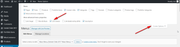
then a css class option will show for each menu item, there you can add a class such as “no_burger”, you can use this same class for all of the items you wish
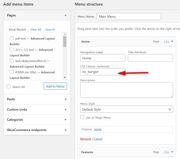
then you can hide these only in the burger menu with this css:#av-burger-menu-ul .no_burger { display: none !important; }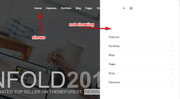
then to control how wide the burger menu flys out use this css:.html_av-overlay-side .av-burger-overlay-scroll { width: 30% !important; }adjust to suit.
Best regards,
MikeDecember 16, 2019 at 2:17 am in reply to: My shop sidebar changes when a category is clicked? #1166214Hi,
Sorry for the late reply, we do have some code that will allow you to have a right sidebar on a single product page, but it works best if your page is full width.
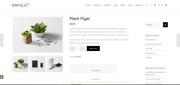
If you would like to try it out, Please add this code in the General Styling > Quick CSS field:/*add right sidebar to woo product page*/ .single-product-main-image { width: 25%; } .single-product-summary { overflow: hidden; width: 40%; float: left; margin-right: 5%; } .single-product .sidebar { width: 35%; }Then add this code to the end of your functions.php file in Appearance > Editor:
add_action('init','ava534345953_init', 50);
function ava534345953_init() {
	add_action( 'woocommerce_after_single_product_summary', 'avia_add_sidebar', 25);
}

function avia_close_image_div() {
	global $avia_config;
	echo "</div>
";
}

function avia_add_sidebar() {
	if(is_product()) {
	$avia_config['currently_viewing'] = "shop_single";
	get_sidebar();
	}
}
Best regards,
MikeHi,
Glad we were able to help, we will close this now. Thank you for using Enfold.For your information, you can take a look at Enfold documentation here
For any other questions or issues, feel free to start new threads in the Enfold forum and we will gladly try to help you :)Best regards,
MikeHey Marc Naumann,
Entschuldigung für die späte Antwort, Ihre Organisation hat eine großartige Geschichte und Mission, aber ich kann sehen, warum Sie Ihre Website aktualisieren möchten, um Ihre Arbeit und diese zu reflektieren und sie für Spender und Rebellen attraktiver zu machen.
Leider ist Enfold nicht mit Visual Composer kompatibel, sodass jemand in Ihrer Organisation Ihre Site von Grund auf neu erstellen muss. Ich glaube, dass dies eine großartige Gelegenheit wäre, eine Website zu erstellen, die Ihre Organisation besser repräsentiert, anstatt nur zu versuchen, Ihre alte Website in Szene zu setzen.Das Erstellen einer großartigen neuen Site mit Enfold ist nicht schwer, da wir viele Demos als Ausgangspunkt verwenden können. Alle unsere Demos finden Sie hier: https://kriesi.at/themes/enfold-overview/
Und unser erstaunlicher Advanced Layout Builder ist einfach zu bedienen und kreativ. Ich wette, dass viele Ihrer Rebellen Enfold nutzen würden, um über Ihre Mission zu berichten und zu zeigen, was sie getan und gelernt haben. Was für ein großartiges Testament das wäre.Selbstverständlich hilft Ihnen unser Support-Team bei allen Fragen und Feinabstimmungen weiter.
Schauen Sie sich also unsere Demos an und lesen Sie hier mehr über Enfold: https://themeforest.net/item/enfold-responsive-multipurpose-theme/4519990
Wenn Sie sich für den Kauf von Enfold entscheiden, empfehle ich, das Kontrollkästchen “Support auf 12 Monate verlängern” zu aktivieren. Es ist zwar nur ein bisschen länger, aber Sie werden feststellen, dass unser Support-Team von großem Wert ist.Ich verstehe, dass Sie mit Spenden operieren, aber aufgrund unseres Vertrags mit Theme Forest, das unsere Lizenzen verwaltet, dürfen wir keine Rabatte gewähren. Ich bin jedoch der Meinung, dass Enfold für Sie der beste verfügbare Wert ist.
— Translated with Google —
Sorry for the late reply, your organization has a great story and mission, but I can see why you would like to update your site to reflect your work and it and make it more appealing to donors and the rebels.
But unfortunately, Enfold is not compatible with the Visual Composer so someone in your organization would need to build your site from scratch. I believe that this would be a great opportunity to build a site that represents your organization better, instead of just trying to put a shine on your old site.Creating a great new site with Enfold is not hard because we have many demos to use as a starting point, see all of our demos here: https://kriesi.at/themes/enfold-overview/
and our amazing Advanced Layout Builder is easy to use and be creative, I bet many of your rebels would have a blast using Enfold to tell about your mission and showcase what they have done and learned. What a great testament that would be.Naturally, our support team can help guide with any questions and fine tweaking you would like.
So please take a look at our demos and read more about Enfold here: https://themeforest.net/item/enfold-responsive-multipurpose-theme/4519990
if you decide to purchase Enfold, I recommend checking the box “Extend support to 12 months” it’s only a little more but you will find our support team is a great value.I understand that you operate on donations, but due to our contract with Theme Forest, who handles our licensing, we are not allowed to give discounts. But nonetheless, I believe you will find Enfold to be the best value available.
Best regards,
MikeDecember 16, 2019 at 12:55 am in reply to: 2 images side by side (with full width button below) directly below the text #1166205Hey bishstan,
Sorry for the late reply, I believe what you are asking is to have the two columns with the images at the bottom of the page to have no top margin and be touching the large column above them, so I added a custom ID to eachleft_no_margin&right_no_marginand then added this css:#left_no_margin,#right_no_margin { margin-top: 0 !important; }you can see the css in a code block element at the bottom of the page, and check the “developer” tab in each column to see the IDs.
Please review the page and let us know if this is what you wanted.Best regards,
Mike -
AuthorPosts
