

Forum Replies Created
-
AuthorPosts
-
December 19, 2019 at 1:12 pm in reply to: Container duplicate website does not keep the same dimensions #1167709
Hi,
I will ask for the team to take a look and see if they also see your issue. Thank you for your patience.Best regards,
MikeHi,
Please include an admin login & FTP access in the Private Content area so we can investigate.Best regards,
MikeDecember 18, 2019 at 2:54 pm in reply to: Social Icons not displaying in Widget area after fix #1167290December 18, 2019 at 2:51 pm in reply to: Problem, after activating the Enfold: Creating default object…Layerslider.php #1167288Hi,
Opps, I just noticed that you had said to go ahead with the 2017 demo install, but I will wait for your feedback on the file test as I don’t want to do anything while you may be testing.Best regards,
MikeHi,
Sorry for the late reply, I’m asking for a team member with Safari to check. Thank you for your patience.Best regards,
MikeDecember 18, 2019 at 2:36 pm in reply to: Social Icons not displaying in Widget area after fix #1167282Hey Thomas,
Thanks for the feedback and the link. I assume that you have already removed the “temp css” fix and this still occurs?
Please include an admin login & FTP access in the Private Content area.Best regards,
MikeHi,
@thinkjarvis Thank you for the feedback, I will reply to your new thread.Best regards,
MikeDecember 18, 2019 at 2:16 pm in reply to: Problem, after activating the Enfold: Creating default object…Layerslider.php #1167278Hi,
I just found a similar issue with theslideshow_layerslider.phpfile that was just changed for our next version, if you don’t mind testing with PHP v7.4 it may solve this issue.
Please try the file in the Private Content area by replacing:
/enfold/config-templatebuilder/avia-shortcodes/slideshow_layerslider/slideshow_layerslider.php
Please keep a copy of your current file as a fallback.Best regards,
MikeDecember 18, 2019 at 1:58 pm in reply to: Problem, after activating the Enfold: Creating default object…Layerslider.php #1167273Hi,
Thank you for the feedback, glad to hear that it is sorted out now. I will report that the LayerSlider doesn’t seem to be v7.4 compatible to the dev team so they can get in touch with the layerslider team.
Please let us know if you are able to import the demo alright or if you need help with it, otherwise, let us know if we should close this thread.Best regards,
MikeHi,
Thank you, I see that the icons are in .svg format, so now you can upload them to fontello.com to create your icon pack.
You see fontello.com changes them into a font file which is what the theme uses.
But note that the result will be black and white icon fonts and looking at the .svg files you sent I see they are in color, so I’m thinking you would like to use colored icons, correct?In this case, we will change course and use css to add your color icons. So the first step is to convert your .svg into .png because WordPress doesn’t allow .svg uploads into the media library without a plugin.
Then we will add this css in the General Styling > Quick CSS field:.avia-icon-grid-container li:nth-child(1) .avia-icongrid-icon { background-image: url(https://test.test/wp-content/uploads/2019/12/rocket.png); height: 40px; background-size: contain; background-repeat: no-repeat; background-position: 50% 50%; } .avia-icon-grid-container li:nth-child(1) .avia-icongrid-icon .icongrid-char:before { display: none; }This css targets the first icon in the Icon Grid element with the image in the url. So please change the url and change the number in
li:nth-child(1)to the one you want to taget. This means that you will copy this code three times to change three icons.

If you need so help targeting many of these please include a link to your page and we can help more.Best regards,
MikeDecember 18, 2019 at 12:24 pm in reply to: How do I show portfolio categories on a portfolio item? #1167242Hi,
Sorry, I’m not sure what you mean, please see the screenshot in Private Content area of what I’m seeing in the search results, which is a title, date, comments, category breadcrumbs, & excerpt. I’m not sure which items on your site are portfolios.Best regards,
MikeDecember 18, 2019 at 11:31 am in reply to: Problem, after activating the Enfold: Creating default object…Layerslider.php #1167219Hi,
Sorry for the late reply, I don’t believe that the ftp access is pointing to the correct install, the theme directory doesn’t include enfold and the plugin directory doesn’t match the plugins showing in the WordPress panel, please check.
So I was not able to try uploading the theme again, but I did find this error one other time in the past due to a plugin called SIMPLE HISTORY, which tracks user changes in the admin, so I tried disabling your plugins without success, but I notice that in the ftp access, which I assumed was wrong, there is a plugin “user role editor” which I believe is normally hidden to most users and has a similar function. Does this install have such a plugin?
I also note that you are using PHP v7.4.0, please try downgrading to v7.3, just to rule this out.
So please check the ftp access as I would still like to upload the theme again.
Also, you asked for the “Default demo” but this demo doesn’t include all of the demo images and content, I recommend the “2017 demo” because it does, and it highlights all of the elements better, please see or demos hereBest regards,
MikeDecember 17, 2019 at 6:26 pm in reply to: Container duplicate website does not keep the same dimensions #1166933Hi,
Sorry, I’m not sure why you are experiencing this, what browser are you using? Please check that zoom is not turned on in one of them, and I assume that they are both the same browser.
I created a video for you in the Private Content area of what I’m seeing.Best regards,
MikeDecember 17, 2019 at 5:44 pm in reply to: Container duplicate website does not keep the same dimensions #1166925Hi,
Sorry, I’m not seeing this. Here is the info on your two sites, pink is margin, green is padding, and blue is the content
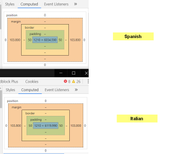
Best regards,
MikeHi,
Sorry, the login is not working for me now, please check.
Also please explain a little further what is not saving, css changes, theme option changes, post and page changes?Best regards,
MikeDecember 17, 2019 at 5:25 pm in reply to: How do I show portfolio categories on a portfolio item? #1166921Hi,
Glad to hear, the sidebar in the search results page is the default demo that shows when there is no widgets in the sidebar, so try adding a widget.
The search results page uses the default sidebar or the “Displayed Everywhere” widget area. It’s in the Appearance > Widgets panel. Make sure that the Sidebar Settings > Sidebar on Pages option is turned on.Best regards,
MikeDecember 17, 2019 at 5:10 pm in reply to: Container duplicate website does not keep the same dimensions #1166920Hi,
I took a look at your screenshots were you had marked from the edge of the featured image to the sidebar divider and both od your sites are 1105px, both of the titles are in the same place, under the breadcrumbs.
I do note that the Spanish breadcrumbs are longer, because the Spanish language has longer words. But we can make the Spanish site 20px wider so the breadcrumbs are on one line, if that helps.html[lang="es-ES"].responsive #top #main .container.template-blog.template-single-blog { max-width: 1330px !important; }or if you want the Italian site 20px smaller, try this css:
html[lang="it-IT"].responsive #top #main .container.template-blog.template-single-blog {
	    max-width: 1290px !important;
}
Best regards,
MikeHi,
Glad we were able to help, we will close this now. Thank you for using Enfold.
I will reply to your other post 👍For your information, you can take a look at Enfold documentation here
For any other questions or issues, feel free to start new threads in the Enfold forum and we will gladly try to help you :)Best regards,
MikeHi,
Please try this code in the General Styling > Quick CSS field or in the WordPress > Customize > Additional CSS field:.avia_transform .avia-gallery-thumb img { opacity: 1 !important; -webkit-transform: none !important; transform: none !important; } .avia_transform .avia-gallery-thumb img.avia_start_animation { -webkit-animation: none !important; animation: none !important; opacity: 1 !important; -webkit-transform: scale(1) !important; transform: scale(1) !important; }Best regards,
MikeDecember 17, 2019 at 4:21 pm in reply to: 2 images side by side (with full width button below) directly below the text #1166887Hi,
Glad we were able to help, we will close this now. Thank you for using Enfold.For your information, you can take a look at Enfold documentation here
For any other questions or issues, feel free to start new threads in the Enfold forum and we will gladly try to help you :)Best regards,
MikeHi,
Thank you for sharing, I’m glad this is sorted out now.
Shall we close this thread then?Best regards,
MikeHi,
Glad we were able to help, we will close this now. Thank you for using Enfold.For your information, you can take a look at Enfold documentation here
For any other questions or issues, feel free to start new threads in the Enfold forum and we will gladly try to help you :)Best regards,
MikeHi,
Perhaps I made a mistake there, I have helped a few German speaking customers with their language files from that thread I linked to earlier, so perhaps this was one of those. Anyway I have not seen anyone submit or ask for the DE “formal” language file yet and it looks behind in the translations. Is that the one you are using? You can edit it with the program Poedit and if you would like to share it with the community you can upload it to that thread, it is where we get our translations from.Best regards,
MikeHi,
Oh, I think I was looking at the wrong element, I was looking at the settings in the backend, now I think you are looking at the cookie popup, is that correct?
Anyways we are changing that wording in the next version to “Click to enable/disable video embeds.”
Here is what it will look like.
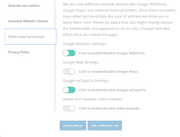
Best regards,
MikeHi,
Please include a link to your zip file so I can test on my localhost.Best regards,
MikeDecember 17, 2019 at 3:08 pm in reply to: Problem with slider menu overlaying video and preview image under slide on mobil #1166853Hi,
Thank you, I reinstalled your theme and cleared the site cache and removed the “temp css fix” and added the fallback image back and now everything seems to work as intended. The slider video still accepted clicks to pause, I believe this is intentional, but I added this css to remove that:#top.home #full_slider_1 { pointer-events: none !important; }Please clear your browser cache a couple of times and check.
After you carefully check your site please let us know and I will remove the backup theme from your theme folder “enfold-old” via ftp so it won’t confuse anyone in the future.Best regards,
MikeHi,
Thank you for the login, your site looks like it is missing css, I see that you are using WordPress 4.8.12, you should update to WordPress 5.3.1.
Please include FTP access in the Private Content area so we can verify your css files are in place.Best regards,
MikeHi,
Did you upload a new image or did you choose one that was already uploaded before?
I tested by replacing your featured image with a new image and it is not cropped, please check.
As I had tried to regenerate your thumbnails before, but the process seemed to lock up without any errors, probably a plugin conflict, but the settings seem to be in effect for new uploads going forward.Best regards,
MikeHi,
Glad we were able to help, we will close this now. Thank you for using Enfold.For your information, you can take a look at Enfold documentation here
For any other questions or issues, feel free to start new threads in the Enfold forum and we will gladly try to help you :)Best regards,
MikeHi,
Glad we were able to help, we will close this now. Thank you for using Enfold.For your information, you can take a look at Enfold documentation here
For any other questions or issues, feel free to start new threads in the Enfold forum and we will gladly try to help you :)Best regards,
Mike -
AuthorPosts
