

Forum Replies Created
-
AuthorPosts
-
December 28, 2019 at 1:22 pm in reply to: Fixing missing footer/socket elements since last update #1169051
Hi,
Sorry for the late reply, the blue quotation mark and closing HTML tag is from a markup error in the Enfold Theme Options > Privacy and Cookies > Auto Reload Page setting, turning this off solves and the markup has been corrected in the upcoming update.
You can also correct by replacing\enfold\includes\helper-privacy.phpwith the version in the Private Content area via FTP.
Please save a copy of your original as a fallback.Best regards,
MikeDecember 28, 2019 at 12:45 pm in reply to: Enfold 4.6.3.1 – no background images loading anymore #1169049Hey rolf2,
Sorry for the late reply, and thanks for the login, I checked your homepage color section and found that no background image has been picked, please add one:

I also see that your media library is not showing the image thumbnails, please try disabling your plugins and clearing your browser and site cache to see if that restores.Best regards,
MikeHi,
Sorry for the late reply and thanks for the login, I was going to add the Avia Layout Builder Debugger code for you, but I see that it is already added.
But when I look at the pages I don’t see a difference from the backend and the frontend, and the shortcode parser is not reporting an error, nor am I seeing any other errors. Please include a screenshot of the error. You can add screenshots by uploading your images to a service such as postimages.org and pasting the html code, or link given in your post or Private Content area.Best regards,
MikeDecember 28, 2019 at 11:55 am in reply to: Adding 'playsinline' to the background video tag #1169047Hi,
Sorry for the late reply, I believe this has been addressed in the our latest version that is coming out after the new year.Best regards,
MikeHi,
Please include an admin login in the Private Content area so we can investigate further, and post which plugins are causing this crash.Best regards,
MikeHi,
I took a look at your pages and saw the error, I also saw that your content is outside of the ID “#main” so your page struggle for your custom templates is not correct “single-cruise.php” & “single-cruise_date.php”
in this screenshot you can see that the horizontal gallery, and all other content, is inside the #main div, this is the correct page structure:

in this screenshot of your custom template the #main div is closed and the horizontal gallery, and all other content, is outside of it, this is not correct:

I believe this is causing the miscalculation of the width of the slider sometimes.Best regards,
MikeHi,
Sorry for the late reply, The login didn’t work for me, please check. I see that your social icon is not showing right now, I believe this is due to an error we identified from a file change in WordPress v5.3.1, the dev team has released this fix for the missing icons, please upload the following file via FTP to
\enfold\framework\php\function-set-avia-frontend.php
https://www.dropbox.com/s/gmbg5202rjz1vou/function-set-avia-frontend.php?dl=0
Please save a copy of your old file should you encounter an upload error.
Then clear your browser cache and any cache plugin, and check.
Then your icon should show. Your css above is not quite right, it looks like you want a round gold background color for the icon before hover, is this correct?
If so Please try this code in the General Styling > Quick CSS field or in the WordPress > Customize > Additional CSS field instead:#top #wrap_all .av-social-link-linkedin a { color: #fff; background-color: #d8b98a; }If you only want it for on hover, try this css:
#top #wrap_all .av-social-link-linkedin:hover a {
    color: #fff;
    background-color: #d8b98a;
}
this is the standard blue on hover color for linkedin
#top #wrap_all .av-social-link-linkedin:hover a {
    color: #fff;
    background-color: #419cca;
}
If you are adding your css to your child theme stylesheet and the changes are not showing, then you probably have Enfold Theme Options > Performance > JS & CSS file merging and compression turned on and need to save your theme settings to rebuild your compressed css file for the changes to show. To do this try going to your Quick CSS and add a blank space and the save your theme settings. Then clear your browser cache and check.
Best regards,
MikeHi,
Sorry for the late reply, I see that your logo is an 80×80 thumbnail, “w-new-logo-small-80×80.png”
please try using the full size logo “w-new-logo-small.png”
So to correct this try going to Enfold Theme Options > Logo, and paste the url in the Private Content area below and then click the “save all changes” button in the top right corner, not the “upload” button to the right of the “logo” box:
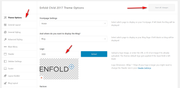
This is because the logo is already uploaded to your site.Best regards,
MikeHi,
Glad to hear this helped. I believe this may be related to this in css3 Merry Christmas and have a Happy New Year.Best regards,
MikeDecember 26, 2019 at 1:44 pm in reply to: Ninja Forms not working after latest WordPress update #1169023Hi,
@domchocolate Sorry for the late reply, my screenshot were I couldn’t reproduce your error was for mobile, so if this continues for you after disabling your other plugins, please open a new thread with admin login details and how we can reproduce so we can investigate.Since this is not your thread posting your login here will not be private and you will not see anything we write in the Private Content area.
Best regards,
MikeHi,
Thank you for the screenshot, I see that this is from your homepage but I’m not able to find this on your page, I did find it on the page at the url in the Private Content area. So the class for the thrive optin boxes is.thrv-leads-form-box
So please try this css:.thrv-leads-form-box { box-shadow: 0px 10px 75px 0px rgba(0,0,0,0.50), 0px 10px 50px 0px rgba(0,0,0,0.5); }Best regards,
MikeHi,
Sorry for the late reply, if you include an admin login and FTP access in the Private Content area I will update your theme for you so you can use the new features and correct the bugs that were in v4.2.6Best regards,
MikeDecember 24, 2019 at 2:59 pm in reply to: 2 and 3 column not mobile responsive with fullwidth featured slider #1168956Hi,
*update*
I found that if the featured image slider’s post off-set is enabled it brakes the layout, so please create a new events category with only the items you want to show right now and then pick that category in the featured image slider so you won’t be using the off-set.
For the off-set you can use “Do not allow duplicate posts on the entire page (set offset automatically)”Best regards,
MikeDecember 24, 2019 at 1:50 pm in reply to: 2 and 3 column not mobile responsive with fullwidth featured slider #1168944Hi,
Thank you for the login, first I found that you had this css in your WordPress > Customize > Additional CSS that was changing the columns to 100% width for desktop:.responsive #top #wrap_all .av_one_third, .responsive #top #wrap_all .av_one_half { width: 100% !important; margin-left:0 !important; }so I commented it out, but the columns were still full-width, after much testing onyour site and my localhost I found that it seems the featured image slider is braking the page, if you remove it the layout corrects.
I’m going to have to test further on my localhost and then submit to the dev team.
Since your site is live you may which to go back to the grid row for now, or use a different slider.
Thank you for your patience.Best regards,
MikeDecember 24, 2019 at 12:05 pm in reply to: Buttons within column not displaying correctly on mobile devices #1168916Hi,
Please try this code in the General Styling > Quick CSS field or in the WordPress > Customize > Additional CSS field:@media only screen and (min-width: 900px) { #top.home #av_section_2 .post-entry-206 .av-flex-placeholder { width: 1% !important; } }Then clear your browser cache and any cache plugin, and check.
Best regards,
MikeHi,
Thank you, I imported the slider into my localhost and it works for all screen sizes, showing the correct images without any loss of images.
So I recommend deleting your current slider and the images from your media library, then clear your browser cache and any cache plugin, and import the layerslider again from the file above.Best regards,
MikeHi,
Ok, but what would you suggest replacing “Click to enable/disable video embeds.” with?Best regards,
MikeHi,
Ok, thank you for the constructive criticism, but as there is not an “issue” that I can help you resolve shall we close this thread then?Best regards,
MikeHi,
Sure we can help with some css, but can I see the live page to ensure I’m targeting the correct sectors?Best regards,
MikeHi,
Thank you, we will close this now. Thank you for using Enfold.For your information, you can take a look at Enfold documentation here
For any other questions or issues, feel free to start new threads in the Enfold forum and we will gladly try to help you :)Best regards,
MikeHey maxcoppeta,
In your portfolio grid are you using the “manually set image size”?
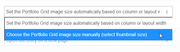
typically they should be the same size, but perhaps because some of your images are in portrait mode it’s off some.
We could use some css to adjust, but we would need to write a few rules for different screen sizes:@media only screen and (min-width: 1440px) { a.grid-image img { height: 361px !important; min-height: 361px !important; } }Please try this code in the General Styling > Quick CSS field or in the WordPress > Customize > Additional CSS field and then clear your browser cache, and check.
This is for desktop screen sizes.Best regards,
MikeDecember 23, 2019 at 1:16 pm in reply to: new icon instagram on social profile and bottom like others #1168725Hi,
Sorry for the late reply, when I check your site on mobile I can see your logo, but I appeared very slowly. It looks like you are using Smush lazyload, please try disabling this plugin and clear your browser cache.Best regards,
MikeHi,
Sorry for the late reply, and thanks for the links. So in mobile view the sidebar will need to go below the content because otherwise there is not enough room to show it. Please see the link in the Private Content area for the page I tested on.
Please try this code in the General Styling > Quick CSS field or in the WordPress > Customize > Additional CSS field:@media only screen and (max-width: 767px) { .responsive #top.single-tribe_events #main .sidebar { display: block !important; } #top.single-tribe_events #main .sidebar { border-left-style: none !important; border-left-width: 0px !important; clear: both !important; } #top.single-tribe_events #tribe-events-content.tribe-events-single { margin-left: 0 !important; } }Then clear your browser cache and any cache plugin, and check.
Best regards,
MikeDecember 23, 2019 at 12:37 pm in reply to: The Events Calendar tag list view: only 5 events visible #1168717Hi,
Sorry for the late reply, Thanks for sharing your solution. Shall we close this thread then?Best regards,
MikeDecember 23, 2019 at 12:33 pm in reply to: "Use as Megamenu" don't appear in the Menu section of my backoffice ! #1168715Hi,
Sorry for the late reply, unfortunately, I have not tested any of the conditional menu plugins, so it’s just a matter of trying each out.
Perhaps we could use css to do this, please try explaining what you would like to do and include an admin login so we can investigate.Best regards,
MikeHi,
@I-Visio, it seems that this topic is solved now, shall we close this then?
or do you need some further assistance?Best regards,
MikeHi,
Glad we were able to help, we will close this now. Thank you for using Enfold.For your information, you can take a look at Enfold documentation here
For any other questions or issues, feel free to start new threads in the Enfold forum and we will gladly try to help you :)Best regards,
MikeDecember 23, 2019 at 11:47 am in reply to: 2 and 3 column not mobile responsive with fullwidth featured slider #1168706Hi,
I was going to take a look but WordPress says you are working on the page right now, so I didn’t want to “take over” can you please save your work so I can take a look?Best regards,
MikeHi,
Glad we were able to help, we will close this now. Thank you for using Enfold.For your information, you can take a look at Enfold documentation here
For any other questions or issues, feel free to start new threads in the Enfold forum and we will gladly try to help you :)Best regards,
MikeHi,
Glad we were able to help, we will close this now. Thank you for using Enfold.For your information, you can take a look at Enfold documentation here
For any other questions or issues, feel free to start new threads in the Enfold forum and we will gladly try to help you :)Best regards,
Mike -
AuthorPosts
