

Forum Replies Created
-
AuthorPosts
-
Hi,
Glad to hear, once you can confirm that this is now working as you wish please let us know that we can close this thread.Best regards,
MikeJanuary 19, 2020 at 6:07 pm in reply to: Symbol in caption of Fullscreen Slider and Text Block #1176029Hi,
Glad we were able to help, we will close this now. Thank you for using Enfold.For your information, you can take a look at Enfold documentation here
For any other questions or issues, feel free to start new threads in the Enfold forum and we will gladly try to help you :)Best regards,
MikeJanuary 19, 2020 at 6:07 pm in reply to: set the same font for different languages frontpage #1176028Hi,
I’m not sure why your layersliders are not updating when they are changed in the backend, I still believe that it must be due to server caching.
I tried disabling almost all of your plugins and changing some of the text in your sliders but the frontend are not updating. Please ask your webhost again about disabling and server caching.
I removed your inline css from your sliders and added it as a custom class with css in the layerslider so that once the site starts updating we can be sure they are all the same.Best regards,
MikeJanuary 19, 2020 at 3:14 pm in reply to: Symbol in caption of Fullscreen Slider and Text Block #1176010Hi,
Sorry, we don’t have a way to do that.
Shall we close this thread then?Best regards,
MikeHi,
Glad to hear this is solved and thanks for sharing the solution with us. Perhaps this information will help other WPML users.
We will close this now. Thank you for using Enfold.For your information, you can take a look at Enfold documentation here
For any other questions or issues, feel free to start new threads in the Enfold forum and we will gladly try to help you :)Best regards,
MikeJanuary 19, 2020 at 2:57 pm in reply to: Purchased theme and have 404 errors – installed on a staging area #1176003Hi,
Thanks for the logins, sorry for the late reply, this was tricky.
So I found that your portfolio items for the category “homepage” which is used to show the items on your /products-range/ page are using the “link portfolio item to external URL” option, and the link begins with “index.php”
removing that corrects the links and solves the 404:
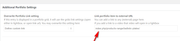
I did “Ballistic Plates” for you to ensure this is the solution, please try correcting the others.Best regards,
MikeHi,
Glad we were able to help, we will close this now. Thank you for using Enfold.For your information, you can take a look at Enfold documentation here
For any other questions or issues, feel free to start new threads in the Enfold forum and we will gladly try to help you :)Best regards,
MikeHi,
I see that you also had another thread for the lightbox image border, I addressed the border request there.
For the gallery border Please try this code in the General Styling > Quick CSS field or in the WordPress > Customize > Additional CSS field:#top div .avia-gallery img { border-style: none !important; border-width: 0 !important; padding: 0 !important; }It may appear that you have a fine line around some images, but I believe this is the white border you added with photoshop, so once you replace these images it should look fine.
After applying the css, Please clear your browser cache and check.
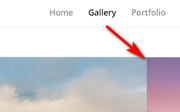
Best regards,
MikeHi,
Thanks for the login and screenshots, Please try this code in the General Styling > Quick CSS field or in the WordPress > Customize > Additional CSS field:img.mfp-img { padding: 0 !important; margin: 40px auto !important; border: red 5px solid !important; } .mfp-bottom-bar { margin-top: 10px !important; } div.avia-popup .mfp-close { top: -35px !important; }This adds a 5px red border to both your gallery and portfolio lightbox images, please feel free to adjust to suit.
I used red as the example because your images already had a white border that you added via photoshop.
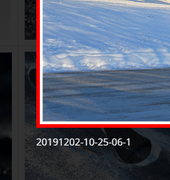
Best regards,
MikeJanuary 19, 2020 at 12:04 pm in reply to: Symbol in caption of Fullscreen Slider and Text Block #1175977Hi,
Glad to hear, you won’t have to do this again, it was an error.
Unless there is anything else we can assist with on this issue, shall we close this then?Best regards,
MikeHi,
Sorry, I don’t understand what your reference to “The Post Grid Pro” plugin is.Best regards,
MikeHi,
The masonry grid shows the titles on mobile because mobile devices do not have a hover event as desktop does.
To have the titles larger on mobile Please try this code in the General Styling > Quick CSS field or in the WordPress > Customize > Additional CSS field:@media only screen and (max-width: 767px) { #top.home #team #av-masonry-1 h3.av-masonry-entry-title { font-size: 2em !important; } #top.home #team #av-masonry-1 .av-masonry-date.updated { font-size: 1.5em !important; } }After applying the css, Please clear your browser cache and check.
Best regards,
MikeJanuary 18, 2020 at 9:25 pm in reply to: Gallery thumbnail hover effect: zoom instead of fade #1175910Hi,
Glad we were able to help, we will close this now. Thank you for using Enfold.For your information, you can take a look at Enfold documentation here
For any other questions or issues, feel free to start new threads in the Enfold forum and we will gladly try to help you :)Best regards,
MikeJanuary 18, 2020 at 9:24 pm in reply to: Overlap image between 2 elements or 2 color sections #1175908Hi,
Glad we were able to help, we will close this now. Thank you for using Enfold.For your information, you can take a look at Enfold documentation here
For any other questions or issues, feel free to start new threads in the Enfold forum and we will gladly try to help you :)Best regards,
MikeJanuary 18, 2020 at 9:22 pm in reply to: New element does not start below the longest column on blog post #1175907Hi,
Glad we were able to help, we will close this now. Thank you for using Enfold.For your information, you can take a look at Enfold documentation here
For any other questions or issues, feel free to start new threads in the Enfold forum and we will gladly try to help you :)Best regards,
MikeJanuary 18, 2020 at 9:20 pm in reply to: Symbol in caption of Fullscreen Slider and Text Block #1175905Hi,
Please try replacing\enfold\config-templatebuilder\avia-shortcodes\av-helper-slideshow.phpwith this file via FTP. Please save a fallback copy of your old file.
If you are not comfortable with doing this please include FTP access in the Private Content area so we can assist.Best regards,
MikeHi,
Thank you for the links and screenshots, for your mobile view of this page please try this code in the General Styling > Quick CSS field or in the WordPress > Customize > Additional CSS field:@media only screen and (max-width: 767px) { #top.postid-41520 #wrap_all #header.av_header_transparency + #main #av_section_2 > .av-parallax { background-position: center 220px !important; } #top.postid-41520 #wrap_all #header:not(.av_header_transparency) + #main #av_section_2 > .av-parallax { background-position: center 100px !important; } }this will adjust the background position before and after the scroll.
Best regards,
MikeHi,
When creating a woocommerce product with the standard WordPress editor this is the layout that is used:
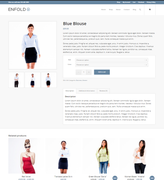
but when using the Advanced Layout Builder this template is not used and that is when you would use the woocommerce elements in the Advanced Layout Builder to create your own layout. Here is an example of a custom product page using the Advanced Layout Builder.
The default woocommerce shop page is this one but if you want to create your own shop page with the Advanced Layout Builder you can use the “product grid” element and the “product slider” element along with the other elements to create your own layout like this example. Here is another example of a custom shop page.
You can change the page that is linked as your shop page in the woocommerce settings:
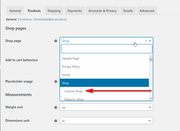
Best regards,
MikeJanuary 18, 2020 at 6:39 pm in reply to: New element does not start below the longest column on blog post #1175888Hey marcoabis81,
Thank you for the login and link, I see that you are creating your post with the WordPress Classic Editor and adding Enfold shortcodes to create the columns. To ensure that the content after your two columns 2/3 + 1/3 continues below the 2/3 column we will add the “equal height” option to this row, the option for this is:min_height='av-equal-height-column'
The option is always added to the first column of the row so your full shortcode looks like this:
[av_two_third first min_height='av-equal-height-column']
I added this for you to see, please check.
Another option instead of using shortcodes is to wrap your text around the smaller images, which I assume the layout you are trying to achieve, please see this article on how to do this.Best regards,
MikeHi,
That is odd, perhaps it’s a server caching issue, I added this css to your Quick CSS to correct the icon:.social_bookmarks_instagram a::before { font-family: 'entypo-fontello'; content: '' !important; }Now the new instagram icon is showing, please clear your browser cache and check.
Best regards,
MikeHey AmelC,
As I understand your question, you are asking why the gallery element doesn’t support tags or categories, this is because the WordPress default media library doesn’t offer tags or categories for images. This is how the core WordPress has been created. If you see this on your install perhaps you are using a plugin that adds this function to the media library similar portfolio items?
As for the layout of the gallery items, if you place the gallery element in a full-width column the images are larger with the fewer columns selected in the options.

Is this what you are trying for?Best regards,
MikeHi,
I have taken a look at your Google Maps, they appear after the cookies are accepted, you can use the setting Enfold Theme Options > Privacy and Cookies > Cookie Handling > Show advanced options > Auto Reload Page to reload the page after the cookies are accepted and show the map.Best regards,
MikeHi,
@frosch178 please open a new thread so we can investigate your issue since this is not your thread posting your login here will not be private and you will not see anything we write in the Private Content area.
I’m not able to recreate your missing tables on my localhost so possibility you are getting a conflict from a plugin, please try disabling your plugins and check again.Best regards,
MikeJanuary 18, 2020 at 4:02 pm in reply to: Open the link for cookie button info in a new window #1175853Hey sdesign-web,
Try adding this code to the end of your functions.php file in Appearance > Editor:function cookie_consent_new_window(){ ?> <script> (function($){ $(document).ready(function(){ $('a.avia-cookie-consent-button-2').attr('target', '_blank'); }); })(jQuery); </script> <?php } add_action('wp_footer', 'cookie_consent_new_window');If this doesn’t help please include the url to your site so we can take a closer look at your sectors.
Best regards,
MikeHi,
I believe you are referring to the archive widget in your sidebar, please see the screenshot in Private Content area.
You can not change the names of these links because they point to date achieve pages, where the posts are sorted by date. You can use a different widget such as the “category” widget or you can use an “HTML” widget to create custom links with any title you wish.
For example, paste this code into an “HTML” widget and adjust to suit:<ul> <li><a href="/2014/08/">Custom Title</a></li> <li><a href="/2014/05/">Custom Title</a></li> <li><a href="/2014/02/">Custom Title</a></li> <li><a href="/2013/12/">Custom Title</a></li> <li><a href="/2013/01/">Custom Title</a></li> <li><a href="/2012/08/">Custom Title</a></li> <li><a href="/2012/05/">Custom Title</a></li> <li><a href="/2011/10/">Custom Title</a></li> </ul>Best regards,
MikeJanuary 18, 2020 at 3:09 pm in reply to: Gallery thumbnail hover effect: zoom instead of fade #1175829Hi,
I see, yes you can add a custom class to the code in the same way, I reopened the topic to answer there, please check.
Shall we close this thread then?Best regards,
MikeHi,
To apply this script to certain elements with a custom class, just add the custom class to the beginning of the sectors typically followed by a space. For example if your custom class is “test” then the code would look like this:function removemasonryImageTitleOnHover(){ ?> <script> jQuery(document).ready(function() { var imgTitle; jQuery(".test a.av-masonry-entry").hover(function(){ imgTitle = jQuery(this).attr("title"); jQuery(this).removeAttr("title"); }, function(){ jQuery(this).attr("title", imgTitle); }); jQuery(".test a.av-masonry-entry .av-masonry-image-container").hover(function(){ imgTitle = jQuery(this).attr("title"); jQuery(this).removeAttr("title"); }, function(){ jQuery(this).attr("title", imgTitle); }); }); </script> <?php } add_action('wp_footer', 'removemasonryImageTitleOnHover');Please try this, if it doesn’t work for you then please post a link to the page so we can check the sectors and ensure the correct placement in the code above.
Best regards,
MikeHey tredition,
I assume that you are referring to the “latest news” widget that only offers a choice of a category in the setting. Try creating a “display” category and add the posts that you wish to display in the widget area to this category also and then choose this category in your widget.
Another option is to use the Ultimate Posts Widget plugin, it has many more options.Best regards,
Mike -
AuthorPosts
