

Forum Replies Created
-
AuthorPosts
-
Hi,
Sorry for the late reply, and thanks for the login I was able to open your post in the Classic Editor without any problems, I see that you said that switching to the Advanced Layout Builder caused problems, but this is expected, please don’t change editors after a page has ben created.
The only errors I found was with your favicon, logo, and preloader, all of which are using http instead of https, which is an easy fix, just add an “s” to the links in your theme options.
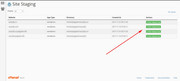
I would recommend updating your site as you are using 4.5.7 and we are now at 4.7.3, since I found no errors I would recommend checking your webhost to see if you have the one click staging site option, this is a option in most cPanels to create a staging clone of your site so you can test an update on it and your live site will stay up and running untouched. You can always ask your webhost to help you with setting this up if you want.Here are some screenshots of what it would look like:

Best regards,
MikeHi,
Sorry for the late reply and thanks for the login, I took a look at your plugin and don’t see any options for the title or any of the Advanced Layout Builder options. The title “Property” is the entry-title that otherwise be the page title. Since this is a custom template in the plugin I don’t think there is anything we can do to change the title.
You can use this css to hide the “Property”, Please try this code in the General Styling > Quick CSS field or in the WordPress > Customize > Additional CSS field:#top.property-template-default .main-title.entry-title a { display: none !important; }After applying the css, Please clear your browser cache and check.
Best regards,
MikeHi,
Sorry for the late reply, and thanks for the login, I see that if you click the “load more” button the last two items don’t load correctly, the page doesn’t behave correctly. I tried recreating your page on my localhost and loading the last few works correctly with an “ajax” style load that takes a few seconds, yours doesn’t it seems to try to load right away.
I thought this might be due to caching so I disabled your caching temporarily but it didn’t change, do you have server caching?
If you do please disable along with your plugin and check again after clearing a few times.
Otherwise, try disabling your other plugins, if that doesn’t help please try updating your theme, I see you are using 4.7.1 and we are now at 4.7.3, you will need to enter your Envato token to update.Best regards,
MikeHi,
Sorry for the late reply, I have taken a look at your page and see that you are using a sidebar menu, I see the search bar on both desktop and mobile. Theadd_shortcode('avia_search', 'get_search_form')is correct and there is not another one.
but you can modify it by using the function$params['ajax_disable'] = true;above.
can you please explain what you would like to see different with your search bar, perhaps a mockup would help us understand better.Best regards,
MikeHi,
Sorry for the late reply, with the layerslider the best results are achieved by creating two sliders, one for desktop and one for mobile. For your mobile slider go to settings > layout and set the canvas height and width to a size like 425×652.
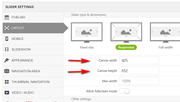
then when you edit your slider you will see where to place your layers and the size to use based on the mobile size, here you will see I adjusted our slider for mobile to account for the screen width and placement

then under the slider settings > mobile set the size to hide each slider, for example, hide the mobile one over 430px and hide the desktop one below 430px
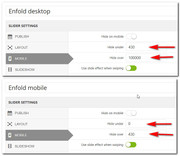
then on your page add the two sliders:
now for mobile and desktop you will have more control over the size and placement of the layers.
desktop

mobile

You can also find more tips in the layerslider documentation.Best regards,
MikeHi,
There are a couple of ways to do this, since your two sections look like they are always above the footer you could create a custom page as footer which includes these two sections,
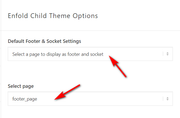
but you still need to add the custom IDs to the sections otherwise they will have different IDs for each page. Another option is to copy the two sections, with the custom IDs, as a template
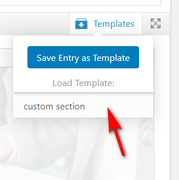
then as you build each page you can click one button to add the sections. When you build the pages now how are you adding the sections?Best regards,
MikeHi,
Glad we were able to help, we will close this now. Thank you for using Enfold.For your information, you can take a look at Enfold documentation here
For any other questions or issues, feel free to start new threads in the Enfold forum and we will gladly try to help you :)Best regards,
MikeHi,
Thank you for your feedback, when I look at your page you have two 1/2 elements so this is the first thing that dictates the size of the text and image, the image fills the 1/2 element.
I found that your original image is 2268×2268 and on your page you are using the 400×495 version, I created a test page with your image and when I added the image I was asked which size to use
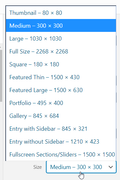
I choose 1500×1500 and displayed a 754×754 because the margin between the columns is 6% so the image can not get any wider.
There are a couple of easy things you can do to improve this, the first is to change the columns to 3/5 & 2/5 the edge of the image is still aligned on the center, but it gives the image just a little more space.
Another option is to crop your original image to remove all of the white space you could get your image down to 1900×1900 which will allow more of the image to show.
So to answer your question about css, you can adjust the size of the image by adjusting the containers, the image will always be 100% of the container. I recommend trying one of the steps above.Best regards,
MikeHi,
Please try this code in the General Styling > Quick CSS field or in the WordPress > Customize > Additional CSS field:@media only screen and (max-width: 767px) { .responsive #scroll-top-link { display: block !important; }} @media only screen and (min-width: 768px) { .responsive #scroll-top-link { display: none !important; }}After applying the css, Please clear your browser cache and check.
Best regards,
MikeHi,
Glad to hear Victoria was able to help, we will close this now. Thank you for using Enfold.For your information, you can take a look at Enfold documentation here
For any other questions or issues, feel free to start new threads in the Enfold forum and we will gladly try to help you :)Best regards,
MikeFebruary 23, 2020 at 1:18 am in reply to: Change Blog date to "last updated" instead of "Date published" – in 2020 #1187027Hey SimonePols,
PLease put a folder called “includes” in your child theme and then put this file in it.Best regards,
MikeFebruary 22, 2020 at 11:50 pm in reply to: Codeblock within editor not working, Enfold 4.7.3 #1187021Hi,
Thanks for the code block, I was able to add it to a code block element, save, view, and re-edit a few times.
Have you tried disabling your plugins to see if that changes anything?Best regards,
MikeHi,
Sorry for the late reply, can we see a page where the popup is not working and another for the Blank Template where it is working.Best regards,
MikeHey mountaintopengraving,
Sorry for the late reply, I couldn’t see any videos at your link, but for self-hosted videos the browser typically looks for ogv, webm, mp4, so if you only have mp4 it could take a little bit.
Try using this converter to make your ogv & webm file then upload them to the same directory as your mp4 via ftp and same file names.
You may also want to add this to your .htaccess file:# Video AddType video / ogg .ogv AddType video / mp4 .mp4.m4v.f4v.f4p AddType video / webm .webm AddType video / x - flv .flvBest regards,
MikeHi,
Sorry for the late reply, and thanks for the login, I see that most of your items are portfolio items so the/portfolio-item/is correct, I tried checking your pages for bad links but didn’t find one, but I did find that you have a portfolio category that is named the same as your/composition-sound-design/page. This typically can lead to trouble, and it sounds like what you were experiencing.
You also said that you installed woocommerce which may require to resave your permalinks.
If you want to create the link you were having trouble with I will take another look.Best regards,
MikeHi,
Sorry for the late reply and thanks for the screenshot, I found the issue was that you have this custom css:form * { font-family: "Barlow",sans-serif !important; }which changes the icon font-family
font-family: 'entypo-fontello';so it will not show correctly.
Please adjust your css so it targets the correct sectors, typically using a “*” is not a good idea.Best regards,
MikeHey mborel,
Sorry for the late reply, you can get the codes for your icons by using the shortcode wand
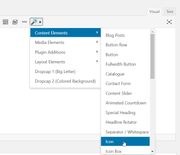
Then for each icon menu item please try this code in the General Styling > Quick CSS field or in the WordPress > Customize > Additional CSS field:#menu-item-115::before { content: "\e808"; font-family: entypo-fontello; font-size: 40px; position: relative; display: inline-block; } #menu-item-115 a { height: 20px !important; line-height: 20px !important; padding-left: 0px; }This code is for your first item “menu-item-115”, so just copy this code a adjust the menu IDs and the icons.
Best regards,
MikeHey diefleischerei,
Sorry for the late reply, and thanks for a good idea, I have added this to our feature requests for the dev team to review.Best regards,
MikeHi,
Sorry for the late reply, Please try this code in the General Styling > Quick CSS field or in the WordPress > Customize > Additional CSS field:#top #header .av-main-nav > li#menu-item-5600:hover > a .avia-menu-text { color: #000000; } #top .header_color .main_menu .menu ul .current-menu-item > a { color: #039934; } #top .header_color .main_menu .menu ul .current-menu-item > a:hover { color: #039934 !important; }This seems to mach your requirements, After applying the css, Please clear your browser cache and check.
Best regards,
MikeHi,
Sorry for the late reply, I have looked at your grid row overlaps but I don’t see the issue with the 3er & 4th images.
Here is what I see:

Is this what you are also seeing?Best regards,
MikeFebruary 22, 2020 at 7:10 pm in reply to: Looking to Build Layout Similar to Construction Demo #1186996Hi,
Sorry for the late reply, and thanks for the link. Your menu items look larger than the “Construction Demo”
Please include an admin login so we can try to match.Best regards,
MikeHey condonpb,
Sorry for the late reply, please link to the page that the tickbox is not working on.Best regards,
MikeHey Keith,
Please try this code in the General Styling > Quick CSS field or in the WordPress > Customize > Additional CSS field:h2.post-title.entry-title { padding: 0px !important; }To sort the results please try adding this code to the end of your functions.php file in Appearance > Editor:
add_filter( 'pre_get_posts', 'custom_get_posts' ); function custom_get_posts( $query ) { if( is_category() || is_archive() ) { $query->query_vars['orderby'] = 'name'; $query->query_vars['order'] = 'ASC'; } return $query; }Best regards,
MikeFebruary 22, 2020 at 6:07 pm in reply to: white background of cell with -90 margin works fine on pc but not on mobile #1186988Hi,
Sorry for the late reply, I took a look at your negative margin element and what I see is that your section has full width, so when it is moved up it just makes the top image look smaller.
I recommend using a different element, such as a grid row, to create this effect.Best regards,
MikeHey whdsolutions,
Thank you for the link and screenshot, for the one page you linked to you could use this css:#av_section_1 > div > div,#av_section_2 > div > div { padding-bottom: 0px; } #footer { z-index: 0 !important; } #av_section_2 > div > div > div > div > div > div > div > div > div > img { margin-bottom: -40px; z-index: 5 } #av_section_1 > div > div > div > div > div > div > div > div > div > img { margin-bottom: -50px; }But I notice that there are other pages with these two elements, so to have these work on all pages please add a custom ID such as “hands-up” and “inspection-copies” on every page they show.
After you do this then this css should work:#inspection-copies > div > div,#hands-up > div > div { padding-bottom: 0px; } #footer { z-index: 0 !important; } #hands-up > div > div > div > div > div > div > div > div > div > img { margin-bottom: -40px; z-index: 5 } #inspection-copies > div > div > div > div > div > div > div > div > div > img { margin-bottom: -50px; }Best regards,
MikeHi,
Thank you for the login, I adjusted your function to this:// Register new icon as a theme icon function avia_add_custom_icon($icons) { $icons['imdb'] = array( 'font' =>'effra', 'icon' => 'uf2d8'); return $icons; } add_filter('avf_default_icons','avia_add_custom_icon', 10, 1); // Add new icon as an option for social icons function avia_add_custom_social_icon($icons) { $icons['imdb'] = 'imdb'; return $icons; } add_filter('avf_social_icons_options','avia_add_custom_social_icon', 10, 1);Please clear your browser cache and check.
Best regards,
MikeHi,
For my example above this css works:#footer .widget_text .custom-html-widget .footer-icons .avia-image-container-inner { padding-right: 5px; }but if this doesn’t work for you plaese link to your page so we can examine.
Best regards,
MikeHi,
I see that the error is for/config-woocommerce/config.php:2016\and you said that you changed/config-woocommerce/config.phpso if you have been replacing the/config-woocommerce/config.phpwith each update there is a good possibility that the file has changed.
Try replacing with the standard file for this version to see if it corrects the error.Best regards,
MikeHi,
Thanks for the link, your “BVG_Cover_Stapel” the magazine cover, seems normal to me, it is 400px, were your other image is 1000px
you can adjust these sizes when you add the image. Can you post the functions.php code that you are concerned about?Best regards,
MikeHi,
Thank you, this is the css I added to your Quick CSS:#top .main_color .BGbiancoTXTblu .avia-color-theme-color.avia-button { background-color: #ffffff; border-color: #24305e; color: #24305e !important; } #top .main_color .BGbiancoTXTblu:hover .avia-color-theme-color.avia-button { color: #fff !important; }Please clear your browser cache and check.
Best regards,
Mike -
AuthorPosts
