

Forum Replies Created
-
AuthorPosts
-
Hi,
As I examine the print preview there is a page inside of a page, so try changing the margin in.template-page.content, which is your actual page, and not in@pagewhich is the preview frame.Best regards,
MikeHi,
Sorry for the late reply, your image was not showing because it was replaced with a 1px X 1px image by your lazy load plugin, I turned it off and now your images show.
Please clear your site & browser cache and check.Best regards,
MikeHi,
I’m surprised how few plugins there are for this, I would have thought there would be more. It seems many were taken down from WordPress due to security risks, perhaps adding this function adds a vulnerability to your site?Best regards,
MikeHi,
Sorry, the css was missing a rule, please try this css instead:li.menu-item-has-children > ul.sub-menu,li.menu-item-has-children > ul.sub-menu { display: none !important; } li.current_page_item.menu-item-has-children > ul.sub-menu,li.current_page_ancestor.menu-item-has-children > ul.sub-menu { display: block !important; }Then clear your browser cache and check.
Best regards,
MikeHi,
Sorry for the late reply, in the opening post you said that on other pages this was working, how are those pages created, with shortcode? Can you customize the shop page the same way?
When I go to the pages “PE2020” & “Outlet” from your main menu, and choose the color white from your sidebar filter the items are sorted to show white items. But this doesn’t work on the “Shop” page, this is the error you mean correct?Best regards,
MikeMay 1, 2020 at 12:34 pm in reply to: Android mobile dose not show the option to select from variable product. #1208822Hi,
Thanks for the link, but on Android the options are showing for me, please see the screenshot in Private Content area.
This could be a cache issue, have you tried clearing your browser cache on your device?Best regards,
MikeHi,
Glad we were able to help, we will close this now. Thank you for using Enfold.For your information, you can take a look at Enfold documentation here
For any other questions or issues, feel free to start new threads in the Enfold forum and we will gladly try to help you :)Best regards,
MikeHi,
I was able to remove the lines, but I can’t add your logo because the header is hidden. Here are some good articles for the “print media” css, Print Basics, Perfect Print Stylesheet
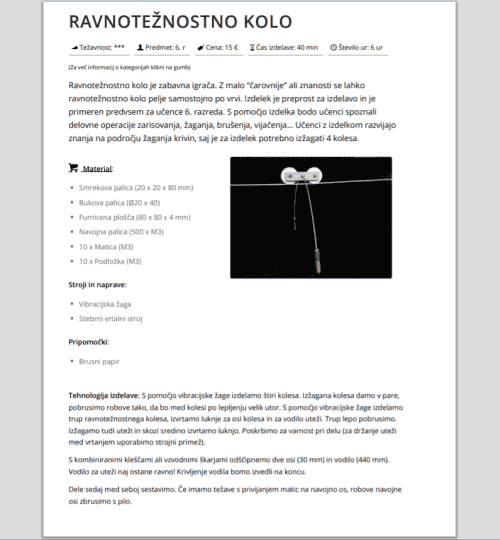
I also removed the background image:
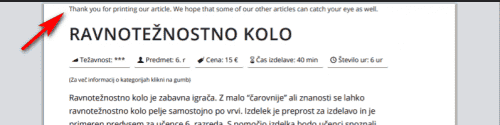
Please try this code in the General Styling > Quick CSS field or in the WordPress > Customize > Additional CSS field:@media print{ .template-page.content { width: 100%; margin: 20px 0 0 0; float: none; } h1 { margin-top: 20px !important; } .main_color span { border-color: transparent !important; } .avia-icongrid-flipback { display: none !important; } p {orphans: 3;} @page { margin: 0cm } }If you would like a message on the top of your print pages, try adding this css to your print media rule:
.template-page.content:before {
content: "\ Thank you for printing our article. We hope that some of our other articles can catch your eye as well.";
color: #777 !important;
font-size: 1em;
padding: 30px 0;
text-align: center !important;
}
Best regards,
MikeHi,
Thank you, please also look in your child theme style.css for:#search-2, div.avia-search-tooltip { top: 30px !important; left: -30px; }and change to:
    div.avia-search-tooltip {
        top: 30px !important;
        left: -30px;
    }
Then add this css:
@media only screen and (min-width: 989px) {
#top #wrap_all #search-2 {
	top: 70px !important;
	right: 12%;
}
#top #custom_html-3 {
	top: 40px !important;
	right: 12%;
}
#top #custom_html-3 .custom-html-widget {
	height: 238px;
    width: 200px;
}
}
@media only screen and (max-width: 988px) {
#top #wrap_all #search-2 {
    top: 30px !important;
    right: 20px;
}
#top #custom_html-3 {
	top: 40px !important;
	right: 2%;
}
#top #custom_html-3 .custom-html-widget {
	height: 238px;
    width: 200px;
}
}
@media only screen and (max-width: 767px) {
	.responsive #top .logo {
		top: 0 !important;
	}
	.logo a {
    top: 0px !important;
	}
	#top #wrap_all #custom_html-3 {
		top: 0px !important;
	}
}
and this function in your functions.php:
function custom_script(){
  ?>
  <script>
(function($){
  $(document).ready(function(){
  	var width = $(window).width()
  	if ((width >= 989)) {
$( '#wrap_all' ).each(function() {
$( this ).find( 'span.logo' ).insertAfter( $(this).find('div#main') );
$("span.logo").css({ 'position': 'fixed','z-index': '0' });

$( this ).find( 'div#search-2' ).insertAfter( $(this).find('div#main') );
$("div#search-2").css({ 'position': 'fixed','z-index': '0' });

$( this ).find( 'div#custom_html-3' ).insertAfter( $(this).find('div#main') );
$("div#custom_html-3").css({ 'position': 'fixed','z-index': '0' });
});
} else {
$( '#wrap_all' ).each(function() {
$( this ).find( 'span.logo' ).insertAfter( $(this).find('div#main') );
$("span.logo").css({ 'position': 'fixed','z-index': '501' });

$( this ).find( 'div#search-2' ).insertAfter( $(this).find('div#main') );
$("div#search-2").css({ 'position': 'fixed','z-index': '501' });

$( this ).find( 'div#custom_html-3' ).insertAfter( $(this).find('div#main') );
$("div#custom_html-3").css({ 'position': 'fixed','z-index': '501' });
});
}
});
})(jQuery);
</script>
<?php
}
add_action('wp_footer', 'custom_script');
Then clear your browser cache and check.
Best regards,
MikeHi,
Thanks, but the link to your login page doesn’t work, please check.
When we are able to login, can we disable plugins to test temporarily?Best regards,
MikeHi,
Thanks for the link, this sidebar menu doesn’t show the behavior you described, the sub-menu items don’t dropdown or show on click. When you click the parent item you go to the page, then the sub-menu is shown, but it doesn’t toggle when clicked.
For this behavior, please remove the function above and only use this css:li.current_page_item.menu-item-has-children > ul.sub-menu,li.current_page_ancestor.menu-item-has-children > ul.sub-menu { display: block !important; }Best regards,
MikeHi,
Thanks, it looks like you are getting a “Too many connections” warning from your database, it looks like it’s set to1040by themax_connectionsoption in your database, if you think you are getting about that much traffic ask your webhost to increase it. This could also be from something else, perhaps the plugin?
The debug log is only showing Notice & Warning but no errors, so I’m still unsure the cause of the 404, and why I’m not getting it on my install, unless it’s because I have no traffic on my localhost to give me the “Too many connections” warning? Earlier you wrote that you were not “married” to this plugin, did you find any similar plugins? Did you see this one?Best regards,
MikeHi,
It seems like the function above is still active, please remove it and the css so I can write and test the new script.Best regards,
MikeApril 29, 2020 at 12:15 pm in reply to: Portfolio category click and automatically scroll down to grid content #1208126Hi,
Thank you for the feedback, the script above is using thesmoothoption, it is looking “smooth” to me and not a “jump”, but if the “smooth” looks too fast try changing the number500in the code to1500and clear your site and browser cache a couple of times.
Unfortunately, I had to target the bottom of the container because the top was already in view and the scroll wouldn’t work. I could try to scroll by pixels, perhaps 400px?
If you would like to try this then please remove the above code so I can try again.Best regards,
MikeHi,
So, you want no hover effect?
Please point to an example of this behavior on our demo, or any of these demos.Best regards,
MikeHi,
It looks like you didn’t set the token with the correct permissions, see the screenshot, and please see our documentation.Best regards,
MikeHi,
Glad to hear, unless there is anything else we can help with on this issue, shall we close this then?Best regards,
MikeHi,
Glad to hear, unless there is anything else we can help with on this issue, shall we close this then?Best regards,
MikeHi,
@thinkingsunshine did you see a “web.config” file? If so then try merging this code in it:<?xml version="1.0" encoding="utf-8"?> <configuration> <system.webServer> <httpProtocol> <customHeaders> <add name="Access-Control-Allow-Origin" value="*" ></add> </customHeaders> </httpProtocol> </system.webServer> </configuration>If not then try asking your webhost for assistance in setting CORS.
Best regards,
MikeHi,
To do this you will have to remove the links from the parent items, right now if you click a parent you go to a URL, you can’t have a second click event because the browser doesn’t know if you want to open the menu or go to the URL.
I can override the first click event, but you will not be able to use those parent links.Best regards,
MikeHi,
Thanks for pointing this out @Guenni007Best regards,
MikeHi,
Glad we were able to help, we will close this now. Thank you for using Enfold.For your information, you can take a look at Enfold documentation here
For any other questions or issues, feel free to start new threads in the Enfold forum and we will gladly try to help you :)Best regards,
MikeHi,
Sorry, you can’t add a click event to the parent item because it is already a link. But if you add this css to your Quick CSS the menu will be expanded when on the parent or sub pages.li.current_page_item.menu-item-has-children > ul.sub-menu,li.current_page_ancestor.menu-item-has-children > ul.sub-menu { display: block !important; }Best regards,
MikeHi,
Thank you, the import is complete, please clear your browser cache and check.Best regards,
MikeHi,
Thank you for the screenshot, please try going to Enfold Theme Options > Select Your Editor and choose the option “Use WP Classic Editor” and save, then check your page again.Best regards,
MikeHi,
Thank you for the feedback, please remove the function above, I will re-write it with the 990 brake point and remove the css so it can be adjusted with the other css.
You can use media queries in your css to adjust for certain screen sizes,@media only screen and (min-width: 990px) and (max-width: 1400px) { .your { css: here; } }Best regards,
MikeHi,
It sounds like you didn’t import the parent theme settings when you activated the child theme.

You can also try disabling or clearing your cache plugins, and disabling the Enfold Theme Options > Performance > JS & CSS file merging and compression and then clear your browser cache.
To enable the shop cart icon in the menu, go to Enfold Theme Options > Shop Options > Header Shopping Cart Icon and choose “Always Display attached to the main menu”

Best regards,
Mike -
AuthorPosts
