

Forum Replies Created
-
AuthorPosts
-
Hi,
Sorry for the late reply and thanks for the link to your site. Unfortunately, this is the correct behavior for the element, but if you use the following script each time the pagination is clicked and the page reloads the page will return to the same area. This will only work on your frontpage “Corporate Updates” element, please let us know if you have other pages that need this.
Try adding this code to the end of your functions.php file in Appearance > Editor:function custom_pagination_script(){ ?> <script> (function($){ $(document).ready(function(){ $(".av-masonry-pagination .pagination a").each(function() { var $this = $(this); var _href = $this.attr("href"); $this.attr("href", _href + '#1'); }); }); })(jQuery); </script> <?php } add_action('wp_footer', 'custom_pagination_script');Best regards,
MikeMay 10, 2020 at 4:49 am in reply to: Dashboard shows a plugin needs update, but when I select no need update #1211570Hi,
Sorry for the late reply, typically this would be the layerslider but I’m not able to recreate this on a new install so I’m not sure if they are sending the notice about an update or not. Since you have disabled the layerslider I assume you have also disabled all of your plugins to ensure it is not a different one causing this. If you are not going to use the layerslider you could use the option in the theme panel to remove it to see if that changes anything.
If the layerslider has sent the notice about an update we won’t be able to update it until our next release.Best regards,
MikeMay 10, 2020 at 4:00 am in reply to: Move Date and Author directly under Blog Title & Tag Wrapping Issue #1211565Hi,
Sorry for the late reply, please try adding this code to the end of your functions.php file in Appearance > Editor:function custom_meta_script(){ ?> <script> (function($){ $(window).load(function(){ $( '.post-entry' ).each(function() { $( this ).find( '.post-meta-infos' ).css({ 'margin-top': '0px','padding': '0px'}).insertAfter( $(this).find('span.blog-categories.minor-meta')); $( this ).find( '.blog-tags.minor-meta' ).css({ 'display': 'inline-block'}).insertAfter( $(this).find('span.post-meta-infos')); }); }); })(jQuery); </script> <?php } add_action('wp_footer', 'custom_meta_script');Then clear your browser cache and check.
Please see the screenshot in Private Content area of the expected results.Best regards,
MikeMay 10, 2020 at 3:08 am in reply to: Change button background color on hover in post "read more" button #1211561Hi,
Sorry for the late reply and thanks for the login, I didn’t find any “read more” buttons, but the class for the “read more” buttons isread-more-linkso your css should look like:.read-more-link:hover { background: rgb(80,80,80) !important; }For the “post comment” button your css should look like:
input.submit[value="Post Comment"]:hover {
background: rgb(80,80,80) !important;
}
Best regards,
MikeHey Sonotheme,
Sorry for the late reply, I tested adding two Google Map widgets in the same sidebar for two locations and it seems to work:

What happened when you tried, can we have an admin login to see?Best regards,
MikeHi,
Sorry for the late reply and thanks for the screenshot, I see in your screenshot that you are using the Advanced Layout Builder, so in that case the page is going to be displayed using the template-builder.php instead of the page.php file.
Please try basing your template on the template-builder.php instead of the page.phpBest regards,
MikeHi,
Thank you, I don’t see these on the front-end, but it does look like you have some yoast headers, you did say that you experience this when you are editing a page, which would make sense because you would not want to cache a draft page, but I don’t see this on my draft pages.
Have you tried disabling your plugins and checking your page headers while editing? If you would like us to try please include admin login in the Private Content area.Best regards,
MikeHey OttoPf,
Sorry for the late reply and thanks for the screenshot, the difference between “User must accept and must opt in, only essential cookies selected” and “Essential cookies are accepted on first page load, user must opt in” is that Essential cookies are accepted on first page and then the user is asked to opt-in, wherewith the other choice the user is asked to opt-in with the essential cookies selected. Please see our documentation here.Best regards,
MikeHey,
Sorry for the late reply, I took a look at the source code and DOM of a new install and didn’t find the headers forCache-Control: no-transform, no-cache,for the front-end or back-end of a page. Perhaps this is added by a plugin for your site?
no-store
Please include a link to your site so we can compare headers.Best regards,
MikeHi,
Sorry for the late reply, I created a test event for the Modern Event Calendar plugin and then I added a magazine element for the event category and the element shows the event date and not the creation date without having to make any changes.
So I’m not sure why you are not getting the same results, perhaps there is a conflict with a plugin?
Please open a new thread so we can assist, and include your admin login in the Private Content area, but as this is not your thread your login info will not be private if posted in this thread.Best regards,
MikeHi,
Sorry for the late reply and thanks for the login, I see for the “out of stock” text color you are using this css:div.product p.stock {color: red; font-size: 13px;}Please try this instead:
#top.single-product p.stock.out-of-stock {color: red; font-size: 13px;}
#top.single-product p.stock.available-on-backorder {color: orange; font-size: 13px;}
After applying the css, Please clear your browser cache and check.
Best regards,
MikeHi,
Sorry for the late reply, an easy way to do this is to go to the Google Tag Manager use the trigger configuration to set a click trigger for a custom class in your developer settings tab for your contact form.Or, try adding this code to the end of your functions.php file in Appearance > Editor:
add_filter('avf_contact_form_submit_button_attr','avia_add_submit_attributes_to_cf', 10, 3);
function avia_add_submit_attributes_to_cf($att, $formID, $form_params){
  $att = "onclick="_gaq.push(['event', 'conversion', {
'send_to': 'AW-671553693/j_4iCNeJscABEJ2xnMAC',
'event_callback': callback
}]);"";
  return $att;
}
function custom_event(){
  ?>
<script async src="https://www.googletagmanager.com/gtag/js?id=AW-671553693"></script>
<script>
window.dataLayer = window.dataLayer || [];
function gtag(){dataLayer.push(arguments);}
gtag('js', new Date());

gtag('config', 'AW-671553693');
</script>
<?php
}
add_action('wp_head', 'custom_event');
Best regards,
MikeHi,
Sorry for the late reply, the Magnific Popup Lightbox has quite a few options but I didn’t see what you have asked for. Perhaps one of the other options will help or try to describe what you want to achieve.Best regards,
MikeHi,
Sorry for the late reply, I took a look at your other thread but found it was already resolved, so I assume that this thread can also be closed?Best regards,
MikeMay 9, 2020 at 10:36 pm in reply to: Contact Form 2 Questions – Return Name and Making a Form Field Optional #1211520Hi,
Glad to hear, thanks for using Enfold.
For your information, you can take a look at Enfold documentation here
For any other questions or issues, feel free to start a new thread and we will gladly try to help you :)Best regards,
MikeHey Tarek,
Sorry for the late reply, this shortcode solution still works, it gives you the title and date as two different shortcodes.
For a more complete meta shortcode try adding this code to the end of your functions.php file in Appearance > Editor: (code updated with following fix)function post_meta_shortcode(){ ob_start(); $the_id = avia_get_the_id(); $taxonomies = get_object_taxonomies(get_post_type($the_id)); $cats = ''; $excluded_taxonomies = apply_filters('avf_exclude_taxonomies', array('post_tag','post_format'), get_post_type($the_id), $the_id); if(!empty($taxonomies)) { foreach($taxonomies as $taxonomy) { if(!in_array($taxonomy, $excluded_taxonomies)) { $cats .= get_the_term_list($the_id, $taxonomy, '', ', ','').' '; } } } if(!empty($cats)) { echo '<span class="blog-categories minor-meta">'.__('in','avia_framework')." "; echo $cats; echo '</span>'; } echo "<span class='post-meta-infos' style='margin-top: -25px;'>"; $markup = avia_markup_helper(array('context' => 'entry_time','echo'=>false)); echo "<time class='date-container minor-meta updated' $markup>".get_the_time(get_option('date_format'))."</time>"; echo "<span class='text-sep text-sep-date'>/</span>"; if ( get_comments_number() != "0" || comments_open() ){ echo "<span class='comment-container minor-meta'>"; comments_popup_link( "0 ".__('Comments','avia_framework'), "1 ".__('Comment' ,'avia_framework'), "% ".__('Comments','avia_framework'),'comments-link', "".__('Comments Disabled','avia_framework')); echo "</span>"; echo "<span class='text-sep text-sep-comment'>/</span>"; } echo '<span class="blog-author minor-meta">'.__('by','avia_framework')." "; echo '<span class="entry-author-link" '.avia_markup_helper(array('context' => 'author_name','echo'=>false)).'>'; echo '<span class="vcard author"><span class="fn">'; the_author_posts_link(); echo '</span></span>'; echo '</span>'; echo '</span>'; echo '</span>'; return ob_get_clean(); } add_shortcode( 'sc_post_meta', 'post_meta_shortcode' );and then use the shortcode
[sc_post_meta]
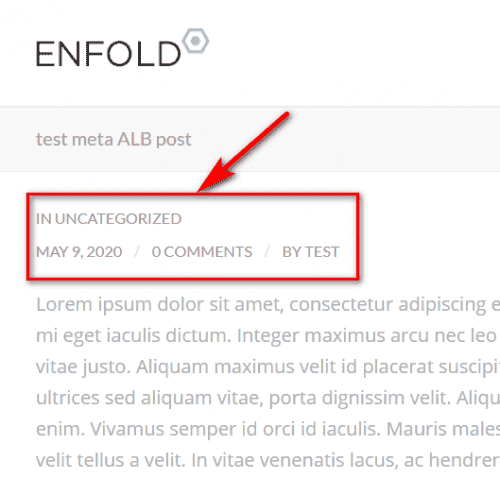
Best regards,
Mike-
This reply was modified 5 years, 10 months ago by
Mike. Reason: updated code with following fix
Hi,
Sorry for the late reply and thanks for the links and images, please try this code in the General Styling > Quick CSS field or in the WordPress > Customize > Additional CSS field:.modal-content { top: 100px !important }This moves the popup down a little to center & also makes the whole popup visible.
Best regards,
MikeHi,
As I understand, you are posting the YouTube link into a post directly, and sometimes it doesn’t change into a video element. This is a native WordPress function and in my tests on a new install it seems to work correctly, so I would recommend disabling all plugins and then try enabling one at a time, to recreate the error. Also are you hitting the [return] key after the video URL? Try a regular space first then a [return] key. Are you editing in the “visual” or “text” tab?Best regards,
MikeMay 9, 2020 at 5:08 pm in reply to: Changing H2 and height of colour section for mobile – urgent #1211432Hi,
Glad we were able to help, we will close this now. Thank you for using Enfold.For your information, you can take a look at Enfold documentation here
For any other questions or issues, feel free to start new threads in the Enfold forum and we will gladly try to help you :)Best regards,
MikeHi,
Sorry for the late reply and thanks for the login. This seems to be an issue with the animation from the tabs and the timeline inside running at the same time. I have tried disabling the animation of both with the element options and css, but this didn’t help. I notice that if the timeline is outside of the tabs on the same page it loads fine. I copied your page to my localhost for further testing, but in the interest of getting your page to load correctly right away, I disabled your timeline and added an HTML version with no animation in a code block in the tab and it seems to fully load each time.
Please clear your browser cache and check that this helps for now.Best regards,
MikeHi,
Sorry, I’m not sure what you mean, so far we have not looked at any code for color, are we successful with the margins and now are on a new topic? Typically we prefer to keep each thread on a single topic, but I’m not seeing anything out of place with your sidebar color?Best regards,
MikeHey nunop,
Sorry for the late reply, I see your site languages arenl-NL&en-GBso using the solution from here, would need to be modified to this:
Please add your text into the field as following<span class="eng-cookie">Your text in English</span> <span class="nl-cookie">Your text in Nederlands</span>Then add following code to Quick CSS
html[lang="nl-NL"] .eng-cookie { display: none !important; }
html[lang="en-GB"] .nl-cookie { display: none !important; }
Please try adjusting and the clear your browser & site cache and check.
Best regards,
MikeHey Michael,
Sorry for the late reply, please try this code in the General Styling > Quick CSS field or in the WordPress > Customize > Additional CSS field:.abbinder a { width: 100% !important; }After applying the css, please clear your browser cache and check.
Best regards,
MikeMay 9, 2020 at 11:35 am in reply to: Changing H2 and height of colour section for mobile – urgent #1211374Hi,
Sorry for the late reply, and thanks for the login, to make your slider H1 bold I added this css:@media only screen and (max-width: 767px) { #top.home #full_slider_2 > div > div > div > div > div > div > h1 { font-weight: bolder !important; } }and for the other section I added this css:
@media only screen and (max-width: 767px) {
#top.home #av_section_1 > div > div,#top.home #after_section_1 > div > div {
	padding: 0px !important;
}
}
Please clear your browser cache and check.
Best regards,
MikeHi,
I checked your page on a Mac with Safari 13.1, please see the video in the Private Content area, but I don’t see the shake either.Best regards,
MikeHi,
You can add this code to the end of your child theme functions.php file in Appearance > Editor:add_filter('avia_load_shortcodes', 'avia_include_shortcode_template', 15, 1); function avia_include_shortcode_template($paths) { $template_url = get_stylesheet_directory(); array_unshift($paths, $template_url.'/shortcodes/'); return $paths; }then add a directory
shortcodesto your child theme and copy the directory\enfold\config-templatebuilder\avia-shortcodes\menu\to theshortcodesdirectory.
Then edit your files to suit, the child theme will then load the function instead of the parent theme.
Then clear your browser & site cache and check.Best regards,
MikeHi,
Do you mean that theHeader set Access-Control-Allow-Origin "*"in the .htaccess works for 4.6.3.1 and not on 4.7.4? That is odd, if we had a admin login and ftp access we would be able to check.Best regards,
MikeHi,
Sorry, I see that you are using the plugin “Ultimate Woo Auction Pro”, but I don’t see a way to add this info from the product tabs to the frontend. Please try asking the plugin support if they have a function or shortcodes to do this, perhaps they have a solution for this.Best regards,
Mike -
This reply was modified 5 years, 10 months ago by
-
AuthorPosts
