

Forum Replies Created
-
AuthorPosts
-
June 7, 2020 at 7:09 pm in reply to: CSS issue (bilingual website with WPML): 1 language is fine, the other is not #1220234
Hi,
Sorry for the late reply, and thanks for the login, I checked both of your language versions and found that your alternative logo has this added to the end of the URL which is causing it to look out of focus?fit=435%2C116&ssl=1I changed this to:?fit=425%2C116&ssl=1and now both seem to be correct, please clear your browser cache and check.The page content layout is a little different with extra div’s for example on the English version under “YOUR LEADING FREIGHT FORWARDER IN BALI”
the layout is:<div class="flex_column_table av-equal-height-column-flextable -flextable"> <div class="flex_column av_three_fifth flex_column_table_cell av-equal-height-column av-align-top av-zero-column-padding first avia-builder-el-34 el_after_av_heading el_before_av_two_fifth"></div> </div> <div class="flex_column_table av-equal-height-column-flextable -flextable"> <div class="av-flex-placeholder"></div> <div class="flex_column av_two_fifth flex_column_table_cell av-equal-height-column av-align-top av-zero-column-padding avia-builder-el-36 el_after_av_three_fifth avia-builder-el-last "></div> </div>where on the french version it is:
<div class="flex_column_table av-equal-height-column-flextable -flextable">
    <div class="flex_column av_three_fifth  flex_column_table_cell av-equal-height-column av-align-top av-zero-column-padding first  avia-builder-el-34  el_after_av_heading  el_before_av_two_fifth"></div>
        <div class="av-flex-placeholder"></div>
    <div class="flex_column av_two_fifth  flex_column_table_cell av-equal-height-column av-align-top av-zero-column-padding   avia-builder-el-36  el_after_av_three_fifth  avia-builder-el-last  "></div>
</div>
so there is an extra div braking the layout.
Was the English version created by the WPML plugin automatically? I changed the first column to individual height instead of the equal height and it seems to have fixed the whole page, it must have been a fluke?
Please clear your browser cache and check the English version.Best regards,
MikeJune 7, 2020 at 4:53 pm in reply to: Removing "Classic Editor, Advanced Layout Builder" from pages list #1220204Hey Axel,
Sorry for the late reply, Try adding this code to the end of your functions.php file in Appearance > Editor:add_filter('display_post_states','remove_ALB_post_state',999,2); function remove_ALB_post_state( $post_states, $post ) { if( "!= Avia_Builder()->get_alb_builder_status($post->ID)" ) { unset($post_states['avia_alb']); } return $post_states; }Then clear your browser cache and check.
Best regards,
MikeHi,
Sorry for the late reply, to change to number of items that show, please change the setting here:

I changed it to 8 from 16, please check.Best regards,
MikeJune 7, 2020 at 12:43 pm in reply to: "alt" Text not updated in Text Block after editing Media Library #1220179Hey BruceJackson,
Sorry for the late reply, when you add the image to the text element are you using the “media” button or are you adding the image URL to the text element and the image is showing? Can we login to your page so we can see and investigate the “alt” tag.
If you are using the “media” button, try adding the image and setting the alt tag at the same time instead of going back in the media library and adding the alt.Best regards,
MikeHi,
Glad we were able to help, we will close this now. Thank you for using Enfold.For your information, you can take a look at Enfold documentation here
For any other questions or issues, feel free to start new threads in the Enfold forum and we will gladly try to help you :)Best regards,
MikeHi,
Glad we were able to help, we will close this now. Thank you for using Enfold.For your information, you can take a look at Enfold documentation here
For any other questions or issues, feel free to start new threads in the Enfold forum and we will gladly try to help you :)Best regards,
MikeHi,
no “cleanup” needs to be done in the green area, selecting Displayed Everywhere from the red area will create a new widget, it is not a control for a widget that is already in place. The goal was to have the Custom HTML inside the Festival Sidebar so the link will show, correct?Best regards,
MikeHi,
I believe the popup login is set by .htaccess or it could be set by a plugin.
Typically, your browser saves your authentication from your first login so it might have been from a while back.
Anyways, please see the link in the Private Content area for your icon font, try to import it at Enfold Theme Options > Import/Export > Iconfont Manager and then check the icon element for your icon.For your second question, if your bullet points are in the text element you can use this css, but if you want to limit it to one page you can add you page id to the beginning of each rule.
Please try this code in the General Styling > Quick CSS field or in the WordPress > Customize > Additional CSS field:.entry-content-wrapper .avia_textblock ul li:before { content: "-"; padding-right: 5px; color:#000 !important; } .entry-content-wrapper .avia_textblock ul { list-style: none !important; } .entry-content-wrapper .avia_textblock li { margin-left: 0 !important; }After applying the css, Please clear your browser cache and check.
Best regards,
MikeHi,
The css causing the green color on hover is this:#top #wrap_all .av-social-link-youtube:hover a, #top #wrap_all .av-social-link-mail:hover a, #top #wrap_all .av-social-link-facebook:hover a { color: #719430; }This custom css, probably in your Quick CSS, is for all 3 of your social icons, so if you want all 3 to be gray try changing the color to
#aaaaaa.
After editing the css, please clear your browser cache and check.Best regards,
MikeHi,
Sorry for the late reply, I believe that this shortcode needs to be used on a product page, it is a “live” filterwithin appropriate context*, the customer can click a term and the page will show products that are related to it.
Your test page has no products so the filter has nothing to do, the woocommerce documentation says:
*This shortcode must be used within appropriate context, i.e. where products are displayed, as for example on a shop page.
When you say “Product Attribute box” do you mean in the backend or the frontend? Can you include a screenshot of what you would like to see?
Best regards,
MikeHi,
Please ensure any caching plugins are disabled and the Enfold Theme Options > Performance > JS & CSS file merging and compression is disabled and then clearing your browser cache a few times, js files can be tricky to clear if you are caching.
If this doesn’t help, please include an admin login in the private content area and link to a page where we can see the issue so we can be of more assistance.Best regards,
MikeHi,
Sorry for the late reply and thanks for the kind words, and most of all, thanks for using Enfold!
Unless there is anything else we can assist with on this issue, shall we close this then?Best regards,
MikeHi,
Sorry for the late reply and thanks for the links, on your page that is “correct” I see this:

Is this really correct?
I didn’t find this on your/materjalid/page, but when I re-read your question and see that you are using “YITH Infinite scrolling plugin” which is lazy loading the product grid which may not work with the solution you have used because the script above runs on page load but your plugin adds more items to the grid without loading the page or giving a trigger, so I don’t believe this will work for you.Best regards,
MikeHi,
Sorry for the late reply, thanks for the login but I’m getting:Error: The password you entered for the username is incorrect.
Please check.
The “error” you got when editing could have been the editor’s error self-check, often within the error message it suggests to make the changes via SFTP, was this your case? If so try using SFTP or use your webhost cPanel file manager to edit the file.

Best regards,
MikeHi,
Glad we were able to help, this customization is too specific to be effective as a general option, but I see that you are using a child theme so this customization will remain in effect after your future updates. We will close this now. Thank you for using Enfold.For your information, you can take a look at Enfold documentation here
For any other questions or issues, feel free to start new threads in the Enfold forum and we will gladly try to help you :)Best regards,
MikeHi,
Sorry for the late reply, the css I posted above will work on any site viewed as mobile with an H2 that also has the classav-mini-font-size-14:@media only screen and (max-width: 767px) { #main .av-mini-font-size-14 > h2 { font-size: 12px !important; } }I don’t imagine that you would like the other “H” tags to have the same font size on mobile as the H2, so if you can tell us what mobile sizes you want with each “H” tag we can assist.
I also recommend linking to a test page with different H tags you would like to customize because they may not all use the classav-mini-font-size-14for mobile so we should check, I also recommend choosing a custom class to add the H tags that you would like to customize, because changing the font size broadly and across your whole site can have surprising results because each element has different font sizes for the H tags depending on how they are used.
Using custom classes for customized styles gives you better control than broadly making changes that may cause conflicts later.Best regards,
MikeHi,
Sorry for the late reply, @coretekk on my localhost with a fresh Enfold install, the sidebar for product archive pages works fine.
Since we have not been able to reproduce this error please open a new thread with admin login in the Private Content area, so we can investigate. Did you have the sidebar showing on your product archive pages and then lost them when you updated or are you trying to get the sidebar to show on product archive pages for the first time? Since this is not your thread posting your login here will not be private and you will not see anything we write in the Private Content area, but you can post a link to your new thread here so we can find it easier.
We will want to see that the error occurs then all of your plugins are disabled, can we disable them for testing?Best regards,
MikeHi,
Sorry for the late reply, ok thanks for explaining, so I logged out and saw the error, but the browser didn’t give the CORs error that I expected to get from your screenshots, or any other errors to explain why the dashicons are not showing when logged out.
I did find a solution for a similar issue, which was:Usually this is caused by an optimisation plugin that lets you disable dashicons. If you have any optimisation plugins installed, please check their options for anything that mentions dashicons, and make sure they’re enabled.
If that doesn’t help I came up with a css solution, please try this code in the General Styling > Quick CSS field or in the WordPress > Customize > Additional CSS field:
div.wpcf7-validation-errors:before {
    content: "\e813" !important;
    color: red !important;
    font-family: entypo-fontello !important;
}
div.wpcf7-mail-sent-ok:before {
	content: "\e812" !important;
	color: green !important;
    font-family: entypo-fontello !important;
}
this will substitute the dashicons font for the entypo-fontello font, after applying the css, please clear your browser cache and check.
Best regards,
MikeHi,
Ok, I think we are not talking about the same things, so in the screenshot in the Private Content area, the area in the red box is where the available widgets are, but the green box is where the used widgets are.
I hope this makes since.Best regards,
MikeHi,
Thank you for the login, I tried to recreate this on my localhost, but my menu works correctly highlighting each menu item as it is in view, with no flickering. I see that you are using a child theme but the WordPress > Appearance > Editor is disabled so I can’t see if you have any custom functions in your functions.php
Please enable the Theme Editor. It looks like your server is using OPCache, is this an option you can disable while we investigate?
I recall an issue with some OPCache because it stores the script precompiled, instead of loading and parsing scripts on each request.
So it would be good to rule this out.Best regards,
MikeHi,
Glad we were able to help, we will close this now. Thank you for using Enfold.For your information, you can take a look at Enfold documentation here
For any other questions or issues, feel free to start new threads in the Enfold forum and we will gladly try to help you :)Best regards,
MikeHi,
Thanks for the screenshot, so do you mean the yellow “!” in the widget?

this is because the widget is empty, there is nothing to worry about.Best regards,
MikeHi,
Very good, we have submitted this to the feature requests for the dev team to review, thanks for using Enfold.Best regards,
MikeHi,
Thanks for the svg, I convert it to an icon font at Fontello.com, but your site is asking for another login before the WordPress login, please check and include a login so we can import the icon font.Best regards,
MikeHi,
Sorry for the late reply, thanks for the feedback, so for companypartners.de it looks like all of the menu items are custom links to anchors on the same page, except for “Startseite” & “News”. I notice that on the “News” page that News & Kontakt flash and the Kontakt menu item takes you to the homepage Kontakt form and not the Kontakt form on the News page.
I also notice that the language switch menu is also getting the “current-menu-item” class on scroll in the same flashing way, but since there is no css rules for this you don’t notice it. Does Kontakt flash on scroll if the language menu is disabled?
Please include an admin login in the Private Content area I would like to copy your menu to my localhost to try to reproduce this and investigate further.Best regards,
MikeHi,
Sorry for the late reply, to correct the space above the header please try this code in the General Styling > Quick CSS field or in the WordPress > Customize > Additional CSS field:#advanced_menu_toggle,#advanced_menu_hide { display: none !important; }For the category shortcode not showing above the “NEW PRODUCTS”, I believe there was an error in your shortcode, I changed a little and put in a code block element and it seems to be working now.
The added shortcode required some css to adjust the top padding, so I added this:.html_header_top.html_header_sticky #top #wrap_all #main{padding-top: 325px;}Please clear your browser cache and check.
Best regards,
MikeHi,
Thanks, have you tried disabling your plugins and then clearing your browser cache? We have had issues with the smushit plugin and it looks like you are using it.
I did find a similar issue on the layerslider support site that points to a server issue, please see here.Best regards,
MikeHi,
Thank you, I have not seen this before and I can’t reproduce it on my localhost, I have asked the rest of the team for suggestions, Thank you for your patience.Best regards,
MikeHi,
Sorry for the late reply and thanks for the login, if I understand correctly you want the error message to show a red X
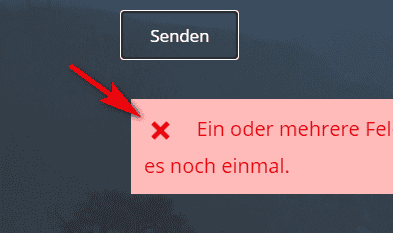
I see the red X, so I’m not sure what the issue is.Best regards,
MikeHi,
Sorry for the late reply, and thanks for the layerslider export, I tested on my localhost with Enfold v4.7.5 and Chrome, Firefox, & Edge and it worked well without the white flash. I see that you are using Enfold Version: 4.5.7, please try updating.
You may need to update via FTP, the easiest and safest way to do this is to download the newest version from Theme Forest and rename your current theme folder to “enfold-old” via ftp then upload the new “enfold” folder and check that your site is working correctly.
Should for some reason you wish to roll-back to the old version, it’s easy to do, simply rename the new “enfold” folder to “enfold-new” via ftp and then rename “enfold-old” to “enfold” then refresh your page.
Once you are happy you can delete the “enfold-old” folder via ftp, (not the WP theme page)
Please don’t try to overwrite the theme folder, as this will leave old files behind and cause errors.Best regards,
Mike -
AuthorPosts
