

Forum Replies Created
-
AuthorPosts
-
Hi,
Glad to hear that you have this sorted out, if you have any further questions please create a new thread and we will gladly try to help you. Thank you for using Enfold.Best regards,
MikeHi,
Glad Guenni007 could help, if you have any further questions please create a new thread and we will gladly try to help you. Thank you for using Enfold.
Thanks Guenni007 for sharing.Best regards,
MikeHi,
Thanks Guenni007, good catch, I had originally commented this out to correct above but didn’t realize it has in two locations, I removed it from the second location and now it is corrected.
Veloryana please ensure that you clear your browser cache before checking again.Best regards,
MikeHi,
Glad Nikko was able to help, if you have any further questions please create a new thread and we will gladly try to help you. Thank you for using Enfold.Best regards,
MikeJune 17, 2022 at 1:27 pm in reply to: Customizing the background of a 1/1 column section with a transparent .png image #1355603Hi,
Thanks for the feedback, for #1 I have added this css to add the top white edge:@media only screen and (min-width: 1210px) { .home_post_layout2 { padding-top: 25px; } }
your original css was not correct, perhaps the page elements or layout changed, anyways please clear your browser cache and check.
For #2 I misunderstood that this was only for the page /all-posts/, so I removed the opacity on hover on this one page by adjusting your SiteOrigin CSS to exclude it:.avia_desktop #top:not(.page-id-4375) .av-hover-overlay-active .av-masonry-entry:hover .av-masonry-image-container, .avia_desktop #top:not(.page-id-4375) .av-hover-overlay-active.av-caption-style-overlay .av-masonry-entry .av-masonry-image-container { opacity: 0.6!important; }note the
:not(.page-id-4375)that I added to your previous css.
then to remove the opacity from that one page before hover I added this css:.avia_desktop #top.page-id-4375 .av-hover-overlay-active .av-masonry-image-container { opacity: 1; }please clear your browser cache and check.
For #3, to make the header transparent all the time on all devices I added this css:.header_color .header_bg { background-color: transparent; }please clear your browser cache and check.
Best regards,
MikeHi,
Glad we were able to help, if you have any further questions please create a new thread and we will gladly try to help you. Thank you for using Enfold.Best regards,
MikeHi,
Do you always want the transparent header on desktop also or just mobile?
Will this be for all pages?Best regards,
MikeHey BFred,
Thanks for your question, please check that lightbox is enabled at Enfold Theme Options ▸ Lightbox Modal Window
If this doesn’t correct please include admin login in the Private Content area so we can investigate.Best regards,
MikeHi,
Thank you for your patience and the link to your page, as I understand you would like the sku, tags and categories on their own lines, please try this code in the General Styling ▸ Quick CSS field or in the WordPress ▸ Customize ▸ Additional CSS field:#top.single-product .product_meta > span { display: block; line-height: 16px; }After applying the css, please clear your browser cache and check.
Please see the screenshot in the Private Content area of the expected results.Best regards,
MikeJune 16, 2022 at 12:32 pm in reply to: Team Member Element – Open Team Member Description in Lightbox #1355482Hi,
Glad we were able to help, if you have any further questions please create a new thread and we will gladly try to help you. Thank you for using Enfold.Best regards,
MikeHi,
I see this makes sense, using the magnificPopup api and your own markup is a good solution, thanks for sharing.Best regards,
MikeHi,
Thanks for sharing Guenni007, I see this working on your site, but on my site, it was opening the overlay but not the image, but I didn’t get any error messages.
But thanks to you I was able to use some of your code to adjust mine and get it working to use the hotspot tooltip as the lightbox title.function popup_tooltips_with_links() { ?> <script type="text/javascript"> window.addEventListener('DOMContentLoaded', function() { (function($){ $('#top.page-id-1386 .av-image-hotspot_inner').each(function () { var toolTip = $(this).closest('.av-image-hotspot').attr('data-avia-tooltip'); var cleanTitle = $(toolTip).text(); $(this).attr('title', cleanTitle ); $(this).magnificPopup({ type: 'image', image: { titleSrc: 'title' } }); }); })(jQuery); }); </script> <?php } add_action('wp_footer', 'popup_tooltips_with_links');In the above code you’ll see that I added
window.addEventListener('DOMContentLoaded', function() { });this is because on my test site I’m loading the scripts in the header before jQuery, I included it here should someone in the future be loading jQuery in the footer.
I also added a page ID so it will only work on my test page.
I also wanted to remove the tags from the titles so I added another variablevar cleanTitle = $(toolTip).text();Best regards,
MikeHi,
Glad Rikard could help, if you have any further questions please create a new thread and we will gladly try to help you. Thank you for using Enfold.Best regards,
MikeHi,
Glad Rikard could help, if you have any further questions please create a new thread and we will gladly try to help you. Thank you for using Enfold.Best regards,
MikeJune 15, 2022 at 7:45 pm in reply to: Customizing the background of a 1/1 column section with a transparent .png image #1355384June 15, 2022 at 7:41 pm in reply to: Team Member Element – Open Team Member Description in Lightbox #1355383Hi,
Glad to hear this helps, try changing the css:.avia-team-member .team-member-description { visibility:hidden; }to:
.avia-team-member .team-member-description {
	display: none;
}
Then clear your browser cache and check.
Best regards,
MikeHi,
Glad we were able to help, if you have any further questions please create a new thread and we will gladly try to help you. Thank you for using Enfold.Best regards,
MikeHi,
Glad we were able to help, if you have any further questions please create a new thread and we will gladly try to help you. Thank you for using Enfold.Best regards,
MikeHi,
Glad we were able to help, if you have any further questions please create a new thread and we will gladly try to help you. Thank you for using Enfold.Best regards,
MikeHi,
Yes, I didn’t know what title he would want for each image and I wanted a different title for each image when I tested so that I knew it was working correctly.
I had thought of getting the tooltip text (data-avia-tooltip) and adding it to the lightbox title, but he is not using the tooltip field so “data-avia-tooltip” was empty.
I believe getting each hotspot tooltip and adding it to the lightbox title should be something like this:(function($){ $('.av-image-hotspot a').each(function () { var toolTip = $(this).parents('div').eq(1).find('.av-image-hotspot').attr('data-avia-tooltip'); $(this).attr('title', toolTip ); $(this).magnificPopup({ type: 'image', image: { titleSrc: 'title' } }); }); })(jQuery);but it’s not working quite as expected, do you have any ideas? Thanks Guenni007
Best regards,
MikeHi,
I believe that we can help you with a button grid, please try the Button Row:

in my example I used 3 buttons per row, centerd, each button x-large, no icon and basic colors, but there is an option for custom colors:

I didn’t see any text wrap at any device size, please check my demo link below:

assuming that you want equal button widths, I added this script to the end of my child theme functions.php file in Appearance ▸ Editor:function equal_buttonrow_button_width() { ?> <script> (function($){ $(window).load(function(){ $('#top.page-id-3240 main > .post-entry-type-page > .entry-content-wrapper').each(function(){ var $rows = $('.avia-button ',this); var maxWidth = Math.max.apply(Math, $rows.map(function(){ return $(this).width(); }).get()); $rows.width(maxWidth); }); }); })(jQuery); </script> <?php } add_action('wp_footer', 'equal_buttonrow_button_width');Note that my page ID is page-id-3240, so you will need to adjust the script to your page ID which is page-id-196
my results are:

Best regards,
MikeHi,
Thanks for the link to your site, when I check your icon it is blue & white on mouse-over, if you want it blue before mouse-over try this code in the General Styling ▸ Quick CSS field or in the WordPress ▸ Customize ▸ Additional CSS field:#top #header_meta .av-social-link-facebook a { color: #37589b; }After applying the css, please clear your browser cache and check.
Best regards,
MikeHey jaliisah,
Thanks for your question, the GenerateBlocks plugin is for the WordPress Block Editor, so it is not available in the WordPress Classic Editor.
The Avia Editor (Advanced Layout Builder) doesn’t support other editor plugins.Best regards,
MikeHi,
Thanks for the feedback, your approach seems fine, another way would be to add the page ID to the title attribute lines like this:function custom_hotspot_title_script() { ?> <script> (function($){ $('#top.page-id-1 .av-image-hotspot-1 a').attr('title','hotspot-1'); $('#top.page-id-1 .av-image-hotspot-2 a').attr('title','hotspot-2'); $('#top.page-id-1 .av-image-hotspot-3 a').attr('title','hotspot-3'); $('#top.page-id-1 .av-image-hotspot-4 a').attr('title','hotspot-4'); $('#top.page-id-1 .av-image-hotspot-5 a').attr('title','hotspot-5'); $('#top.page-id-1 .av-image-hotspot-6 a').attr('title','hotspot-6'); $('#top.page-id-1 .av-image-hotspot-7 a').attr('title','hotspot-7'); $('#top.page-id-1 .av-image-hotspot-8 a').attr('title','hotspot-8'); $('#top.page-id-2 .av-image-hotspot-1 a').attr('title','hotspot-1'); $('#top.page-id-2 .av-image-hotspot-2 a').attr('title','hotspot-2'); $('#top.page-id-2 .av-image-hotspot-3 a').attr('title','hotspot-3'); $('#top.page-id-2 .av-image-hotspot-4 a').attr('title','hotspot-4'); $('#top.page-id-2 .av-image-hotspot-5 a').attr('title','hotspot-5'); $('#top.page-id-2 .av-image-hotspot-6 a').attr('title','hotspot-6'); $('#top.page-id-2 .av-image-hotspot-7 a').attr('title','hotspot-7'); $('#top.page-id-2 .av-image-hotspot-8 a').attr('title','hotspot-8'); $('#top.page-id-2 .av-image-hotspot-9 a').attr('title','hotspot-9'); $('#top.page-id-2 .av-image-hotspot-10 a').attr('title','hotspot-10'); $('#top.page-id-2 .av-image-hotspot-11 a').attr('title','hotspot-11'); $('#top.page-id-2 .av-image-hotspot-12 a').attr('title','hotspot-12'); $('#top.page-id-2 .av-image-hotspot-13 a').attr('title','hotspot-13'); $('#top.page-id-2 .av-image-hotspot-14 a').attr('title','hotspot-14'); $('#top.page-id-2 .av-image-hotspot-15 a').attr('title','hotspot-15'); $('#top.page-id-2 .av-image-hotspot-16 a').attr('title','hotspot-16'); $('#top.page-id-2 .av-image-hotspot-17 a').attr('title','hotspot-17'); $('#top.page-id-3 .av-image-hotspot-1 a').attr('title','hotspot-1'); $('#top.page-id-3 .av-image-hotspot-2 a').attr('title','hotspot-2'); $('#top.page-id-3 .av-image-hotspot-3 a').attr('title','hotspot-3'); $('#top.page-id-3 .av-image-hotspot-4 a').attr('title','hotspot-4'); $('#top.page-id-3 .av-image-hotspot-5 a').attr('title','hotspot-5'); $('#top.page-id-3 .av-image-hotspot-6 a').attr('title','hotspot-6'); $('#top.page-id-3 .av-image-hotspot-7 a').attr('title','hotspot-7'); $('#top.page-id-3 .av-image-hotspot-8 a').attr('title','hotspot-8'); $('.av-image-hotspot a').magnificPopup({ type: 'image', image: { titleSrc: 'title' } }); })(jQuery); </script> <?php } add_action('wp_footer', 'custom_hotspot_title_script');but I can’t say that one way is better than the other, I guess it’s just preference.
Best regards,
MikeHi,
Thanks for the feedback, your server doesn’t have the PHP ZipArchive Extension activated,

you should be able to active this in the cPanel under PHP Selector it probably says Zip like in this screenshot
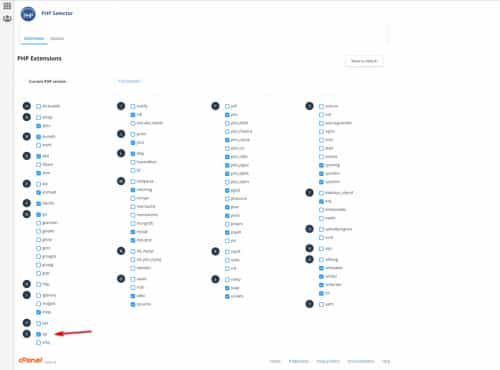
I see that you are using PHP v8.1.5, on my server PHP v8+ didn’t have the same PHP setting active by default and I had to manually compare them to PHP v7.4, your server may have the other extensions activated as in my screenshot, but if you still have trouble try switching to PHP v7.4 and then try importing again, if it then works you can always switch back to PHP v8.1.5, if you like.
I disabled all of your plugins to ensure there was no conflict in the demo import, please try like this.Best regards,
MikeHi,
On the page Modifier les thèmes under Fichiers du thème please click on the title functions.php

I added the script for you, please check.
If you find a page that is still showing the mouse-over image titles, please link to it so we can examine and adjust the script.Best regards,
MikeHi,
Glad we were able to help, if you have any further questions please create a new thread and we will gladly try to help you. Thank you for using Enfold.Best regards,
MikeHi,
Glad to hear that you have this sorted out, if you have any further questions please create a new thread and we will gladly try to help you. Thank you for using Enfold.Best regards,
MikeJune 14, 2022 at 8:02 pm in reply to: Remove commas between metadata items when using the Post Metadata Widget #1355247Hi,
Glad Rikard could help, if you have any further questions please create a new thread and we will gladly try to help you. Thank you for using Enfold.Best regards,
Mike -
AuthorPosts
