

Forum Replies Created
-
AuthorPosts
-
Hey schweg33,
Thanks for your question, you could try wrapping your css in a media query like this:@media only screen and (min-width: 1440px) { .page-id-1090 #socket { position: fixed; bottom: 0; width: 100%; } }Best regards,
MikeHi,
Glad Rikard could help, if you have any further questions please create a new thread and we will gladly try to help you. Thank you for using Enfold.Best regards,
MikeJuly 31, 2022 at 7:00 pm in reply to: Change order of portfolio entries only on right oder left click #1360014Hi,
Very good, unless there is anything else we can assist with on this issue, shall we close this then?Best regards,
MikeHi,
Very good, if you have any further questions please create a new thread and we will gladly try to help you. Thank you for using Enfold.Best regards,
MikeHi,
Thanks for the feedback, unfortunately, we don’t have a recommended list of plugins.Best regards,
MikeHi,
Thanks for the feedback, my solution above will work for as many images as you like.
I have tested by adding numbers to the hover image that you posted earlier to demonstrate that the correct image is swapped in the Swap Images on Hover With Closest Hidden Image solution:

Please try this and if you have further trouble with the solution Please include an admin login in the Private Content area so we can assist.Best regards,
MikeHi,
Thanks for your feedback, the child theme doesn’t need to be updated, the parent theme (Enfold) is updated while the child theme is the activate theme.
This is because the child theme uses the core files of the parent theme (Enfold), I hope this makes sense.
Thanks for using Enfold.Best regards,
MikeJuly 31, 2022 at 6:02 am in reply to: Change order of portfolio entries only on right oder left click #1359986Hey Tobias,
Thank you for the link to your site, but perhaps I’m reading your date format incorrectly. From what I’m seeing the portfolio post that you linked to is the newest post, so if using the order: newest to oldest there would be no post to the right:

the newest would be to the right and if you are at the newest there would be nothing to the right.
As a user, to me, the left would mean to “go back” or older posts.Best regards,
MikeHi,
Glad Ismael could help, if you have any further questions please create a new thread and we will gladly try to help you. Thank you for using Enfold.Best regards,
MikeHi,
Thanks for the link to your images, I misunderstood your approach. For this, I would recommend using two image elements to Swap Images on Hover With Closest Hidden Image
Let’s start with an image element and add the custom class beforeHover:

then we will add another image element next to it with the custom class afterHover and assign the Element Visibility to hidden for all devices:
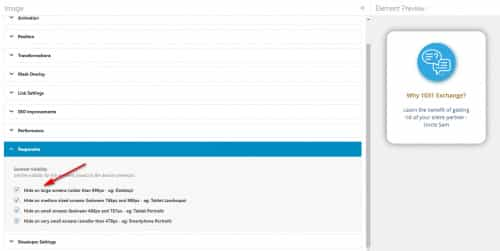
so the example page will look like this:

then add this code to the end of your functions.php file in Appearance ▸ Editor:function custom_swap_image_on_hover_with_closest_hidden_image_script() { ?> <script> window.addEventListener('DOMContentLoaded', function() { (function($){ $('.avia-image-container.beforeHover').hover(function(e){ $(this).find('img').attr('data-url', $(this).find('img').attr('src')); $(this).find('img').attr('src', $(this).next('.afterHover').find('img').attr('src')); $(this).find('img').attr('srcset', $(this).next('.afterHover').find('img').attr('src')); }, function(e){ $(this).find('img').attr('src', $(this).find('img').attr('data-url')); $(this).find('img').attr('srcset', $(this).find('img').attr('data-url')); }); })(jQuery); }); </script> <?php } add_action('wp_footer', 'custom_swap_image_on_hover_with_closest_hidden_image_script');please give this a try and if you need further help please link to a test page that we can examine.
Best regards,
MikeJuly 31, 2022 at 12:18 am in reply to: Theme Options -> General styling -> color fields changing the hex value I add #1359977Hi,
Glad Rikard could help, if you have any further questions please create a new thread and we will gladly try to help you. Thank you for using Enfold.Best regards,
MikeJuly 31, 2022 at 12:17 am in reply to: Enfold Avia Layout Architect does not load on LOCALHOST (MAMP) #1359975Hi,
Glad Rikard could help, if you have any further questions please create a new thread and we will gladly try to help you. Thank you for using Enfold.Best regards,
MikeHi,
Thanks for the feedback, I see that if I log out and check the burger menu it doesn’t work, but it does while I’m logged in, strange.
Does your server also have caching or Cloudflare? If so it might take a couple of hours for it to catch up. Typically when you are logged in caching is not served to you.
Try logging in on your phone a see if the menu works for you.Best regards,
MikeHi,
Thanks for the feedback, I disabled your Enfold Theme Options ▸ Performance ▸ JS & CSS file merging and compression to flush it and re-enabled it and this seems to have helped. Please check.Best regards,
MikeJuly 30, 2022 at 11:42 pm in reply to: WPML Language Switch Header to the left of burger menu #1359970Hi,
Thanks for your question, to change the global WPML language switcher option from flags to text please see this documentation: Configuring Language Switchers, in Enfold you can set the Enfold WPML Language Flags option to Hide the default language flags.
To place the language switcher before the mobile menu try this solution.Best regards,
MikeJuly 30, 2022 at 11:09 pm in reply to: Resize logo at on the top of the page after jumping to an anchor #1359967Hi,
Thanks for your question and the link to your site, for your logo this css should help:@media only screen and (min-width: 768px) { .av_header_transparency #header_main svg { height: 200px !important; max-height: 200px !important; } }but I notice that your main menu height is also not correct, perhaps you have tried to change the header height with some custom css instead of using the theme options at Enfold Theme Options ▸ Header ▸ Header Layout ▸ Header Size?
Perhaps it would be better to remove your custom css and try the theme option.
As for your main menu links, it seems like your page is reloading instead of jumping down to the anchor, in your menu items did you place the whole url, try just using the anchor ID.
If this doesn’t help please include an admin login in the Private Content area so we can be of more assistance.Best regards,
MikeHey phausner,
Thanks for your question, I see that you have this error:
Uncaught SyntaxError: Unexpected string at siteground-optimizer-combined-js
please try disable your siteground optimizer javascript combiner and clear your site and browser cache and check again, if this doesn’t help then try disabling your siteground optimizer plugin and check again.Best regards,
MikeHey Steven Ridder,
Thanks for your question, typically this occurs when the child theme has a custom header.php or footer.php that is out-of-date, try saving these files to your computer for fallback and delete the ones in the child theme directory.
Another possibility is some other custom file in the child theme directory or a function in the child theme functions.php
You could save your child theme to your computer for fallback and then replace it via FTP with a new one and then add the old child theme functions one at a time until you find the Fatal Error.
If you have further questions please log in to the support forum and create a new thread and we will gladly try to help you. The contact form is not intended for support requests. Thank you for using Enfold.Best regards,
MikeHi,
Thanks for your question, I believe that you are referring to an editor with Powered by Tiny in the bottom right corner like this:

this is not our editor and is typically from the TinyMCE Advance plugin, but another plugin may be adding this.
Try disabling all of your plugins and see if this editor returns, if not try enabling each of your plugins one at a time until the error returns.Best regards,
MikeHey Michael,
Thanks for your question, while the MailChimp Newsletter Option is integrated into Enfold, you could use other services by adding their specific code into a code block element.
If you have any trouble using a specific newsletter service in Enfold, please let us know and we will try to help.Best regards,
MikeJuly 30, 2022 at 9:12 pm in reply to: Is there an advantage to using the Post Format options? #1359960Hi,
Glad we were able to help, if you have any further questions please create a new thread and we will gladly try to help you. Thank you for using Enfold.Best regards,
MikeHey Daniel,
Thanks for your question, for SVG images you will need to add the title element in the SVG, this is necessary for screen readers to read it, this article explains further.
So you will need to edit your SVG logo.Best regards,
MikeHey Daniel,
Thanks for the link to your page, to keep the images inline on hover please add this css to your Quick CSS:.flickr .lightwindow { display: inline !important; }After applying the css, please clear your browser cache and check.
If you don’t want the overlay when you hover please also add this css:.flickr .lightwindow .image-overlay-inside { display: none; } .avia_transform .flickr .lightwindow:hover .image-overlay { opacity: 0 !important; }Best regards,
MikeJuly 30, 2022 at 8:32 pm in reply to: Is there an advantage to using the Post Format options? #1359952Hey gb,
Thank you for your question, there are some advantages to using the specific post formats, for example the audio format shows the audio player in the grid blog layout:

the video post format hides the featured image on the post page so the video is showcased, and the same with the gallery post format.
The link post format links to another page instead of the article.
There are also different icons shown in some cases and perhaps some slight styling differences. Please check the Enfold Church Demo for more specifics.
If you don’t think that you will be using any of these features right away then you could just use the standard post format for all posts to start and adjust them in the future.Best regards,
MikeHey GWS,
Thank you for the link to your site, but it is in maintenance mode so we can not see your menu. I have tested the Enfold Theme Options ▸ Main Menu ▸ Separator Between Menu Items ▸ Small Separator on my demo site and found it to be working, the css you posted also worked to change the color, so please include an admin login to your site in the Private Content area so we can investigate.Best regards,
MikeHi,
Glad Rikard could help, if you have any further questions please create a new thread and we will gladly try to help you. Thank you for using Enfold.Best regards,
MikeHey hostworks,
Thanks for your question, the elements that you have linked to are using css for the mouse-over effect.
The box shadow around the element uses this css:.apx-card:hover .apx-card-inner { -webkit-box-shadow: 0 15px 34px #a9afac; box-shadow: 0 15px 34px #a9afac; }the background color of the icon uses this css:
.apx-card:hover .apx-card-img-inner {
    background: #5ba07c;
    color: #fff;
}
and the lines of the icon uses the invert filter
.apx-card:hover img {
    -webkit-filter: brightness(0) invert(1);
    filter: brightness(0) invert(1);
}
If you wanted to recreate this with the Icon Box element, you could add the custom class apx-card to it:

then add this css:.apx-card:hover .iconbox_icon { background-color: #fff; color: #000; } .apx-card:hover { -webkit-box-shadow: 0 15px 34px #a9afac; box-shadow: 0 15px 34px #a9afac; }for this result on mouse-over (the middle element)

please give this a try and if you need further help please link to a test page that we can examine.Best regards,
MikeHi,
Thanks for your question, yes you would place the code at the end of your functions.php.
But I note that the site you linked to above doesn’t seem to be using a Child Theme, we would recommend that to follow the steps to install a child theme, otherwise this code that you add to the functions.php will be lost with each update.
Please give this a try, and if you need further help please include an admin login in the Private Content area so we can assist.Best regards,
MikeHey vantagepointmg,
Thanks for your question, your Facebook Likebox is being blocked by the browser, in the latest Safari update, Safari now blocks Facebook trackers by default, probably the same for iOS Firefox.
To work around this you can create a fake Facebook Likebox with html or an image that is linked to Facebook.Best regards,
Mike -
AuthorPosts
