

Forum Replies Created
-
AuthorPosts
-
Hi,
Thanks for the feedback, on your homepage I found 3 grid row sections that match this layout so I added the custom class custom-tablet-padding to the cell with text in each of these and then I changed the css to this:@media only screen and (max-width: 1085px) and (orientation: landscape) { .responsive #top #wrap_all #main .av-layout-grid-container .flex_cell.custom-tablet-padding { padding: 0 50px 50px 50px !important; } }and this seems to be working for all three, please clear your browser cache and check.
Please note that testing with iPads & iPhones can be hard to clear the cache, often you need to also clear the history to fully purge the cache, following these steps for Safari and note Step 4 where you will Clear the History.
Also note that your Kontakt has extra padding on the inner column, so if you want it to look like the other two sections please remove this extra padding.
Now you should be able to add the custom class custom-tablet-padding to grid row cells that are similar on other pages for the same effect.Best regards,
MikeDecember 11, 2022 at 2:40 am in reply to: Transparent Mobile menu as on desktop "Transparent header" function. #1375816Hi,
To have the burger menu icon white with the header is transparent and have it change to dark gray when the burger menu is opened please try this css:@media only screen and (max-width: 989px) { .html_mobile_menu_tablet .header_color.av_header_transparency div .av-hamburger-inner, .html_mobile_menu_tablet .header_color.av_header_transparency div .av-hamburger-inner::before, .html_mobile_menu_tablet .header_color.av_header_transparency div .av-hamburger-inner::after { background-color: #fff !important; } .html_av-overlay-side.av-burger-overlay-active #top .header_color.av_header_transparency div .av-hamburger-inner, .html_av-overlay-side.av-burger-overlay-active #top .header_color.av_header_transparency div .av-hamburger-inner::before, .html_av-overlay-side.av-burger-overlay-active #top .header_color.av_header_transparency div .av-hamburger-inner::after { background-color: #404040 !important; } }After applying the css, please clear your browser cache and check.
If you have trouble try clearing your server cache or add the css to the WordPress ▸ Customize ▸ Additional CSS fieldBest regards,
MikeHey steph delagarza,
Thanks for your question all of our demos would work with woocommerce in the same way.
Theme Forest is the only place that sells and licenses our theme, due to our contract with them we can not sell licenses directly.
If you can not login to the previous designer’s Theme Forest account then you will need to purchase a new license, Envato will not transfer licenses.
The good news is when you buy a new license you will get 6 months support to our forum, but please note that for a little more you could get a full year of support:

Best regards,
MikeHi,
Glad we were able to help, if you have any further questions please create a new thread and we will gladly try to help you. Thank you for using Enfold.Best regards,
MikeDecember 11, 2022 at 12:49 am in reply to: Bildhöhe verändern | Farbsektion Top Enfold Restaurant #1375808Hey Nic_007,
If you mean the top image on the page, go to your color section and increase the minimum height:

Best regards,
MikeHey Stephen,
Thanks for the link to your site, to remove the pencil icon from the gray square please try this css:#top.blog .post-entry .blog-meta .small-preview .iconfont:before { display: none; }To remove the pencil icon and the gray square try this css:
#top.blog .post-entry .blog-meta {
	display: none;
}
To pick a different icon to show in the gray box go to the icon element and hover over the icon to want to use to see the Charcode

and then use it in this css:#top.blog .post-entry .blog-meta .small-preview .iconfont:before { content: "\e82a"; }
Best regards,
MikeHi,
To place the images on the left side of the tables please try this css:.template-search .post-entry .entry-content-wrapper { display: flex; } .template-search .post-entry .entry-content-wrapper .entry-content-header { display: flex; flex-direction: column-reverse; align-items: center; justify-content: flex-end; width: 50%; } .template-search .post-entry .entry-content-wrapper .entry-content { display: flex; width: 50%; }After applying the css, please clear your browser cache and check.
Please see the screenshot in the Private Content area of the expected results.Best regards,
MikeDecember 11, 2022 at 12:04 am in reply to: Problems with the automatic backup again! ***urgent*** #1375802Hi,
I have not seen “automatic backup” I have seen “auto save” and that is from WordPress not Enfold, I would not click it.
Here is an article on how to disable it there are also plugins to disable it.
I have not tried these, I don’t click it.Best regards,
MikeDecember 10, 2022 at 11:56 pm in reply to: H1 whithin the product category description converted to uppercase #1375799Hi,
Glad we were able to help, if you have any further questions please create a new thread and we will gladly try to help you. Thank you for using Enfold.Best regards,
MikeDecember 10, 2022 at 11:48 pm in reply to: Hidden full screen slider image is downloaded on phone #1375798Hi,
Please try this javascript in your child theme functions.php, it will remove the fullscreen slider on your home page on mobile, it is added to your page head so it should be loaded before the slider image is called to be downloaded. If you have any plugins that defer javascript disable them because this will only work if it runs before the image is called.function pure_javascript_remove_slider_on_mobile() { ?> <script> const fullscreenSlider = document.querySelector("#top.home .avia-fullscreen-slider"); const viewportWidth = Math.max(document.documentElement.clientWidth || 0, window.innerWidth || 0) function removefullscreenSlider(width){ if(width <= 480){ fullscreenSlider.parentNode.removeChild(fullscreenSlider); } return } removefullscreenSlider(viewportWidth); </script> <?php } add_action('wp_head', 'pure_javascript_remove_slider_on_mobile');Best regards,
MikeDecember 10, 2022 at 11:15 pm in reply to: Woocommerce checkout and cart looks just wrong on mobile #1375794Hey j0schi,
Thank you for your patience, please try this css:@media only screen and (max-width: 767px) { .responsive #top #wrap_all .container { width: 95%; max-width: 95%; } .responsive table.shop_table .product-subtotal, .responsive .shop_table .product-quantity, .responsive table.shop_table.cart .product-thumbnail { display: table-cell; padding: 0; } .responsive table.shop_table.cart .product-thumbnail, .responsive table.shop_table.cart .product-thumbnail img { width: 50px; min-width: 50px; } }The expected results:

Best regards,
MikeDecember 10, 2022 at 10:48 pm in reply to: H1 whithin the product category description converted to uppercase #1375792Hi,
Thanks for the link to your page, please try this css:#top.archive .template-search-none.template-page .entry-content-wrapper h1 { text-transform: capitalize; }After applying the css, please clear your browser cache and check.
Best regards,
MikeDecember 10, 2022 at 10:40 pm in reply to: Text blocks, icons and colour sections do not show the selected colour #1375790Hi,
Thank you for your patience I was unable to login are you blocking IPs from outside your country?
On the page you first linked to I didn’t see an issue with the videos, but I did see that your prices icons were small and black so I was going to investigate it.
Please see the error I got in the screenshot in the Private Content area.Best regards,
MikeDecember 10, 2022 at 10:27 pm in reply to: Changing size of blog images from sidebar affects images of backend #1375789Hey walhai,
Thank you for your patience but I’m not able to reproduce this because the images that show on the backend for blog entries use the widget size image not the entry_with_sidebar size

Perhaps you have used a custom modification to change the image size or you also changed the widget size image or you are using a plugin that has changed this?
Try removing any custom functions from your child theme functions.php and check.
Then try disabling your plugins and check.
If this doesn’t help please explain the steps you took to change your image size so we can try to reproduce this.
Can you create a staging site copy of your site so we can investigate without risking your live site?Best regards,
MikeHey rixi,
Thanks for the link to your page, typically to have the first letter of each word capitalized in your slider you would use this css:#top #wrap_all .all_colors #full_slider_1 h2 { text-transform: capitalize; }But since you have some single letters with hyphens between them this won’t make them small. If you want them small then use this css:
#top #wrap_all .all_colors #full_slider_1 h2 {
    text-transform: unset;
}
and type them in the field exactly as you want to see them.
Best regards,
MikeHi,
Please use the sidebar options in the admin sidebar panel when editing the portfolio item:

Best regards,
MikeHi,
Did you install the font in Enfold Theme Options ▸ Import/Export ▸ Custom Font Manager?
Brush-script & Leonidas are not default fonts, you would need to install them first and the above would work.
If you do have them installed please link to your test page and include admin login in the Private Content area for us to check.Best regards,
MikeDecember 10, 2022 at 9:26 pm in reply to: Anchor link form hotspot to content section on the same page #1375785Hey JoStudioDeRijp,
Thanks for your question, when you edit the hotspot go to the advanced tab and for Hotspot Link choose set manually, then for the URL just enter your anchor link ID such as #jump if the element on the same page has the ID of jump

Best regards,
MikeHey woogie07,
Thanks for the link to your site, typically if you wanted a call button you would add the tel: link to your menu item and use the button option, but I see that you have a phone number in your topbar and the topbar shows on mobile so would you like a call button there?
If so you could use the shortcode wand to create your button and use it to create a call button shortcode that you can add anywhere to display it, such as the Enfold Theme Options ▸ Header ▸ Extra Elements ▸ Phone Number or small info text field.
So to do this first open a new post and in the block editor select the classic block and in the toolbar select the shortcode wand ▸ Button:

then the standard Advanced Layout Builder button element will open for you to design the button, after you build your button and save the button shortcode will show for you to copy

Then add your button shortcode to this function:function call_button_shortcode( ){ echo do_shortcode(" button-shortcode-here "); } add_shortcode( 'call_button', 'call_button_shortcode' );for my example I used this code:
function call_button_shortcode( ){
	echo do_shortcode("[av_button label='Call Us' icon_select='yes' icon='ue854' font='entypo-fontello' link='manually,tel://555-555-5555' link_target='_blank' size='medium' position='right' label_display='' title_attr='' size-text='' av-desktop-font-size-text='' av-medium-font-size-text='' av-small-font-size-text='' av-mini-font-size-text='' margin='' margin_sync='true' padding='' padding_sync='true' av-desktop-margin='' av-desktop-margin_sync='true' av-desktop-padding='' av-desktop-padding_sync='true' av-medium-margin='' av-medium-margin_sync='true' av-medium-padding='' av-medium-padding_sync='true' av-small-margin='' av-small-margin_sync='true' av-small-padding='' av-small-padding_sync='true' av-mini-margin='' av-mini-margin_sync='true' av-mini-padding='' av-mini-padding_sync='true' color_options='' color='theme-color' custom_bg='#444444' custom_font='#ffffff' btn_color_bg='theme-color' btn_custom_grad_direction='vertical' btn_custom_grad_1='#000000' btn_custom_grad_2='#ffffff' btn_custom_grad_3='' btn_custom_grad_opacity='0.7' btn_custom_bg='#444444' btn_color_bg_hover='theme-color-highlight' btn_custom_bg_hover='#444444' btn_color_font='theme-color' btn_custom_font='#ffffff' btn_color_font_hover='white' btn_custom_font_hover='#ffffff' border='' border_width='' border_width_sync='true' border_color='' border_radius='' border_radius_sync='true' box_shadow='' box_shadow_style='0px,0px,0px,0px' box_shadow_color='' animation='' animation_duration='' animation_custom_bg_color='' animation_z_index_curtain='100' hover_opacity='' sonar_effect_effect='' sonar_effect_color='' sonar_effect_duration='1' sonar_effect_scale='' sonar_effect_opac='0.5' css_position='' css_position_location=',,,' css_position_z_index='' av-desktop-css_position='' av-desktop-css_position_location=',,,' av-desktop-css_position_z_index='' av-medium-css_position='' av-medium-css_position_location=',,,' av-medium-css_position_z_index='' av-small-css_position='' av-small-css_position_location=',,,' av-small-css_position_z_index='' av-mini-css_position='' av-mini-css_position_location=',,,' av-mini-css_position_z_index='' id='' custom_class='' template_class='' av_uid='' sc_version='1.0' admin_preview_bg='']");
}
add_shortcode( 'call_button', 'call_button_shortcode' );
Then add this to your child theme functions.php, and add the call button shortcode
[call_button]to your Phone Number Or Small Info Text field:

This is the result for desktop and mobile:

You can also add this call button shortcode in other places like widgets and your footer.Best regards,
MikeDecember 10, 2022 at 8:32 pm in reply to: Problems with the automatic backup again! ***urgent*** #1375783Hi,
I don’t think that I have seen “automatic backup” before, where did you see this? Can you share a screenshot of this?Best regards,
MikeHi,
Thanks for the feedback, please try this css for a max-width of 1080px and landscape:@media only screen and (max-width: 1080px) and (orientation: landscape) { .responsive #top #wrap_all .flex_cell.av-5hi5me6-b34177ccafb611f881e8135e1bc9f448 { padding: 0 50px 50px 50px !important; } }After applying the css, please clear your browser cache and check.
Please see the screenshot in the Private Content area of the expected resultsBest regards,
MikeHi,
To have this for the homepage only I added the class .home to each rule in the css:@media only screen and (max-width: 767px) and (orientation: portrait) { #top.home #wrap_all #header_main {background-color: transparent;} .responsive #top.home #wrap_all #header {height: 0;} .responsive #top.home #wrap_all .main_menu {top: 32px;} } @media only screen and (max-width: 890px) and (orientation: landscape) { #top.home #wrap_all #header_main {background-color: transparent;} .responsive.html_mobile_menu_tablet #top.home #wrap_all #header {height: 0;} .responsive #top.home #wrap_all .main_menu {top: 32px;} .html_header_top.html_main_nav_header #top.home .av_menu_left .main_menu .av-main-nav-wrap {left: 100%;transform: translateX(-50%);} .html_mobile_menu_tablet #top.home .header_color div .av-hamburger-inner, .html_mobile_menu_tablet #top.home .header_color div .av-hamburger-inner::before, .html_mobile_menu_tablet #top.home .header_color div .av-hamburger-inner::after {background-color: #CC0000;} .html_header_top.html_main_nav_header.av-burger-overlay-active #top.home .av_menu_left .main_menu .av-main-nav-wrap {left: 96%;transform: unset;} }please try this
Best regards,
MikeHi,
Please try this css:#top .av_header_glassy.av_header_transparency .header_bg{background-color: #fff; opacity: .5;}.5 = 50%
1 = 100%
try adjusting to suit.Best regards,
MikeHi,
Thank you for your patience and further explanation. I believe that I have come pretty close to what you want to achieve with our elements and some css.

For this I used the Blog element to show Portfolio Entries and the big image style:

I also added the custom class custom-portfolio-layout so the css would only effect this element:

I used this css in the Enfold Theme Options ▸ General Styling ▸ Quick CSS field:.custom-portfolio-layout .post-entry .entry-content-wrapper { display: flex; flex-wrap: wrap; flex-direction: row; } .custom-portfolio-layout .post-entry .entry-content-wrapper .big-preview.single-big { display: flex; width: 60%; } .custom-portfolio-layout .post-entry .entry-content-wrapper .entry-content { display: flex; width: 25%; padding: 0; margin: 0; justify-content: center; } .custom-portfolio-layout .post-entry .entry-content-wrapper .entry-content-header { display: flex; width: 10%; padding: 0; margin: 0; justify-content: center; align-items: center; } .html_elegant-blog #top .custom-portfolio-layout .post-entry .post-meta-infos { display: none; } .custom-portfolio-layout .post-entry .entry-content-wrapper .entry-content-header .blog-categories { transform: rotate(90deg); } .custom-portfolio-layout .post-entry .entry-content-wrapper .entry-content-header h2.post-title.entry-title { transform: rotate(90deg); width: 377px; padding-bottom: 100px !important; }After applying the css, please clear your browser cache and check.
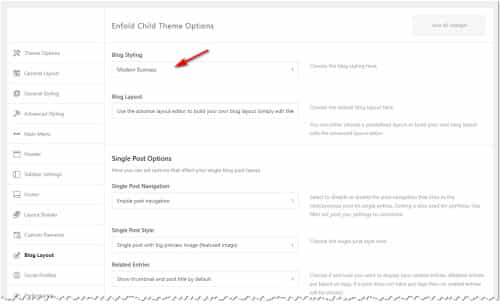
One last point is that on my demo site the blog style is set to Modern Business at Enfold Theme Options ▸ Blog Layout ▸ Blog Styling, if you use a different layout this may look a little different for you.
Also please note that my demo portfolio items were created with the Advanced Layout Builder so to show the excerpts I had to manually add them into the Excerpt Field. To use this option go to your portfolio item, and at the top of the page click “Screen Options” and choose the “Excerpt” box.

I linked to my test page below.Best regards,
MikeHey Nic_007,
Please see the Layout admin side panel Header visibility and transparency and try the Transparent & Glassy Header option. If this doesn’t add enough opacity for you we can suggest some css to increase this option.

Best regards,
MikeHi,
Thanks for the link to your site, please try this css:@media only screen and (max-width: 767px) and (orientation: portrait) { #top #wrap_all #header_main {background-color: transparent;} .responsive #top #wrap_all #header {height: 0;} .responsive #top #wrap_all .main_menu {top: 32px;} } @media only screen and (max-width: 890px) and (orientation: landscape) { #top #wrap_all #header_main {background-color: transparent;} .responsive.html_mobile_menu_tablet #top #wrap_all #header {height: 0;} .responsive #top #wrap_all .main_menu {top: 32px;} .html_header_top.html_main_nav_header #top .av_menu_left .main_menu .av-main-nav-wrap {left: 100%;transform: translateX(-50%);} .html_mobile_menu_tablet .header_color div .av-hamburger-inner, .html_mobile_menu_tablet .header_color div .av-hamburger-inner::before, .html_mobile_menu_tablet .header_color div .av-hamburger-inner::after {background-color: #CC0000;} .html_header_top.html_main_nav_header.av-burger-overlay-active #top .av_menu_left .main_menu .av-main-nav-wrap {left: 96%;transform: unset;} }After applying the css, please clear your browser cache and check. Please see the screenshot in the Private Content area of the expected results.
Best regards,
MikeHi,
Are you still using PHP 5.5?
If you have updated your PHP then try to follow this thread.
According to this threadThe error indicates an issue with the certificate that your web server is serving. Please contact your hosting company support to fix the certificate of a server for you.
But if you are still using PHP 5.5 then that would be the first thing to correct. Please see PHP Compatibility and WordPress Versions starting with WordPress 5.2, WordPress has Dropped support for PHP 5.5.
Best regards,
MikeHi,
Glad we were able to help, if you have any further questions please create a new thread and we will gladly try to help you. Thank you for using Enfold.Best regards,
MikeDecember 10, 2022 at 2:00 pm in reply to: Blog list, keep article extract CSS in the Blog List view #1375767Hi,
Glad we were able to help, if you have any further questions please create a new thread and we will gladly try to help you. Thank you for using Enfold.Best regards,
Mike -
AuthorPosts
