

Forum Replies Created
-
AuthorPosts
-
Hey Munford,
This sounds like your web host has not enabled the PHP ZipArchive Extension You can check if the PHP ZipArchive Extension is installed by going to the layerslider dashboard and clicking the three dots in the upper right corner and click the System Status

then look under the Server Settings to see if PHP ZipArchive Extension is enabled.

If it is not enabled you will need to ask your web host to enable.Best regards,
MikeHi,
Glad we were able to help adjust this for you, if you have any further questions please create a new thread and we will gladly try to help you. Thank you for using Enfold.Best regards,
MikeHi,
I’m unable to login due to this error:500 (Internal Server Error)please check your server error logs to find the issue.
I did see that you were getting a 404 error for the 3 icon fonts that are related to your error: /avia_fonts/justice/ I uploaded them for you via FTP.Best regards,
MikeHey OguenKingInternet,
This is typically due to a plugin, try disabling all of your plugins then reactivate each one individually until you find the cause.Best regards,
MikeHey Sebastian,
Thanks for your question, I don’t have much experience with Polylang, but I believe I have a workaround for the Modal Window Custom Content
I added text for both DE & EN to my Modal Window Custom Content Tab Label & Tab Content wrapping the text with spans and a custom language class, like this:<span class="lang-de">...</span> <span class="lang-en">...</span>
Then I added this css to my WordPress ▸ Customize ▸ Additional CSShtml[lang="en-US"] .lang-de { display: none; } html[lang="de-DE"] .lang-en { display: none; }and when my site language is EN the Modal Window Custom Content popup shows only the EN text:

and same for DE

Perhaps someone else will know how to get Polylang to translate the Modal Window Custom Content popup, but hopefully this will help.Best regards,
MikeHi,
It’s been a while since I helped you create this, so I tried to recreate this on my test site and found that changing the label in the function to di like this works correctly:echo '<p> di : ' . $value . '</p>';

But after re-reading the original support thread after this solution was created you asked for the author’s name to be also linked.
So I believe you are not using this function and you are using the script instead.
In this case please add this script to your child theme functions.php:function custom_replace_autore_script() { ?> <script> window.addEventListener('DOMContentLoaded', function() { (function($){ $('.pa-autore .autore-label').contents().filter(function() { return this.nodeType == 3 }).each(function(){ this.textContent = this.textContent.replace('Autore','di'); }); })(jQuery); }); </script> <?php } add_action('wp_footer', 'custom_replace_autore_script');the expected results:

Best regards,
MikeHi,
I see that you are using Enfold v5.3.1.1 with updates disabled, please update to v5.5
If you have trouble enabling a Token that allows you to update within the theme then please follow these steps to manually update:
To update download the latest installable WP version from your Theme Forest account and upload it to your WordPress ▸ Appearance ▸ Themes ▸ Add Themes ▸ Add New

after you choose the zip file and click install, you will see a This theme is already installed message because you are updating, you can continue

then you will see the Theme updated successfully message.

Best regards,
MikeHi,
Glad Rikard could help, if you have any further questions please create a new thread and we will gladly try to help you. Thank you for using Enfold.Best regards,
MikeHey Munford,
Thank you for the link to your site please try adding this css to your Enfold Theme Options ▸ General Styling ▸ Quick CSS field:#top.av-framed-box.page-id-110 .av-submenu-container { left:0px; border-style: none; } #top.av-framed-box.page-id-110 .av-subnav-menu > li > a { border-left-style: none; }After applying the css, please clear your browser cache and check.
Best regards,
MikeHi,
Glad we were able to help, if you have any further questions please create a new thread and we will gladly try to help you. Thank you for using Enfold.Best regards,
MikeApril 2, 2023 at 3:12 pm in reply to: Avia Builder / Masonry Gallery: miniatures in the editor #1403291Hi,
The Dev Team replies: There is an option “Short description for backend” in Advanced -> Developer Settings. Here you can enter a short description for the masonry. This should help most users. There is currently no plan in near future to extend the canvas layout because this is pretty complicated.Best regards,
MikeHi,
As Guenni007 points out, you can set the social icons in the topbar at Enfold Theme Options ▸ Header ▸ Extra Elements ▸ Header Social Icons ▸ Display in top bar at the right and Enfold Theme Options ▸ Header ▸ Extra Elements ▸ Header Secondary Menu ▸ Secondary Menu in top bar at the left


The button style doesn’t show but you could adjust with css to suit your needs.Best regards,
MikeApril 2, 2023 at 2:55 pm in reply to: Avia Builder / Masonry Gallery: miniatures in the editor #1403289Hey synkrown,
Thank you for your patience but this is not a feature, it would make the element take more space in the backend, but I have submitted your feature request to the Dev Team for review, I will reply when I hear from them. Thank you for your patience and for using Enfold.Best regards,
MikeHi,
Glad Ismael could help, if you have any further questions please create a new thread and we will gladly try to help you. Thank you for using Enfold.Best regards,
MikeHey hyrion,
Perhaps you didn’t see the included buoy icon:

Otherwise the icon you download as a SVG to upload to fontello in the “custom icons” section must be black & white, no colors.
Try this thread: The Fontello site is a bit picky about the compound path.
If you want to use color icons see this thread
If you still are having issues please include an admin login in the Private Content area so we can be of more assistance.Best regards,
MikeHi,
Glad we were able to help, if you have any further questions please create a new thread and we will gladly try to help you. Thank you for using Enfold.Best regards,
MikeHi,
Thank you for the link to your site, I found that you had jQuery loading in your footer via the theme settings so I adjusted the script and now it is working, please clear your browser cache and check.Best regards,
MikeHi,
Thanks for the feedback, please Enable Avia Layout Builder Debugger in your child theme functions.php, I tried but received a message that it must be done via SFTP on your server.//set builder mode to debug add_action('avia_builder_mode', "builder_set_debug"); function builder_set_debug() { return "debug"; }Best regards,
MikeHi,
Please include an admin login in the Private Content area so we can examine.Best regards,
MikeApril 2, 2023 at 1:59 pm in reply to: How to use lightbox for videos/images as media element in Accordion-toggle? #1403280Hey MyWin,
To add an image in the accordion toggle that will open in a lightbox, use the add media button above the text field

choose your image and in the ATTACHMENT DISPLAY SETTINGS choose Link to media file

now clicking on the image will open it in a lightbox

To open a video in a lightbox, choose an image as your video thumbnail and in the ATTACHMENT DISPLAY SETTINGS choose Link to Custom URL and add your link, if using YouTube use this format:https://www.youtube.com/watch?v=G0k3kH
now clicking on the image will open the video in a lightbox.Best regards,
MikeHey Monika,
Thanks for your patience and the link to your site please try adding this css to your Enfold Theme Options ▸ General Styling ▸ Quick CSS field:@media only screen and (min-width: 768px) and (max-width: 989px){ #header_main .logo svg { width: 120px; } }After applying the css, please clear your browser cache and check.
Best regards,
MikeHi,
Glad we were able to help, if you have any further questions please create a new thread and we will gladly try to help you. Thank you for using Enfold.Best regards,
MikeHey cambium.digital,
Thank you for your patience, the file to edit to add the categories to the Latest News widget is:
/wp-content/themes/enfold/framework/php/widgets/widget-classes/class-avia-newsbox.php
on line 219 (v5.5) look for:
echo '<strong class="news-headline">' . get_the_title();
below this add:echo '<br />'; $cats = get_the_category(); foreach ( $cats as $cat ) { echo '<span class = "widget_latest_category">'.$cat->cat_name.'</span> '; }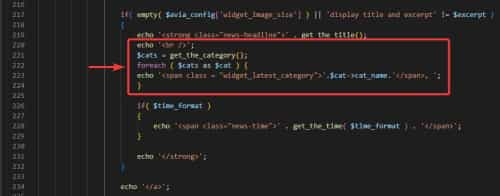
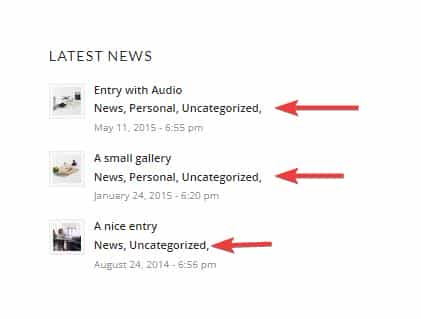
If you don’t want the date to show place two slashes before the lineecho '<span class="news-time">' . get_the_time( $time_format ) . '</span>';like this://echo '<span class="news-time">' . get_the_time( $time_format ) . '</span>';
Typically files in the /framework/ directory can not be added to a child theme and copying the function directly to the child theme functions.php was not successful.Best regards,
MikeHi,
Try changing the di in the function that gets the labeladd_action( 'woocommerce_single_product_summary', 'product_attribute_dimensions', 25 ); function product_attribute_dimensions(){ global $product; $taxonomies = array('pa_authors'); foreach($taxonomies as $taxonomy){ $value = $product->get_attribute( $taxonomy ); if ( $value ) { $label = get_taxonomy( $taxonomy )->labels->singular_name; echo '<p>' di ': ' . $value . '</p>'; } } }
Best regards,
MikeHi,
Thanks for the screenshot and the link to your site, please try adding this css to your Enfold Theme Options ▸ General Styling ▸ Quick CSS field:#top #main .avia_ajax_form .text_input, #top #main .avia_ajax_form .select, #top #main .avia_ajax_form .text_area { border-radius: 0; }After applying the css, please clear your browser cache and check.
Best regards,
MikeHi,
Your developer can examine the file at \enfold\includes\related-posts.php it uses tags to show the related posts.
Another option would be to create your tags specific to the items you want to show.Best regards,
MikeApril 1, 2023 at 9:17 pm in reply to: Problem with Magnific-Popup – Popup links to another popup #1403248Hi,
Thanks for the screenshots please include a link to your page so we can examine, an admin login in the Private Content area may also be helpful.Best regards,
MikeHey envisageiam,
Thank you for the link to your site I see that you are using two sliders and two sections below them, one set for mobile and one set for desktop please try arranging the elements so they are like this:
mobile slider
mobile section
desktop slider
desktop section
I believe this will correct the z-index issue.Best regards,
MikeApril 1, 2023 at 8:52 pm in reply to: Fullwidth Submenu in standard Woocommerce single product page #1403244Hey Illingco,
Thanks for your patience and the link to your site, as I understand your question you would like to add a full-width sub-menu element to all of your single product pages.
First you will need the shortcode for the full-width sub-menu element, to get this Enable the Avia Layout Builder Debugger and on a new page use the Advanced Layout Builder to create your full-width sub-menu element, then in the debugger field below the ABL you will see the shortcode, save this to a plain text editor and discard the page. Then remove any line breaks in the shortcode and add it to this function in your child theme functions.php:add_action('ava_after_main_container', 'ava_after_main_title_mod'); function ava_after_main_title_mod() { if(is_product()) { echo do_shortcode("[your submenu shortcode here]"); } }The expected results

Best regards,
Mike -
AuthorPosts
