

Forum Replies Created
-
AuthorPosts
-
Hi,
Glad we were able to help, if you have any further questions please create a new thread and we will gladly try to help you. Thank you for using Enfold.Best regards,
MikeHi,
Glad we were able to help, if you have any further questions please create a new thread and we will gladly try to help you. Thank you for using Enfold.Best regards,
MikeOctober 4, 2023 at 12:05 pm in reply to: Apply custom link to the whole box of a portfolio grid #1421375Hi,
Glad we were able to help, if you have any further questions please create a new thread and we will gladly try to help you. Thank you for using Enfold.Best regards,
MikeOctober 4, 2023 at 12:05 pm in reply to: Enfols multilanguage site using child and parents sub-directories on WP basis #1421374Hi,
Glad we were able to help, if you have any further questions, or run into any snags adding your other two languages please create a new thread and we will gladly try to help you. Thank you for using Enfold.Best regards,
MikeHi,
To import the band.xml file you will need to go to WordPress ▸ Tools ▸ Import ▸ WordPress and manually upload the file to WordPress.
Unfortunately though since OVH won’t whitelist our site the images in the band.xml file may not import.
You could try creating a localhost wordpress site on your computer and then import the demo, and then use the plugin Duplicator to move it to your OVH host.Best regards,
MikeHi,
Glad we were able to help sort this out, I linked to the version below, once you download the file please let us know so we can close this thread.Best regards,
MikeOctober 3, 2023 at 6:21 pm in reply to: Enfols multilanguage site using child and parents sub-directories on WP basis #1421309Hi,
I believe that I already solved the “line 2” error, at least I don’t see it anymore, I checked all three sites, I solved it by correctly the code on the page.
If you see the editor error again, switch to the Advanced Layout Builder and save the page again, if this doesn’t help you will need to use the page revisions and go back to a version before the last save, so you may lose some of your last edits.
Whenever you open a ALB page and don’t see the ABL toolbar please use the ALB button to switch to it before saving to page.Best regards,
MikeHi,
To bring the articles in the sidebar closer together, try this CSS in your Enfold Theme Options ▸ General Styling ▸ Quick CSS field:.sidebar .widget { padding: 30px 0 0 0; }There is a way to ensure that the page URL becomes /podcasting/ when you are ready to delete the old page and switch to using the test page, I will do it for you when you are ready.
Please check if the above css helps and you are happy with the test page on desktop & mobile, and let us know if you want any more adjustments.Best regards,
MikeOctober 3, 2023 at 5:59 pm in reply to: Label for post types creating a link in Avia Builder #1421307Hi,
Is this screenshot in the backend? I believe that you can edit the language file for your language with Poedit, the language files are at enfold/lang/Best regards,
MikeHi,
I removed the links.
As I see the fisrt one is a Advanced Layout Builder page and the second one is a category archive page, the the setting that ypu are referring to doesn’t modify archive pages.
So the category page will not look like the first page, this is not an error.
If originally they did look alike then someone manually edited some files and when you updated the modifications were lost, if this is the case then you should try to find a server backup and restore the site to before the update and try to figure out what files were modified and evaluate how to move forward from there.Best regards,
MikeOctober 3, 2023 at 1:22 am in reply to: Enfols multilanguage site using child and parents sub-directories on WP basis #1421218Hi,
Yes it is also called the default editor, the WordPress default editor has two choices at Enfold Theme Options ▸ Select Your Editor the Classic Editor & the Block Editor, this is the one that you are currently using. I’m just in the Habit of specifying the one used. when I write.
This thread is very long now, and it seems like we have covered creating a multi-language site using sub-directories fairly well now, did you have any more questions on this, or do you feel comfortable if we closed this thread?Best regards,
MikeHi,
Oh I see, as I review the posts above, the staging site doesn’t produce the issue, this layout on the staging site is correct:
* removed by request *
this layout from the live site for the same page is wrong:
* removed by request *
and you have tried to disable all of the plugins and reviewed all of the settings without success?
It is very strange that you created a staging site from the live site with the error and the error doesn’t occur.
Typically a staging site will copy and create a new database from the original, try changing the database that the staging site uses to the live site in the wp-config.php file and check the layout on the staging site. Perhaps it is an error in the live database?
If the staging site is correct, is repacing the live site with it an option?Best regards,
MikeHi,
Oh I see, the test page that I created should look good for all devices, desktop & mobile, please review the page and if you agree then you can trash your original page and rename the test page to use it. If you find something that you don’t like about the test page on desktop please let us know so we can help, but I don’t see a major difference between the two on desktop. I only see some very minor padding and spacing differences when I have the two in different tabs and switch back and forth, hopefully this minor spacing is not troublesome for you.Best regards,
MikeOctober 2, 2023 at 7:03 pm in reply to: Enfols multilanguage site using child and parents sub-directories on WP basis #1421191Hi,
I checked all three sites and made the adjustments needed, the white space around the EN site slider looks like was caused by the page being saved as a “Block Editor” page instead of the Advanced Layout Builder that it is, I corrected. Please note that ALB pages should not be edited or saved with the Block Editor.
Please check your sites.Best regards,
MikeHi,
Sorry I’m not sure what you mean, are you seeing the same as in my screenshot above? What part is rounded? Perhaps including a screenshot would help.Best regards,
MikeHi,
Glad we were able to help, if you have any further questions please create a new thread and we will gladly try to help you. Thank you for using Enfold.Best regards,
MikeHi,
Unfortunately I don’t know of any database setting for this, it sounds like a conflit somewhere, your best approach is to manually make the tweek for each user.
I would not recommend rolling back to any 4.x version they are not WP6 ready and I would expect a lot of errors. I recommend staying with v5.6.6 and manually make this minor tweek.Best regards,
MikeHi,
1: I adjusted this css from 50% to 55% and it seems better, if you want more space try 60%

2: I added this css:.main_color .sidebar p { color: #000; }3: I view the podcasting test page on my Android and with Chrome Dev Tools, please see this article, is this what you mean?
Best regards,
MikeHi,
I looked at your site and the Advanced Layout Builder is showing, are you refuring to another site now?
I don’t think that you need to roll back to another version, as we have not had any reports of this issue and can not reproduce this on our site.
Perhaps there is a plugin conflict? If the check box is hidden from you try changing the display and then check it and you will probably not have any other issues.
If you really want to roll back tell us which version you want and we will give you a link.Best regards,
MikeHey Martijn,
Try this CSS in your Enfold Theme Options ▸ General Styling ▸ Quick CSS field:@media only screen and (max-width: 767px) { .responsive #top #wrap_all #header { background-color: transparent; } }the expected results:
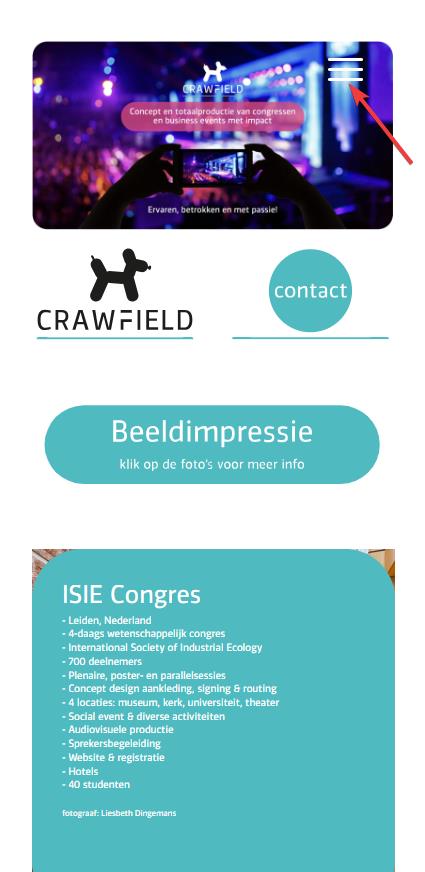
Best regards,
MikeHi,
Try this CSS in your Enfold Theme Options ▸ General Styling ▸ Quick CSS field:@media only screen and (max-width: 989px) { .team-social-inner { top: 25%; } .responsive.av-no-preview #top .avia-team-member .team-social { height: 100px; } }the expected results:
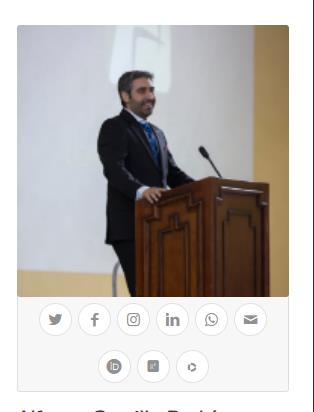
Best regards,
MikeHey SimonePols,
Thank you for the link to your site, I see that this is a LearnPress CPT created with the Classic Editor, I’m not familiar with LearnPress, it looks like you don’t have an option to choose a template in the Page Attributes that WordPress gives to pages:

and since it is not a Advanced Layout Builder page you can’t remove the header and footer with the Layout options

Perhaps try asking the LearnPress support how you can achieve this, as they would know more about this than us.
Or you can try this css to remove the header, footer and inner elements, except the title and your video from your single-lp_lesson pages:.single-lp_lesson .lp_lesson .blog-meta, .single-lp_lesson .lp_lesson .av-vertical-delimiter, .single-lp_lesson .lp_lesson .post-meta-infos, .single-lp_lesson .lp_lesson .av-social-sharing-box { display: none !important; } .single-lp_lesson .container_wrap_first { height: 100vh !important; } .single-lp_lesson #header, .single-lp_lesson #socket, .single-lp_lesson .wpautoterms-footer { display: none !important; }Perhaps this will help, Please see the screenshot in the Private Content area.
Best regards,
MikeHi,
Glad to help, so on the /podcasting-test/ page you are not seeing Steve’s Podcasting Articles under the Podcast “Aircheck” like this?

I see this in chrome dev tools emulating a mobile device and in my Android mobile.
Please note that testing with iPads & iPhones can be hard to clear the cache, often you need to also clear the history to fully purge the cache, following these steps for Safari and note Step 4 where you will Clear the History.
What device are you using? Perhaps try disabling your maintenance mode and check again.
I added the css to your WordPress ▸ Customize ▸ Additional CSS perhaps this will help your device.Best regards,
MikeHi,
Glad we were able to help, if you have any further questions please create a new thread and we will gladly try to help you. Thank you for using Enfold.Best regards,
MikeHi,
Thank you for the link to your site, I found that you are not using a child theme and I didn’t see any other code snippet plugins, so I added the WPcode plugin this plugin supports PHP code snippets, JavaScript code snippets, & CSS code snippets.
I then added the function temporary_removal_title_tags and cleared my browser cache and now the titles are not shown on mouse-over:

please clear your browser cache and check. Please note Safari can be hard to clear the cache, often you need to also clear the history to fully purge the cache, following these steps for Safari and note Step 4 where you will Clear the History.Best regards,
MikeHi,
Sorry I don’t see it posted here, please post in the Private Content area below.
Try going to the support forum and reply the thread there and not via email, if that is what you are doing.Best regards,
MikeHi,
Thank you for the link to your site, I see the css from the other thread is in your Quick CSS:#top #wrap_all .avia-slideshow .av-slideshow-caption .avia-caption-title { font-size: 36px; } #top .avia-slideshow .avia-caption-content p { font-size: 20px; }and on your /news/ page you are only using 8 slides, when I change to 12 by cloning the last iten 4 more times and clear my browser cache and check with Windows in Chrome, Firefox, & Edge & Mac in Safari, Chrome, Firefox all items show correctly.
Perhaps when you added the other items your cache was not fully cleared, Please note that Safari can be hard to clear the cache, often you need to also clear the history to fully purge the cache, following these steps for Safari and note Step 4 where you will Clear the History.
I removed the extra items, please try adding the new slides that you want and clear your cache, perhaps a couple of times, and if that doesn’t help please let us know so we can look and help.Best regards,
MikeHi,
As I understand your last message this thread can be closed, correct?Best regards,
Mike -
AuthorPosts
