

Tagged: .tff fonts, .woff fonts, import fonts
-
AuthorPosts
-
December 1, 2025 at 3:31 pm #1491986
hi
I am trying to upload a font called Block Berthold from a woff or tff file, but it’s not working.
I have compresseed the file from an .otf file, and then compressed the single blockberthold.ttf file into a .zip file called blockberthold.ttf.zip.
When I import it, it just comes up as a Font: MACOSX ( font-family: macosx ) and not the real font.
Can you help with this? I have imported other fonts on the site without problems.
thanks
NancyDecember 1, 2025 at 3:45 pm #1491989I added this but it still is not showing up.
@font-face {
    font-family: 'block_bertholdregular';
    src: url('blockberthold.ttf') format('truetype');
    font-weight: normal;
    font-style: normal;
}
December 1, 2025 at 5:39 pm #1491992Hi,
Did you check the documentation on how to upload fonts? https://kriesi.at/documentation/enfold/typography/#how-to-upload-custom-fonts
Best regards,
RikardDecember 1, 2025 at 6:34 pm #1491993yes and have tried with blockberthold.woff, blockberthold.woff2, blockberthold.tff all generated @fontquirrel from my blockberthold.otf file, then compressed as zip files and imported. I only have a single font (not variants) I and already have another font on the site that I uploaded.
I tried with use any font plugin as well, but the enfold settings seemed to override those settings so I deactivated it. I can’t see what the problem is.December 1, 2025 at 10:41 pm #1491997did you get this file from here: https://online-fonts.com/fonts/block-berthold
December 1, 2025 at 11:14 pm #1492001mo, my client sent me the .otf file
December 1, 2025 at 11:27 pm #1492002use the font-manager of enfold – it works great – even for variable fontfiles
first – if you compress your font-files on a mac (OSX) it will include even the typically non visible files on OSX folder. This is what you see – when you are talking about Font: MACOSX ( font-family: macosx ).
But your font-file of berthold should be there too.I do not know if fontsquirrel can convert otf files of variable Fonts to ttf or woff2.
just one moment – i’m looking for an older post of mine. …
https://kriesi.at/support/topic/how-to-submit-and-use-custom-fonts/#post-1470894
you can download that script app – just place it on your desktop – and drag & drop files there to zip.
Or use keka to compress your font folder. And do not include invisible files
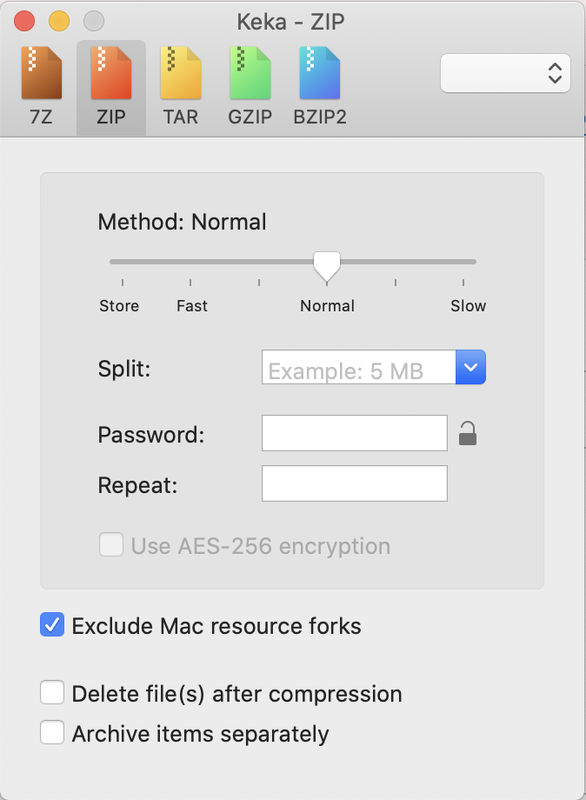
after compression it should show inside that font zip file only the fonts – and nothing else:
 December 1, 2025 at 11:46 pm #1492003
i’ll try that but it’s just the regular variation and font squirrel seemed to convert it to .woff snd .ttf without issue.
December 2, 2025 at 12:03 am #1492006Yes – but that downloaded zip file from fontsquirrel is not the neede zip for uploading it to enfold fontmanager.
You had to pull out the fontfiles into a separate folder and compress that folder for uploading.December 2, 2025 at 12:21 am #1492007 -
AuthorPosts


- The topic ‘trouble importing .tff or .woff fonts’ is closed to new replies.