

Tagged: overlay, secondary menu
-
AuthorPosts
-
January 16, 2026 at 10:44 am #1494014
Hello,
I’m trying to make a website for a client faster, and in order to do that I’m removing various plugin.
I’m wondering if it’s possible to create an overlay menu (like the mobile version) which enter from a side with conditional content.
this is the actual page and if you click on the “taglie” black button on the left you’ll se an overlayer coming from the right, same as the mobile menu style, with a specific content, in this case for a leash. If you go on a collar you’ll se a different content and so on.This flyout plugin made me create various flyout with an id and I created a fuction to let the right flyout be seen on the page
function flyout_custom_restrictions( $skip, $flyout_id ) {
if( $flyout_id == '11367' ) {
		if( strpos( $_SERVER['REQUEST_URI'], '/guinzagli/regular/guinzaglio-' ) !== false ) {
			$skip = false;
		} else {
			$skip = true;
		}
	}
	if( $flyout_id == '23943' ) {
		if( strpos( $_SERVER['REQUEST_URI'], '/outlet/guinzaglio-regular' ) !== false ) {
			$skip = false;
		} else {
			$skip = true;
		}
	}
So I get the right id accordingly to the url I’m seeing, which contain the relative category.
Sadly this plugin I’m using is old and no more supported and I would like to recreate it exactly like the mobile menu in overlay.January 17, 2026 at 3:54 pm #1494037Hey SurigliaStudio,
When I test your site the “Taglie” button doesn’t create a mobile style flyout menu, I assume that you now have the plugin disabled, but I think that I understand. I have created a custom function that will create a mobile style overlay menu from a sticky button on the right using a image that you can choose:


and on mobile the overlay is about 95% of the screen.
The function uses the Named Menus from your WordPress menus to show:
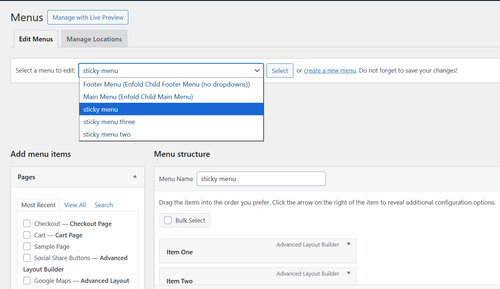
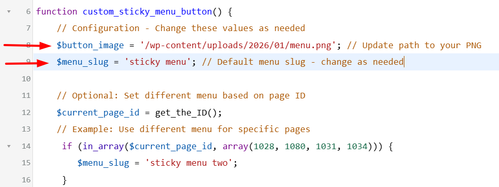
In Configuration there is a line to choose your menu image/icon and the default menu to show on all pages:
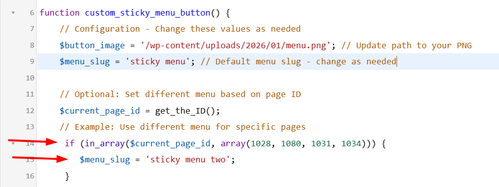
and below you can add as many additional menus with an array of pages that they will show on:
The code also has all of the css built-in for styling if you want to adjust.
Add this code to your child theme functions.php file, if you are not using a child theme you could use the WP Code plugin then add a new snippet, in the top right corner use the PHP snippet as the code type:
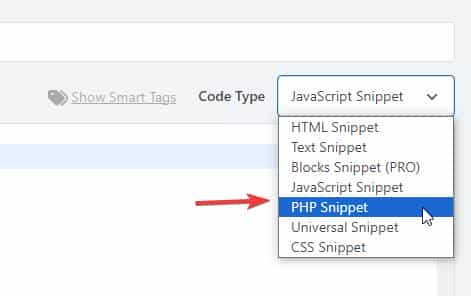
then add the above code and save./** * Add Sticky Button with Fly-out Menu * Add this to your Enfold child theme's functions.php */ function custom_sticky_menu_button() { // Configuration - Change these values as needed $button_image = '/wp-content/uploads/2026/01/menu.png'; // Update path to your PNG $menu_slug = 'sticky menu'; // Default menu slug - change as needed // Optional: Set different menu based on page ID $current_page_id = get_the_ID(); // Example: Use different menu for specific pages if (in_array($current_page_id, array(1028, 1080, 1031, 1034))) { $menu_slug = 'sticky menu two'; } if (in_array($current_page_id, array(1376, 1331, 1277, 1283))) { $menu_slug = 'sticky menu three'; } // Get the menu $menu_items = wp_get_nav_menu_items($menu_slug); if (!$menu_items) { return; // Exit if menu doesn't exist } ?> <!-- Sticky Button --> <div id="sticky-menu-btn" class="sticky-menu-button">" alt="Menu"> </div> <!-- Fly-out Menu Overlay --> <div id="flyout-menu-overlay" class="flyout-menu-overlay"> <div class="flyout-menu-close">×</div> <nav class="flyout-menu-content"> <?php wp_nav_menu(array( 'menu' => $menu_slug, 'container' => false, 'menu_class' => 'flyout-nav-menu', 'fallback_cb' => false )); ?> </nav> </div> <style> /* Sticky Button Styles */ .sticky-menu-button { position: fixed; right: 20px; top: 50%; transform: translateY(-50%); width: 50px; height: 50px; border-radius: 50%; cursor: pointer; z-index: 9998; transition: opacity 0.3s ease; box-shadow: 0 2px 10px rgba(0,0,0,0.3); overflow: hidden; } .sticky-menu-button img { width: 100%; height: 100%; object-fit: cover; } .sticky-menu-button.hidden { opacity: 0; pointer-events: none; } /* Fly-out Menu Overlay */ .flyout-menu-overlay { position: fixed; top: 0; right: -100%; width: 25%; height: 100vh; background: #fff; z-index: 9999; transition: right 0.4s ease; box-shadow: -2px 0 10px rgba(0,0,0,0.2); overflow-y: auto; } .flyout-menu-overlay.active { right: 0; } /* Close Button */ .flyout-menu-close { position: absolute; top: 20px; right: 20px; font-size: 36px; cursor: pointer; color: #333; width: 40px; height: 40px; display: flex; align-items: center; justify-content: center; line-height: 1; transition: color 0.3s ease; } .flyout-menu-close:hover { color: #000; } /* Menu Content */ .flyout-menu-content { padding: 80px 30px 30px; } .flyout-nav-menu { list-style: none; margin: 0; padding: 0; } .flyout-nav-menu li { margin: 0 0 15px 0; } .flyout-nav-menu a { display: block; padding: 12px 0; color: #333; text-decoration: none; font-size: 16px; transition: color 0.3s ease; border-bottom: 1px solid #eee; } .flyout-nav-menu a:hover { color: #000; } /* Sub-menu styles */ .flyout-nav-menu .sub-menu { list-style: none; margin: 10px 0 0 20px; padding: 0; } .flyout-nav-menu .sub-menu a { font-size: 14px; padding: 8px 0; } /* Mobile Styles */ @media (max-width: 768px) { .flyout-menu-overlay { width: 95%; } } </style> <script> (function() { var btn = document.getElementById('sticky-menu-btn'); var overlay = document.getElementById('flyout-menu-overlay'); var closeBtn = document.querySelector('.flyout-menu-close'); // Open menu btn.addEventListener('click', function() { overlay.classList.add('active'); btn.classList.add('hidden'); document.body.style.overflow = 'hidden'; // Prevent body scroll }); // Close menu closeBtn.addEventListener('click', function() { overlay.classList.remove('active'); btn.classList.remove('hidden'); document.body.style.overflow = ''; // Restore body scroll }); // Close on overlay click outside menu overlay.addEventListener('click', function(e) { if (e.target === overlay) { overlay.classList.remove('active'); btn.classList.remove('hidden'); document.body.style.overflow = ''; } }); })(); </script> <?php } add_action('wp_footer', 'custom_sticky_menu_button');
Adjust the image, menus, and page IDs to suit.
Best regards,
MikeJanuary 21, 2026 at 8:33 pm #1494139nice …
January 21, 2026 at 10:36 pm #1494142 -
AuthorPosts


- You must be logged in to reply to this topic.