Viewing 30 results - 2,881 through 2,910 (of 142,850 total)
  • Author
    Search Results
  • #1473382

    In reply to: MEGA MENU COLUMNS

    And maybe you decide to have the burger-menu on top:

    #top #header #av-burger-menu-ul {
      vertical-align: top;
      padding: 125px 0 !important;
    }
    #1473375

    Hi Rikard,

    You can close the topic.
    Thank you for your support.

    Best regards,
    Vera

    #1473370
    Nick_Skehan
    Participant

    Hi.
    I have a few different user Roles and I want to hide certain elements on the homepage based on the Role.

    Have a look at the Home page. When I log in as a certain user, the elements are hidden, but the spaces are left where they were, making the layout have gaps all over where the elements have been removed.

    The following is what I have tried, but I am not sure if I am targeting the correct elements.

    JavaScript:
    document.addEventListener(“DOMContentLoaded”, function () {
    console.log(“Custom.js is running”);
    console.log(“User Data:”, userData);

    const userRole = userData.role.toLowerCase(); // Convert role to lowercase for comparison
    console.log(“User Role:”, userRole);

    if (userRole === “mrpi_user”) {
    console.log(“Role matches MRPI User. Waiting for elements to load…”);

    const interval = setInterval(function () {
    // Specify the elements to remove
    const elementsToRemove = [
    document.getElementById(“Wholesaler_Element_Homepage”),
    document.getElementById(“Products_Element_Homepage”),
    ];

    let allElementsFound = true;

    // Loop through the elements to remove
    elementsToRemove.forEach(function (element) {
    if (element) {
    console.log(“Removing element:”, element);
    element.remove(); // Remove the specific element
    } else {
    console.log(“Element not found yet.”);
    allElementsFound = false; // Keep checking if any element is not found
    }
    });

    // Stop checking when all elements are removed
    if (allElementsFound) {
    clearInterval(interval);
    }
    }, 100); // Check every 100ms
    } else {
    console.log(“Role does not match. Skipping element removal.”);
    }
    });

    CSS:

    #av_section_2 {
    display: flex; /* Enable flexbox layout */
    flex-wrap: wrap; /* Allow items to wrap to the next row if necessary */
    justify-content: flex-start; /* Align items to the left */
    padding: 0; /* Remove internal padding */
    margin: 0; /* Remove external margins */
    height: auto; /* Adjust height dynamically */
    gap: 10px; /* Optional: Add spacing between items */
    }

    #av_section_2 > .flex_column {
    flex: 1 1 auto; /* Allow items to grow and shrink dynamically */
    margin: 0; /* Remove margin between elements */
    padding: 0; /* Remove internal padding */
    }

    HTML:
    <div id=”Wholesaler_Element_Homepage”></div>
    <div id=”Products_Element_Homepage”></div>

    #1473367

    Hi,

    Great, I’m glad that Ismael could help you out. Please let us know if you should need any further help on the topic, or if we can close it.

    Best regards,
    Rikard

    #1473363

    Hi Guenni007

    Thank you very much for your quick reply. It works :-)
    You can close this topic.

    Best regards
    Bernd

    #1473352

    Hi,

    Thank you for the update.

    You can use this css code to adjust the height of the lightbox container:

    .mfp-iframe-scaler {
        padding-top: 100%;
    }
    

    Default top padding is 50%.

    Best regards,
    Ismael

    #1473347

    Hi,

    Thank you for the update.

    1. Remove the text Share This Entry
    2. Remove the Hover Tabs “link to facebook” etc
    3. Make the icons smaller – one one line?

    Please add the following css code to adjust the social icons based on your requests above:

    #top #footer-page .av-social-sharing-box:not(.av-social-sharing-box-default) .av-share-box ul li .avia-related-tooltip.avia-tt {
        display: none !important;
    }
    
    #top #footer-page .av-social-sharing-box:not(.av-social-sharing-box-default) .av-share-box ul {
        display: flex;
    }
    
    #top #footer-page .av-social-sharing-box.av-social-sharing-box-same-width .av-share-box ul li a {
        width: 30px;
        height: 30px;
    }
    
    #top #footer-page .av-share-box ul li a {
        display: block;
        padding: 2px 0;
        text-decoration: none;
        color: inherit;
        font-size: 11px;
        transition: all 0.2s ease-in-out;
    }

    4. Change the background color of the icons and icon color?

    Then use this css code to adjust the background and color of the social icons — note the selector “.av-social-link-facebook” when modifying other social icons.

    #top #footer-page .av-social-sharing-box.av-social-sharing-box-color-bg .av-social-link-facebook a {
        color: #fff;
        background-color: #37589b;
    }
    

    Best regards,
    Ismael

    #1473329

    Hello Ismael – yes I added that code, as per the code I posted to you, you can see it in the first line. What I am trying to do is create a video scrubber scrolling effect. This requires the container to be at that height, so the scroll is tied to the video position (see rest of code). Then to remove the height so it works similarly to parallax then we use section.vid div.holder {position:sticky!important; top:0!important;}. Making the screen stick to enable the scrolling video. However the problem is that Enfold automatically generates container tags around a code block. Therefore these div containers are also being set at that height of the section.vid box. My original question was how do we insert code without the container tags being generated, which would be the cleanest method. If that is not possible, then is there another solution to make the container tags also the same size? Any ideas appreciated. Thanks, Philip.

    #1473317

    In reply to: MEGA MENU COLUMNS

    maybe you can get comfortable with not having all top-level menu items open with a drop down.
    You could, for example, only have one of them open at a time. When you click on another one, the one open menu item closes.

    #1473300

    Hi,

    Great, I’m glad that we could help. Please let us know if you should need any further help on the topic, or if we can close it.

    Best regards,
    Rikard

    #1473299

    Hi,

    Thanks for the update. Please let us know if you should need any further help on the topic, or if we can close it.

    Best regards,
    Rikard

    https://kriesi.at/documentation/enfold/intro-to-layout-builder/#customization

    This is a real good docu – unfortunately, there is too little research being done here

    PS : above there are the two lines listed ( 876 and 877 newest Enfold 6.0.8) – but only the 876 has been changed .
    but i guess it is easier to replace that little block of those two lines.

    #1473282
    CaptOM89
    Participant

    Hello,
    I published a post this morning and, for the first time in going on 20 years of using Enfold, it didn’t appear at the top, or indeed anywhere, on my News page. It can be found at it’s own URL, and appears on at the top of the “Recent” widget list on other blog pages, but not on the blog landing/News page.

    I’m using Enfold v. 18-01-14 with WordPress v. 6.6.2.

    Appreciate your advice to fix this. Thanks! Lance

    #1473269

    In reply to: add custom icon

    Hi,
    For the css, each icon has a different code number, for your shield with the check mark it is \e802

    div[data-av_icon="\e802"] {
    	content: " ";
    	background-image: url(/wp-content/uploads/2024/12/Goering_Icon1_eCheck_farbig_RGB.png) !important;
    	background-size: contain;
    	background-repeat: no-repeat;
           font-size: 0 !important
    }

    I adjusted your css and now it works.
    Enfold Support 6559
    Please review the thread on how to find the icon code:
    Enfold Support 6561

    Best regards,
    Mike

    #1473250

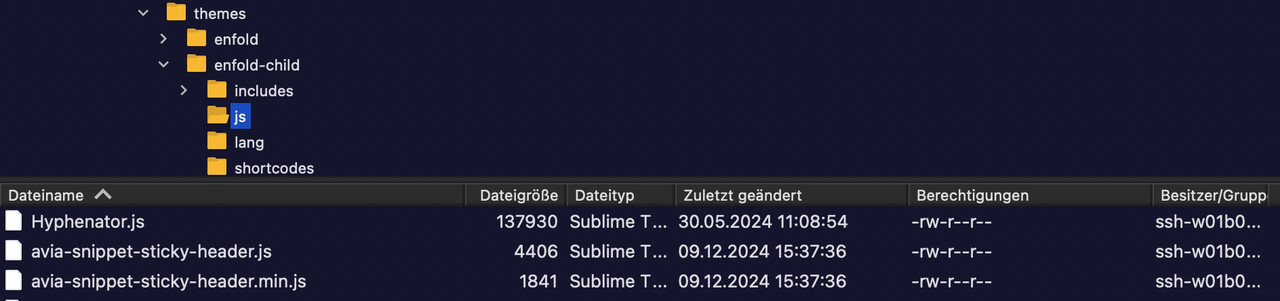
    you have to have a child-theme avia-snippet-sticky-header.js file.
    on line 79 there is:

    remove that && ! isMobile so there is only :

    if( shrinking )
    

    if you like to minify your theme script and css files – put both files ( the script itself and the minified script to a js subfolder to your child-theme. The edited script : you can minfy the code at: https://www.toptal.com/developers/javascript-minifier

    This comes to your child-theme functions.php:

    function wp_change_sticky_header_script() {
      wp_deregister_script( 'avia-sticky-header' );
    
      $vn = avia_get_theme_version();
      $options = avia_get_option();
      $child_theme_url = get_stylesheet_directory_uri();
      $min_js = avia_minify_extension( 'js' );
    
      $condition  = ( isset( $options['header_position'] ) && $options['header_position'] == 'header_top' );
      $condition2 = ( isset( $options['header_sticky'] ) && $options['header_sticky'] == 'header_sticky' ) && $condition;
      avia_enqueue_script_conditionally( $condition2 , 'avia-sticky-header-child', "{$child_theme_url}/js/avia-snippet-sticky-header{$min_js}.js", array('avia-default'), $vn, true);
    }
    add_action( 'wp_enqueue_scripts', 'wp_change_sticky_header_script', 100 );
    #1473247
    This reply has been marked as private.
    #1473241

    In reply to: add custom icon

    This reply has been marked as private.
    #1473240
    Vera
    Participant

    Hi,

    I have a problem with archive pages of categories. They show a noindex in the header.
    In the general settings of wordpress for reading the option „prevent search engines from indexing“ ist NOT chosen. (While testing I had this option chosen.)
    In the SEO-Tool the categories are set to be indexed. In source code you can see this at the top.
    Do you have any idea how to fix this?

    Thank you.

    Best regards,
    Vera

    maybe this is then the way it works:

    ok – try now – change to your needs and transition timings:

    /*** ===============================***/
    /* Basisstil für alle Weiter Lesen "buttons" */
    .more-link {
      display: inline-flex !important; /* Flexbox für zentrierten Inhalt */
      flex-flow: row nowrap;
      justify-content: center; /* Horizontale Zentrierung */
      align-items: center; /* Vertikale Zentrierung */
      font-weight: 800; /* Fettschrift */
      text-align: center !important;
      white-space: nowrap;
      vertical-align: middle;
      user-select: none;
      border: 2px solid #ff3366 !important; /* Rahmenfarbe */
      padding: 0.95rem 2.5rem 0.95rem 2rem !important; /* Innenabstand */
      font-size: 1rem; /* Schriftgröße */
      line-height: 1rem; /* Zeilenhöhe */
      border-radius: 100px !important; /* Abgerundete Ecken */
      color: #ffffff !important; /* Schriftfarbe Weiß */
      font-family: 'Montserrat', sans-serif; /* Schriftart */
      letter-spacing: 0.25px; /* Buchstabenabstand */
      text-transform: uppercase; /* Großbuchstaben */
      background-color: #ff3366; /* Hintergrundfarbe */
      position: relative; /* Für die Animation */
      overflow: hidden; /* Inhalt begrenzen */
      transition: all 300ms ease-in-out; /* Sanfter Übergang */
      width: auto !important;
    }
    
    /* Stil für den Text und die Pfeile */
    .more-link span {
      display:  inline-flex; /* Flexbox für Text und Pfeile */
      flex: 0 1 auto;
      transition: all 700ms ease-in-out; /* Sanfte Bewegung */
      padding: 0px;
    }
    
    .more-link:hover span {
      padding: 0 3px;
    }
    
    /* Stil für die Pfeile */
    .more-link .more-link-arrow::after {
      content: ">>"; /* Pfeile */
      font-family : inherit;
      opacity: 0; /* Unsichtbar im Standardzustand */
      visibility: hidden;
      position: absolute;
      top: 14px;
      right: 0.5ch;
      color: #ffffff; /* Pfeile in Weiß */
      font-size: inherit;
      font-weight: 800;
      line-height: inherit;
      transition: all 700ms ease-in-out;
    }
    
    /* Hover-Effekt für die Pfeile */
    .more-link:hover .more-link-arrow::after {
      visibility: visible;
      opacity: 1; /* Pfeile werden sichtbar */
     
    }
    
    .more-link:hover .read-more-text {
      transform: translateX(-1ch); /* Text verschiebt sich leicht nach links */
    }
    
    #1473229

    Hey SurigliaStudio,

    Please try the following in Quick CSS under Enfold->General Styling:

    #header_main {
      position: absolute;
      top: 50%;
      -ms-transform: translateY(-50%);
      transform: translateY(-50%);
    }

    Best regards,
    Rikard

    #1473221
    SurigliaStudio
    Participant

    Hello,
    I have a left side main menu sticky, and I’d like to have it at the center of the page on desktop. How can I do that?
    Thanks in advance.

    Hi,

    Thank you for the update.

    To adjust the vertical alignment of the caption, look for this css rule and adjust the bottom property to 41% or so:

    .avia-slideshow.av-desktop-hide.av-medium-hide .avia-caption {
        bottom: 31%;
        left: 50%;
        transform: translateX(-50%);
    }

    For the arrows, add this css code:

    #top .avia-slideshow-arrows a {
        top: 40%;
    }

    Best regards,
    Ismael

    #1473189
    coredesignsupport
    Participant

    I’m unable to figure out why my Enfold site has stopped working. Except for the Contact page, nothing appears below the header menu. I’ve removed my caching plugin, updated to the most current version of Enfold, and searched for suggestions about what the problem might be with no luck.

    I’m including Private Content so you can take a look at the back end also.

    #1473182

    Hey Jak73,
    Try this CSS in your Enfold Theme Options ▸ General Styling ▸ Quick CSS field:

    .widget_recent_entries li {
        border-top-style: dotted;
    }

    Best regards,
    Mike

    #1473176

    In reply to: add custom icon

    Hi Mike,

    okay, got it. I´ve created a new thread over there: https://kriesi.at/support/topic/add-custom-icon-2/

    Best regards,
    Tim

    #1473170

    Hi,
    When I test it, it seems to work, try this instead:

    #top #main label {
        font-weight: 400;
    }

    If this still doesn’t work, please include an admin login in the Private Content area so we can examine.

    Best regards,
    Mike

    #1473167

    Hey Gianluca,
    Try this CSS in your Enfold Theme Options ▸ General Styling ▸ Quick CSS field:

    #top label {
        font-weight: 400;
    }

    After applying the css, please clear your browser cache and check.

    Best regards,
    Mike

    #1473162

    In reply to: add custom icon

    This reply has been marked as private.
    #1473153

    In reply to: add custom icon

    Hi,
    You can not use.otf or .woff, use must use iconfont which will only be black and white, no colors.
    Please see this post, Guenni007 points out that Fontello is a bit picky about the compound paths and offers a solution.
    He also offers a solution to use images instead of svg here.
    Please note that using the contact form is not appropriate for support questions, please log in to the support forum and open a new thread if you need further assistance.

    Best regards,
    Mike

    #1473145

    Hi Rikard,

    it was strange – the issue occured only sometimes in Chrome when the cache was cleared. I deactivated all plugins, issue still occured sometimes and sometimes not:-?
    I canceled the layer slider and used the fullwidth instead – there was no need for layer slider, so thx anyway issue can be closed.

    Best Regards
    Christoph

Viewing 30 results - 2,881 through 2,910 (of 142,850 total)