Hey JL,
Unfortunately fontello.com doesn’t offer a Blue Sky icon, perhaps they will in the future as it becomes more popular, in the meanwhile you could add your Blue Sky link to a social network that you don’t use and use css to replace the icon with a Blue Sky image. See this thread.
You can also add your request to the open Enfold Feature Request for Blue Sky here.
Best regards,
Mike
or just – activate the option in main menue to show search icon ( this is the one for ajax search )
and put this to your child-theme functions.php:
function add_search_to_main_menu($items, $args) {
    if ($args->theme_location == 'avia') {
        $search_form = '<li id="menu-item-search-desktop" class="menu-item av-medium-hide av-small-hide av-mini-hide" role="menuitem">' . get_search_form(false) . '</li>';
        $items .= $search_form;
    }
    return $items;
}
add_filter('wp_nav_menu_items', 'add_search_to_main_menu', 10, 2);
and this to quick css:
#avia-menu {
  display: flex;
  flex-flow: row nowrap;
  justify-content: space-between;
  align-items: center;
}
#top #searchform > div {
  position: relative;
  max-width: 220px;
  opacity: 1 !important;
  display: block !important;
}
/*=== synchronise it with your hamburger breakpoint ===*/
@media only screen and (min-width: 990px) {
  #menu-item-search {
    display: none;
  }
}
Advantage : Ajax Functionality is preserved for mobile case.
see: https://enfold.webers-webdesign.de/
PS: after you have seen the demo page, I will remove it again, because it disturbs other demos on the site.
e.g. the one with left and right header layout
Ganz herzlichen Dank für den Hinweis lieber Guenni. An der Stelle war ich schon – aber ich weiss nicht, wie ich die Positionen genau einstellen soll? Alle Möglichkeiten probiert und es ergibt entweder weiterhin die falsche Reihenfolge oder mal ist ein Bild ganz verschwunden. Es geht auch nur bis Position 6? Ich habe 5 Raster. Jeweils in einem Raster ist ein Text und ein Bild. Auf dem Desktop sollen sie nebeneinander erscheinen, was korrekt ist. Auf dem Handy kommen dann aber 2 mal Text oder 2 mal Bild untereinander. Oder kurz: wie muss ich die Einstellungen mit Positionen vornehmen, damit die Reihenfolge auf dem Handy stimmt? Danke und sorry, wenn ich es nicht gleich verstehe. LG “Marie” (https://swisspecial.com)
Hello,
On each page I have a space at the top (after the header) and at the bottom (above the footer) of my “code block” with a Depicter element, how can I remove these spaces so as not to lose space on the screen?
Have a nice day
exemple : https://french-desserts.fr/restauration/
Hi,
The footer height is determined by the content in the footer, but if you want it smaller you can remove the padding & margin with this css:
#top #footer {
    padding: 0;
}
#top #footer .widget {
margin: 0;
}
but you will need to add more page content so the socket doesn’t become larger and stays at the bottom of the page.
Best regards,
Mike
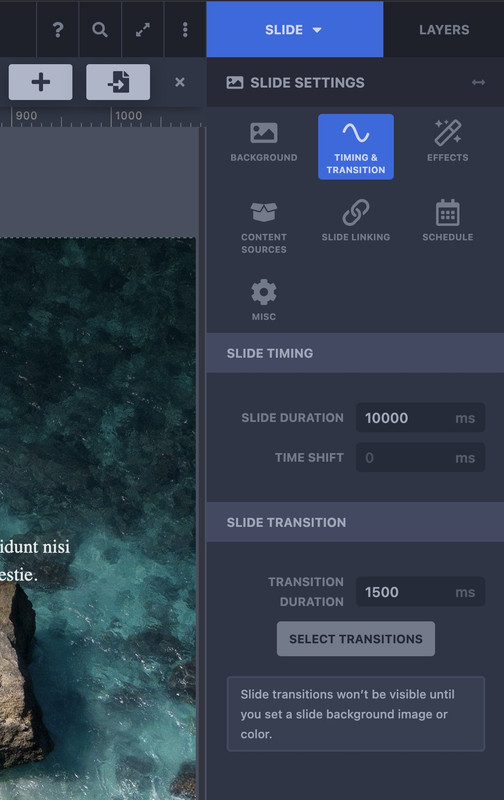
and you have found on top right the switch between Slide and Layers.
Go to Slide then navigate to Timing & Transition – and go to Slide Transitions – press Select Transitions – and choose the type you like to have.
Hi,
Thanks for the update. Please let us know if you should need any further help on the topic, or if we can close it.
Best regards,
Rikard
You have to find these rules:
@media only screen and (min-width:768px) and (max-width:989px) {
  body,
  body .avia-tooltip {
    font-size:80px
  }
  h1 {
    font-size:60px
  }
  h2 {
    font-size:50px
  }
  h3 {
    font-size:42px
  }
}
@media only screen and (min-width:480px) and (max-width:767px) {
  body,
  body .avia-tooltip {
    font-size:66px
  }
  h1 {
    font-size:46px
  }
  h2 {
    font-size:37px
  }
  h3 {
    font-size:29px
  }
}
@media only screen and (max-width:479px) {
  body,
  body .avia-tooltip {
    font-size:53px
  }
  h1 {
    font-size:38px
  }
  h2 {
    font-size:28px
  }
  h3 {
    font-size:20px
  }
}
This is a very unusual scaling.
First of all, the value for the base (body) is set very high.
Even if you take the aspect of wai aria into account, a body font-size of 53 ( below 479px) is gigantic. For desktop screen widths, this is 13px.
Here I would rather go higher, e.g. to 16px.
Because you have set a merging of the styles – i can not say where the rules comes from ( maybe it is a merging of W3total Cache ).
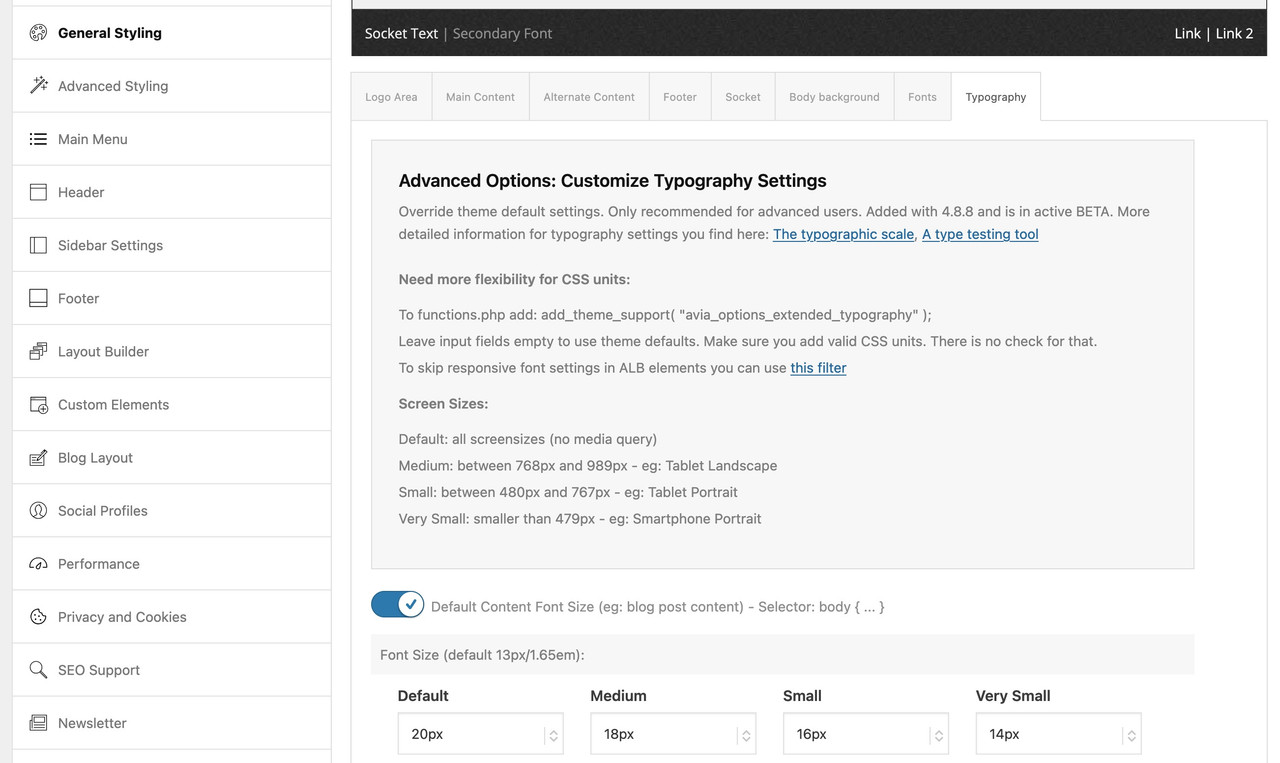
have a look if you have set on General Styling – Typography these values or in your quick css.
Please do you have any update about this open issue ? and this one https://kriesi.at/support/topic/sku-field/ ?
Best regards,
Hi, I contacted my hosting company, they said they can’t find any issue on their end, and a test php they used loads very fast with a minimal TTFB.
They suggested to add “fetchpriority=”high” to the photo I have at the top of the page (the background of the color section). Any idea if that should help, and if so, how to implement it?
Also if you have any other suggestions regarding this issue that would be great. The LCP in PageSpeed jumps to a very high score (very low time) once I remove the color section image and only uses a plain color. I tried to install Optimole to compress and scale this image but it didn’t change the LCP score much.
I use 4 rows of grids on the start page. Each with an image and a text. An image and a text now appear alternately on the desktop. Below this is the text and then the image. This is how it should look on the desktop. However, I need a setting so that the order is different on the cell phone. There 2 times text and 2 times picture appear one below the other. How do I do this?
Hi,
Thank you for the update.
It plays on your end due to the following points mentioned in the browser policy:
— The user has interacted with the domain (click, tap, etc.).
— On desktop, the user’s Media Engagement Index threshold has been crossed, meaning the user has previously played a video with sound.
Please review the browser policy and mute the video to enable autoplay.
Best regards,
Ismael
Hi,
Thank you for the clarification.
We modified the code a bit. Please try it again:
add_filter( 'wp_nav_menu_items', 'avia_append_search_nav', 10, 2 );

function avia_append_search_nav($items, $args) {
    if (avia_get_option('header_searchicon', 'header_searchicon') != 'header_searchicon') {
        return $items;
    }

    if (avia_get_option('header_position', 'header_top') != 'header_top') {
        return $items;
    }

    if ((is_object($args) && $args->theme_location == 'avia') || (is_string($args) && $args == 'fallback_menu')) {
        ob_start();
	get_search_form( [ 'ajax_disable' => false ] );
	$form = ob_get_clean();

	$form = str_replace( '<form ', '<form role="search" ', $form );
	$form = htmlspecialchars( $form );

        $items .= '<li id="menu-item-search" class="av-medium-hide av-small-hide av-mini-hide menu-item menu-item-search-dropdown">' . $form . '</li>';

        $items .=	'<li id="menu-item-search" class="noMobile menu-item menu-item-search-dropdown menu-item-avia-special av-desktop-hide" role="menuitem">';
        $items .=		'<a aria-label="' . $aria_label . '" href="?s=" '. $nofollow . ' data-avia-search-tooltip="' . $form . '" ' . av_icon_string( 'search', false ) . '>';
        $items .=			'<span class="avia_hidden_link_text">' . __( 'Search', 'avia_framework' ) . '</span>';
        $items .=		'</a>';
        $items .=	'</li>';
    }

    return $items;
}
Best regards,
Ismael
Hé Guenni007
I appreciate what you do immensely.
Making a demo site, converting my logo, …
Where do you find the time?
I manged to put the logo on the site with overlap.
Had to fiddle with the z-index because the slider was constantly displaying on top.
I compared my logo and your logo with notepad++ and boy what a difference.
I don’t have access to Illustrator but I converted my logo with SVGPathCommander to path and that logo displays also. Will have to figure out how to do it properly with Inkscape when I find the time. First time working with SVG. I’ve been out of the business for almost 10 years. I used to code all my sites with NotePad++ from scratch.
“As I said, it’s always better for us who want to help to be able to analyze the page with the problems.”
What type of access do you need to do this? Is the access URL not enough?
I wish you a very Merry Christmas and Happy Holidays!!
@Ismael
How can I ‘close’ the topic? Or mark it as resolved?
I would like to mark Guennni007’s post as the solution.
if this belongs to your belgium page – i can see the svg logo.
First – even if the text in your svg is a common font (helvetica) it might be better to convert those letters to path.
try it with: https://webers-testseite.de/logo-top.zip
https://webers-testseite.de/logo-top.svg
by the way: you are not forced to have the logo inside that logo container – you can overlap the header area:
https://webers-testseite.de/overlapping-logo/
I created a SVG version of the logo because I can’t make a png or jpg that is really sharp.
When I select it to display as the logo it’s not displayed..
When I insert it as an image in the content it displays just fine.
When I inspect the code I don’t see a reference to the image:
<span class="logo avia-svg-logo"><a href="https://my-site/" class="av-contains-svg" aria-label="logo-top" title="logo-top"></a></span>
and in the header it shows:
a.av-contains-svg | 0 x 116
When I select a .png as logo and the during inspect I change the filename to the svg filename it displays as it should.
<img src="https://my-site/wp-content/uploads/2024/12/logo-top2.png" height="100" width="300" alt="my-site" title="logo-top2">
changed to:
<img src="https://my-site/wp-content/uploads/2024/12/logo-top.svg" height="100" width="300" alt="my-site" title="logo-top2">
How can I fix this?
Hi,
Great, I’m glad to hear that you got things working. Please let us know if you should need any further help on the topic, or if we can close it.
Best regards,
Rikard
I have a YouTube video set in the video media element. The mute and autoplay checkboxes work fine, but the loop checkbox does not seem to be working. Once the video is finished, it stops playing and shows suggested YouTube videos. Please advise.
I’m on the page right now and the 2 other videos play with sound on autoplay in the lightboxin chrome. They are not muted. Why would this be if it is not allowed? I did add the code to mute but it still did not autoplay… The large video below to 2 youtube shorts.
-
This reply was modified 1 year, 3 months ago by
 stevengamez.
Hi, my LCP time is thru the roof and PageSpeed is indicating the issue is with the color section background I use at the top of my page (link in private content), any idea how to pre-load this background image, or any other tips how to improve this score? Thanks!
Edit: now after tweaking a few settings, PageSpeed doesn’t suggest pre-loading anymore, but the LCP time is still very high and it’s mostly Load Delay and Render Delay. Not sure what it is and why it’s so high on that color section.
-
This topic was modified 1 year, 3 months ago by
 0_o.
0_o.
Hi Ismael,
your code is going in the right direction. Unfortunately, it does not yet work as desired. A search icon is added to the mobile menu at the end, which is not quite the behavior I want to achieve.
Regarding your question: My code works. It comes here from your forum and I use it on several pages. It works as follows:
Desktop: Search field instead of icon in the menu
Mobile: Neither
What I want to achieve:
Desktop: Search field instead of icon in the menu (as with my code)
Mobile: Magnifying glass icon next to the lines of the hamburger menu. So basically the same as it is in your standard.
Can I change my code so that it only affects the normal menu (used for desktop) and the mobile menu remains unchanged? Perhaps that would be a simpler solution than defining something specially for the mobile. What do you think? Is there a corresponding restriction that I could use?
Christmas greetings,
Daniel
Hi Mike, added in the code and cleared cache but no change – tab image still grayscale on desktop view
Hi,
Thank you for the update.
The other two videos were muted when we checked. Have you tried adding the mute parameter? As mentioned above, autoplay is not allowed when videos are not muted.
Chrome’s autoplay policies are simple:
Muted autoplay is always allowed.
Autoplay with sound is allowed if:
— The user has interacted with the domain (click, tap, etc.).
— On desktop, the user’s Media Engagement Index threshold has been crossed, meaning the user has previously played video with sound.
— The user has added the site to their home screen on mobile or installed the PWA on desktop.
— Top frames can delegate autoplay permission to their iframes to allow autoplay with sound.
Please check this link for more info: https://developer.chrome.com/blog/autoplay
Best regards,
Ismael
try to give an ID to the selector f.e.:
#top .blokje .avia-image-overlay-wrap a.avia_image {
  overflow: visible;
}
#top .blokje img.avia_image {
  border: 1px solid #005999;
  padding: 40px;
  box-shadow: 5px 5px 0px 0px #005999;
}
i placed here a different value so that you can clearly see that “shadow” will work – afterwards you can change back to your box-shadow.
and btw: https://kriesi.at/support/topic/changing-buttons-colors-to-gradient/#post-1473778
Greetings,
For some reason the table I created using the table content element is showing up on my site as code on a desktop browser using Chrome and Mozilla (but not in preview). My skills are very limited, so hopefully there is an easy fix.
Thank you!
Hey schweg33,
Try this CSS in your Enfold Theme Options ▸ General Styling ▸ Quick CSS field:
#header.av_header_transparency #header_main .av-logo-container {
	display: none;
}
#header.av_header_transparency #header_main {
margin-top: 91px !important;
}
After applying the css, please clear your browser cache and check.
Best regards,
Mike



